
Ask Ben: Screen Scraping PowerBall Statistics With ColdFusion
I was spending my free time this weekend checking the powerball website when i decided i wanted to use cfhttp and get the number frequency information on this page:
http://www.powerball.com/powerball/pb_frequency.asp?
matrixID=2&graph=0The problem is I am not sure what to do next.
What I am trying to do is get into this page and grab the numbers from the table...then loop through a DB insert and populate a table. How do I do this using cfhttp?
Before we get into this, let's just talk about screen scraping for a second. Screen scraping is always a dangerous thing to do because it relies on a third-party service that may change at the drop of a hat. When scowering a page for data, we can do things like search for keywords and match patterns, which works; but, at any time, the target page can have its structure change which may or may not render our algorithm completely useless. So, use screen scraping with discretion.
That being said, let's dive right into the problem. While I don't know what database you are going to use to store the PowerBall statistics, I am going to move the PowerBall data into a manually created ColdFusion query. You can then easily take this ColdFusion query, loop over it, and insert the values into a database.
In order to get the PowerBall statistical data from the page, we are going to use a little regular expression pattern matching. From looking at the page source of the given URL, it is clear that the PowerBall statistics exist in an HTML table with set headers. We can use this knowledge to pull out every complete table and search its contents for the given headers. This will give us a sort of brute force way to find the proper data table.
Once we have this HTML data table in a variable, we are going to treat it like an XML document against which we can run some XmlSearch() calls. The hurdle with this is that most HTML is not really XML-standards compliant. So, to get around this, we are going to take our table HTML and try to strip out all elements and attributes that might violate XML standards. This will include all the Font tags and Br tags and even the table tag attributes. Once this is done, we should be left with a data string that consists only of table, tr, and td tags which can easily be parsed.
Let's take a look at that code:
<!---
	Determine the PowerBall URL that we want to scrape.
	NOTE: I am building this rather than just putting it
	in the CFHttp tag for text-wrapping reasons.
--->
<cfset strURL = (
	"http://www.powerball.com/powerball/pb_frequency.asp?" &
	"matrixID=2&graph=0"
	) />


<!--- Grab the PowerBall HTML page. --->
<cfhttp
	url="#strURL#"
	method="get"
	useragent="#CGI.http_user_agent#"
	result="objGet"
	/>


<!---
	We want to grab all the tables out of the page.
	One of them should be the one that we are looking for.
	Realize, however, that we are doing this based on what
	the HTML of the target page looked like at the time of
	this writing. One of the dangerous parts of screen
	scraping is that the target page may change at any time
	without any warning, rendering this algorithm totally
	useless.
--->
<cfset objPattern = CreateObject(
	"java",
	"java.util.regex.Pattern"
	).Compile(
		JavaCast(
			"string",
			"(?i)<table[^>]*>([\w\W](?!<table))+?</table>"
			)
		) />


<!---
	Create the pattern matcher based on our regular
	expression pattern and the FileContent that we got
	from our CFHttp call.
--->
<cfset objMatcher = objPattern.Matcher(
	JavaCast( "string", objGet.FileContent )
	) />


<!---
	Set default table code. This variable will hopefully
	contain our target HTML table in a little bit.
--->
<cfset strTableHtml = "" />


<!--- Find the proper table. --->
<cfloop condition="objMatcher.Find()">

	<!---
		Check to see if we have the right table. This
		one will contain the header values taht we are
		searching for.

		NOTE: Just a reminder that this may change at any
		point and only holds true at the time that this
		blog entry was written.
	--->
	<cfif (
		Find( "Ball Number", objMatcher.Group() ) AND
		Find( "White Balls", objMatcher.Group() ) AND
		Find( "Powerball", objMatcher.Group() ) AND
		Find( "Power Play", objMatcher.Group() )
		)>

		<!--- Extract table code. --->
		<cfset strTableHtml = objMatcher.Group() />

	</cfif>

</cfloop>


<!--- Check to see if we have found the HTML table. --->
<cfif Len( strTableHtml )>

	<!---
		Now that we have the table HTML, we want to
		strip out most of the data so that we can treat
		it as XHTML. To do this, we are going to strip out
		everything but the table related tags.
	--->
	<cfset strTableHtml = strTableHtml.ReplaceAll(
		JavaCast( "string", "(?i)<(?!/?(ta|tr|th|td))[^>]*>" ),
		JavaCast( "string", " " )
		) />


	<!---
		Now, strip out all tag attributes. This just helps
		to make sure that the resultant HTML is more likely
		to stick to an XML standard.
	--->
	<cfset strTableHtml = strTableHtml.ReplaceAll(
		JavaCast( "string", "(?i)<(/?\w+)[^>]*>" ),
		JavaCast( "string", "<$1>" )
		) />


	<!---
		ASSERT: At this point, the XHTML that we have
		remaining should function as a basic XML document,
		which we can query off of.
	--->


	<!---
		Now, let's build a ColdFusion query that will hold
		the values of the HTML.
	--->
	<cfset qPowerBall = QueryNew(
		"ball_number, white_ball_fr, powerball_fr, power_play_fr",
		"varchar, varchar, varchar, varchar"
		) />


	<!---
		Get all TR elements that are in the 3rd or greater
		position (we have no need to grab the headers or
		the buffer row that exists between the header and
		the body rows).
	--->
	<cfset arrTR = XmlSearch(
		Trim( strTableHtml ),
		"//tr[ position() > 2 ]"
		) />


	<!--- Loop over the TR nodes. --->
	<cfloop
		index="intTRIndex"
		from="1"
		to="#ArrayLen( arrTR )#"
		step="1">

		<!---
			Get a short hand reference for the current
			TR node.
		--->
		<cfset xmlTR = arrTR[ intTRIndex ] />


		<!---
			For each row, we are going to want to add a record
			the PowerBall query we are building.
		--->
		<cfset QueryAddRow( qPowerBall ) />


		<!---
			For each row, we might have anywhere from zero to
			four columns. We won't know until we query for the
			TD text. When querying for text, we want to make
			sure to strip out the white space which we may have
			created when cleaning the HTML. Normally, we would
			use normalize-space() to trim the text() value, but
			CFMX7 does not support this yet.
		--->
		<cfset arrTD = XmlSearch(
			xmlTR,
			"td/text()"
			) />


		<!--- Loop over the TD values. --->
		<cfloop
			index="intTDIndex"
			from="1"
			to="#ArrayLen( arrTD )#"
			step="1">

			<!---
				The column to which we add this value will
				depend on the index of the current TD.
			--->
			<cfswitch expression="#intTDIndex#">
				<cfcase value="1">
					<cfset strColumn = "ball_number" />
				</cfcase>
				<cfcase value="2">
					<cfset strColumn = "white_ball_fr" />
				</cfcase>
				<cfcase value="3">
					<cfset strColumn = "powerball_fr" />
				</cfcase>
				<cfcase value="4">
					<cfset strColumn = "power_play_fr" />
				</cfcase>
			</cfswitch>


			<!---
				Set the column value. Be sure to cast to a Java
				String, just to make sure we don't corrupt our
				ColdFusion query.
			--->
			<cfset qPowerBall[ strColumn ][ qPowerBall.RecordCount ] = JavaCast( "string", Trim( arrTD[ intTDIndex ].XmlValue ) ) />

		</cfloop>

	</cfloop>


	<!--- Dump out the resultant query. --->
	<cfdump
		var="#qPowerBall#"
		label="PowerBall Statistics"
		/>

</cfif>
Running the code, we get the following PowerBall statistics query:
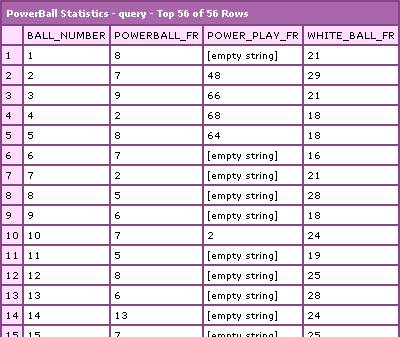
Works quite nicely. Just remember, the cell values in our ColdFusion query that look like empty strings are actually NULL values, but ColdFusion will treat them as empty strings. When you go to insert these values into your own database, you can either use the null="" attribute of the CFQueryParam tag to insert the nulls, or just use the column value (qPowerBall.COLUMN) to insert an empty string.
Hope that helps a bit.
Want to use code from this post? Check out the license.

Reader Comments
Thanks Ben, this is awesome...I'm going to work with it want I get home.
Frank
@Frank,
My pleasure.
Ben, I have a mildly retarded question. How do I stuff the output into an access table? I don't even know what angle to come from at this (laugh).
@Frank,
No problem. All you have to do is loop over the resultant PowerBall query and insert each record. Something like this:
<cfloop query="qPowerBall">
<cfquery name="qInsert" datasource="...">
INSERT INTO pb
(
ball_number,
frequency
) VALUES (
<cfquerypara value="#qPowerBall.ball_number#" type="cf_sql_varchar" />,
<cfquerypara value="#qPowerBall.powerball_fr#" type="cf_sql_varchar" />
);
</cfquery>
</cfloop>
Of course, you just need to adjust for the columns that you actually have. Should be good.
Thanks again Ben. I'll give that a go when I get home.
Now, how about a probability algorithm based on the ball drop frequency?
HA! just kidding...
:D
Thanks Again...
Just copy and paste into excel. Run your stats then.
When attempting to test the code provided on my host, I get an error stating "...denied access to createobject(java)..."
What is the (or a ) workaround for this?
Thank you,
John
@John,
Sounds like the CreateObject() method is not allowed in your hosting environment. You might want to try CFInvoke, but to be honest, I am not sure if that can create Java objects (I hardly ever use it).
it's so many things that I can learn from here... great
keep updating....
Thanks Ben for pointing me to this thread - this looks exactly like what I could use!
This site is übercool... I should take a week off and do nothing but read up on all the great advice and become a better programmer :-)
@Jonas,
Ha ha, thanks for the kind words. Glad to be helping.
I am using your code and works great btw. My question is, this pulls the first table which is correct, but this table is within a td cell and I need to pull 5 more cells in this row and this continues on for 2 more rows. So to sum, you have a table with 16 cells. I need the table within each cell. Is this even possible lol?
when i run the code i didnt get any information(cfdump result).Nothing display
@Yamuna,
If CFDump is not showing *anything*, then there is probably an error happening. Try looking at your generated Page Source. Sometimes, when an error occurs, depending on the state of the HTML, the error is not rendered (but will show up in the underlying source code).
Ben,
cfhttp delay Have you seen anyone use a delay after onload event so the returning scrape includes an updated page? Is this something worth adding to the next CF?
thanks Dan
Lovely articles. Lots of nice and clean comments.
I am noticing a big difference between source code from save as... pages and the source code itself.
Newer apps that are Javascript driven, the underlying data is hidden behind the javascript calls. So a cfhttp.fileContent yields just the javascript, the save file yields actual content.
I have not figured out how to work around this one yet...
Hi Ben, I am trying to accomplish something similar to what you have showed in the above example. I am tweaking your code. but my final table string strTableHtml is rendering as empty. Im not able to move forward and you please suggest what can be done?
below is my code.
<cfhttp url="https://abc.com/xyz/EM2/LTMR.cfm" method="get" username="ds812x" password="newyear2014" result="objGet" useragent="#CGI.http_user_agent#">
<cfhttpparam type="url" name="LTMX" value="Andre Fuetsch / Shelly K Lazzaro">
</cfhttp>
<cfdump var="#objGet#">
<cfset objPattern = CreateObject(
"java",
"java.util.regex.Pattern"
).Compile(
JavaCast(
"string",
"(?i)<table[^>]*>([\w\W](?!<table))+?</table>"
)
) />
<cfdump var="#objPattern#">
<!---
Create the pattern matcher based on our regular
expression pattern and the FileContent that we got
from our CFHttp call.
--->
<cfset objMatcher = objPattern.Matcher(
JavaCast( "string", objGet.FileContent )
) />
<!---
Set default table code. This variable will hopefully
contain our target HTML table in a little bit.
--->
<cfset strTableHtml = "" />
<!--- Find the proper table. --->
<cfloop condition="objMatcher.Find()">
<cfif (
Find( "Liaison Name", objMatcher.Group() ) AND
Find( "Application Acronym", objMatcher.Group() ) AND
Find( "MOTS ID", objMatcher.Group() ) AND
Find( "Priority", objMatcher.Group() ) AND
Find( "MC", objMatcher.Group() ) AND
Find( "DR Exercise", objMatcher.Group() ) AND
Find( "ARM/SRM Maintenance", objMatcher.Group() ) AND
Find( "ARM/SRM Creation", objMatcher.Group() ) AND
Find( "Backup & Recovery Certification", objMatcher.Group() ) AND
Find( "Interface Certification", objMatcher.Group() ) AND
Find( "AIA Compliance", objMatcher.Group() )
)>
<!--- Extract table code. --->
<cfset strTableHtml = objMatcher.Group() />
</cfif>
</cfloop>
<cfdump var="#strTableHtml#"><cfabort>
<!--- Check to see if we have found the HTML table. --->
<cfif Len( strTableHtml )>
<cfset strTableHtml = strTableHtml.ReplaceAll(
JavaCast( "string", "(?i)<(?!/?(ta|tr|th|td))[^>]*>" ),
JavaCast( "string", " " )
) />
<cfset strTableHtml = strTableHtml.ReplaceAll(
JavaCast( "string", "(?i)<(/?\w+)[^>]*>" ),
JavaCast( "string", "<$1>" )
) />
<cfset qPowerBall = QueryNew(
"Liason_name, App_name, varmotsid, varpriority, varmc, vardrexercise,vararmaint,varcreate,varbackup,varinterfacecertif,varaiacompl",
"varchar2, varchar2, varchar2, varchar2,varchar2, varchar2, varchar2, varchar2,varchar2, varchar2, varchar2"
)>
<cfset arrTR = XmlSearch(
Trim( strTableHtml ),
"//tr[ position() > 1 ]"
) />
<cfloop
index="intTRIndex"
from="1"
to="#ArrayLen( arrTR )#"
step="1">
<cfset xmlTR = arrTR[ intTRIndex ] />
<cfset QueryAddRow( qPowerBall ) />
<cfset arrTD = XmlSearch(
xmlTR,
"td/text()"
) />
<cfloop
index="intTDIndex"
from="1"
to="#ArrayLen( arrTD )#"
step="1">
<cfswitch expression="#intTDIndex#">
<cfcase value="1">
<cfset strColumn = "ball_number" />
</cfcase>
<cfcase value="2">
<cfset strColumn = "white_ball_fr" />
</cfcase>
<cfcase value="3">
<cfset strColumn = "powerball_fr" />
</cfcase>
<cfcase value="4">
<cfset strColumn = "power_play_fr" />
</cfcase>
</cfswitch>
<cfset qPowerBall[ strColumn ][ qPowerBall.RecordCount ] = JavaCast( "string", Trim( arrTD[ intTDIndex ].XmlValue ) ) />
</cfloop>
</cfloop>
<cfdump
var="#qPowerBall#"
label="PowerBall Statistics"
/>
</cfif>
</body>
</html>