
Ask Ben: Optimizing Tables For Printing
Hey I have a report I want to print but keep the header on every page, column names. Any suggestions?
HTML table elements are actually designed to allow for this very functionality. The trick is that you have to use the THEAD tag which defines the table header. By using the THEAD tag, the rows that you define within the THEAD tag will be displayed at the top of every printed page. Additionally, you can use the TFOOT tag to define the table footer. By using the TFOOT tag, the rows that you define within the TFOOT tag will be displayed at the bottom of every page.
Let's take a look at some sample HTML that has a long table that makes use of both the THEAD and TFOOT HTML tags:
<!DOCTYPE html PUBLIC "-//W3C//DTD XHTML 1.0 Transitional//EN" "http://www.w3.org/TR/xhtml1/DTD/xhtml1-transitional.dtd">
<html>
<head>
	<title>Table Printing Demo</title>

	<style type="text/css">

		body {
			font-family: verdana, arial, sans-serif ;
			font-size: 12px ;
			}

		th,
		td {
			padding: 4px 4px 4px 4px ;
			text-align: center ;
			}

		th {
			border-bottom: 2px solid #333333 ;
			}

		td {
			border-bottom: 1px dotted #999999 ;
			}

		tfoot td {
			border-bottom-width: 0px ;
			border-top: 2px solid #333333 ;
			padding-top: 20px ;
			}

	</style>

</head>
<body>

	<cfoutput>

		<h1>
			Table Print Demonstration
		</h1>

		<p>
			This demonstrates how to properly define an HTML table
			in such a way that it will display the table header on
			each of the printed pages.
		</p>


		<table
			cellspacing="0"
			summary="This is a really long table that is used to demonstrate the print of headers across several pages.">

		<!---
			Define the HEAD of the table. This is the data that
			will be displayed at the top of every printed page.
		--->
		<thead>
			<tr>
				<th>
					ID
				</th>
				<th>
					Value
				</th>
			</tr>
		</thead>

		<!---
			Defint eh FOOTER of the table. This is the data that
			will be displayed at the bottom of every printed page.
		--->
		<tfoot>
			<tr>
				<td colspan="2">
					Kinky Solutions Table Demo
				</td>
			</tr>
		</tfoot>

		<!--- Define the BODY of the table. This is the data. --->
		<tbody>

			<!---
				Let's now create a ton or rows that will require
				several pages to fully print.
			--->
			<cfloop
				index="intRow"
				from="1"
				to="100"
				step="1">

				<tr>
					<td>
						#intRow#
					</td>
					<td>
						#RandRange( 111111, 999999 )#
					</td>
				</tr>

			</cfloop>

		</tbody>
		</table>

	</cfoutput>

</body>
</html>
Now, when we go to view the print preview of the page, this is what we get:
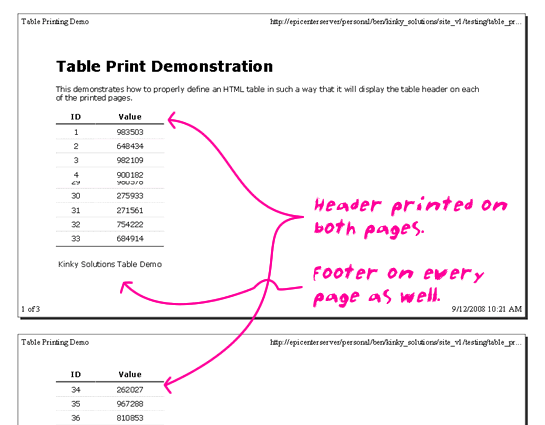
Notice that the header and footer data of the table are displayed on all pages that are required to print the table data.
Want to use code from this post? Check out the license.
Reader Comments
How would you put this into a PDF with the styles working?
@B,
You should just be able to wrap this in a CFDocument tag, but I have not test that. I can see if I carve out a few minutes.
What, no sexy tbody?!
@Todd,
She's there, I just felt her goodness was implicit enough that it didn't need mention :)
But, but... I was looking forward to a saucy tbody!!
@Todd,
Oh man, I didn't even think of that! My brain is slacking! Maybe when I start to mess with the PDF version ;)
Ya the PDF version will do that to ya
How come CFTABLE doesn't do that? :)
I had high hopes for CFTABLE, but every time I use it, my boss will ask me to give him strip colour...
Bam! back to reality.
Then I'll have to go back to the good old CFOUTPUT... until CSS3 is available or use jQuery.
People still use CFTABLE? o_O
To me, the TABLE element is a constant source of surprises ;-) Until recently, I was not aware of the COL element for instance which allows a great deal of flexible styling and markup with touching individual table cells.
@Robert,
I am a big fan of the COL tag to define column widths, but I have had some trouble getting it to work with other styles. What kind of styles are you finding work nicely?
Now if only IE would support these tags properly. (I'm the millionth person to post that sentence - I win!)
I'm currently working on migrating a bunch of reports from Access (don't ask) to CF. One of them displays information for a bunch of different vendors, a couple of pages per vendor, and shows vendor name and phone number in the page footer.
Using TFOOT puts me closer than anything else I've tried: in Firefox, the footer is displayed at the bottom of all pages but the last for each vendor, which is fine. (On the last vendor page, it's displayed at the bottom of the content.) Unfortunately, there are very few people here who use Firefox, so my solutions have to work in IE. :(
Oh yes, did I mention that the intranet (where the reports are housed) is currently running on MX 6?
Hopefully I will get some time soon to start moving our sites to CF 8 ... at the last place I worked, we didn't even use 6, just went straight from 5 to MX 7 ...
@Dave,
Oh my god! I feel like such an idiot. Can you believe that I didn't even test this solution in Internet Explorer (IE). For some reason, I just assumed that the way tables were handled when printing was handled the same across all browsers. I guess, I just categorized it as part of the print driver or something.
But, I just tested the above in IE7, and you are correct - this doesn't work at all. Lame!!!
I just tried this with CFDocument as well and I am disappointed to report that the PDF does not print the table header properly either! Not cool :(
@Ben,
I can believe it ... I've run into something similar two or three times already on this project. Usually it's been when my boss asked how a report was coming along, and I showed him in Firefox. We open IE aaaaand it's back to the drawing board.
Maybe IE 8 will reach the same level of CSS compliance as Firefox ... I'd try the beta but I'm afraid of it. :)
i just came across this. i'd seen people use thead before, but i didn't see the point. i was excited to go out and try it. started testing.. not only does it not work in ie, but it appears this is simply a ff feature. opera, safari and chrome don't seem to do this operation either... it is a nice feature though.
Man, that scared me a bit. I thought I had been missing something all this time that would've been real useful. What a relief to realize I hadn't. I just googled THEAD and saw you can use this: <style> thead { display: table-header-group; } </style>. But then IE doesn't break the table cleanly - you get vertical lines that have been cut off halfway. Of course a workaround in CF is to use <cfsavecontent variable="tableHeader"><tr><th>Col1</th><th>Col2</th></cfsavecontent>, count lines, close your table, then insert a page break - <p style="page-break-after: always; color:white;">.</p>
The problem with that workaround in my case is that I have several fields that are basically memo/text/clob fields, so I can't even be sure how many lines I'm displaying on a "page", and there's one particular section of the report that can be repeated often enough that it might take up more than one page on its own ...
Well, okay, actually the problem in my case is that we're trying to take a report that was designed specifically for Access and preserve the appearance but also make it look good as an HTML report printed on paper. :)
I feel bad - that I thought this stuff was all cross-browser. I didn't mean to mislead or panic anyone.
... however, let's not forget that using THEAD and TFOOT does have a number of benefits! For starters, it's simply good, semantic HTML. But, more than that, using THEAD and TFOOT gives us many CSS hooks to help style our tables without additional class names.
I ended up going back to font= and basic table tags to get pages to display across browser type and print with header and footer.
Works well enough.
Oh and using cfdocument
not to mention you can use jquery to sort the columns in the dom rather than another page request. you have to use the thead, th, tbody of the table. working on something in that now.
@Dave
For memo/text/clob/etc fields, you can determine the number of characters in the data, estimate the number of characters per line and calculate when to break a page. Of course with most fonts that will only be an estimate, as some letters (ie, WWWWW) would be longer than others (ie, IIIII). There are fixed-width fonts like Courier New, that if you're users don't mind the look of them, would allow you to calculate exactly when to break a page. Oh, one other thing, in the table style I fix the width in centimeters (rather than px, em, etc) b/c that seems to work across different PCs and printers in IE (not sure of the other browsers). 17.5cm for portrait and 23.5cm for landscape. Eg., <table style="width:17.5cm;">.
@Ben
No worries.
@Ray
It's true, I could probably fake a page footer by tracking the approximate position on the page and inserting whatever would be necessary to put a div with my "page footer" near the bottom of each page, with a break to follow ... I've done stuff like that in Excel before for similar reasons (long report sections that people wanted to view on paper rather than electronically).
It's just disappointing to have to put in all this extra code! If they could just support the same properties and features ... grr ...
By the way, specifying a width in cm (in a style, because you can't do it in the width property of a table) works fine in Firefox 3, and it seems to work in Chrome as well, although without a print preview function, I can't tell for sure (on my screen, the text in Chrome appears to be as wide as the text in Firefox).
print to pdf to get around the print preview omission.
can we escape the footer to not print on all the pages except for the last page....
@Mallik (or Ben),
Did you ever get/figure out an answer to this question of selective display of header/footer?
For a job at work, using CF 8.01 (all patches applied, as far as I know,) we are hoping that there is a way to manipulate the "cfdocumentitem" tag logic such as to selectively control which pages a header (or footer) actually appears on.
For example, we want to not display the header on the first page, but to go ahead and display it on every page thereafter.
Our main issue so far is that when trying to reference the "cfdocument.currentpagenumber" inside the "cfdocumentitem" tag, CF complains that the variable doesn't exist. (A problem I have seen other have experienced: http://blog.dkferguson.com/index.cfm/2008/1/11/CFDocument--pdf-generation-broke-after-CF8-upgrade )
"Any advice you could give me that might point me the way of success would be, by me, appreciated." - Ainsley Hayes, The West Wing
"Well, not speaking in iambic pentameter might be a step in the right direction." - Lionel Tribbey, The West Wing
Thanks all,
David L.