Kinky File Explorer - ColdFusion And jQuery Based File Explorer

Posted October 16, 2007 at 6:17 PM by Ben Nadel

Tags: ColdFusion, Javascript / DHTML

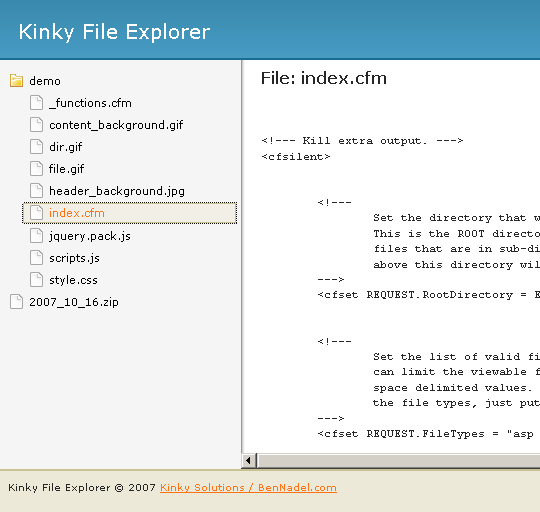
As a precursor to my Project Huge: Exercise List project (in which I will learn me some Object Oriented Programming goodness), I have very quickly revamped my ColdFusion and jQuery File Explorer and turned it into a new project. The Kinky File Explorer will provide me with a way to let you (the users) view my project code base in a read-only manner. The Kinky File Explorer locks you into a hard coded directory so that you cannot abuse the system to view proprietary files.

Here is a screen shot of what it looks like (easily skinable):


Kinky File Explorer - ColdFusion And jQuery File Explorer  


You can view the project details here. I did this in a hurry because I really want to start the Exercise List project; as such, I didn't want to waste to much time on the initial file viewer effort. And so, it's a bit rough around the edges. More updates to come.

NOTE: This is NOT a file management system.


Reader Comments

Oct 16, 2007 at 9:02 PM // reply »
95 Comments

Kick ass! Looks pretty nice dude. I'll be taking advantage of it.


Oct 17, 2007 at 7:08 AM // reply »
11,238 Comments

@Boyan,

Thanks dude. Right now the code just gets loaded into a PRE tag. However, it might be worth looking into loading it into TextArea and using one of the code highlighting programs that's already out there. Maybe it's time I really look into the custom brushes that you have been working on :)


Oct 17, 2007 at 8:23 AM // reply »
9 Comments

Nice, for Image types you could simply display the image, but i am sure you already thought about it :)


Oct 17, 2007 at 8:30 AM // reply »
11,238 Comments

@Thomas,

I think definitely for the next update, it will do that. The initial effort was just quick and dirty.


Oct 17, 2007 at 9:24 AM // reply »
95 Comments

Ben, that's a great idea. I think you should definitely use the code highlighting brush. It's as simple as adding a name="code"and class="cf" to your pre tags!


Oct 17, 2007 at 9:42 AM // reply »
11,238 Comments

Cool. I will look into it. I guess I could use different brushes based on the file extension and set the PRE class dynamically.


Nov 1, 2007 at 2:06 PM // reply »
110 Comments

Really liking the file explorer. My only issue is that the div that holds the content does not reset to the top of the page each time I click on a new file. Not a huge deal, but when I click on a new file, I would usually prefer to start at the top of the page :)


Nov 2, 2007 at 7:24 AM // reply »
11,238 Comments

@Gareth,

Thanks for pointing that out. I never even thought of that; usually, I just click around to see that things work, I never really scrolled down all that much. This should be easy to fix.


Nov 20, 2007 at 8:46 AM // reply »
11,238 Comments

@Gareth,

I know it took a while to get to, but issue you pointed out has been fixed :)


Nov 20, 2007 at 10:33 AM // reply »
110 Comments

*Finally*...it's not like you've been learning OOP and OOP data validation or anything crazy like that :)


Nov 20, 2007 at 10:38 AM // reply »
11,238 Comments

@Gareth,

Better late than never :)


Post A Comment

Comment Etiquette: Please do not post spam. Please keep the comments on-topic. Please do not post unrelated questions or large chunks of code. And, above all, please be nice to each other - we're trying to have a good conversation here.

Please review the following issues:

Author Name:


Author Email:

Author Website:

Comment:

Supported HTML tags for formatting: <strong>bold</strong>   <em>italic</em>   <code>code</code>


  • Help Wanted - Find Your Next ColdFusion Job
Ben Nadel's Company - Epicenter Consulting Recent Blog Comments
May 20, 2013 at 11:45 AM
Using jQuery's Animate() Step Callback Function To Create Custom Animations
This is really useful. I found out that you don't actually have to use a dummy css property (surprisingly). To animate a property in a linear-gradient for instance I did this this.css('someLinearGra ... read »
May 20, 2013 at 10:51 AM
Using A Dynamic Column Name With ValueList() In ColdFusion
@Josh, Oh snap! You're totally right! I'm not sure I've ever tried that. I did know that you can call a number of other array-methods on ColdFusion query columns: http://www.bennadel.com/blog/167 ... read »
May 20, 2013 at 10:45 AM
Using A Dynamic Column Name With ValueList() In ColdFusion
@Ben - I believe you can achieve the same functionality with ColdFusion's built in ArrayToList() function. ArrayToList( users[ "id" ] ); ... read »
May 20, 2013 at 10:21 AM
My Experience With AngularJS - The Super-heroic JavaScript MVW Framework
Is there any error logging and handling framework in angularjs, if not then in what way I can do this. ... read »
May 19, 2013 at 2:31 PM
My Experience With AngularJS - The Super-heroic JavaScript MVW Framework
It's funny really just how well that image describes the way I would imagine most people that go with angular for some project is. I have had a similar roller-coaster ride with it as well, but not qu ... read »
May 17, 2013 at 7:42 PM
HashKeyCopier - An AngularJS Utility Class For Merging Cached And Live Data
Ben - thanks so much for posting these Angular articles and findings, they've been a huge help towards learning one of the more 'complex' JavaScript frameworks out there (IMO). I have been using Angu ... read »
May 16, 2013 at 5:01 PM
UPDATE: Parsing CSV Data Files In ColdFusion With csvToArray()
Your code was the closest thing I've found to obtaining some direction for converting ISO fields to values that CF can translate properly. Thank you for posting! ... read »
May 15, 2013 at 6:07 PM
Making SOAP Web Service Requests With ColdFusion And CFHTTP
Ben, you once again saved my bacon at work. Thank you, thank you, thank you! ... read »
InVision App - Prototyping Made Beautiful With Prototyping Tools