
Converting XML To HTML Using ColdFusion And XSLT
As part of my exploration of XML, I've been playing around more with ColdFusion and XSLT. For this experiment, I am trying to encapsulate the data of an HTML page in XML. Then, I am using ColdFusion and XSLT to transform that XML document into an XHTML page. The ColdFusion XML document that I am starting off with contains:
- Page Title
- Meta Data information
- Navigation elements
- Primary Content information
Here is my ColdFusion XML document, built using the CFXML tag:
<!---
	Define the ColdFusion XML document object that
	will represent the data on an HTML page.
--->
<cfxml variable="xmlPage">

	<page>
		<title>
			Maria Bello Fan Site
		</title>

		<!--- Meta information. --->
		<meta>
			<keywords>
				maria bello,sexy girls,crazy sexy
			</keywords>
			<description>
				My Maria Bello fan site.
			</description>
		</meta>

		<!--- Primary navigation. --->
		<primarynav>
			<navitem
				text="Home"
				href="index.cfm"
				ison="true"
				/>
			<navitem
				text="Photos"
				href="photos.cfm"
				/>
			<navitem
				text="Videos"
				href="videos.cfm"
				/>
		</primarynav>

		<!---
			Primary page content. This will make up the bulk
			of the rendered page.
		--->
		<primarycontent>
			<![CDATA[
				<p>
					Welcome to my Maria Bello Fan Site. If you
					are like me, then you think she's just all
					kinds of sexy. I've spent many hours
					compiling this repository of images and
					videos for your (and my) enjoyment. Hope you
					enjoy and please check back soon.
				</p>

				<p>
					If Maria Bello were a cereal, she'd be
					magically babelicious.
				</p>
			]]>
		</primarycontent>
	</page>

</cfxml>
You will notice that I am keeping a lot of white space in my XML nodes (ex. keywords and description nodes). This is NOT recommended. This adds white space to the final XML node value. I am doing this purely for better code display, not as a best practice. Notice also that the primary content of the page is contained in a CDATA node. From what I have read about XSLT in general, it would appear that CDATA node type is not well liked (and perhaps not widely supported???); however, it seems to work quite nicely for XHTML type pages.
Then, once I have my ColdFusion XML document ready, I need to create my XSLT templates. These are the XML directives that will take the ColdFusion XML document and translate it in a divide-and-conquer fashion into the resultant data file which is, in our case, an XHTML page.
<!--- Define the XSL Transformation (XSLT). --->
<cfsavecontent variable="strXSLT">

	<!--- Document type declaration. --->
	<?xml version="1.0" encoding="ISO-8859-1"?>

	<xsl:transform
		version="1.0"
		xmlns:xsl="http://www.w3.org/1999/XSL/Transform">

		<!---
			Tell the ColdFusion XSLT engine that we are
			going to be producing an HTML document and that we
			want to use indenting.
		--->
		<xsl:output
			method="html"
			indent="yes"
			/>

		<!---
			Bind this template to the root of the XML document
			using the "/" match attribute.
		--->
		<xsl:template match="/">

			<html>
			<head>
				<title>
					<!--- Output the page title. --->
					<xsl:value-of select="page/title" />
				</title>

				<!--- Output meta data template. --->
				<xsl:apply-templates select="page/meta" />
			</head>
			<body>

				<h1>
					<xsl:value-of select="page/title" />
				</h1>

				<!--- Output primary navigation. --->
				<xsl:apply-templates select="//primarynav" />

				<!--- Output page content. --->
				<xsl:apply-templates
					select="page/primarycontent"
					/>

			</body>
			</html>

		</xsl:template>


		<!--- Template for HTLM meta data. --->
		<xsl:template match="meta">

			<!--- Output met akeywords element. --->
			<xsl:element name="meta">
				<xsl:attribute name="keywords">
					<xsl:value-of select="keywords" />
				</xsl:attribute>
			</xsl:element>

			<!--- Output meta description element. --->
			<xsl:element name="meta">
				<xsl:attribute name="description">
					<xsl:value-of select="description" />
				</xsl:attribute>
			</xsl:element>

		</xsl:template>


		<!--- Template for the primary navigation items. --->
		<xsl:template match="primarynav">

			<ul id="primarynav">
				<!--- Loop over nav items. --->
				<xsl:for-each select="navitem">

					<li>
						<!--- Define the nav link HTML. --->
						<xsl:element name="a">
							<xsl:attribute name="href">
								<xsl:value-of select="@href" />
							</xsl:attribute>

							<!---
								Check to see if this link is on.
								If so, then we have to add the
								appropriate class.
							--->
							<xsl:if test="@ison = 'true'">
								<xsl:attribute name="class">
									on
								</xsl:attribute>
							</xsl:if>

							<!--- Text of link. --->
							<xsl:value-of select="@text" />
						</xsl:element>
					</li>

				</xsl:for-each>
			</ul>

		</xsl:template>


		<!--- Template for primary page content. --->
		<xsl:template match="primarycontent">

			<div id="sitecontent">

				<!---
					When outputting the page's primary content,
					make sure to DISABLE escaping so that our
					XHTML will come through properly.
				--->
				<xsl:value-of
					select="."
					disable-output-escaping="yes"
					/>

			</div>

		</xsl:template>

	</xsl:transform>

</cfsavecontent>


<!---
	Output the transformed XML page data into an
	HTML formatted web page using XSLT.
--->
#XmlTransform(
	xmlPage,
	Trim( strXSLT )
	)#
I have chosen to make this ColdFusion XML Transformation a bit more complicated than it needs to be for the purposes of forcing myself to learn more about the XSLT syntax. Some of this complexity is self-imposed, but also, XSLT is just a complicated syntax. For instance, instead of just writing an XHTML element and using some conditional logic to write attributes (such as adding an "active" class to an "on" navigational item), you have to use the xsl:element node and add each attribute as a descendent xsl:attribute node. A bit wordy if you ask me.
Also, notice that when I am outputting the CDATA, I am using the xsl:value-of attribute, disable-output-escaping. I have to do this other wise the XSLT engine will convert the HTML elements into escaped HTML elements.
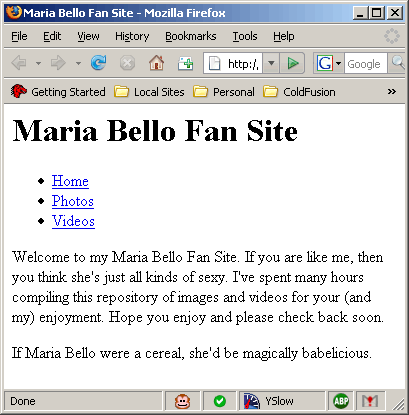
Running the above code, we get the following page:
XSLT is interesting. I think I am a little turned off by how complicated it seems to be. On the one hand, I like that you can take XML and convert it to any other kind of text-based data based on the Transformation files. But on the other hand, I feel like you can use ColdFusion to do this programmatically with much less stress. Plus, I think white space management is a big issue in XSLT. I like being able to space my ColdFusion code out in a way that makes me happy and produce quality output. I think that with XSLT, this is going to be a much harder task to accomplish.
Still not sure how I feel about it. I am gonna keep poking around; XSLT is HUGE! There are many functions and elements to be used. Luckily, it looks like ColdFusion only supports a subset of this functionality, so it won't be the beast that it could be. Plus, I am not sure I need to fully learn the syntax to get an idea of what is capable. The good thing is that it keeps me fresh with the XPath stuff I did a while back.
Want to use code from this post? Check out the license.

Reader Comments
XSLT does have the ability to strip/preserve white-space. I haven't tested Coldfusion's implementation on this, but it is available:
http://www.cafeconleche.org/books/bible2/chapters/ch17.html#d1e8886
@Dustin,
You maginificent bastard! That works (the normalize-space function). I had tried to use xsl:strip-space but couldn't get it to work. Maybe I wasn't doing it right it just wasn't supported in ColdFusion. Nicely done!
No problem!
The xsl:strip-space is to remove empty nodes from your XML so they don't display the whitespace of the empty node. The function name is a little misleading, I know for sure I was confused by it when I started using XSLT. From the link above:
"You can also automatically delete white-space only nodes in the input document by using xsl:strip-space."
w00t!
Yes, I agree. We just got the Google Mini, which comes with built-in xslt, which you can edit. It just seemed so much easier to return the results in XML, convert them to a query, and then manipulate them through ColdFusion.
This post helped reaffirm my decision.