
Earlier today, I posted about how John Eric dropped a bomb shell on me, demonstrating that you could run a SQL JOIN statement inside of a SQL UPDATE statement. Well, after reading my blog post, Pinal Dave of The SQL Authority followed up with another revelation - you can do the same thing inside of a SQL DELETE statement. The syntax for this is a bit strange, but perhaps equally powerful.
Taking my previous example with the @boy, @girl, and @relationship tables, I am now updating it such that we are going to delete all boys who have not had the skills to date Winona Ryder. Now, I am not saying that I would necessarily perform the SQL DELETE using this exact methodology, but certainly, it is fun to explore this SQL flexibility.
<cfquery name="qUpdateTest" datasource="#REQUEST.DSN.Source#">
	<!--- Declare in-memory data tables. --->
	DECLARE
		@boy TABLE
		(
			id INT,
			name VARCHAR( 30 ),
			is_stud TINYINT
		)
	;

	DECLARE
		@girl TABLE
		(
			id INT,
			name VARCHAR( 30 )
		)
	;

	DECLARE
		@relationship TABLE
		(
			boy_id INT,
			girl_id INT,
			date_started DATETIME,
			date_ended DATETIME
		)
	;


	<!---
		Populate the boy table with some information.
		Notice that as I populate the IS_STUD column, all
		the values are going to be ZERO (meaning that these
		dudes are not very studly). This will be updated
		based on the relationship JOIN.
	--->
	INSERT INTO @boy
	(
		id,
		name,
		is_stud
	)(
		SELECT 1, 'Ben', 0 UNION ALL
		SELECT 2, 'Arnold', 0 UNION ALL
		SELECT 3, 'Vincent', 0
	);


	<!--- Populate the girl table with some information. --->
	INSERT INTO @girl
	(
		id,
		name
	)(
		SELECT 1, 'Maria Bello' UNION ALL
		SELECT 2, 'Christina Cox' UNION ALL
		SELECT 3, 'Winona Ryder'
	);


	<!--- Populate the relationship table. --->
	INSERT INTO @relationship
	(
		boy_id,
		girl_id,
		date_started,
		date_ended
	)(
		SELECT 1, 1, '2007/01/01', NULL UNION ALL
		SELECT 1, 3, '2004/09/15', '2005/06/15' UNION ALL
		SELECT 2, 1, '2006/05/14', '2006/05/23'
	);


	<!---
		DELETE from the in-memory table. Here, we are going to
		join the boy, girl, and relationship table to see if
		any of the boys have NOT been studly enough to date
		Winona Ryder. We are only interested in keeping boys
		who have been in this sort of elite relationship.

		NOTE: Maria Bello would quite clearly be a studlier
		conquest, but I am trying to keep in line with my
		previous UPDATE demo.
	--->
	DELETE
		b
	FROM
		@boy b
	LEFT OUTER JOIN
		(
				@relationship r
			INNER JOIN
				@girl g
			ON
				(
						r.girl_id = g.id
					AND
						g.name = 'Winona Ryder'
				)
		)
	ON
		b.id = r.boy_id
	WHERE
		g.id IS NULL
	;


	<!---
		To see if the delete has taken place, let's grab
		the records from the boy table; we should now ONLY
		have boys who have dated Winona Ryder.
	--->
	SELECT
		id,
		name,
		is_stud
	FROM
		@boy
	;
</cfquery>


<!--- Dump out the updated record set. --->
<cfdump
	var="#qUpdateTest#"
	label="Delete-Updated BOY Table"
	/>
This code has a few cool things in it (in my opinion). For starters, we are demonstrating the whole point of this blog post - running the JOIN inside of the DELETE statement. Here we are using both an INNER JOIN and a LEFT OUTER JOIN. But, we are also performing a LEFT OUTER JOIN to the result of an INNER JOIN of two different tables; that in and of itself is a pretty nifty SQL ability. But anyway, take a look at the final syntax there - we are deleting a table from a table; a little strange, but I guess this is one of those things that you just need to get comfortable with.
Anyway, running the above code, we get the following CFDump output:
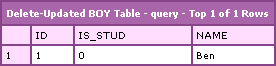
Notice that now the only record left in the @boy table is Ben - the only one who had a relationship with Winona Ryder. Pretty nifty stuff.
Thanks Pinal Dave!

Reader Comments
Ben,
Thanks for posting this article. I glad that you find it useful.
I think my blog reader will find this details very useful as I never wrote about this on my own blog.
Tomorrow I will write down summary and point to this two wonderful (and well explained) post you have. I like your examples.
Regards,
Pinal
My pleasure. Thanks for the tips.
I usually like to use a subquery for delete's as they are simpler and have less room for error. An example would be:
DELETE FROM table
WHERE id IN (SELECT id FROM anothertable WHERE this = 'that')
@Kevin,
That's definitely the way that I roll most of the time. However (and I don't know if this applies to DELETE statements), when I have used sub-queries with UPDATE statements, I could never alias the table name (syntax error). Using this FROM methodology would allow me to do so and would actually give me more power in my updates.
But, true, more power comes with more complexity. Use the best tool for the situation.
Thanks for the tip! Exactly what I needed for my instead of delete trigger!
A strange sample ...
Since there aren't foreign key constraints the bug in the sample wasn't seen by nobody ... ;-)
"Arnold" (2) and "Vincent" (3) where deleted but in the relation table still contains an entry with boy_id = 2 ...
I was looking for another but similar sample. I need to purge old date from a huge database.
I need to delete old contracts and all related rows in other tables
e.g.
Contract
- FromParticipant
- ToParticipant
- ContractItem
- TransportPlan
- etc.
Not all contracts having a TransportPlan and not always the From/ToParticipant should be deleted (only if they aren't used somewhere else) etc.
Hi,if a cell contain aa;bb;cc, how am i going to write a statement to delete aa only?
Thanks!
@BabyMilo: In that case you'll use an UPDATE command ... (of course you have to "calculate" the new values before using string functions)
@BabyMilo,
Yeah, you have to do an update:
UPDATE [table]
SET [column] = 'bb;cc'
WHERE [column] = 'aa;bb;cc'
What if i want to delete aa only without update all the records? there are plenty of records that contains aa.
What if i want to delete aa only without update all the records? there are plenty of records that contains aa.
@BabyMilo,
It won't update all records that contain "aa"; it will only update records that have exactly "aa;bb;cc". That is what the WHERE clause is for.
@BabyMilo,
U can write as:
update SomeTable
set SomeColumn = 'xxyyzz' where SomeColumn like '%abc%'
This is really a very helpful article.
I always used "In" for deleting a record coz i was not getting any way to Delete records using Select Query just as "Update Select"...
but this article helped me make "Delete Select" kind of query & increased the Query Execution speed
Thanx
Thank you! This was very helpful.
I needed to delete from a joining table with a two-field primary key so I couldn't use my normal method since there was no single unique field:
DELETE FROM table WHERE field IN (SELECT...)
Instead I used:
DELETE J
FROM Users U
inner join LinkingTable J on U.id = J.U_id
inner join Groups G on J.G_id = G.id
WHERE G.Name = 'Whatever'
and U.Name not in ('Exclude list')
@Varsha, @Rob,
Yeah, the IN() approach is good; but using JOINs really gives you some awesome control. Using JOINs in an UPDATE statement is all a lot of fun.
Hi guys,
Sort of in response to Kevin..
Just thought I'd point out something to any relative newbies like me trying to use the where clause subquery method with more than one join.
I'm using MS Access for my particular problem. Haven't tried it in grown up T-SQL but trying to make the link in one go with a concatenation made the wonderful Access hang:
WHERE (A & B & C) not in (SELECT (A & B & C)FROM TheOtherTable)
(Obviously for "&" read "+" in T-SQL)
I'm not totally certain this would have any similar trouble in Transact-SQL but for those using Access get rid of the second table from your design view then in SQL you'll need separate subqueries for each join like this:
WHERE
A not in (SELECT A FROM TheOtherTable)
and B not in (SELECT B FROM TheOtherTable)
and C not in (SELECT C FROM TheOtherTable)
There's probably a better way but it's the best I've found so far.
@Kevin,
Forget the last part of that.
Wasn't thinking straight and hadn't done it exactly that way myself.
It'll work if you're doing an 'In' but if you're doing a 'Not In' as above it'll do each check across all records separately.
This will be obvious to pros so again I'm only writing for newbies like me.
e.g if you're looking to delete where there's no longer a dog called
A B C
Bingo Barking Chaplin
you won't if there's a another who's first name is Bingo or surname of Chaplin,etc...
(I realise this is an unlikely dataset)
All the best
Some Guy called Adam
@Some,
I haven't used Access in a while; but, it certainly wouldn't surprise me that it can't handle some of the more processing-intensive query techniques.
@Kevin,
Thanks for your query, It was very useful for my case.
Regards,
Sruthi
I have to learn how delete a field data from a table. I saw many examples about deleting a row or plural rows. I seek a good example about that..
I thought that.. but it lacks
--
delete from spUrtUretimHareketiDet ...... where nIslemID = 14296683
Great post. I tried a: DELETE FROM tablex WHERE id NOT IN (SELECT id FROM tabley LEFT OUTER JOIN...)
Good thing: It works
Bad thing : It is SLLLOWWW when your table has a lot of records. I might try an Index or something else..
Please ignore my earliar comments on this as MY Colleague kidding with me.
Sorry once again
Jayant Dass
I am so impressed that you can use a JOIN in a delete.
Thanks Ben and Pinal!
SQL GETS HUGE IN A HURRY!