
I love learning new, cool stuff about SQL. It doesn't happen all that often (most of my SQL is fairly simple), but every now and then someone shows me something that just rocks my world, whether it be the power of Indexing or just something as simple as using UNION ALL instead of UNION. Last week, John Eric dropped a bomb shell on me, demonstrating how to update a table in conjunction with a SQL JOIN statement.
I have known for a long time that you could update a SQL View in Microsoft SQL Server (back when I used to use Views), so it makes sense that you could update a JOIN, but it never occurred to me to try this. Not only did it not occur to me, but the syntax used to do this is very strange to me (although now that I have stared at it for a long time, it's starting to make more sense).
Anyway, enough talk, let's take a look at this in action. Since I don't have any tables ready to play with, I have created three in-memory SQL tables: boy, girl, and relationship. The boy table lists boys, the girl table lists girls, and the relationship table lists out romantic relationships between the two (what can I say, I am a romantic fool at heart). Then, what I am going to do is UPDATE the boy table based on certain relationship criteria - in this case, anyone who has dated Winona Ryder is clearly a stud and should be flagged as such.
<cfquery name="qUpdateTest" datasource="#REQUEST.DSN.Source#">
	<!--- Declare in-memory data tables. --->
	DECLARE
		@boy TABLE
		(
			id INT,
			name VARCHAR( 30 ),
			is_stud TINYINT
		)
	;

	DECLARE
		@girl TABLE
		(
			id INT,
			name VARCHAR( 30 )
		)
	;

	DECLARE
		@relationship TABLE
		(
			boy_id INT,
			girl_id INT,
			date_started DATETIME,
			date_ended DATETIME
		)
	;


	<!---
		Populate the boy table with some information.
		Notice that as I populate the IS_STUD column, all
		the values are going to be ZERO (meaning that these
		dudes are not very studly). This will be updated
		based on the relationship JOIN.
	--->
	INSERT INTO @boy
	(
		id,
		name,
		is_stud
	)(
		SELECT 1, 'Ben', 0 UNION ALL
		SELECT 2, 'Arnold', 0 UNION ALL
		SELECT 3, 'Vincent', 0
	);


	<!--- Populate the girl table with some information. --->
	INSERT INTO @girl
	(
		id,
		name
	)(
		SELECT 1, 'Maria Bello' UNION ALL
		SELECT 2, 'Christina Cox' UNION ALL
		SELECT 3, 'Winona Ryder'
	);


	<!--- Populate the relationship table. --->
	INSERT INTO @relationship
	(
		boy_id,
		girl_id,
		date_started,
		date_ended
	)(
		SELECT 1, 1, '2007/01/01', NULL UNION ALL
		SELECT 1, 3, '2004/09/15', '2005/06/15' UNION ALL
		SELECT 2, 1, '2006/05/14', '2006/05/23'
	);


	<!---
		Update the in-memory table. Here, we are going to join
		the boy, girl, and relationship table to see if any of
		the boys have been studly enough to date Winona Ryder.
		If so, that BOY record will be updated date with the
		is_studly flag.
	--->
	UPDATE
		b
	SET
		b.is_stud = 1
	FROM
		@boy b
	INNER JOIN
		@relationship r
	ON
		b.id = r.boy_id
	INNER JOIN
		@girl g
	ON
		(
				r.girl_id = g.id
			AND
				g.name = 'Winona Ryder'
		)
	;


	<!---
		To see if the update has taken place, let's grab
		the records from the boy table.
	--->
	SELECT
		id,
		name,
		is_stud
	FROM
		@boy
	;
</cfquery>


<!--- Dump out the updated record set. --->
<cfdump
	var="#qUpdateTest#"
	label="Updated BOY Table"
	/>
Notice how the SQL UPDATE statement is JOINing the @boy, @girl, and @relationship table using INNER JOINs and limiting it to boys who have dated Winona Ryder. The update is made to the result of that JOIN and then we are selecting all the rows from that updated @boy table (to see that it works). Running the above code, we get the following CFDump output:
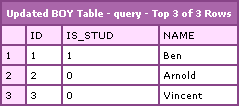
Notice that the Ben record was updated to reflect the Studly property. This is pretty cool stuff. Frankly, I haven't even ever used a FROM clause in my UPDATE statement (unless part of a sub-query). This is going to give me some cool stuff to explore.
Thanks John Eric!

Reader Comments
Ben,
As general rule you can write all your UPDATE, DELETE query the same way you can write SELECT Query. They have same structure of syntax. You could also DELETE using JOIN as well. Try following query you will love it.
DELETE tableName
FROM tableName tn
INNER JOIN JoinedTable jn ON jn.col = tn.col
WHERE jn = someval
I see where you are going. Similar thing happened to me.
I was biggest fan of ColdFusion and can not stop thinking about it. One day, I started to learn SQL and here it goes. I could not come back to ColdFusion from SQL.
I guess, Once you go SQL...
Pinal
@Pinal Dave,
Cool stuff. I didn't know you could use this in DELETE as well. Awesome stuff. One of the things I have always wanted to do is create a table alias in the UPDATE statement, but it has always failed due to Syntax error. That was before I knew you could do a FROM clause in the UPDATE statement. This should make things much easier, especially when dealing with an UPDATE that uses a sub-query.
Good stuff!
Pinal --> For me it's been using them both together. I've seen some people write a lot of CF code to do something they could do in just a few SQL commands passed off via CFQuery.
@Pinal,
Works like a charm!
www.bennadel.com/index.cfm?dax=blog:939.view
The syntax is a bit strange to me, but I just need to get used to it. Thanks for the hot tip.
I am with Allen on this one. I don't think one is necessarily better than the other - they do different things. They work together to create harmony. The trick is to know when to leverage the powers of each tool.
Ben,
I am sure my blog readers will find it useful.
http://blog.sqlauthority.com/2007/09/05/sqlauthority-news-interesting-read-using-a-sql-join-in-a-sql-updatedelete-statement-ben-nadel/
Regards,
Pinal
How odd that I would stumble across this. Recently I started using UPDATE...SET...FROM to persist an array of objects in one SQL statement.
Essentially, I pass an array of components to a persistence object, and construct an in-memory table within the UPDATE statement, looping through the array of objects to be persisted and adding a UNION ALL after every loop iteration. Except the last one, of course.
Works well, and is much, much faster than using one SQL statement per loop iteration. Although, I'll admit upfront that my measurement process consists of running the app and saying "Well, that seemed a lot faster". :)
@Matt,
If you think about applications from a "user experience" standpoint, it's the "that runs faster" moment much more important than any numeric reading? As long as you perceive it to be faster, that's all that counts.
Ben and Pinal
Hi guys!
I was wondering if this technique could be modified to set is_stud to the value of one of the other tables in the join (say, g.id) instead of a static 1.
This would be very useful for me in a situation I've been finding myself in frequently.
I have a table of countries (country_id, country_name etc.) and a new table (people) with a country_name field that matches up with countries.country_name
I would like to set people.country_id (which for all records is currently set to zero since the data is new) equal to countries.country_id where the country names in each table match.
Is this achievable with just SQL and not CF as I have been doing?
I'm just not sure of values can be returned from the join conditions being met.
Thanks and keep up the good help :)
Steve
@Steve,
Yes, you can update one table using the value in another table in the manor. Create the JOIN that you think is appropriate and then set one column to the other.
Thanks for your help
I like any piece of code that contains the line INSERT INTO Girl ;-)
http://www.rajib-bahar.com/rajib/BlogEngine.Web/post/2009/03/26/useful-blog-entries-on-Joins-using-join-in-update-or-delete-statement.aspx
I put a linkback to this entry because some of my colleagues/students may find it useful. All the best.
Effin ay, mang! You should teach a class! As far as blogs go, this one didn't suck. And I learned something. kudos.
@James,
Thanks my man. Glad you don't think my blog sucks :)
Excellent help!!
I am a fan of creating an array via XML, parsing it into a table, then using the above set-based insert/update/delete method.
By using XML and the above method, you can drop the execution time of multiple inserts in one transaction drastically. For example, if you had to loop over an insert statement; try changing it to creating XML with the same loop, then having SQL parse the XML into a temporary table and doing your insert via a select statement on the temporary table.
It is also possible to create a "CRUD" like stored procedure by adding a variable in the nodes to flag whether it is an insert, update or delete.
If anyone is interested in the XML CRUD stored procedure, let me know and I will see if I can dig it out of one of my past projects.
@eXcalibur.lk,
I am sorry, I don't follow what you are saying; but, I am intrigued. What XML are you talking about? And how are you turning that XML into an INSERT / UPDATE statement?
I am on holidays in another state at the moment, so I can not get my previous work; however here is an approach that is a little bit less verbose than my example: http://pratchev.blogspot.com/2008/11/import-xml-file-to-sql-table.html
When I get back, I will post my example. I did a proof of concept at my last job by looping over a cfquery with a sql insert and compared that to looping over an xml document, then doing the insert via sql parsing and table to table inserts. The results even surprised me.
@Andrew,
Oh wow, that's pretty cool. I've never seen that before. Do you know what databases this is valid for?
@Ben,
The functionality is for MS SQL (I think form 2005 on), I have not been able to find anything similar for other DBMSs; mind you have not been looking to hard, as currently all my projects have been with MS SQL.
@Andrew,
Gotcha, makes sense - MS SQL has some pretty powerful stuff.
Hi Ben, thanks for posting this, hope you don't mind I've put a link from my (rarely used) blog to your page and thought you'd like to know that I just used this technique to update 132 million records in an hour!
@Matt,
132 million records!!! Dangy! Glad the technique is effective.
hi, does this syntax also suit for Insert Query?
@J.D.
Sure can, Ben shows how in the blog:
INSERT INTO @girl
(
id,
name
)(
SELECT 1, 'Maria Bello' UNION ALL
SELECT 2, 'Christina Cox' UNION ALL
SELECT 3, 'Winona Ryder'
);
If you need the values to come from a table, then substitute the static information for column names and add a from clause; for example:
INSERT INTO @girlInRelationship
(
id,
name
)(
SELECT girl.id, girl.name
FROM girl
INNER JOIN relationship
ON girl.id = relationship.girl_id
);
** I am assuming Ben's code is for MySQL, which I don't normally code in, as such the syntax for my example may be off.
thanks Andrew Bauer :D
may I ask do you know does SQL can do "split" like C# can do?
in my column save data like this
Table A
SHOPNO GOODS
101`102 BANANA
Table B
SHOPNO SHOPNAME
101 SUN
101 MOON
is it possible to split A.SHOPNO then compare with B.SHOPNO to get B.SHOPNAME?
I hope can get result like this
SHOPNO SHOPNAME GOODS
101'102 SUN`MOON BANANA
does SQL could do split like other code languae can do?
thanks alot
@JD,
I am glad that I could help with my previous reply.
With your question; it is possible to do with stored procedures and functions, but I would not suggest it. It is not a good idea to hold multiple key values in the same column.
Having multiple keys in a column leads to data integrity issues (like will banana exist in your database, if the links to shops 101 & 102 are removed?). I would suggest changing it into 3 tables:
Table A (Goods)
GoodsID, GoodsName
1, Banana
2, Apple
Table B (Shops)
ShopNo, ShopName
101, Sun
102, Moon
Table C (ShopGoods or Inventory) "Join Table"
ID, GoodsID, ShopNo
1, 1, 101
2, 1, 102
3, 2, 102
This is the basic setup for a many-to-many relationship between two entities (tables). By adding the join table you can then manage the relationships with simple Insert/Update/Delete statements. Also the result you are after is achieved with an inner join (however over multiple rows):
SELECT B.ShopNo, B.ShopName, A.GoodsName
FROM Goods AS A
INNER JOIN ShopGoods AS C
ON A.GoodsID = C.GoodsID
INNER JOIN Shops AS B
ON B.ShopNo = C.ShopNo
Results:
ShopNo, ShopName, GoodsName
101, Sun, Banana
102, Moon, Banana
102, Moon, Apple
@Ben,
Sorry for the long comment. I realize that I could of answered the question directly, and I don't want to hi-jack your blog comments with essay responses of my own; however I have seen too many people fall into the trap of getting a table's rows to describe more than one entity, and am hoping to help with an alternative approach.
hi, Andrew Bauer
again thanks for your reply !!
I been google for find the answer
people just siad like you just told
not suggest to save mutiple value in same column..
but the schema and exist data just save like this format.. ( I can't change schema... which old Data exist many data row already)
Table A
SHOPNO GOODS
101`102 BANANA
if I really need to find a way to retrieve the SHOPNAME..is the best way by other code language not SQL?
thank you very much!!
@JD,
I can understand the pain of not being able to change the schema and I know that a well structured schema saves you from a lot of headaches.
Personally, I would flat-out refuse to work with this type of database schema, opting to volunteer rewriting the structure and creating ETL (Extract Transfer Load) scripts to move the data to the new schema. In my opinion, a couple of days for writing a schema/ETL scripts and changing code that my already rely on the current structure, is much better to creating a hack that will cause you troubles down the line.
If you absolutely must continue with the current structure; then the quickest and easiest approach would be to query Table A in ColdFusion, loop over each record, then loop over each value in the ShopNo list of IDs (ColdFusion has some useful list functions), query Table B with the list values, then write the desired values to a custom query result set. This approach is very verbose and will make it difficult to maintain, not too mention it will be very slow as more records are added.
I hope for your sanity that you manage to convince whoever to let you change the schema.
hi thank you Andrew Bauer
I just tried to convince them to let me change the schema , but ... in vain , for some reason they just want this kind of schema to save data..
maybe I will try the way ( use other code languae ) to get the result I need
thanks for your patient and suggestion !!
thanks alot
I love the style and look of your website blog. What blogging application are you using? I see the design was inspired by Tim Ferriss. Could you please point me in the right direction.
PS. Thanks for the comments in SQL Joins it helped solve my problem.
Thank you in advance. Mike (Smile)
@Michael,
My blog app is home-built. The design was also hand crafted using Fireworks.
Great blog! Saved me an hour + of typing... I had updated a table in my development world and wanted to use some of the field data to update the live table counterpart.
sorry for asking a sql question (I am sorry for if it's ok not to ask in here)
I spend 1 week to think out how to finger out this soluction
SELECT SHOPNO,HWSNO,BDATE,HPYNO FROM ECRPYHS
RESULT:
SHOPNO HWSNO BDATE HPYNO
A 01 2004/06/15 01
A 01 2004/06/15 01
A 01 2004/06/15 03
A 01 2004/06/20 03
A 01 2004/06/20 03
A 01 2004/06/20 01
SELECT SHOPNO,HWSNO,BDATE,HSALE_ID FROM ECRHDHS
RESULT:
SHOPNO HWSNO BDATE HSALE_ID HASTOTAL
A 01 2004/06/15 ALLEN 10
A 01 2004/06/15 ALLEN 5
A 01 2004/06/15 NAOMI 10
A 01 2004/06/20 NAOMI 10
A 01 2004/06/20 NAOMI 5
A 01 2004/06/20 ALLEN 10
SELECT PYNO,PYID FROM PAYINFO
RESULT:
PYNO PYID
01 TWD
02 CNY
03 USD
04 JPY
05 HKD
06 KRW
07 GBP
08 AUD
09 CRD
WOULD LIKE TO HAVE THIS RESULT THEN NEED TO BINDING WITH GRIDVIEW
HSALE_ID TWD CNY USD JPY HKD KRW GBP AUD CRD
ALLEN 25 0 0 0 0 0 0 0 0
NAOMI 0 0 25 0 0 0 0 0 0
THE QUESTIONS I WOULD LIKE TO ASK IS
1 ASSUME I DON'T KNOW HOW MANY KINDS OF PAYINFO ( PAYINFO.PYNO) HOW TO SETTING BoundField FOR GRIDVIEW?
2 HOW TO JOIN PAYINFO THEN COUNT EACH KIND OF PAYMENT TYPE THEN JOIN TO MAIN TABLE ?
IT'S NOT PROBLEM FOR ME TO JOIN ECRPYHS WITH ECRHDHS
THEN I HAVE PROBLEM TO JOIN WITH PAYINFO ...
PLEASE HELP.. OR GIVE ME A EXAMPLE TO KNOW HOW TO DO
THANK YOU VERY MUCH!!
Hi J.D,
If you can join ECRPYHS and ECRHDHS, it should be easy to join PAYINFO as well. It looks like PAYINFO.PYNO is related to ECRPYHS.HPYNO
Once you have the joined table, you can use the crosstab stored procedure below to create the cross tabbed table.
You can then tell gridview to automatically generate columns with the tag AutoGenerateColumns="True". You can then configure the columns via sub routines if necessary.
I do this quite often and find it invaluable.
Common syntax for sp_crosstab is;
EXEC [dbo].[sp_Crosstab]
@DBFetch = 'table or view to be cross tabbed - can be a temp table',
@DBField = 'Field to become column headings - PYID in your case',
@PCField = 'Field to be totaled - HASTOTAL in your case',
@PCBuild = 'COUNT, SUM, MIN, MAX or AVG'
I'm not sure where I get this procedure from, so I'm not sure who to give credit to. It is certainly very useful though!
Cheers
Dave
P.S - Sorry for the long post.
--------------------------------
SET ANSI_NULLS ON
GO
SET QUOTED_IDENTIFIER ON
GO
CREATE PROCEDURE [dbo].[sp_Crosstab]
@DBFetch varchar(4000), --specifies the set of data to summarize
@DBWhere varchar(2000) = NULL, --is optional, specifies a WHERE clause to filter the data specified by the @DBFetch parameter
@DBPivot varchar(4000) = NULL, --is optional, specifies the column names to appear in the result set
@DBField varchar(100), --specifies the column containing the data that becomes result set column names
@PCField varchar(100), --specifies the column to be aggregated.
@PCBuild varchar( 20), --specifies the aggregation to be performed (COUNT, SUM, MIN, MAX or AVG)
@PCAdmin varchar( 20) = NULL, --is optional, specifies a result set column name to represent null values
@DBAdmin int = 0, --is optional, specifies whether any additional columns should be added to the result set for totals
@DBTable varchar(100) = NULL, --is optional, specifies a table name for the result set
@DBWrite varchar(160) = NULL, --is optional, specifies a database name for the @DBTable parameter
@DBUltra bit = 0 --is optional, specifies whether the result set table (if specified) should be dropped (if it already exists) before saving the result set. A value of zero (0) means the table is dropped and created again. A value of one (1) means the result set is to be appended to an already existing table
AS
SET NOCOUNT ON
DECLARE @Return int
DECLARE @Retain int
DECLARE @Status int
SET @Status = 0
DECLARE @TPre varchar(10)
DECLARE @TDo3 tinyint
DECLARE @TDo4 tinyint
SET @TPre = 'tbl'
SET @TDo3 = LEN(@TPre)
SET @TDo4 = LEN(@TPre) + 1
DECLARE @DBAE varchar(40)
DECLARE @Task varchar(8000)
DECLARE @Bank varchar(4000)
DECLARE @Cash varchar(2000)
DECLARE @Rich varchar(2000)
DECLARE @DBAI varchar(4000)
DECLARE @DBAO varchar(8000)
DECLARE @DBAU varchar(2000)
DECLARE @Name varchar(100)
DECLARE @Same varchar(100)
DECLARE @Home varchar(160)
DECLARE @Some varchar(20)
DECLARE @Work int
DECLARE @Wink int
SET @DBAE = '##Crosstab' + RIGHT(CONVERT(varchar(10),@@SPID+100000),5)
SET @Task = 'IF EXISTS (SELECT * FROM tempdb.dbo.sysobjects WHERE name = ' + CHAR(39) + @DBAE + CHAR(39) + ') DROP TABLE ' + @DBAE
--PRINT @Task
EXECUTE (@Task)
CREATE TABLE #DBAT (Work int IDENTITY(1,1), Name varchar(100))
SET @Bank = @TPre + @DBFetch
IF NOT EXISTS (SELECT * FROM sysobjects WHERE RTRIM(type) = 'U' AND name = @Bank)
BEGIN
SET @Bank = CASE WHEN LEFT(@DBFetch,6) = 'SELECT' THEN '(' + @DBFetch + ')' ELSE @DBFetch END
SET @Bank = REPLACE(@Bank, CHAR(94),CHAR(39))
SET @Bank = REPLACE(@Bank,CHAR(45)+CHAR(45),CHAR(32))
SET @Bank = REPLACE(@Bank,CHAR(47)+CHAR(42),CHAR(32))
END
IF @DBWhere IS NOT NULL
BEGIN
SET @Cash = REPLACE(@DBWhere,'WHERE' ,CHAR(32))
SET @Cash = REPLACE(@Cash, CHAR(94),CHAR(39))
SET @Cash = REPLACE(@Cash,CHAR(45)+CHAR(45),CHAR(32))
SET @Cash = REPLACE(@Cash,CHAR(47)+CHAR(42),CHAR(32))
END
SET @DBField = REPLACE(@DBField,CHAR(32),CHAR(95))
SET @PCField = REPLACE(@PCField,CHAR(32),CHAR(95))
SET @PCBuild = REPLACE(@PCBuild,CHAR(32),CHAR(95))
SET @PCAdmin = REPLACE(@PCAdmin,CHAR(32),CHAR(95))
SET @DBTable = REPLACE(@DBTable,CHAR(32),CHAR(95))
SET @DBWrite = REPLACE(@DBWrite,CHAR(32),CHAR(95))
SET @DBWhere = CASE WHEN @DBWhere IS NULL THEN '' ELSE ' WHERE (' + @Cash + ') AND 0 = 0' END
SET @Some = ISNULL(@PCAdmin,'NA')
SET @Task = 'SELECT * INTO ' + @DBAE + ' FROM ' + @Bank + ' AS T WHERE 0 = 1'
--PRINT @Task
IF @Status = 0 EXECUTE (@Task) SET @Return = @@ERROR
IF @Status = 0 SET @Status = @Return
IF @DBPivot IS NOT NULL
BEGIN
IF LEFT(@DBPivot,6) <> 'SELECT'
BEGIN
SET @Wink = 1
SET @Work = CHARINDEX('|',(@DBPivot)+'|')
WHILE @Work > 0
BEGIN
SET @Name = SUBSTRING(@DBPivot,@Wink,@Work-@Wink)
INSERT #DBAT (Name) VALUES (@Name)
SET @Wink = @Work + 1
SET @Work = CHARINDEX('|',(@DBPivot)+'|',@Wink)
END
END
ELSE
BEGIN
SET @Task = 'INSERT #DBAT (Name) ' + @DBPivot
SET @Task = REPLACE(@Task, CHAR(94),CHAR(39))
SET @Task = REPLACE(@Task,CHAR(45)+CHAR(45),CHAR(32))
SET @Task = REPLACE(@Task,CHAR(47)+CHAR(42),CHAR(32))
--PRINT @Task
IF @Status = 0 EXECUTE (@Task) SET @Return = @@ERROR
IF @Status = 0 SET @Status = @Return
END
END
ELSE
BEGIN
SET @Task = ' INSERT #DBAT (Name)'
+ ' SELECT CONVERT(varchar(100),' + @DBField + ')'
+ ' FROM ' + @Bank + ' AS T ' + @DBWhere
+ ' GROUP BY CONVERT(varchar(100),' + @DBField + ')'
+ ' ORDER BY 1'
--PRINT @Task
IF @Status = 0 EXECUTE (@Task) SET @Return = @@ERROR
IF @Status = 0 SET @Status = @Return
END
UPDATE #DBAT SET Name = @Some WHERE Name IS NULL
SET @DBAI = ''
SET @DBAO = ''
SET @Rich = ''
DECLARE Fields CURSOR FAST_FORWARD FOR
SELECT C.name
FROM tempdb.dbo.sysobjects AS O
JOIN tempdb.dbo.syscolumns AS C
ON C.id = O.id
AND C.name != @DBField
AND C.name != @PCField
AND O.name = @DBAE
ORDER BY C.colid
SET @Retain = @@ERROR IF @Status = 0 SET @Status = @Retain
OPEN Fields
SET @Retain = @@ERROR IF @Status = 0 SET @Status = @Retain
FETCH NEXT FROM Fields INTO @Same
SET @Retain = @@ERROR IF @Status = 0 SET @Status = @Retain
WHILE @@FETCH_STATUS = 0 AND @Status = 0
BEGIN
SET @DBAI = @DBAI + ', ' + @Same
FETCH NEXT FROM Fields INTO @Same
SET @Retain = @@ERROR IF @Status = 0 SET @Status = @Retain
END
CLOSE Fields DEALLOCATE Fields
SET @DBAI = SUBSTRING(@DBAI,3,4000)
DECLARE Fields CURSOR FAST_FORWARD FOR
SELECT Name
FROM #DBAT
ORDER BY Work
OPEN Fields
FETCH NEXT FROM Fields INTO @Same
WHILE @@FETCH_STATUS = 0 AND @Status = 0
BEGIN
IF LEN(@DBAO) < 7900 - LEN(@DBField) - LEN(@PCField) - LEN(@Same) - LEN(@Same)
BEGIN
SET @DBAO = @DBAO + ', ' + @PCBuild + '(CASE WHEN ISNULL(CONVERT(varchar(100),' + @DBField + '),'
+ CHAR(39) + @Some + CHAR(39) + ') = '
+ CHAR(39) + @Same + CHAR(39) + ' THEN '
+ @PCField + ' ELSE NULL END) AS '
+ CHAR(91) + @Same + CHAR(93)
END
ELSE
BEGIN
SET @Status = 50000
END
FETCH NEXT FROM Fields INTO @Same
END
CLOSE Fields DEALLOCATE Fields
IF @DBAdmin IN (1,3) SET @Rich = @Rich + ', ' + @PCBuild + '(' + @PCField + ') AS All_' + @PCBuild
IF @DBAdmin IN (2,3) SET @Rich = @Rich + ', COUNT(' + @PCField + ') AS All_COUNT'
IF @DBAdmin IN (2,3) SET @Rich = @Rich + ', MIN(' + @PCField + ') AS All_MIN'
IF @DBAdmin IN (2,3) SET @Rich = @Rich + ', MAX(' + @PCField + ') AS All_MAX'
SET ANSI_WARNINGS OFF
SET @Home = ''
SET @Name = ''
IF @DBTable IS NOT NULL
BEGIN
SET @Name = @DBTable
IF LEFT(@Name,2) = '##'
BEGIN
IF @DBUltra = 0
BEGIN
SET @Task = 'IF EXISTS (SELECT * FROM tempdb.dbo.sysobjects WHERE name = ' + CHAR(39) + @Name + CHAR(39) + ') DROP TABLE ' + @Name
--PRINT @Task
IF @Status = 0 EXECUTE (@Task) SET @Return = @@ERROR
IF @Status = 0 SET @Status = @Return
END
END
ELSE
BEGIN
IF @DBWrite IS NOT NULL SET @Home = @DBWrite + '.dbo.'
IF @DBUltra = 0
BEGIN
SET @Task = 'IF EXISTS (SELECT * FROM ' + @Home + 'sysobjects WHERE name = ' + CHAR(39) + @Name + CHAR(39) + ') DROP TABLE ' + @Home + @Name
--PRINT @Task
IF @Status = 0 EXECUTE (@Task) SET @Return = @@ERROR
IF @Status = 0 SET @Status = @Return
END
END
END
IF @DBTable IS NOT NULL
BEGIN
IF @DBUltra = 0
BEGIN
IF @Status = 0 EXECUTE ( ' SELECT ' + @DBAI + @DBAO + @Rich
+ ' INTO ' + @Home + @Name
+ ' FROM ' + @Bank + ' AS T ' + @DBWhere
+ ' GROUP BY ' + @DBAI
+ ' ORDER BY ' + @DBAI ) SET @Return = @@ERROR
IF @Status = 0 SET @Status = @Return
END
ELSE
BEGIN
IF @Status = 0 EXECUTE ( ' INSERT ' + @Home + @Name
+ ' SELECT ' + @DBAI + @DBAO + @Rich
+ ' FROM ' + @Bank + ' AS T ' + @DBWhere
+ ' GROUP BY ' + @DBAI
+ ' ORDER BY ' + @DBAI ) SET @Return = @@ERROR
IF @Status = 0 SET @Status = @Return
END
END
ELSE
BEGIN
IF @Status = 0 EXECUTE ( ' SELECT ' + @DBAI + @DBAO + @Rich
+ ' FROM ' + @Bank + ' AS T ' + @DBWhere
+ ' GROUP BY ' + @DBAI
+ ' ORDER BY ' + @DBAI ) SET @Return = @@ERROR
IF @Status = 0 SET @Status = @Return
END
SET ANSI_WARNINGS ON
SET @Task = 'IF EXISTS (SELECT * FROM tempdb.dbo.sysobjects WHERE name = ' + CHAR(39) + @DBAE + CHAR(39) + ') DROP TABLE ' + @DBAE
--PRINT @Task
EXECUTE (@Task)
DROP TABLE #DBAT
SET NOCOUNT OFF
RETURN (@Status)
--------------------------------
Thanks a lot, it really helps me.
This is academic as we got the data updated another way but were we're
wondering why something works the way it does:
Given these two SQL statements, we get the following results:
--This pulls 1 row
SELECT *
FROM CompletedRequirement cr
INNER JOIN vwRequirementList rl ON cr.RequirementID = rl.RequirementID
WHERE cr.CompletedRequirementID = 90271
--This updates 28000 rows
UPDATE cr
SET cr.CreatedBy = 'jsmith'
FROM CompletedRequirement cr
INNER JOIN vwRequirementList rl ON cr.RequirementID = rl.RequirementID
WHERE cr.CompletedRequirementID = 90271
The FROM, INNER JOIN, and WHERE clauses of both statements are the
same.
One CompletedRequirement entry can have many related entries in the
vwRequirementList view. Still, I would think that using the primary
key in a WHERE clause (CompletedRequirementID = 90271) would restrict
the UPDATE to 1 row as it does the SELECT.
Any ideas?
Thanks
Dennis
In regards to the above, i think if has to do with joining on a view since i cannot reproduce it when joining on a table.
Did you try moving the ID restriction to the inner join clause? That may help when dealing with the view.
@Dennis,
Change the query to:
UPDATE CompletedRequirement
SET CompletedRequirement.CreatedBy = 'jsmith'
FROM CompletedRequirement cr
INNER JOIN vwRequirementList rl ON cr.RequirementID = rl.RequirementID
WHERE cr.CompletedRequirementID = 90271
Think of the from and join tables as separate from the update table and left side column of the set statement.
The updated table does need to be in the from/inner join clause as does need to have an alias.
I am assuming that the from/inner join clause is only there to by-pass a sub-query of "where CompletedRequirement.RequirementID is in (select all RequirementIDs from vwRequirementList)"; otherwise in this cause it would be superfluous as you are not using any values from the view.
@Dennis,
Very interesting! I don't work with Views very much; but I would think that it would work as expected.
@Andrew,
I am pretty sure (but have not double-checked) that I have used an alias in join-based update statements... but I could be totally wrong.
My goal in using the Update From syntax is to write select statements and then turn them into update statements without changing the code.
So i usually set them up like this:
UPDATE cr
SET cr.CreatedBy = 'jsmith'
--SELECT *
FROM CompletedRequirement cr
INNER JOIN vwRequirementList rl ON
cr.RequirementID = rl.RequirementID
WHERE cr.CompletedRequirementID = 90271
When I highlighted and ran the select section, i got 1 row. When i ran the whole statement i was very surprised that it affected 28080 rows. Luckily it was on a test system, but i would have felt comfortable running this in production after verifying the select results.
I got the below suggestion from another blog which works well and enables me to turn selects into updates:
WITH cte
AS
(
SELECT cr.*
FROM CompletedRequirement cr
INNER JOIN vwRequirementList rl ON cr.RequirementID = rl.RequirementID
WHERE cr.CompletedRequirementID = 90271
) UPDATE cte SET CreatedBy= 'jsmith'
Thanks for all your help,
Dennis
@Dennis,
Thank you for following up on that one and sharing it with us. Only the blog log keeper knows how many but I suspect quite a few will stumble across this one and find it helpful.
@Dennis,
Very cool - I've never see the WITH keyword in SQL. I'll have to look into that.
@Ben,
I believe it is required to use aliases in the join section of a join-based update query, however Dennis was attempting to update the alias. When updating via a join-based query in MS SQL (not sure if it is so for other RDBMS) you have to think of it as being referenced twice (like in a self-join query).
@Dennis,
Did you get the desired results from the query I posted previously?
@Andrew,
Ah gotcha; it's been a while since I've use MS SQL (been rocking the groovy tunes of MySQL lately).
This is for academic purpose. What i want to do is that there is table which has age and zip code. I am writing a code that takes four records through loop then copy them to temporary table (calculate average over there of the four records ) then store that avg value in a variable. After that want to replicate the avg value in the original table. I have done all the above steps only have problem in replicating the avg value only against the four record only that were first selected and for whom average was calculated.
DECLARE @count3 INT
SET @count3 = 0
WHILE (@count3 <@count2 )
BEGIN
INSERT INTO #MyTempTable VALUES (1)
SET @count3 = (@count3 + 1)
END
CREATE TABLE #MyTempTable (cola INT)
Select * from #MyTempTable
Delete #MyTempTable
Create table majeedwaheed(agee int, zipee int)
DECLARE cursor_first CURSOR FOR
SELECT Zip_code , age FROM Rt_md_rd_II
OPEN cursor_first
Declare @count5 INT
Set @count5 = 0
Declare @v_zip_code INT
Declare @v_age INT
Fetch NEXT from cursor_first into @v_zip_code,@v_age
While (@count5 < 4)
BEGIN
Select @v_zip_code as zip_code,@v_age as age insert into majeedwaheed values(@v_zip_code, @v_age)
Set @count5 = (@count5 + 1)
Fetch NEXT from cursor_first into @v_zip_code,@v_age
END
Declare @avg_age int
set @avg_age = (select avg(zipee) from majeedwaheed)
select @avg_age
Declare @count9 INT
Set @count9 = 4
While (@count9 < = 0)
begin
update Rt_md_rd_II set zip_code = @avg_age
set @count5 = (@count9 - 1)
END
the output of my code should be:
original table
Zip code Age
1305 21
1306 22
1309 23
1400 30
Output table
Zip code Age
1330 24
1330 24
1330 24
1300 24
@Waheed, your post doesn't really have a question to it, though it sounds like you are attempting to ask one.
I am assuming that you want to find the average age of people in a zip code; is this correct? If so your query can be reduced to a single insert or update query.
@Ben, have you thought of creating a forum for your site and off-loading question based comments on articles into that?
@Andrew,
Thank you Andrew for your reply, actually I could not clearly mention the problem. The problem was that the code that I pasted in my earlier post, was doing that (in total records of 12) it just picks first 4 records take average of the first 4 selected records and replicate the (zip code, age) with the record on whose values (zip code, age) computation was done. and then stopped. The code was not then picking the next four record, as it was supposed to pick.
I have now solved it. Thank you for proving such an informative portal and a platform for viewing and sharing different programing problems.
Thank you once again
@Waheed, happy to help. I was curious about your problem as your code looked very verbose for what you seemed to be doing.
Looking at it, it seemed to me that you were attempting to calculate the averages one record at a time via cursors, instead of doing it all at once with a single update statement.
This may not be the case. However, I would recommend using cursors sparingly. SQL is optimised to do things in sets (groups) and cursors are resource hungry.
@Andrew,
I hear what you're saying re:forum. The only time I ever get concerned is when people post large code snippets, especially since they do not format properly (and it's not really the appropriate place for it). But in general, I do like that the blog posts can lead to more indepth conversations.
@Ben Nadel,
I can understand about the formatting frustrations, I hope that I have not left snippets unformatted :)
How about a hybrid of blog comments and forum? Have it when a blog is posted it automatically creates a forum thread.
Truthfully, this is a great and helpful post from you. I've needed to do such a thing and I did not realize how to achieve it until I found yours.
that alias concept was what I was looking for. I might actually like sql some day. thanks.
UPDATE T SET T.AccesAgreementId = A.Id FROM TemporaryHousing T INNER JOIN AccessAgreements A ON A.RENumber = T.RENumber
UPDATE T SET T.AccesAgreementId = A.Id FROM Remediation T INNER JOIN AccessAgreements A ON A.RENumber = T.RENumber
Hi all, hopefully it's okay to post this here. Seems like someone here (hopefully Ben) would know how to help me. I am trying to do the same thing you have done with this join and update, just a little different. Here goes:
I am not sure the syntax is correct. This is probably the most advanced SQL query I have attempted.
UPDATE File
Set ShortFileName = File2.ShortFileName
From File
Inner Join File2
ON File.MatterID = File2.MatterID
It's important that the query is smart enough to match the rows on each table, find the match and return the ShortFileName from that row only, updating the real File table with the data from the new File2 table (which I am importing simply to be able to do the lookup using the Join statement).
@Jashua,
That looks roughly correct; the UPDATE-JOIN syntax changes with each database, so you might have to tweak it depending on your environment. Are you getting an error when you run this?
Need help:
UPDATE Test
SET Debt = Debt + SalesRecord.Debt
WHERE EXISTS
(select *
from SalesRecord
where Test.Customer_Name = SalesRecord.Customer_Name AND Test.Debt>2000);
Error:The multi-part identifier "SalesRecord.Debt" could not be bound.
Thanks Ben
Your post helped an amateur make an update where I had to join two tables. Normally I don't do joins when I have to update, so i googled and ended at your blog, where I found the formula.
So thanks a lot, and have a great day. Yours is starting (if you are a worm in the apple), and my workday is ending in a couple of hours.
Greetings from Valby, Denmark
@Justin,
I don't think that the tables in the EXISTS clause can be referenced externally. Plus, I am not sure there is any guarantee as to which record comes back in the EXISTS. The clause dictates that it will return TRUE if even one record matches (at which point it stops searching). It sounds like you need to use something other than EXISTS.
@Michael,
Very awesome - glad to help. I also don't JOIN all that often in an UPDATE statement; but, when you need to, this is super powerful.
@Ben
It worked! Thanks for responding, I'm just now seeing it as gmail caught the notifications as spam, and they never made it to MS Outlook.
Thanks again!
@Jashua,
Awesome - glad you figured it out.
This failes because the command requires update permission on all the fields used in the select - not only is_stud.
UPDATE b SET b.is_stud = 1...
this is not good
Thanks, Ben,
Your site is superb - better than the original documentation - when it comes to just making an SQL query work, esp with ColdFusion.
How do we figure out your schedule so we can go to the right conference and get our picture taken with you?
Cheers from Bloomington, Indiana
@Willy,
I have not yet dealt with a database that only allows update on certain fields. I can imagine that complicates many things.
@John,
Ha ha ha, thanks :) I try to go to as many ColdFusion conferences as I can afford / allot time for. Some years that's more than others. Will hopefully be getting to cf.Objective() this year. I did go to BFusion/BFLex the last 2 years - seems like the one that would be closest to you :)
Hi,
You look well built, how do you work out and be a programmer at the same time?
Tien
What a sexist schema! Are you saying that Men can only have relationships with Women?!
:-)
I'm sure you're just fine Richard Green
@Richard,
I would say it is a homophobic schema!
@Tien,
Ha ha, I don't do much else other than programming and work out :D Though, I haven't worked out much lately. Trying to get back on track.
@Richard, @Tokhir,
Ha ha, I'm just trying to keep my JOINs easier :P
What about the order of updates? Will this always be a valid statement?
update u set
u.UserName = t.UserName,
u.updated = case when u.UserName <> t.UserName then 1 else 0 end
from Users u
join UserImport t on u.ID = t.ID
Thanks for your blog. I was writing a hell of lot code to achieve an update and you just made it a lot simpler.
Claire
Hi there - I have been struggling with the syntax for an update on a select with a foxpro databsase. This blog has a lot of good ideas, but I think I have tried every one of them without success.
I am entering my SQL into a text box and then doing a database .execute
Set dbCompany = OpenDatabase(strDatabase, dbDriverComplete, False, "FoxPro 2.6")
dbCompany.Execute (ExportSQL)
The ones that run and do not give syntax errors are as follows, but the update more records than they should. Any help appreciated.
UPDATE Trade set zComments = "Updated" where Qtyord in (Select QtyOrd from ((Trans ts inner join Trade td ON ts.Internref = td.Intordref) inner join Inventry inv ON td.Accountid = inv.Uniqueid) where Trantype = 39 AND QtyOrd > QtyDel and inv.Accountno = "Test")
UPDATE Trade set zComments = "Updated" where Qtyord in (Select QtyOrd from Trans ts, Trade td where ts.Internref = td.Intordref and ts.Trantype = 39 AND td.QtyOrd < td.QtyDel and td.ledgerno = 1)
THIS ONE GIVES ERROR - CANNOT EXECUTE A SELECT QUERY
*************************************************
WITH Trade
AS
(SELECT td.*
FROM Trade td
INNER JOIN Trans ts ON td.intordref = ts.internref
WHERE ts.trantype = 39
) UPDATE Trade SET zComments = 'Updated'
THIS ONE GIVES ERROR - SYNTAX
*******************************
HOTHOUSEUPDATE Trade SET zcomments = "Updated" FROM (Trade td inner join Trans ts ON Td.Intordref = ts.Internref where ts.Trantype = 39 AND td.QtyOrd > td.QtyDel and td.Ledgerno = 1)
Going quietly nuts here :o)
Hi there - I have been struggling with the syntax for an update on a select with a foxpro databsase. This blog has a lot of good ideas, but I think I have tried every one of them without success.
I am entering my SQL into a text box and then doing a database .execute
Set dbCompany = OpenDatabase(strDatabase, dbDriverComplete, False, "FoxPro 2.6")
dbCompany.Execute (ExportSQL)
The ones that run and do not give syntax errors are as follows, but the update more records than they should. Any help appreciated.
UPDATE Trade set zComments = "Updated" where Qtyord in (Select QtyOrd from ((Trans ts inner join Trade td ON ts.Internref = td.Intordref) inner join Inventry inv ON td.Accountid = inv.Uniqueid) where Trantype = 39 AND QtyOrd > QtyDel and inv.Accountno = "Test")
UPDATE Trade set zComments = "Updated" where Qtyord in (Select QtyOrd from Trans ts, Trade td where ts.Internref = td.Intordref and ts.Trantype = 39 AND td.QtyOrd < td.QtyDel and td.ledgerno = 1)
THIS ONE GIVES ERROR - CANNOT EXECUTE A SELECT QUERY
*************************************************
WITH Trade
AS
(SELECT td.*
FROM Trade td
INNER JOIN Trans ts ON td.intordref = ts.internref
WHERE ts.trantype = 39
) UPDATE Trade SET zComments = 'Updated'
THIS ONE GIVES ERROR - SYNTAX
*******************************
UPDATE Trade SET zcomments = "Updated" FROM (Trade td inner join Trans ts ON Td.Intordref = ts.Internref where ts.Trantype = 39 AND td.QtyOrd > td.QtyDel and td.Ledgerno = 1)
Going quietly nuts here :o)
Hi Ben,
I have following to 2 tables
SQL> select * from a;
EN SAL
-- ----------
a 100
b 200
c 300
d 400
e 500
SQL> select * from b;
EN SAL
-- ----------
aa
bb
cc
dd
ee
I want to update SAL in table b corresponding to table a.
please suggest me.
Hi Guru's,
How can i use a update inside a select statement?
with thanks,
Safi.
Thanks! I've found this article helpful a few times. Good information and well indexed with google.
wow...you are so cooooolllll !!! >.<
How many times have I come back to this post trying to figure out the syntax for update joins?
Good man!
hmm..,
why it doesn't work on my code??
i'm doing this on sybase (it suposed to be using the same t-sql with sql server right?)
it keep giving me : "exist_on_psak_ecf_file" does not found, i can assure that field does exist
here's the snippet of it :
UPDATE aa
SET aa.exist_on_psak_ecf_file = 'Y'
FROM #Active_Account aa
INNER JOIN DBA.PSAK_ECF_FILE EF
ON aa.masterID = EF.acc_mstr_id
WHERE aa.having_ecf = 'Y'
but it work with this kind of code:
UPDATE #Active_Account
SET aa.exist_on_psak_ecf_file = 'Y'
FROM #Active_Account aa
INNER JOIN DBA.PSAK_ECF_FILE EF
ON aa.masterID = EF.acc_mstr_id
WHERE aa.having_ecf = 'Y'
would appreciate any help on this..,
thanks in advance.. :D
found my solution,
the right query is one that's work (obviuosly)
well why is that ?
after reading the post again and seeing ben's code and pinal's code i found that pinal example is one that's work :
DELETE tableName
FROM tableName tn
INNER JOIN JoinedTable jn ON jn.col = tn.col
WHERE jn = someval
so youcan only use aliases in join filter or where clause but not after delete/update word
Thanks! This was the perfect solution!
I just stumbled across this whilst looking for something else and I am so impressed that you can use a JOIN in a delete.
Thanks Ben and Pinal!
SQL GETS HUGE IN A HURRY!
I am not a programmer but I have this SQL subject this session and have to prepare for it. What all topics should be covered in it?
And has anyone studied from this course www.wiziq.com/course/125-comprehensive-introduction-to-sql of SQL tutorial online?? or tell me any other guidance...
would really appreciate help