
Ask Ben: Handling Redirects With ColdFusion CFHttp
Hello again. I was wondering if you might have any idea on how to figure this out. I am trying to capture images with <cfimage> that use a redirect of some kind. Here's the situation... CafePress.com has an affiliate web service. In their returned XML, the image location is something like this:
http://www.cafepress.com/cp/search/image.aspx?p=57077504&i=8382663
I can't get an image name to capture using the above url so I can call the image later locally off of my server. What is interesting is that if you cut/paste the above url into your browser, you are redirected to:
http://images.cafepress.com/product/57077504v5_150x150_Front.jpg
Obviously, here, I can use listlast(url, "/") to get an image name. Any ideas on how to transform the first URL into the second URL on the fly?
By default, ColdFusion's CFHttp tag follows redirects that are returned in the response headers. This turns out to be something easy to stop. All you have to do is set the Redirect attribute of the CFHttp tag to False. By doing this, ColdFusion will just return the CFHttp response to the invoking code no matter what data it has in it.
To see what I am saying, let's try calling the above URL using the standard, default ColdFusion CFHttp tag:
<!---
	Set up the base URL that we want to get (I am
	doing this for easier display reasons).
--->
<cfset strBaseUrl = (
	"http://www.cafepress.com/cp/search/image.aspx?" &
	"p=57077504&i=8382663"
	) />

<!---
	Grab the response header for the given URL. This
	will give us the response without taking the time
	to download the file content.
--->
<cfhttp
	method="head"
	url="#strBaseUrl#"
	useragent="#CGI.http_user_agent#"
	result="objGet"
	/>


<!--- Dump out the response. --->
<cfdump
	var="#objGet#"
	label="CFHttp Get Header"
	/>
Notice here that we are not doing anything special except using the HEAD method instead of the GET method. This makes the same request, but instead of downloading the entire contents of the response body, this request just waits for the response headers to be sent. This gives us all the information we are looking for and takes a fraction of the time to execute (less data to transfer). Running the above code, we get the following CFDump output:
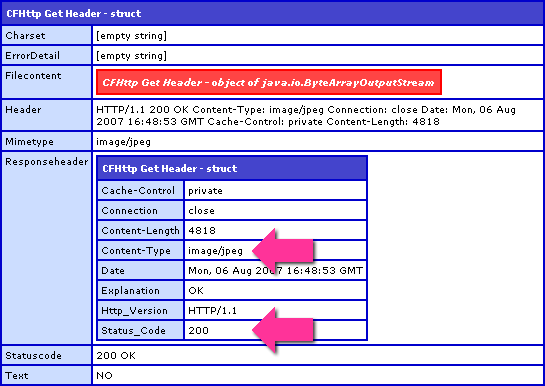
Notice that the returned content type is an image and that the status code is 200. This is because ColdFusion followed the redirect returned from initial Cafe Press request.
Now, let's run the same code, except this time, we are going to tell the ColdFusion CFHttp request not to follow any redirects by setting the Redirect attribute to false:
<!---
	Grab the response header for the given URL. This
	will give us the response without taking the time
	to download the file content. Tell the HEAD action
	NOT to follow any redirects. This will allow us
	to see what URL we are being redirected to.
--->
<cfhttp
	method="head"
	url="#strBaseUrl#"
	useragent="#CGI.http_user_agent#"

	<!--- Do not follow redirects. --->
	redirect="false"

	result="objGet"
	/>


<!--- Dump out the response. --->
<cfdump
	var="#objGet#"
	label="CFHttp Get Header (No Redirect)"
	/>
Running this updated code, we get the following CFDump output:
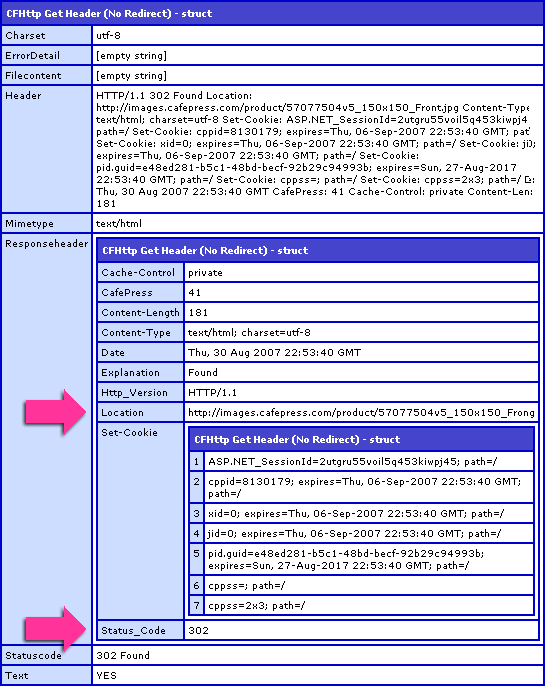
Notice that this time the response code was 302 - Moved Temporarily. ColdFusion did NOT follow this redirect to the target image. Notice also that this time, there is a Location key in our response header. This is the file to which ColdFusion was being redirected. Knowing this, we can then grab that Location URL and make a subsequent ColdFusion CFHttp call to download the image binary:
<!---
	Grab the response header for the given URL. This
	will give us the response without taking the time
	to download the file content. Tell the HEAD action
	NOT to follow any redirects. This will allow us
	to see what URL we are being redirected to.
--->
<cfhttp
	method="head"
	url="#strBaseUrl#"
	useragent="#CGI.http_user_agent#"
	redirect="false"
	result="objGet"
	/>

<!---
	Check to see if the returned value was a redirect.
	We will know this is the case if the Location value
	exists in the response header.
--->
<cfif StructKeyExists( objGet.ResponseHeader, "Location" )>

	<!---
		Get the file name from the file to which the new
		location is pointing.
	--->
	<cfset strFileName = ListLast(
		objGet.ResponseHeader.Location,
		"/\"
		) />

	<!--- Clean up the file name. --->
	<cfset strFileName = strFileName.ReplaceAll(
		"[^\w\d\.\-_]+",
		"_"
		) />


	<!--- Grab the file at the new location. --->
	<cfhttp
		method="get"
		url="#objGet.ResponseHeader.Location#"
		useragent="#CGI.http_user_agent#"
		getasbinary="yes"
		result="objGet"
		/>

	<!--- Set the file name based on the Location. --->
	<cfheader
		name="content-disposition"
		value="inline; filename=#strFileName#"
		/>

	<!---
		Stream the file to the browser. We are setting an
		explicit file type here (because we know the context
		of the demo), but this might not always be possible.
	--->
	<cfcontent
		type="image/jpg"
		variable="#objGet.FileContent#"
		/>

</cfif>
Here, we are getting the response headers without following redirects. We then grab that returned target Location and launch a second ColdFusion CFHttp call which downloads the target image as a binary object. This binary object is then being streamed to the browser:

Instead of streaming it to the browser, you could have just as easily done a ColdFusion CFFile write to store it on the server's file system.
Hope that helps a bit.
Want to use code from this post? Check out the license.

Reader Comments
First of all, thanks! A few questions about your code...
#1. Why do you "break up" the strBaseUrl into 2 sections? For visual reasons?
#2. How is
<cfset strFileName = ListLast(objGet.ResponseHeader.Location,"/\") />
different than
<cfset strFileName = ListLast(objGet.ResponseHeader.Location,"/") /> for getting the filename?
#3. What are you "cleaning up" with: <cfset strFileName = strFileName.ReplaceAll("[^\w\d\.\-_]+","_") />? RegEx is like reading Sanskrit to me. :)
@J,
#1: Yes, purely for visual reasons. I try to keep my lines less than 65 characters long otherwise it might make my CODE div scroll horizontally, and this can be hard to read (for me), especially if the horizontal scroll bar takes vertical scrolling to get to.
#2: The difference is only that I am using both forward and backward slashes as list delimiters. Most likely, yours is just fine. I get nervous about the paths. I am never 100% sure which slash gets used, so just as a precaution, I use both as list delimiters. I know that on Windows vs. Linux the file system slashes are different (I think), but I don't know about web paths - I guess those are always forward slashes right? I'm just nervous, and I take a bit of precautions.
#3: The regex there is using the underlying Java regex engine, but this could also be written more safely as:
<cfset strFileName = REReplace(
strFileName,
"[^\w\d\.\-_]+",
"_",
"ALL"
) />
As far as what it is doing, it is replacing all characters that are NOT word, digit (hmmm, included in word in think, oops), ., -, or _ with the underscore. Basically, it is leaving you with just character-based file names (no spaces and random punctuation and what not).
@J,
As far as #3 is concerned, you don't really have to do it. It's just a precaution to make sure the file name isn't crazy.
Good tip as always. Thanks Ben.
Ben, I am new to using and authoring ColdFusion and I am attempting to redirect all requests from http://www.edwardbeckett.com/index.cfm to http://www.edwardbeckett.com/ The script I'm using works for any non- www. requests to the domain. However, It does not work for the index.cfm file. Can you take a look at this and tell me what looks wrong? Thanks, Edward Beckett
~Application.cfm~
<cfif left(CGI.HTTP_HOST,4) NEQ 'www.'>
<cfif CGI.Path_info EQ '/index.cfm'>
<cflocation url="http://www.#CGI.HTTP_HOST#/" addtoken="no">
<cflocation url="http://#CGI.HTTP_HOST##CGI.Path_Info#" addtoken="no">
</cfif>
</cfif>
@Edward,
You have two CFLocations in a row. This does not work this way. The first CFLocation will execute and then basically abort out of the page processing such that the second one never gets run.
I don't think you even need that inner CFIF. Just execute the CFLocation that include the Path_Info all the time. There is no need to not have it. On requests that don't have a path, at the very worst, CGI will return the empty string, which is the same as running the first CFLocation that doesn't have path_info.
i was just looking for this kind of tips, well thanks
Ben, thanks for the awesome write-up... I'm playing with your code sample now and am noticing that sometimes a URL comes back and clean like:
www.bennadel.com/resources/uploads/cfhttp_redirect_result_cafepress_tshirt.jpg
But for some URLs it comes back like this: /resources/uploads/cfhttp_redirect_result_cafepress_tshirt.jpg
Any tips for dynamically solving for this? The URL that this is happening with is:
http://feeds.marketwatch.com/marketwatch/topstories?format=xml
Thanks!
B
Hi guys,
I am trying to retreive a PDF from a web service by passing an XML request to the server using the POST method. When using a cfdump to write structure information, I am getting the Mimetype as "application/pdf", header as "HTTP/1.1 200 OK Content-Type: application/pdf Connection: close Date: Wed, 26 Aug 2009 06:54:32 GMT Server: Apache/2.0.46 (Red Hat)".
I need a way so that I can get the file "Location" in the ResponseHeader as displayed in your example above. I tried using the method = "head" but it returns "500 Internal Server Error" error in the structure.
Thanks
Parag
@Parag,
I don't think you can use the same concept of HEAD when dealing with a web service; hitting a web service that serves up a file is NOT the same as hitting a file with CFHTTP. The "location" is the web service as far as your are concerned; all other information about the location of the file is encapsulated away from you by the API they provide.
@Brett,
When running CFHTTP, you should be able to use the ResolveURL attribute to have it prepend the appropriate domain to the paths. I have had times in the past where that didn't work for some reason and I'll usually replace paths that start with "/..." with the target server name.
@Ben thxs, that's what I ended up having to do which I wasn't a fan of. It just isn't as elegant as a solution as I would have liked...
Thanks again,
Brett
http://tweetmenews.com/
First of all, thank you for the great post. I'm having some issues that I think are related to this post but I still can't figure out what I need to do. Here's the situation...
I'm using Coldfusion to talk to Flex using a gateway set up in the coldfusion server admin. I have my cfc's in a place that is not the coldfusion root so I created a mapping in the coldfusion server admin. When I try to make a remote procedure call from Flex to my cfc I get back a 302 response and the call throws a fault in Flex. If I move my cfc to the coldfusion root then everything works fine. But for production I can not do this. Do you have any ideas how I might fix this issue?
Thanks :)
@Josh,
Unfortunately, I know almost nothing about the FLEX to CF gateway workflow. I am not sure how all the endpoints get configured. I've even tried to talk to some FLEX people about how the HTTP request actually gets processed and it seems that no one is quite thinking about it at that level.
Can you hit the remote CFCs directly with a URL to try and test it without the FLEX leg of the workflow?
Oh, shit storm... Thank you! When you told me to hit the remote cfc directly I tried it and noticed in the resulting url string that it was sending a variable along, GET style, that had the root path of the cfc's being the directory that I was trying to map to. DUH!, I guess since I saw that the wwwroot cfc directory was not in the same location of our components directory I just assumed that I had to map the root component directory but I was big time wrong. Thanks again.
:)
@Josh,
Most excellent! I am not exactly what you have going on, but I am glad I could help you debug the problem.
We don't know each other Ben, but next time I'm at a conference that you're at, I'm buying you a beer!
I've been tying to figure out how to use ColdFusion and our CAS functionality to auto login to a 3rd party site and you saved me. I found that what I was getting back from my cfhttp call was the contents of the page that the call was getting redirected to after authenticating, but I didn't know how to get myself over there or how to find out the URL with the ticket and so on. By adding redirect='false', I was able to see the results of the authentication with the location parameter and then use that to navigate to the page.
Here's a quick and dirty example of my code:
Thanks!
Thanks for this and so many other solutions, Ben! I have a follow-up question to this solution.
I am on a CF8 server in a shared environment, trying to test a dynamic list of URL's to see if they are still valid/working. All of them seem to test fine, some with http and some with https. But one of them is not behaving:
https://www.caadac.org/
I am getting ErrorDetail: I/O Exception: peer not authenticated.
Googling this seems to result in solutions involving modifying the server's JRE or manually adding the site's certificate to our server...neither of which are possible in our shared environment.
Any suggestions on how this can be handled?