
Ask Ben: Handling Errors With ColdFusion CFError
A tutorial on how to get ANY ColdFusion error emailed to you automatically and a friendly message displayed to the visitor would be great, I found one on EasyCFM.com but doesn't actually work.
Having looked at the EasyCFM tutorial, it looks like you want to know about how to use ColdFusion's CFError tag. Before I go into this, I have to just say that if you are using ColdFusion 7 or greater, I would recommend moving to the Application.cfc model and use the OnError() application event method handler; it just provides a nice, clean way of doing this. But that is a whole other discussion. For now, I will just cover the use of the ColdFusion CFError tag and how it can be used for error handling.
To start off with, we have to put the ColdFusion CFError tag on a template that will be executed for every page request such that every new page request will know how to properly handle errors. The obvious choice is to use the Application.cfm template:
<!--- Kill extra output. --->
<cfsilent>

	<!--- Define the application settings. --->
	<cfapplication
		name="ErrorHandlingDemo"
		applicationtimeout="#CreateTimeSpan( 0, 0, 1, 0 )#"
		sessionmanagement="true"
		sessiontimeout="#CreateTimeSpan( 0, 0, 1, 0 )#"
		setclientcookies="true"
		/>

	<!--- Define the page request settigs. --->
	<cfsetting
		requesttimeout="20"
		showdebugoutput="false"
		/>

	<!--- Define erorr handling template. --->
	<cferror
		type="exception"
		template="./cferror.cfm"
		/>

	<!--- Include functions. --->
	<cfinclude template="functions.cfm" />

</cfsilent>
As you can see here, with the ColdFusion CFError tag we are telling it to handle "Exception" based errors with the template, "cferror.cfm". The template path that you want to use with this tag is relative to the Application.cfm file itself; it does not matter which page in the application actually throws the root error - like the ColdFusion CFInclude tag, the path is relative to the tag-defining template not the page template.
Also, if you look at the documentation, you will see that you can define more that one CFError tag - one for each of the possible error types. Don't worry about this. You pretty much will never do that. Stick to Exception. The others no longer serve any real purpose. In fact, if you are using the other types, you might want to reconsider what you are doing (god forbid you are using the built-in ColdFusion data validation!!!).
The template that we are pointing to, cferror.cfm, is not really special in any way. It's just a ColdFusion template like any other. The only real difference is that if the template gets included by the CFError tag, a new variable is created: VARIABLES.Error. This Error object contains the information about the exception that was thrown by the code. This will include things like the stack trace, tag context, message, detail, and template and line number where the error occurred.
Other than that, the only other thing you have to worry about is whether or not content has already been flushed to the browser. If the exception was thrown before the content buffer started flushing, then the CFError template has a blank slate to work with. If, however, content has already been flushed to the browser at the time of the error, then the CFError template will already have a partial page displayed. If one of the goals here is to show a nice "Error Page" to people, then this is something to be weary of. In the following page, you will see that we try to set some header values. If that fails (indicating that content has already gone to the client), we will redirect the user back to the error page explicitly so that we can start a new page. Of course, either way, we want to mail the error to someone.
Here it my example cferror.cfm ColdFusion template:
<!--- Kill extra output. --->
<cfsilent>

	<!---
		Check to see if the error object exists. Even though
		we have landed on this page, it is possible that
		someone called it directly without throwing an erorr.
		The error object only exists if an error was caught.
	--->
	<cfif StructKeyExists( VARIABLES, "Error" )>

		<!---
			Mail out the error data (and whatever other scopes
			you would like to see at the time of th error). When
			you CFDump out the objects, make them Secure AND
			also be sure to use a TOP attribute when appropriate
			so that the CFDump doesn't recurse forever.
		--->
		<cfmail
			to="ben@xxxxxxxxxx.com"
			from="web-errors@xxxxxxxxxx.com"
			subject="Web Site Error"
			type="html">

			<p>
				An error occurred at
				#DateFormat( Now(), "mmm d, yyyy" )# at
				#TimeFormat( Now(), "hh:mm TT" )#
			</p>

			<h3>
				Error
			</h3>

			<cfdump
				var="#MakeStructSecure( VARIABLES.Error )#"
				label="Error object."
				/>

			<h3>
				CGI
			</h3>

			<cfdump
				var="#MakeStructSecure( CGI )#"
				label="CGI object"
				/>

			<h3>
				REQUEST
			</h3>

			<cfdump
				var="#MakeStructSecure( REQUEST )#"
				label="REQUEST object"
				top="5"
				/>

			<h3>
				FORM
			</h3>

			<cfdump
				var="#MakeStructSecure( FORM )#"
				label="FORM object"
				top="5"
				/>

			<h3>
				URL
			</h3>

			<cfdump
				var="#MakeStructSecure( URL )#"
				label="URL object"
				top="5"
				/>

			<h3>
				SESSION
			</h3>

			<cfdump
				var="#MakeStructSecure( SESSION )#"
				label="SESSION object"
				top="5"
				/>

		</cfmail>

	</cfif>


	<!---
		When setting the header information, be sure to put
		it in a CFTry / CFCatch. We can only send header
		information if the site has NOT already been flushed
		to the browser. Also set a flag so that we know if
		information has been committed.
	--->
	<cfset REQUEST.RequestCommitted = false />

	<cftry>
		<!--- Set the status code to internal server error. --->
		<cfheader
			statuscode="500"
			statustext="Internal Server Error"
			/>

		<!--- Set the content type. --->
		<cfcontent
			type="text/html"
			reset="true"
			/>

		<!--- Catch any errors. --->
		<cfcatch>

			<!---
				There was an error so flag the request as
				already being committed.
			--->
			<cfset REQUEST.RequestCommitted = true />

		</cfcatch>
	</cftry>

</cfsilent>

<!---
	Check to see if the request has been committed. If it
	has, then it means that content has already been committed
	to the browser. In that case, we are gonna want to refresh
	the screen, unless we came from a refresh, in which case
	just let the page run.
--->
<cfif (
	StructKeyExists( VARIABLES, "Error" ) AND
	REQUEST.RequestCommitted AND
	(NOT StructKeyExists( URL, "norefresh" ))
	)>

	<script type="text/javascript">

		window.location.href = "cferror.cfm?norefresh=true";

	</script>

	<!--- Exit out of the template. --->
	<cfexit />

</cfif>


<!DOCTYPE html PUBLIC "-//W3C//DTD XHTML 1.0 Transitional//EN" "http://www.w3.org/TR/xhtml1/DTD/xhtml1-transitional.dtd">
<html>
<head>
	<title>An Error Occurred</title>
</head>
<body>

	<h1>
		Internal Server Error
	</h1>

	<p>
		An internal server error has occurred, but our
		squad of CF Ninjas are looking into it! Naturally,
		you won't be able to tell that they're doing
		anything because they are Ninjas! But, rest assured,
		stuff is getting done.
	</p>

</body>
</html>
A few minor things to notice in the above template. First, we are checking to see if the variable Error exists in the VARIABLES scope. If it does, then we are sending out the error email. This will stop us from trying to reference the Error object if the cferror.cfm page was called directly. Also notice that when we CFDump out our relevant scopes, we have two things going on:
- We are using the TOP attribute.
- We are using the UDF, MakeStructSecure().
The TOP attribute of the ColdFusion CFDump tag is VERY awesome. It limits the depth of recursion when dumping out the contents of the given variables. It also limits query and array dumping, but that's not what's so cool at this moment. If you ever have a struct that has circular references (like a bi-directional linked list), your CFDump will possibly crash the server because it never knows when to stop. By telling the CFDump tag to stop at 5 levels, even if you have circular references, it will limit the recursive depth to 5 - wicked sweet!
The MakeStructSecure() ColdFusion user defined function is a method that I built based on a tip I got from Tobe Goldfinger of the New Your ColdFusion User group. She was saying that when we mail ourselves error information, often times we forget that it might contain secure information such as credit card numbers and expiration dates. Obviously, we don't want to be sending that information out over the unsecured email pathways, so this MakeStructSecure() recursively searches through the given struct looking for keys that look suspicious so that it can black out the values:
<!---
	Define function that will recursively search a
	struct and it's nested elements for keys that should
	be considered secure and blacked out.
--->
<cffunction
	name="MakeStructSecure"
	access="public"
	returntype="any"
	output="false"
	hint="Does a very cursory job of cleaning up a struct by blacking out secure information.">

	<!--- Define argumets. --->
	<cfargument
		name="Struct"
		type="struct"
		required="true"
		hint="The struct we are going to clean."
		/>

	<cfargument
		name="Depth"
		type="numeric"
		required="false"
		default="1"
		hint="The depth of the current search - this will stop the function from looping infinitely."
		/>

	<!--- Define the local scope. --->
	<cfset var LOCAL = StructNew() />

	<!---
		Check to see if we have reached our max depth
		for this search.
	--->
	<cfif (ARGUMENTS.Depth GTE 5)>

		<!---
			You're going too deep, it hurts! We might be
			looping in a circular struct reference.
		--->
		<cfreturn />

	</cfif>


	<!---
		ASSERT: If we have made it this far, then we have
		to check all the struct keys at this level.
	--->

	<!---
		Define the list of keys that would be considered
		to hold secure data.
	--->
	<cfsavecontent variable="LOCAL.SecureKeys">
		CreditCard
		CCNumber
		CCNum
		ExpirationDate
		Expry
		ExpDate
		CCExp
	</cfsavecontent>


	<!---
		Loop over the struct looking for keys that would
		flag secure data to be removed.
	--->
	<cfloop
		item="LOCAL.Key"
		collection="#ARGUMENTS.Struct#">

		<!---
			Check to see if the key is to be considered
			secure AND that the value in it is simple.
		--->
		<cfif (
			FindNoCase( LOCAL.Key, LOCAL.SecureKeys ) AND
			IsSimpleValue( ARGUMENTS.Struct[ LOCAL.Key ] )
			)>

			<!--- Black out value. --->
			<cfset ARGUMENTS.Struct[ LOCAL.Key ] = RepeatString(
				"*",
				Len( ARGUMENTS.Struct[ LOCAL.Key ] )
				) />

		<!---
			Check to see if this key is a struct that we
			might have to search through.
		--->
		<cfelseif IsStruct( ARGUMENTS.Struct[ LOCAL.Key ] )>

			<!---
				Recurse through this one. Be sure to send
				through a new depth value so we don't loop
				forever.
			--->
			<cfset MakeStructSecure(
				Struct = ARGUMENTS.Struct[ LOCAL.Key ],
				Depth = (ARGUMENTS.Depth + 1)
				) />

		</cfif>

	</cfloop>


	<!--- Return out. --->
	<cfif (ARGUMENTS.Depth EQ 1)>

		<!--- Return the cleaned struct. --->
		<cfreturn ARGUMENTS.Struct />

	<cfelse>
		<cfreturn />
	</cfif>
</cffunction>
Here, this ColdFusion user defined function is looking for the following keys:
- CreditCard
- CCNumber
- CCNum
- ExpirationDate
- Expry
- ExpDate
- CCExp
Now, this can work, but if you KNOW that one of your structs (ex. the FORM scope) might have secure information, I would check for this explicitly. Do NOT rely on this function to actually work. I put it in more to have a little fun and to demonstrate that we need to be actively thinking about this kind of stuff.
Right before we display the error page, we try to set some header information using the CFHeader / CFContent tag. If this works, then we know that we have a blank page to work with. However, if this fails (you cannot set header information on a page response that has already been committed to the browser), it means that some of the page content has already been flushed. If that is the case, we are using Javascript to immediately forward the user (browser refresh) to the cferror.cfm page. At this point, the CFMail has already been sent out, we just care about proper display. Notice that when we refresh the browsr, we are passing along a flag so the cferror.cfm template knows not to do that again if asked to (this will prevent infinite forwarding).
Note: There are other ways to check to see if the request has already been committed, but I am trying to keep this a bit more low-level.
The last thing left is just to throw an error to see this in action :) In our index.cfm file, we are going to refer to an undefined variable:
<!--- Kill extra output. --->
<cfsilent>

	<!--- Set some sercur form data. --->
	<cfset FORM.CreditCard = "1234567890123456" />
	<cfset FORM.ExpirationDate = "12/12" />

</cfsilent>

<html>
<head>
	<title>ColdFusion CFError Handling Tutorial</title>
</head>
<body>

	<!--- Force an error. --->
	<cfset asdf = sf />

</body>
</html>
Just to demonstrate that the MakeStructSecure() method is actually doing something, I have thrown some credit card information into the FORM scope. Anyway, throwing the error above provides the user friendly error page and sends out the email. The email that we get looks like this:
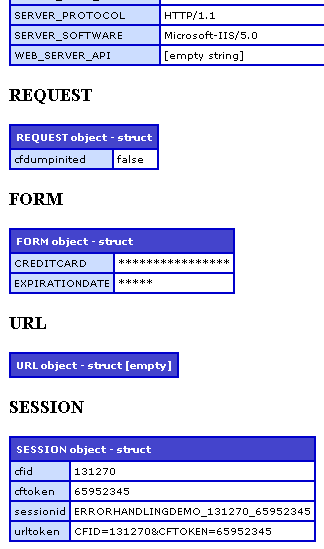
Notice that we get our nicely formatted HTML email and that the secure FORM data has been escaped.
Hope this helped a bit or at least pointed you in the right direction.
Want to use code from this post? Check out the license.

Reader Comments
Great work Ben,
I implemented a similar concept into my app just a moment ago, using the onError() method from my application.cfc, I've already spotted and fixed 5 bugs that I wasnt aware of as they existed in an old web service which isnt used for user iteraction, so there was no one to report the error to me :-D
Great stuff mate, really great stuff, I'd been thinking about doing this for a long while, just needed a firm kick in the pants to get it done.
*thumbs up
Rob
@Rob,
Thanks a lot. Also, since you mentioned OnError(), I just wanted to mention to other people that OnError() is great because it is a very clean way to integrate with the application level events, but at the same time, most of the same issues are still present (partial page flushing, potentially undefined error object).
Glad to see error handling is working out so nicely for you :)
lots of great info in there, Ben. Thanks for the thorough explanations! How do you have time to get actual work done? Does your job mind you spending time blogging during work hours?
Anyways, here's a custom tag I worked up over the years, though I use onError() now in CF 7 and 8:
http://cfzen.instantspot.com/blog/index.cfm/2007/5/4/heres-my-errorHandlercfm-what-do-you-think
(it's open for comment)
cheers.
Some good ideas in here Ben! You might want to also consider removing the CFID/CFTOKEN since theoretically someone could use those to hijack another user's session, and possibly view secure information, depending on your application. With my errors, I took the approach of writing the full error dumps out to a protected .cfm file and just email the admin a summary of the error. The full error pages are viewable through an admin login area and SSL.
now if the error was actually a database error and you wanted to see the sql, you could just add a cfif section for the error type?
@Michael
If you are catching db errors you'll output these:
<cfif IsDefined("catch.SQLState")>
SQL State: #catch.SQLState#
</cfif>
<cfif IsDefined("catch.Sql")>
SQL: #catch.Sql#
</cfif>
<cfif IsDefined("catch.queryError")>
Query Error: #catch.queryError#
</cfif>
<cfif IsDefined("catch.where")>
Where :#catch.where#
</cfif>
Has anyone found a way to dump the local var scope in a CFC? It doesn't seem that ColdFusion puts them into any named scope which makes it really frustrating to track down an intermittent error in a CFC.
@Mary Jo,
I can't seem to find the link right now, but I recently read a blog post about someone who got the "Active Local Scope" from the Page Context object.
GetPageContext().getActiveFunctionLocalScope()
Give that a go.
Thanks Ben, looks like you blogged about all the GetPageContext stuff awhile back. ;-)
www.bennadel.com/blog/758-ColdFusion-GetPageContext-Massive-Exploration.htm
It does seem that the local scope still gets destroyed before going to a site-wide error handler (which I guess you would expect but what I'd really like to find a way around), but at least this will give me a tool when I need to remotely debug something in a CFC.
Ben,
I have been looking to use something like this for a while. I seem to be having an issue receiving emails from the script. I have experienced this before on another script a while back while I didn't really need the feature but now I really need the email delivery feature. Any suggestions.
@Chris,
Are you checking your Mail logs in the CF Admin?
Re: Chris's post of 7/14/09: I am on a shared CF8 server, and have been using an error trap script for some while on other sites. But on this new CF8 site the cferror template never sends email. After exhaustive testing I have confirmed that all CFM tags are fine, just no mail ever goes out.
I have had to modify the error script to append error information to a text file, which I will periodically look at, but this is a kludge.
2 questions: Is CF8 <cferror> known to have this trouble? If not, what might the Mail log report that I can refer the hosting company to?
Thanks!
Ben,
Well, after trying out the <cferror> template that you show in the article above, I actually received an error email from my site! So, either the host found and fixed something and did not notify me, or there's something in my tried-and-true error template which does not work on CF8.
But I am much more satisfied with your approach, so I will be implementing it across my sites.
Thanks!! Problem resolved.
@Don,
Hmm, no idea why mine would work and the prior one wouldn't; but, glad you got it working ;)
Can we use CFOUTPUT in the template which we have specified in the cferror tag.
Because when I try to use it, I don't see any effect of cfoutput.
eg. <cfoutput>#test#</cfoutput>
- it gives me the output as #test#
@Anwar,
You should be able to use CFOutput as far as I know. If you can use CFMail (which I am in this blog post), you should be able to use CFMail since CFMail is basically doing an implicit CFOutput; I would think it odd that it would work in one way and not in another.
Make sure you have the right TYPE set on your CFError tag; I think one of the type options doesn't allow CF tags to execute... but it's been a long time since I've used this. If you are using CF7+, I would suggest looking into Application.cfc with the OnError() event handler.
@Ben Nadel,
I am using CF 7 MX.
And Application.cfm for error handling with cferror Type=request.
As you said - there might be the problem with the "request" type.
But, if I change type to "exception" then I am not able to catch the errors such as
--- Element xyz is undefined in the FORM.
So, is there any way I can catch these type of errors and still able to use CFOUTPUT.
Thanks,
Anwar
@Anwar,
I believe that "Request" error types do NOT let you run CFML in the error handler (or at least, very very limited CFML).
I am surprised that the "Exception" type doesn't let you catch those "undefined" errors. It really should from what I remember.
@Ben Nadel,
Got it now, there was error in my Error Handler template - and the CF server was not showing the error which occured in Error handler template - but instead it was showing the Original error. So it thought that the errors are handled in case of "Exception" type.
Thanks.
@Ben Nadel,
Got it now, there was error in my Error Handler template - and the CF server was not showing the error which occurred in Error handler template - but instead it was showing the Original error. So it thought that the errors are handled in case of "Exception" type.
Thanks.
@Anwar,
Ah gotcha - yeah, that will get you ever time. If your error handlers break (same for onError() event handler), they just start throwing errors. I assume this is meant to prevent an infinite loop of error handling :)
but how are you get a error handle in Application.cfm that reload page iff there is a error
@Thomas,
Once you are on the error page, you can use the CFLocation to redirect the page. However, typically, on an error page, you want to give the user some sort of error message so they know something went wrong. In addition to the error message, there's usually some sort of link like, "Click here to try returning to the homepage."
no only that the first time i load the page it get me a error. after reload the page it work good. there is somfing that give me this error but i dont now how to make it go away. only that page work after reload
this is a value in ListDeleteAt that mess the page upp
@Thomas,
Hmm. If listDeleteAt() is messing you up, you might have to put a listLen() check around it before you do any delete.
So glad I found this. I think we have a circular reference on the request scope and when dumped is crashing the server. Gonna try out the TOP attribute of cfdump
Hope u back up this site religiously, cause if it was lost, it would be devastating.
Derek
@Derek,
The TOP attribute of CFDump has saved my skin so many times. It really just lets you output variables without fear!
I just wish TOP had support for things like object references. It'd be nice to just dump an object and not include all its cascading members and methods.
@Mary Jo,
In CF9, I think there are some more options available like being able to hide/show certain keys and I think hide UDFs. They're getting closer :)
@Ben, as far as I can tell from the docs, the only change to cfdump in CF9 was the addition of the abort attribute (nice to not have to put a separate abort tag when debugging, but not exactly a big update). There is a setting as well to hide the getters and setters, but the current option for hiding/showing keys applies to structures not to objects. I have some pretty big objects in my CF9 ORM model so this is something I keep running into. ;-) Probably should just write a custom dump method that creates a copy of the object, removes the children and then dumps it.
@Mary Jo,
Ah, I was not aware there was a functional difference between objects and structs as far as hiding / showing goes. In that case, I guess it can lead to some huge output. They should do something about the hide/show behavior.
Hello,
I was wondering if someone could explain definitively what is the difference between a
type="request"
and
type="exception" exception="any"
In other words, when does "type=request" throw and when does "type=exception exception=any" throw? They seem like the same thing to me, but we've got evidence in our production environment that these throw under different circumstances. The official documentation is very vague in this regard (it keeps re-using the same words as if a circular definition explains anything).
I understand that they have different resulting behaviors, but I still don't understand why "type=exception exception=any" wouldn't just catch everything.
Thanks,
Joe R.
@Joe,
To be honest, I am not fully sure what the differences were. From a technical standpoint, certain CFError types provide for different functional abilities (ie. CF-tag usage). But, from an error catching standpoint, I am not sure why you'd ever want to use "Request" over "Exception".
As far as "Validation", you'll probably never need to use that as it talks about ColdFusion's native form validation - a feature which seems to be universally disliked by developers.
Sorry I cannot be more helpful other than to say you'll likely be fine using the Exception type.
@Ben, the difference between the two types is that one of them can output CF variables and can use CF tags, etc. so is more useful for using with complex error handlers. The other is generated when an exception happens such that the higher level error handler cannot be used...such as if the handler itself has an error. It can only use cferror variables in it. But it may be useful to trap situations where your normal error handler fails.
I don't recall offhand which is which (and am out of town so can't look it up!) but that's the difference.
@Mary Jo,
Exception allows for full tag usage, Request is only minimal CF functionality. I guess that makes sense to use Request as a sort of back-up to the standard error handler - good point.
@Ben, thanks...yup, I had the Request one coded to put all the exception information into an email form, which since it can't use cfmail, asks the user to add their information and is just hard-coded to be sent to the webmaster when they submit it.
But unless you actually have a CF error in your normal handler, it's a fairly rare situation that an error causes the Request handler to get called. But I have seen it from time to time.
I'm trying to implement this on my GoDaddy Shared Hosting server. one of the issues with it is that I cannot cfdump arguments.exception because it apparently uses createObject. I've gotten around it by outputting the values, such as ARGUMENTS.exception.name, but the values are all weird. the name is "onRequest", the message is "Event Handler Exception." and detail is "An exception occurred when invoking a event handler method from Application.cfc The method name is: onRequest." i cant get rootcause or stacktrace to output, and tag context is returning an empty array. am i doing something wrong?
the error i made for testing is on my index.cfm,
<cfset foo = bar> where bar doesn't exist.
@myself:
once again, I answer my own question. The values I'm looking for are inside of the rootcause variable, and to get to them with godaddy I have to loop through the collection and evaluate each item.
@Kevin,
Sorry to hear that you cannot use createObject() - that's kind of a crucial function in the language. However, it sounds like you are using Application.cfc; as such, I'd recommend using the onError() event handler instead of CFEerror. In the end, they do the same thing; but, onError (as an event handler defined in Application.cfc) is more inline with the intent of Application.cfc.
I am using onError(), guess I should have specified that too.
As far as createObject() being missing, I really do miss it be cause I find it so useful at work. Godaddy just wont let you use it, so I have to find other methods to get the same result. You get what you pay for. One day I hope to be able to go to something else.
@Kevin,
Yeah, createObject() is sweet. Not to rub salt in the wound, but I have heard that GoDaddy prevents a couple of key functions in ColdFusion; I've never used it, but this is just what I've heard in passing.
I haven't run into any issues as far as disabled functions go other than createObject(), and that only came around when I wanted to try out the CFFormProtect. Of course, all I'm running is a simple blog, I really don't use that many tags. For what I'm doing, GoDaddy works fine as long as I can keep away from their website.
@Kevin,
Sounds good then. I think I had remembered their CFFile and CFDirectory tags also being disabled; however, if you're just running a blog, then it probably doesn't require the use of those tags.
Ben,
I am trying to catch 502 Proxy Error. Actually I am trying to query DB for a report (from the form page). Its works fine if the query is ok, else it gives a 502.
The uesre of the applications get worried, Is there a way that instead of 502 Proxy error, I can display a readble user message.
I tried using try catch. Please help
@Purnima,
I am not very familiar with 502 errors specifically; but, I would think you can Try/Catch any kind of error. If that is not working, I am not sure what to tell you.
Hi Ben,
Thanks for your reply, well I did use a try catch in both form as well as report page
<cftry>
whole
<cfcatch type="any" >
<cflocation urls="Errorpage.cfm">
</cftry>
But the problem is the query in the report page is taking too long to execute (i tried adding timeout=1200 in the cfquery too and even added requesttimeout=1200 in the form action url)
Well I question is how can we handle an apache server exception.
Any http error.
Any idea??
Regards,
Purnima
@Purnima,
Hmm, that's a long time to have to wait for the server. Also, the newer versions of ColdFusion don't actually listen to requestTimeout value in URL/FORM. That was deprecated and now needs to be done using the CFSetting tag.
If the server is really having trouble, there's only so much that ColdFusion can actually recover from. I don't have much more to suggest, sorry.
You mentioned early on that it doesn't matter the location of the templates in the CFERROR tags, because they are relative to the Application.cfc file. However, I'm getting errors on pages that run that are in subfolders, yet use the same Application.cfc file in the parent folder. My tags look like this:
<cferror type="exception" template="errorException.cfm"/>
<cferror type="request" template="errorRequest.cfm"/>
So I have pages that run in a subfolder, but when the page runs it's looking for the errorException.cfm page and doesn't find it because it's not located in the subfolder. The error is that the page cannot be found. If I were to copy that page also into the subfolder, it'd work. But that's not a good solution because I have many subfolders. How do I get the subfolder pages to recognize the errorException.cfm page is in the parent folder? Please help.
Thanks!!
@Justin,
I see you are using both Exception and Request type error handling. Does this hold for both types of error templates? I only really have experience with Exception-type handling.
Also, you might try putting a Try/Catch around the contents of your actual error page (inside the CFError tag, not around it). Sometimes when the error handler itself has an error, you can get confusing error messages.
@Ben,
Yes, I am using both and it happens to both. Since you are only familiar with the Exception-type, I'll just stick to that one in this discussion.
The problem I am having is that I have the cferror tag in my Application.cfc at the root level. And any pages that run in the root, it works fine. But the subfolder pages give an error that the template cannot be found. I have tried multiple iterations to fix this issue such as:
1. <cferror type="exception" template="errorException.cfm"/>
2. <cferror type="exception" template="/ca/errorException.cfm"/>
3. <cferror type="exception" template\\ServerAlpha\www\htdocs\material\ca\errorException.cfm"/>
4. ETC
None of my attempts work. And as opposed to finding the errorException.cfm page in relation to the Application.cfc, it's trying to find it in relation to whatever page is running. Without making copies of my errorException.cfm page and sprinkling throughout the site, how can I get the pages (regardless of where they are) to find the errorException.cfm in the root?
Thanks,
Justin
@Justin,
I just fired up ColdFusion Builder and it looked like the behavior has changed from Application.cfm (the old days) to the Application.cfc (the hip and now). When the CFError page is placed directly within the pseudo constructor of the Application.cfc component, I am also getting the "template note found" error.
However! When I place the CFError tag within the onRequestStart() event handler, it then starts to work at both the root-directory and sub-directory levels.
Give that a try and let me know if it works any better.
@Justin,
You will get the best results if you switch over to using the onError() event handler as this will help you across all event handlers within Application.cfc. If you have to put the CFError tag in the onRequestStart() event handler, it won't help you with application/session START errors.
@Ben,
This is probably too late to help Purnima, but I just ran across an instance of 502 errors that were caused by an invalid combination of CFHEADER tags. Removing the bad tags allowed the page to load properly.
It doesn't sound exactly like Purnima's situation, since the page loads when the query is successful, and there is certainly a performance problem there, but maybe there is some conditional or error handling logic causing the trouble.
@Mark,
What do you mean an invalid combination of CFHeader tags - can you expand on that a bit more?
Sorry if this is a stupid question, but I keep running into a problem with cferror:
I want to use URL variables within the "template" attribute, but I already know that the cferror tag cannot handle those variables and throws me an error. I already tried to get around it with cfif's, but that didn't work either.
Is there a way (or workaround) for adding variables to the URL? Or is it not the cferror tag but the fact that I use it inside an application?
In the <cfapplication> tag, is it possible to not use the sessionmanagement and sessiontimeout attributes? I have a problem where people using my site have had their sessions cancelled when someone else, in a different page in the same site, throws an exception.
I get a lot of errors with people putting strange urls in place of my variables. Have you seen that before? Do you know why they do this and do you know of a way to stop it from happening?
@Joel,
I'm thinking you are experiencing someone trying SQL Injection attacks. You may want to use CFQUERYPARAMs if the variables are being used in queries.
@Justin the urls they put in the variable look like urls to a site. Could there be code on that site that reads back to the Coldfusion site. I do use cfqueryparams, thats why I get the errors emailed to me. Just so strange that the urls are not script type urls. I updated to cf 9.0.1 and it seemed to have stopped for a few days.
Hi Ben,
I'm using this CFerror page as you've outlined on this page and it's been working great on my site for a while. However we're doing a redesign and upgrading to CF9 and now my custom error page displays but the "500 Internal Server" error message displays on top of it.
My guess is that when you set the cfheader in the try catch, it does not catch an error and displays that error screen no matter what.
Is there any way to get around this so my custom error shows up?
PS. I've learned a ton from you site over the years. Thanks.
I was having a similar issue. Seems that in IIS7 you can set the error page globally by clicking on your server name in the left pane, then going to Error Pages, and specifying a local CFM of your choosing. What this does is bypass CF and run the error processing page, but without the error scope (since it was IIS who launched the page, and not CF, and really, what would IIS know?).
So, all I can think of is creating a separate error-iis500.cfm page that does everything but include the error scope in the email. At least I'll know something happened, and on what page, but not the line number or the specific error.
Thoughts?
I posted this to Ray's blog on the same subject.
http://www.raymondcamden.com/index.cfm/2007/12/5/The-Complete-Guide-to-Adding-Error-Handling-to-Your-ColdFusion-Application
We've had lot of issues with certain versions of IIS not allowing our errors response from ColdFusion to fall through to the end user. Meaning, if my app throws a 404 or a 500, IIS will override the response with some custom IIS error message.
To get rid of this, we add this to the web.config (under system.webServer):
<httpErrors existingResponse="PassThrough" />
... this allows the ColdFusion response to pass through.
Not sure if this is what you're talking about; but, it has helped us.
@Ben,
Yes, I tried this, but for some reason I only get the stock simple CF error screen, not my custom one as dictated by the CFERROR tag.
This is what I used instead of modifying web.config
%windir%\system32\inetsrv\appcmd.exe set config "My ColdFusion Website Name/" -section:system.webServer/httpErrors -existingResponse:PassThrough
BTW, the default value for existingResponse is Replace.
Mik
Even more bizarre, I set it back to passThrough and even encapsulated my forced error for testing (CFLIF) inside a CFTRY and it still displays the standard CFM error...
-----------------------------------
Invalid token ( found on line 2 at column 11.
The CFML compiler was processing:
The tag attribute val, on line 2, column 8.
A cflif tag beginning on line 2, column 2.
A cflif tag beginning on line 2, column 2.
The error occurred in x:/xxxx/index.cfm: line 2
1 : <cftry>
2 : <cflif val(url.print)>
3 : <cf_content>
4 : <cfelseif val(url.wrap)>
I know this is an old post - but still useful! Thanks Ben!
I began using MakeStructSecure, but a small problem occurred - some unexpected variables got concealed! It turned out that using findnocase meant that a short attribute - for example, form.num or form.ration, would get compared to the secure list (e.g.form.ccnum) and would end up being hidden.
I got around this by making LOCAL.SecureKeys into a list, and then using ListFindNoCase to an entire key-key comparison.
May be useful to somebody...
Ben, you always have great advice but now have a cold fusion job and I see you on like almost a daily basis, learning cold fusion here. Keep it up bro and thank you
What is annoying me is I am getting errors for all the bad guys trying to to do SQL injections, "Invalid data -1' for CFSQLTYPE CF_SQL_FLOAT."
Do I want these specific e-mails? Seems to me cfqueryparam is doing it's job. I suppose I should be scrubbing the input with regex before even sending to cfqueryparam.
Hi ,
I have this following problem.
I have multiple query results in a form, which the user will update only one record. I have a function which calculates sum of all the fields in Javascript/Coldfusion.
The problem is only the first record is being totalled. The second or third or fourth can not be updated by total.
Here is the example
section 1 in the form
Field a: 10 Field b: 20 Field C:30 Field:D 40
Total:100
Section 2 in the form
Field a:5 Field b:25 Field C: 35 Field D: 35
Total: 100
Section 3 in the form
Field a:15 Field b:20 Field C: 25 Field D: 40
Total: 100
I am writing the function total() in javascript as
<script>
function total() {
var a = document.getElementById('a').value;
var b = document.getElementById('b').value;
var c = document.getElementById('c').value;
var d = document.getElementById('d').value;
var result = (parseFloat(a)+parseFloat(b)+parseFloat(c)+parseFloat(d));
if(!isNaN(result)){
document.getElementById('total').value = result;
}
}
The field in coldfusion is defined as
<cfinput type="Text" name="a" size="6" value=#a# onchange="total()">
What would you do in this kind of situation?