
Strange ColdFusion Component Shell Behavior
I have known for a while that you can use mixins to create dynamic functionality in a ColdFusion component, but for yucks, this morning I tried to CFInclude the entire ColdFusion component code (CFComponent tags and all) as a mixin. And, much to my surprise, it worked! Well, sort of. Here is the directory structure I am working with:
./cfc_include/index.cfm
./cfc_include/Test.cfc./cfc_include2/BaseComponent.cfc
./cfc_include2/cfc_code.cfm
Notice that the last two files, BaseComponent.cfc and cfc_code.cfm, are in a separate, parallel directory (cfc_include2). In my index file, I am merely instantiating and using the Test.cfc ColdFusion component:
<!--- Create the Test ColdFusion component. --->
<cfset objTest = CreateObject( "component", "Test" ) />

<p>
	#objTest.Echo( "I'm bringing sexy back" )#
</p>
Running this code, we get the following output:
I'm bringing sexy back
Ok, nothing interesting about that, until we look at how it is all coming together at run time. Let's look at the Test.cfc ColdFusion component:
<!--- Include the CFC code from another directory. --->
<cfinclude template="../cfc_include2/cfc_code.cfm" />
All that Test.cfc does is include a file from the parallel directory, cfc_include2. It doesn't even define CFComponent tags. It doesn't have anything but the CFInclude. Crazy stuff.
And, here is the cfc_code.cfm that is being included into the Test.cfc:
<cfcomponent
	extends="BaseComponent"
	output="false">


	<cffunction
		name="Echo"
		access="public"
		returntype="any"
		output="false"
		hint="Echos back the argument that was passed in.">

		<!--- Define argument. --->
		<cfargument
			name="Value"
			type="any"
			required="true"
			/>

		<!--- Return the value. --->
		<cfreturn ARGUMENTS.Value />
	</cffunction>

</cfcomponent>
This ColdFusion template defines the ColdFusion component, including the CFComponent tags. As you can see, the Echo user defined function here is being access properly from the index.cfm file listed above. But, also, notice that the CFComponent tag for this template defines an EXTENDS component, BaseComponent. As you can see from the directory structure, BaseComponent.cfc is in the same directory as cfc_code.cfm, NOT in the same directory as Test.cfc.
Here is BaseComponent.cfc:
<cfcomponent
	output="false">

	<!--- Give CFC instance a unique ID. --->
	<cfset THIS.InstanceID = CreateUUID() />

</cfcomponent>
But, wait, there's more, if you CFDump out the Test.cfc instance, you get this output:
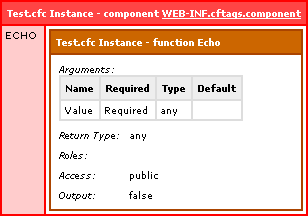
Notice that the Echo() method is defined in the THIS scope, but the InstanceID from the BaseComponent.cfc is NOT defined anywhere. Does this mean that it could NOT find the BaseComponent.cfc? No, if that were the case, ColdFusion would have thrown the following error:
Could not find the ColdFusion Component BaseComponent. Please check that the given name is correct and that the component exists.
However, NO error is being thrown. Yet, at the same time, it seems to be completely ignoring the Extends directive.
So, what does this all mean? I am not exactly sure. I am not even sure WHAT I would expect to happen. Frankly, I am surprised this worked at all. Here's what we know:
- The entire content of a CFC can be included at runtime (include CFComponent tags).
- The included CFC cannot seem to Extend another CFC.
- Extends attribute does not work, but does NOT throw an error.
I don't think I would EVER use anything like this, but I think the idea of creating "Shell" CFCs for a centralized repository for actual CFC code is vaguely interesting. Anyone have any thoughts on this?
I thought maybe the name, BaseComponent, was a special name, but it didn't matter. If I changed the CFC name I kept getting the same outcome. I was also surprised by the CFDump output label, "component WEB-INF.cftags.component". This is NOT where the Test.cfc is located. Something VERY STRANGE is going on here :)
Want to use code from this post? Check out the license.

Reader Comments
Just for the pure oddness of what you are finding I decided to mess around with this a little, this is what I found.
1. If you add <cfcomponent> around your cfinclude it "fixes" the WEB-INF.cftags.component thing.
2. It seems that coldfusion ignores the <cfcomponent> inside the included cfm files. So, I changed them to cfc and alas, you get the same result.
It seems it will ignore any cfcomponent tags within an included file. This explains why we arn't getting the uuid in the output. Also, it explains why we are getting the WEB-INF.cftags.component in the dump. I'm assuming coldfusion is looking at the file ext and it knows that it's supposed to be a cfc, but it can't find the component declaration so it likely isn't getting instantiated properly and gets the super class definition.
Of course if you move your <cfcomponent> and the extends attribute to the test.cfc it reports everything as would be expected.
@Dustin,
Nice detective work! I feel like something, somewhere should be throwing an error on this??? What you are saying makes a lot of sense as to why it goes to the install folder to find the base CFC.
Thanks!
I was getting the same feeling as I was testing it as well. I even tested it with <cfcomponent> within both the .cfc and the .cfm pages. I could have swore if you tried to declare a component within another component it would throw an error.
Dustin is pretty much on the mark.
Here's a key clue: inside a CFC you can omit <cfcomponent> and it will still work.
CFCs compile to "regular" pages (which is why they can be included) but the magic of being an object is handled by how you interact with that page (class). <cfcomponent> adds metadata to the page that is only used if the page (.cfc) is used in an "object-like" context.
In your example, Test.cfc has no <cfcomponent> tag so it gets the default "object" metadata - and the <cfcomponent> inside the included file is ignored (because you're not using that file like an object).
It might be interesting to dump getMetadata(objTest) in your index.cfm...
@Sean,
The meta data gives me this:
NAME - WEB-INF.cftags.component
PATH - D:\....\testing\cfc_include\Test.cfc
TYPE - component
No functions, right?
Because the metadata is all about the Test.cfc file rather than what a dynamic object of type Test contains.