Does The World Know That You Use ColdFusion?
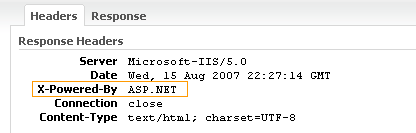
It was recently pointed out to me that my site is showing up on www.builtwith.com as being run by ASP.NET. I didn't know what would flag this since the only file extensions that I use on my site are HTM and CFM. David Epler pointed out to me that this value was probably being taken from my server's response header, X-Powered-By:
I tried to update the header value using ColdFusion's CFHeader tag:
<!--- Set ColdFusion application server. --->
<cfheader
	name="x-powered-by"
	value="ColdFusion MX7"
	/>
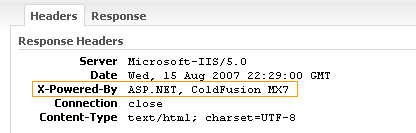
... but this only added a x-powered-by value (not replaced the existing value):
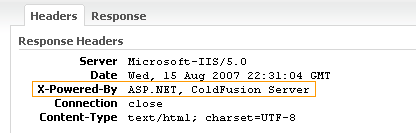
Even if I could replace the existing value, I am not sure what the proper value should even be. It might be safer to grab the value out of the SERVER scope and ColdFusion product name:
<!---
	Set ColdFusion application server as it is
	defined by the actual install setup.
--->
<cfheader
	name="x-powered-by"
	value="#SERVER.ColdFusion.ProductName#"
	/>
This will change depending on your installation (or maybe not - I can only test on one type of server).
Now, does this stuff really matter at all? No, not in the least, but come on, have some pride - get your ColdFusion support out there! Who knows, this might even sway some stats that keep getting published about ColdFusion.
Want to use code from this post? Check out the license.

Reader Comments
Looks like IIS will always report ASP.NET - I'm wondering if you can even disable the dlls or if IIS will break.
Go into the http headers tab on the site (or the global site) and change it to Coldfusion... nice and simple :-)
Yeah, changing it (or removing it >:P) in IIS will do the trick!
@Ben: You could even add Server.ColdFusion.ProductLevel and Server.ColdFusion.ProductVersion to your output (although ProductVersion is a comma separated list, so you might want to output the first 3 items in the list separated by periods instead). Then the output would look like:
ColdFusion Server Standard 7.0.2
or
ColdFusion Server Standard 8.0.0
It's interesting to think that IIS's default behaviour when .NET is installed could be bumping up the reported use of .NET, even when it's not being used...
Just updated our IIS settings since we only use CF.
We should all use the same string... maybe Adobe can put it in their next updater for 7 and 8 (too late for 6.x)
eg:
Adobe Coldfusion (v8.0 standalone)
Adobe Coldfusion (v6.1 war)
What do you think?
or
Adobe Coldfusion Standard (v8.0 standalone)
he he - just noticed that, with this and the previous post in your blog, the Google ads on your recent blog entries page started advertising .net charting....
Production web servers should be configured to reveal as little about themselves as possible - you certainly don't want your CF patch level advertised (unless you are trying to draw attention to the fact you are easily p0w3d).
@Tom,
Would you recommend not doing this then? I know so little about server-administration that telling people too much about the server would never even occur to me.... however, as a ColdFusion enthusiast, it just doesn't sit right that I am being represented as ColdFusion - I hope my pride doesn't lead to my downfall :)
Couldn't you just say "ColdFusion" and leave it at that?
Adobe Coldfusion (v6.1 war)! 100%
I would second the notion of revealing as little about your server as possible, but it makes little difference. I would say that more people would try exploits based on the fact that you run IIS 6.0 (as reported by your server) than CFMX 7. And either way, hiding that information will not prevent exploits.
Assuming you have access to the IIS snap-in (don't know if you're on shared hosting or not), right-click on the webspace name, and go to "Properties". Go to the "Headers" tab, and remove the offending X-Powered-By line in the "Custom Headers" tab. If you want to keep in the ColdFusion MX7 X-Powered-By, that's likely not a problem, but I wouldn't go farther than that.
It's not just IIS/.NET, CFML running on a LAMP server will likely identify itself as PHP in the Server header (luckily Apache makes it relatively easy to change this).
@Ben: "Would you recommend not doing this then?"
If you *really* want to, saying 'ColdFusion' doesn't give much more away than a '.cfm' in your URL.
Anything more is just increasing the information the bad guys have about you, and that's very rarely worthwhile, even for some 'higher good' of driving CF up some sites rankings.
Actually, playing with this a bit more. Tried out houseoffusion.com through builtwith and it reports back ColdFusion for the framework. House of Fusion does not report a X-Powered-By, so what ever they are analyzing to report ColdFusion is probably also tied to session cookies CFGLOBALS, CFID, CFTOKEN or possibly generating a request for Application.cfm.
Personally, I agree with some of the other posts. I try to report back as little information regarding my setup. But with hosting companies have very little control over it. Think the idea of adding just "ColdFusion" to the X-Powered-By is a good idea, but if Adobe implemented it I would want to be able to configure it via the ColdFusion Administrator.
If there was a CF version specific exploit I'm sure hackers would try it on every CF server they could get their hands on anyway, regardless of your server version number... If they see a .cfm extension then that's good enough to make an attempt at an attack, IMO. They might also be thankful for the recent lists published of top-rated CF sites to gain maximum exposure :P
Also on version numbers, check out some info about www.php.net for example, which includes PHP version numbers in what the web server is reporting:
http://toolbar.netcraft.com/site_report?url=http://www.php.net
But I do agree - if you are at all worried, don't publish it.
It's pretty easy to see what version you are running anyway. You just need to have a look at the web exposed parts of /cfide/ directory and compare it to a known source to find the version someone is running, you can even tell some of the updaters from the code there.
It's a simple:
X-Powered-By="Adobe Coldfusion 8 Standard"
X-Powered-By="Adobe Coldfusion 7 Enterprise"
Exposing this kind of information is no more risky than keeping the .cfm extension after your filenames. It's ridiculous to say because you have exposed a header and ignored the fact you have a publicly accessable cfide directory and .cfm extension that you have given any more away then what is already blatantly obvious. Your attack surface is no larger for giving this information. As of version 8 all of the attack surface elements are present in both standard and enterprise anyway, so this information is of no further risk.
Chris you are making the assumption that we all leave our CFIDE directories publicly accessible.
Not to sound cheesy, but it's more fun to live with pride than live with fear :) And, I am proud to be using ColdFusion.
That's the spirit Ben :) Hehe...
I gave up on coldfusion ages ago, its applications just wernt diverse enough