
Passing Referer AS ColdFusion CFHttp CGI Value vs HEADER Value?
The other day, someone posted a SPAM comment on my site that directed users to a site serving up free Playboy magazine centerfold downloads. I am so tired of people posting spam to my site that I figured I would actually try and turn the tables on this particular spammer. Sites like this operate on the fact that you have to actually view their pages and therefore, view their ads (which is how, I assume, they make their money). However, grabbing the merchandise without loading any ads defeats their entire reason for spamming in the first place.
And so it is that I set out to script the download of every Playboy magazine centerfold from 1954 to 2007 without ever loading a single page on the spammers site (naturally, I had to load a few pages to see how the site worked). Here's what I came up with:
<!---
Photo pages in form of:
http://www.oxpe.net/playboy/playboy195401.html
Photos in form of:
http://www.oxpe.net/playboy/photos/195401.jpg
Available Years:
1954 - 2007
--->
<!---
Set a high request timeout - there are a LOT of
images to be downloading here.
--->
<cfsetting requesttimeout="500" />
<!--- Loop over available years. --->
<cfloop
index="intYear"
from="1954"
to="2007"
step="1">
<!--- Loop over available months. --->
<cfloop
index="intMonth"
from="1"
to="12"
step="1">
<!---
Get the short hand for the file name. All the
months have to be double-digits.
--->
<cfset strName = (
intYear &
NumberFormat( intMonth, "00" )
) />
<!---
Set up base URL that will be used by both the
CFHttp target as well as the referer.
--->
<cfset strBaseURL = "http://www.oxpe.net/playboy/" />
<!--- Echo back the photo we are trying to get. --->
<p>
<cfoutput>
#strName#.jpg
</cfoutput>
</p>
<!---
Perform an HTTP GET to grab the target image
as binary. CAUTION: Once we go beyond the
vailable year/months (ex. 2007/12), this will
come back with 200 status, but NOT be a valid
image binary.
--->
<cfhttp
method="get"
url="#strBaseURL#photos/#strName#.jpg"
useragent="#CGI.http_user_agent#"
getasbinary="yes"
result="objGET">
<!---
Set CGI referrer to be the page that it was
called from. We want to fake the target
server into thinking we just came from an
internally hosted page.
--->
<cfhttpparam
type="CGI"
name="referer"
value="#strBaseURL#playboy#strName#.html"
/>
</cfhttp>
<!--- Check status. --->
<cfif FindNoCase( "200", objGET.StatusCode )>
<!--- Save file. --->
<cffile
action="write"
file="#ExpandPath( './#strName#.jpg' )#"
output="#objGET.FileContent#"
/>
</cfif>
<p>
<cfoutput>
» <em>#objGET.StatusCode#</em>
</cfoutput>
</p>
<cfflush />
</cfloop>
</cfloop>
Unfortunately, this did not work at all. Running the code above, the server kept returning 403 Forbidden Access errors:
195401.jpg
» 403 Forbidden
195402.jpg
» 403 Forbidden
195403.jpg
» 403 Forbidden
Clearly, the server had something in place to prevent hotlinking. But, I was sending the Referer, which should have taken care of this.
After a good deal of time trying to tweak the values, I finally turned to one of the most badass tools out there - FireBug. I actually went to the target page and viewed the HTTP Request headers that were being sent across for the graphic request:
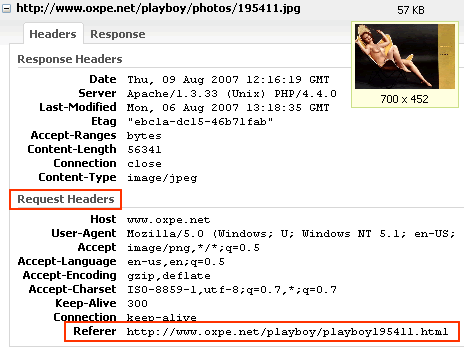
Nothing was popping out at me. But then, I realized I was looking at the HEADER values. Obviously. But, wasn't I sending the Referer value as a CGI value? I know that ColdFusion's CFHttpParam tag has a HEADER type, so I tried to change the type from Referer to HEADER:
<!---
	Perform an HTTP GET to grab the target image
	as binary. CAUTION: Once we go beyond the
	vailable year/months (ex. 2007/12), this will
	come back with 200 status, but NOT be a valid
	image binary.
--->
<cfhttp
	method="get"
	url="#strBaseURL#photos/#strName#.jpg"
	useragent="#CGI.http_user_agent#"
	getasbinary="yes"
	result="objGET">

	<!---
		Set referrer to be the page that it was called
		from. We want to fake the target server into
		thinking we just came from an internally hosted
		page. Use the HEADER value rather than the CGI
		value.
	--->
	<cfhttpparam
		type="HEADER"
		name="referer"
		value="#strBaseURL#playboy#strName#.html"
		/>

</cfhttp>
This time, things went off without a hitch:
95401.jpg
» 200 OK
195402.jpg
» 200 OK
195403.jpg
» 200 OK
Works great - downloads all the Playboy centerfolds since the beginning of time, but this got me thinking: if both the CGI:Referer and the HEADER:Referer end up in the CGI scope (at least in ColdFusion), what's the difference between sending these two values. Why did one work and one not work?
The answer turns out to be Encoding. By default, the ColdFusion CFHttpParam tag Encodes all FormField and CGI value types using a URL-encoding. HEADER values, on the other hand, are not encoded in any automatic way. Therefore, if you tried to send this value:
http://www.oxpe.net/playboy/playboy.html
... as a CFHttpParam CGI value, it would show up in the CGI object as:
http%3A%2F%2Fwww%2Eoxpe%2Enet%2Fplayboy%2Fplayboy%2Ehtml
This has been encoded for URL usage. If, however you turned off encoding (Encoded = "false"), or sent it as a CFHttpParam HEADER value, it would show up in the CGI object as:
http://www.oxpe.net/playboy/playboy.html
This is good stuff to know. I should really do a much more in-depth exploration of all the different CFHttpParam types to see how they can really be leveraged properly. I am still not 100% clear on the difference between all the HEADER and CGI values; it looks like HEADER values might be a more natural way to mimic this sort of clint-server interaction. I will do some further testing.
On a related note, it's really funny to see the contrast in what Playboy presented in 1954 compared to what they put in the magazine in today. 1954 was very safe. Pubic hair didn't really make much of any show until the early 1970s... and now, in the 2000s, pubic hair is gone again (but this time, of course, for very different reasons).
Want to use code from this post? Check out the license.

Reader Comments
Ben Nadel, ladies and gentlemen... always ready to tackle the topics that others want to know but are afraid to talk about.... like how to safely strip porn from spammer websites in the name of learning!
I love it! Now to download the code so I can investigate it further... for learning purposes, of course! ;)
@Max,
It's all about the learning :) I learned something very valuable here about using ColdFusion's CFHttp and CFHttpParam tags. Totally justified :)
Yep... and I've always felt it learning was easier when passionate about the subject matter.
That subject being CF, y'know.... ummmm yeah, ColdFusion.
ColdFusion is dead sexy.
He he, good job! I love the above banner too :-)
Ben for president!!!!!!!!!!!!!
I'm just doing my part in the war against spammers :)
Just to let you know, I think this is great Ben! A little cf, some classic porn, eating a spammers bandwidth, I love.
I have 4 servers running it right now, just to hurt them! :-)
Ha ha ha ha. That reminds me of the movie Hackers where they had people all over the world attacking this one computer system. That was a sweet movie .... back when Angelina Jolie was actually acttractive to me :(
Ben Nadel, you are a wicked, wicked man. And that is why we value you so highly in the CF community. :-)
@Trent,
I'm just one dude trying to make a difference.
Header values are the meta data that goes into the HTTP request (and return with the response). The receiving webserver turns header values into CGI variables, and CGI variables are available during request processing. I think of it like: HEADER > Webserver > CGI > ColdFusion
@Steven,
Thank you for the insight. To me (Based on your explanation), I feel like the "spoofing" should happen as high up in the chain as possible. From that, I would think I should choose Header over CGI in CFHttpParam whenever possible. How does that sound?
This doesn't work anymore... at least not with Playboy.
The images appear to download OK, but if you open up the images, they are all corrupted files.
I guess they pulled one over your eyes? ;-)
Anthony
I try to do this with the CGI.REMOTE_ADDR but it doesn't work.
If I do this:
<cfhttp
method="post"
url="http://mytestdomain.com/iptest.cfm"
result="result">
<cfhttpparam
type="CGI"
name="remote_addr"
value="92.63.154.23"
encoded="false">
</cfhttp>
<cfoutput>#result.FileContent#</cfoutput>
and iptest.cfm contains this:
Hello from <cfoutput>#CGI.SCRIPT_NAME#</cfoutput>!<br />
Your remote_addr is <cfoutput>#CGI.remote_addr#</cfoutput>
it still outputs
Hello from /iptest.cfm!
Your remote_addr is 127.0.0.1
instead of what I expected:
Hello from /iptest.cfm!
Your remote_addr is 92.63.154.23
same with http_user_agent. I cannot overwrite this value with cfhttpparam.
Am I missing something?
Marc
Try using TYPE="HEADER" instead of TYPE="CGI".
@Marc,
From what I have been told, a lot goes into calculating someone's IP address. You can't just fake it with a header or CGI value. I ran into this when I was messing with http://www.moanmyip.com . I kept trying to get her to moan numbers at my command, but alas, I could not come up with any way to fake it.
The difference between type="CGI" and type="HEADER" is that the former gets urlencoded by default, the latter not. If I add encoded="false" to type="CGI" the two are identical.
To get an overview of CGI variables that you can modify and CGI variables that are not modifyable do this:
in test1.cfm:
<cfhttp method="get" url="http:mydomain.com/iptest.cfm" result="result">
<cfloop collection="#CGI#" item="CGIKey">
<cfhttpparam type="CGI" name="#CGIKey#" value="[#CGI['#CGIKey#']#] IS_MODIFYABLE" encoded="false">
</cfloop>
</cfhttp>
<cfoutput>#result.FileContent#</cfoutput>
In iptest.cfm:
<cfdump var="#CGI#">
You get a dump of the CGI scope. There are many CGI variables you can modify but remote_addr is not one of them. Actually 10 out of 44 are not modifyable on my server - Apache 2.059. Not quite clear why some values can be overwritten and others not.
Hey! I used to work for her! She was a hotty well into her sixties too! She had a big set of knockers .. too bad she was a boozer. Still ... a luscious GILF after all these years!
Hey Ben, thanks as always. Although we didn't have the chance to use it for such altruistic purposes as you, this did help us set up a connection for a merchant account for a client.
@Marc,
Oh very clever. I like the idea of testing to see what CGI variables are modifiable. I'll try and run that this week.
@Steve,
Great - glad it helped solve some business problems.
Hey Everyone,
I have a coldfusion problem related to this thread. The details can be found here:
http://www.codingforums.com/showthread.php?t=184866
They told me to come here and ask the master :)
Hope everyone is having a nice holiday.
Sincerely,
Travis Walters
@Travis,
What happens when you remote into you server and then, on the server, try to download one of the images from the web site (using a standard browser).... basically, use the website as you would as a standard user.
What I want to check is to make sure you actual IP hasn't been given some type of restriction. If you can't use it as a standard user, then it's an IP issue.
@Ben Nadel,
I used remote desktop to access the server and used FireFox to access my website. The images were able to be downloaded using a regular IMG tag.
I double checked to make sure the forbidden error was still there and it was. It has been giving me a 403 error for about a week now so this does not appear to be a temporary problem.
One correction to the forum post I was retrieving the photos as binary originally.
@Travis,
Try hard-coding your user agent value to be something common. If you are running this script via a scheduled task, ColdFusion uses its own user agent (I think it announces itself as "ColdFusion").
See if that helps. The server might have blocked your user agent.
@Ben Nadel,
When I heard your response, I thought you might have been onto something. I was running the script via a scheduled task so it was announcing itself as coldfusion which might have given the script away.
I just tried hard-coding a few common user agents like so:
<cfhttp method="get" url="#photoURL#" useragent="Mozilla/5.0 (Windows; U; Windows NT 6.1; en-US) AppleWebKit/532.0 (KHTML, like Gecko) Chrome/3.0.195.38 Safari/532.0" getasbinary="yes" result="objGET"><cfhttpparam type="HEADER" name="referer" value="#bizWebsiteURL#" /></cfhttp>
However, I still received the forbidden message.
I made the photoURL variable a local webpage to track what was getting sent. I noticed the server IP address was always being used.
I tried to mask the IP address using:
<cfhttpparam type="CGI" name="remote_addr" value="92.63.154.23" encoded="false">
and
<cfhttpparam type="HEADER" name="remote_addr" value="92.63.154.23" encoded="false">
I had no success doing this.
I noticed the cfhttp call has possible proxy attributes. Do you think I would have any success trying a proxy server? I am running out of ideas :)
Sincerely,
Travis Walters
@Travis,
Yeah, you can't just override your IP address - it gets created at a different part of the whole process.
Would it be possible for you to give me a sample URL (for a photo) that I can try to play with. I'll see if I can, 1) duplicate the issue, and 2) beat it!
Drop me an email at ben at bennadel.com.
Hey Guys,
Ben helped me figure out why the forbidden messages were coming up.
Be careful if you have special characters in your URLs. Having a "&" in the URL as opposed to "&" was the difference between a Forbidden message and an OK message. I also noticed a 403 error comes up if an image does not exist.
<cfset photoURL = #Replace(photoURL, "&", "&", "ALL")#>
One line of code fixes the problem. Hope this helps somebody in the future!
Thanks again Ben!
Sincerely,
Travis Walters
@Travis,
Always happy to help :)
Great little article, and as a way to give back to the community, I thought I would share an updated scrape for this. Sorry Ben, for posting so much code:
Just replace zzz with a in variable temp (anchor tags not allowed in comments!)
We unable to fake the IP but if how about my server have a lot of IPs and I want to assign specific IP to CGI.remote_addr for posting. Is there any possibility?