
For a time, I was considering putting a background color on the events in my Kinky ColdFusion calendar system. The problem this presented was that I needed to pick a text color that had good contrast with the background so that it would be easy to read. Now, I didn't want to go crazy with different colored text, I just wanted to stick to simplicity - black and white text.
This of course is a bit of a subjective algorithm, but I am using the RGB colors of the HEX value to determine whether or not I should use black text. I am defaulting to white text (FFFFFF) as I feel that white text generally looks better on a colored background. Then, I am using black text (000000) as the exception text only when needed. To demonstrate, I will first build an array of the web-safe colors:
<!--- Kill extra output. --->
<cfsilent>

	<!--- Set up event colors. --->
	<cfset arrColors = ArrayNew( 1 ) />
	<cfset ArrayAppend( arrColors, "000000" ) />
	<cfset ArrayAppend( arrColors, "000033" ) />
	<cfset ArrayAppend( arrColors, "000066" ) />
	<cfset ArrayAppend( arrColors, "000099" ) />
	<cfset ArrayAppend( arrColors, "0000CC" ) />
	<cfset ArrayAppend( arrColors, "0000FF" ) />
	<cfset ArrayAppend( arrColors, "003300" ) />
	<cfset ArrayAppend( arrColors, "003333" ) />
	<cfset ArrayAppend( arrColors, "003366" ) />
	<cfset ArrayAppend( arrColors, "003399" ) />
	<cfset ArrayAppend( arrColors, "0033CC" ) />
	<cfset ArrayAppend( arrColors, "0033FF" ) />
	<cfset ArrayAppend( arrColors, "006600" ) />
	<cfset ArrayAppend( arrColors, "006633" ) />
	<cfset ArrayAppend( arrColors, "006666" ) />
	<cfset ArrayAppend( arrColors, "006699" ) />
	<cfset ArrayAppend( arrColors, "0066CC" ) />
	<cfset ArrayAppend( arrColors, "0066FF" ) />
	<cfset ArrayAppend( arrColors, "009900" ) />
	<cfset ArrayAppend( arrColors, "009933" ) />
	<cfset ArrayAppend( arrColors, "009966" ) />
	<cfset ArrayAppend( arrColors, "009999" ) />
	<cfset ArrayAppend( arrColors, "0099CC" ) />
	<cfset ArrayAppend( arrColors, "0099FF" ) />
	<cfset ArrayAppend( arrColors, "00CC00" ) />
	<cfset ArrayAppend( arrColors, "00CC33" ) />
	<cfset ArrayAppend( arrColors, "00CC66" ) />
	<cfset ArrayAppend( arrColors, "00CC99" ) />
	<cfset ArrayAppend( arrColors, "00CCCC" ) />
	<cfset ArrayAppend( arrColors, "00CCFF" ) />
	<cfset ArrayAppend( arrColors, "00FF00" ) />
	<cfset ArrayAppend( arrColors, "00FF33" ) />
	<cfset ArrayAppend( arrColors, "00FF66" ) />
	<cfset ArrayAppend( arrColors, "00FF99" ) />
	<cfset ArrayAppend( arrColors, "00FFCC" ) />
	<cfset ArrayAppend( arrColors, "00FFFF" ) />
	<cfset ArrayAppend( arrColors, "330000" ) />
	<cfset ArrayAppend( arrColors, "330033" ) />
	<cfset ArrayAppend( arrColors, "330066" ) />
	<cfset ArrayAppend( arrColors, "330099" ) />
	<cfset ArrayAppend( arrColors, "3300CC" ) />
	<cfset ArrayAppend( arrColors, "3300FF" ) />
	<cfset ArrayAppend( arrColors, "333300" ) />
	<cfset ArrayAppend( arrColors, "333333" ) />
	<cfset ArrayAppend( arrColors, "333366" ) />
	<cfset ArrayAppend( arrColors, "333399" ) />
	<cfset ArrayAppend( arrColors, "3333CC" ) />
	<cfset ArrayAppend( arrColors, "3333FF" ) />
	<cfset ArrayAppend( arrColors, "336600" ) />
	<cfset ArrayAppend( arrColors, "336633" ) />
	<cfset ArrayAppend( arrColors, "336666" ) />
	<cfset ArrayAppend( arrColors, "336699" ) />
	<cfset ArrayAppend( arrColors, "3366CC" ) />
	<cfset ArrayAppend( arrColors, "3366FF" ) />
	<cfset ArrayAppend( arrColors, "339900" ) />
	<cfset ArrayAppend( arrColors, "339933" ) />
	<cfset ArrayAppend( arrColors, "339966" ) />
	<cfset ArrayAppend( arrColors, "339999" ) />
	<cfset ArrayAppend( arrColors, "3399CC" ) />
	<cfset ArrayAppend( arrColors, "3399FF" ) />
	<cfset ArrayAppend( arrColors, "33CC00" ) />
	<cfset ArrayAppend( arrColors, "33CC33" ) />
	<cfset ArrayAppend( arrColors, "33CC66" ) />
	<cfset ArrayAppend( arrColors, "33CC99" ) />
	<cfset ArrayAppend( arrColors, "33CCCC" ) />
	<cfset ArrayAppend( arrColors, "33CCFF" ) />
	<cfset ArrayAppend( arrColors, "33FF00" ) />
	<cfset ArrayAppend( arrColors, "33FF33" ) />
	<cfset ArrayAppend( arrColors, "33FF66" ) />
	<cfset ArrayAppend( arrColors, "33FF99" ) />
	<cfset ArrayAppend( arrColors, "33FFCC" ) />
	<cfset ArrayAppend( arrColors, "33FFFF" ) />
	<cfset ArrayAppend( arrColors, "660000" ) />
	<cfset ArrayAppend( arrColors, "660033" ) />
	<cfset ArrayAppend( arrColors, "660066" ) />
	<cfset ArrayAppend( arrColors, "660099" ) />
	<cfset ArrayAppend( arrColors, "6600CC" ) />
	<cfset ArrayAppend( arrColors, "6600FF" ) />
	<cfset ArrayAppend( arrColors, "663300" ) />
	<cfset ArrayAppend( arrColors, "663333" ) />
	<cfset ArrayAppend( arrColors, "663366" ) />
	<cfset ArrayAppend( arrColors, "663399" ) />
	<cfset ArrayAppend( arrColors, "6633CC" ) />
	<cfset ArrayAppend( arrColors, "6633FF" ) />
	<cfset ArrayAppend( arrColors, "666600" ) />
	<cfset ArrayAppend( arrColors, "666633" ) />
	<cfset ArrayAppend( arrColors, "666666" ) />
	<cfset ArrayAppend( arrColors, "666699" ) />
	<cfset ArrayAppend( arrColors, "6666CC" ) />
	<cfset ArrayAppend( arrColors, "6666FF" ) />
	<cfset ArrayAppend( arrColors, "669900" ) />
	<cfset ArrayAppend( arrColors, "669933" ) />
	<cfset ArrayAppend( arrColors, "669966" ) />
	<cfset ArrayAppend( arrColors, "669999" ) />
	<cfset ArrayAppend( arrColors, "6699CC" ) />
	<cfset ArrayAppend( arrColors, "6699FF" ) />
	<cfset ArrayAppend( arrColors, "66CC00" ) />
	<cfset ArrayAppend( arrColors, "66CC33" ) />
	<cfset ArrayAppend( arrColors, "66CC66" ) />
	<cfset ArrayAppend( arrColors, "66CC99" ) />
	<cfset ArrayAppend( arrColors, "66CCCC" ) />
	<cfset ArrayAppend( arrColors, "66CCFF" ) />
	<cfset ArrayAppend( arrColors, "66FF00" ) />
	<cfset ArrayAppend( arrColors, "66FF33" ) />
	<cfset ArrayAppend( arrColors, "66FF66" ) />
	<cfset ArrayAppend( arrColors, "66FF99" ) />
	<cfset ArrayAppend( arrColors, "66FFCC" ) />
	<cfset ArrayAppend( arrColors, "66FFFF" ) />
	<cfset ArrayAppend( arrColors, "990000" ) />
	<cfset ArrayAppend( arrColors, "990033" ) />
	<cfset ArrayAppend( arrColors, "990066" ) />
	<cfset ArrayAppend( arrColors, "990099" ) />
	<cfset ArrayAppend( arrColors, "9900CC" ) />
	<cfset ArrayAppend( arrColors, "9900FF" ) />
	<cfset ArrayAppend( arrColors, "993300" ) />
	<cfset ArrayAppend( arrColors, "993333" ) />
	<cfset ArrayAppend( arrColors, "993366" ) />
	<cfset ArrayAppend( arrColors, "993399" ) />
	<cfset ArrayAppend( arrColors, "9933CC" ) />
	<cfset ArrayAppend( arrColors, "9933FF" ) />
	<cfset ArrayAppend( arrColors, "996600" ) />
	<cfset ArrayAppend( arrColors, "996633" ) />
	<cfset ArrayAppend( arrColors, "996666" ) />
	<cfset ArrayAppend( arrColors, "996699" ) />
	<cfset ArrayAppend( arrColors, "9966CC" ) />
	<cfset ArrayAppend( arrColors, "9966FF" ) />
	<cfset ArrayAppend( arrColors, "999900" ) />
	<cfset ArrayAppend( arrColors, "999933" ) />
	<cfset ArrayAppend( arrColors, "999966" ) />
	<cfset ArrayAppend( arrColors, "999999" ) />
	<cfset ArrayAppend( arrColors, "9999CC" ) />
	<cfset ArrayAppend( arrColors, "9999FF" ) />
	<cfset ArrayAppend( arrColors, "99CC00" ) />
	<cfset ArrayAppend( arrColors, "99CC33" ) />
	<cfset ArrayAppend( arrColors, "99CC66" ) />
	<cfset ArrayAppend( arrColors, "99CC99" ) />
	<cfset ArrayAppend( arrColors, "99CCCC" ) />
	<cfset ArrayAppend( arrColors, "99CCFF" ) />
	<cfset ArrayAppend( arrColors, "99FF00" ) />
	<cfset ArrayAppend( arrColors, "99FF33" ) />
	<cfset ArrayAppend( arrColors, "99FF66" ) />
	<cfset ArrayAppend( arrColors, "99FF99" ) />
	<cfset ArrayAppend( arrColors, "99FFCC" ) />
	<cfset ArrayAppend( arrColors, "99FFFF" ) />
	<cfset ArrayAppend( arrColors, "CC0000" ) />
	<cfset ArrayAppend( arrColors, "CC0033" ) />
	<cfset ArrayAppend( arrColors, "CC0066" ) />
	<cfset ArrayAppend( arrColors, "CC0099" ) />
	<cfset ArrayAppend( arrColors, "CC00CC" ) />
	<cfset ArrayAppend( arrColors, "CC00FF" ) />
	<cfset ArrayAppend( arrColors, "CC3300" ) />
	<cfset ArrayAppend( arrColors, "CC3333" ) />
	<cfset ArrayAppend( arrColors, "CC3366" ) />
	<cfset ArrayAppend( arrColors, "CC3399" ) />
	<cfset ArrayAppend( arrColors, "CC33CC" ) />
	<cfset ArrayAppend( arrColors, "CC33FF" ) />
	<cfset ArrayAppend( arrColors, "CC6600" ) />
	<cfset ArrayAppend( arrColors, "CC6633" ) />
	<cfset ArrayAppend( arrColors, "CC6666" ) />
	<cfset ArrayAppend( arrColors, "CC6699" ) />
	<cfset ArrayAppend( arrColors, "CC66CC" ) />
	<cfset ArrayAppend( arrColors, "CC66FF" ) />
	<cfset ArrayAppend( arrColors, "CC9900" ) />
	<cfset ArrayAppend( arrColors, "CC9933" ) />
	<cfset ArrayAppend( arrColors, "CC9966" ) />
	<cfset ArrayAppend( arrColors, "CC9999" ) />
	<cfset ArrayAppend( arrColors, "CC99CC" ) />
	<cfset ArrayAppend( arrColors, "CC99FF" ) />
	<cfset ArrayAppend( arrColors, "CCCC00" ) />
	<cfset ArrayAppend( arrColors, "CCCC33" ) />
	<cfset ArrayAppend( arrColors, "CCCC66" ) />
	<cfset ArrayAppend( arrColors, "CCCC99" ) />
	<cfset ArrayAppend( arrColors, "CCCCCC" ) />
	<cfset ArrayAppend( arrColors, "CCCCFF" ) />
	<cfset ArrayAppend( arrColors, "CCFF00" ) />
	<cfset ArrayAppend( arrColors, "CCFF33" ) />
	<cfset ArrayAppend( arrColors, "CCFF66" ) />
	<cfset ArrayAppend( arrColors, "CCFF99" ) />
	<cfset ArrayAppend( arrColors, "CCFFCC" ) />
	<cfset ArrayAppend( arrColors, "CCFFFF" ) />
	<cfset ArrayAppend( arrColors, "FF0000" ) />
	<cfset ArrayAppend( arrColors, "FF0033" ) />
	<cfset ArrayAppend( arrColors, "FF0066" ) />
	<cfset ArrayAppend( arrColors, "FF0099" ) />
	<cfset ArrayAppend( arrColors, "FF00CC" ) />
	<cfset ArrayAppend( arrColors, "FF00FF" ) />
	<cfset ArrayAppend( arrColors, "FF3300" ) />
	<cfset ArrayAppend( arrColors, "FF3333" ) />
	<cfset ArrayAppend( arrColors, "FF3366" ) />
	<cfset ArrayAppend( arrColors, "FF3399" ) />
	<cfset ArrayAppend( arrColors, "FF33CC" ) />
	<cfset ArrayAppend( arrColors, "FF33FF" ) />
	<cfset ArrayAppend( arrColors, "FF6600" ) />
	<cfset ArrayAppend( arrColors, "FF6633" ) />
	<cfset ArrayAppend( arrColors, "FF6666" ) />
	<cfset ArrayAppend( arrColors, "FF6699" ) />
	<cfset ArrayAppend( arrColors, "FF66CC" ) />
	<cfset ArrayAppend( arrColors, "FF66FF" ) />
	<cfset ArrayAppend( arrColors, "FF9900" ) />
	<cfset ArrayAppend( arrColors, "FF9933" ) />
	<cfset ArrayAppend( arrColors, "FF9966" ) />
	<cfset ArrayAppend( arrColors, "FF9999" ) />
	<cfset ArrayAppend( arrColors, "FF99CC" ) />
	<cfset ArrayAppend( arrColors, "FF99FF" ) />
	<cfset ArrayAppend( arrColors, "FFCC00" ) />
	<cfset ArrayAppend( arrColors, "FFCC33" ) />
	<cfset ArrayAppend( arrColors, "FFCC66" ) />
	<cfset ArrayAppend( arrColors, "FFCC99" ) />
	<cfset ArrayAppend( arrColors, "FFCCCC" ) />
	<cfset ArrayAppend( arrColors, "FFCCFF" ) />
	<cfset ArrayAppend( arrColors, "FFFF00" ) />
	<cfset ArrayAppend( arrColors, "FFFF33" ) />
	<cfset ArrayAppend( arrColors, "FFFF66" ) />
	<cfset ArrayAppend( arrColors, "FFFF99" ) />
	<cfset ArrayAppend( arrColors, "FFFFCC" ) />
	<cfset ArrayAppend( arrColors, "FFFFFF" ) />

</cfsilent>
These are the web-safe colors, but this should work for any 6-digit HEX value, web safe or not. Once I have these, I examine the decimal version of the 1st, 3rd, and 5th HEX digit values. While the 2nd, 4th, and 6th digits do to come into play when determining the overall color, digits 1, 3, and 5 have so much more weight (16 times more weight) and really control the overall color that gets rendered.
<!DOCTYPE html PUBLIC "-//W3C//DTD XHTML 1.0 Transitional//EN" "http://www.w3.org/TR/xhtml1/DTD/xhtml1-transitional.dtd">
<html>
<head>
	<title>Selecting Contrast Text Color</title>

	<!--- Style sheets. --->
	<style type="text/css">

		body {
			font: 10px verdana ;
			margin: 0px 0px 0px 0px ;
			}

		p {
			border: 1px solid #000000 ;
			border-width: 0px 1px 1px 0px ;
			float: left ;
			line-height: 20px ;
			margin: 0px 0px 0px 0px ;
			text-align: center ;
			width: 9% ;
			}

	</style>
</head>
<body>

	<cfoutput>


		<!--- Loop over all colors. --->
		<cfloop
			index="intColor"
			from="1"
			to="#ArrayLen( arrColors )#"
			step="1">

			<!--- Get the current background color. --->
			<cfset strHEX = arrColors[ intColor ] />


			<!---
				We are gonna get the decimal values for the
				different HEX parts (R,G,B). However, we
				don't really care about all the numbers, we
				only care about digits 1, 3, and 5 as those
				carry the most weight.
			--->

			<!--- Get red in decimal format. --->
			<cfset intRed = InputBaseN(
				Mid( strHEX, 1, 1 ),
				16
				) />

			<!--- Get green in decimal format. --->
			<cfset intGreen = InputBaseN(
				Mid( strHEX, 3, 1 ),
				16
				) />

			<!--- Get blue in decimal format. --->
			<cfset intBlue = InputBaseN(
				Mid( strHEX, 5, 1 ),
				16
				) />


			<!---
				Now that we have the background HEX color
				in RGB values, we are going to find the most
				appropriate foreground (text) color to use.
			--->
			<cfif (
				<!--- Very green values. --->
				(intGreen GT 9) OR

				<!--- Very light values. --->
				((intRed + intGreen + intBlue) GT 30)
				)>

				<!---
					For very green and very light colors,
					we want to contrast that with black text.
				--->
				<cfset strColor = "000000" />

			<cfelse>

				<!--- Default to white. --->
				<cfset strColor = "FFFFFF" />

			</cfif>


			<p style="background-color: ###strHEX# ;">

				<span style="color: ###strColor# ;">
					#strHEX#<br />
					#intRed#:#intGreen#:#intBlue#
				</span>

			</p>

		</cfloop>

	</cfoutput>

</body>
</html>
As you can see from the code, I am using black text for light backgrounds as well as backgrounds that are very green. I do not understand the mathematics of color selection in any way, but I can tell you that of all the primary-colors, green does not play well with white text (at least in my eyes). This was just found by trial and error, and is not based on any real math :)
It's not perfect, but running the above code, we get a page that looks like this:
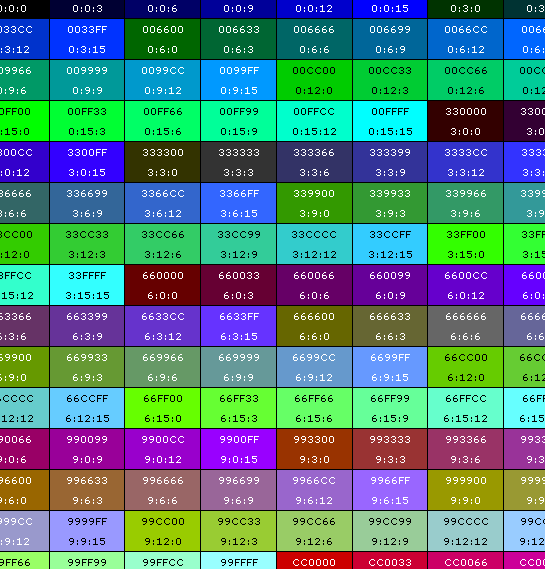
The color selection is quite satisfactory - all the white and black text shows up nicely on their backgrounds. The only ones that bug me are some of the oranges. They show up as whites, but I just think they might be better as black. However, in the interest of simplicity, I didn't want to start creating too many exception cases for color. If you want to view the demo, click here.

Reader Comments
The reason you are having trouble with the greens is because the human eye can see greens better than other colors, so they actually look brighter. Try weighting the colors something like the below. I'd post some code myself but my server is down. :(
Y' = 0.299 * R + 0.587 * G + 0.114 * B
This is the part of the formula that converts RGB to YCbCr. Y' is the grayscale part of the image.
From: http://www.jpeg.org/public/jfif.pdf
Interesting way of solving the problem! I was in a similar scenario a while ago when I needed to generate a colour palette containing potentially any number of colours, each with enough contrast from the others, to fill regions on a treemap.
I had the same problem with figuring out the best colour for text but ended up running out of time and just settled on using white the whole time. I might go back to it and have a go at implementing something like this to make the text much more readable.
@Dustin,
Interesting stuff. I like the weighted color idea. I was thinking of doing something like that, but I barely passed my Statistics course and I just couldn't see the pattern. I'll let you know how it turns out.
@George,
Good luck :) Let me know if I can help you with anything.
Interestingly enough, I had just finished building some code for this problem when I did my daily check of your web log. I started by looking at the functions (in PHP, but the theory still holds) here:
http://www.ad7six.com/MiBlog/Contrast
And that lead me to the W3.org's write-up at:
http://www.w3.org/TR/AERT#color-contrast
So, using these two sources, I built a few "color" functions that seemed handy to me. The first is a function that you pass a RGB code and it uses the W3 "Color Brightness" to return its "brightness" on a scale of 1-100 (0 being black). You could technically use this to determine whether to use black or white text on a certain color.
The second function I built actually takes 4 arguments. The base color (background), two other colors to choose from, and an optional "weight" to apply to the first of the optional colors (in case you wanted to favor one of the colors over the other). The function then uses the W3 "Color Difference" formula to figure out the contrast between the base color and the optional colors. It compares that contrast between the two and returns the one that has the higher contrast (after weighting the first one, if specified).
So, a little more complicated than your solution, but it seems to work pretty well. Indicentally, I compared the results for our two functions, and they match most of the time...
@Kevin,
That looks pretty cool. I am not very good at reading PHP (I get hung up on certain syntax), but I like where you went with this. I didn't even know that the W3C had color suggestions - what don't they do :) When I have a bit more time, I will really sit down and try to follow what you are doing, maybe convert it to ColdFusion. Thanks.
@Kevin
The MiBlog color contrast actually uses the same formula as I posted above to calculate the brightness. Albeit theirs does a tiny bit more math:
function brightness($colour) {
list ($r, $g, $b)= ColourManipulator :: explode($colour);
return ($r * 299 + $g * 587 + $b * 114) / 1000;
}
@Ben
I had a chance to test this out, you get quite the same results as Kevin stated except you can remove the conditions for greens. It even gets most of your oranges to turn out black instead of white. Definitely good stuff. :)
<cfif (0.299 * intRed) + (0.587 * intGreen) + (0.114 * intBlue) GT 7> <cfset strColor = "000000" />
<cfelse>
<!--- Default to white. --->
<cfset strColor = "FFFFFF" />
</cfif>
@Ben
I actually just used the PHP code as a jumping-off point. I built my function in CF. I'll spare you the details, but the real meat happens at the end:
<cfset diff1 = Abs(baseR-Red1) + Abs(baseG-Green1) + Abs(baseBlue-Blue1)>
<cfset diff2 = Abs(baseR-Red2) + Abs(baseG-Green2) + Abs(baseBlue-Blue2)>
<cfif (diff1*weight) GT diff2>
<cfreturn option1>
<cfelse>
<cfreturn option2>
</cfif>
I ported a Perl script to CF to generate a colour cube for a specified number of colours. It'll generate a nice gradient of colours for you and use the brightness test on the W3 site to decide whether to colour the text black or white. I needed this to make sure that no two colours on my treemap graphs were the same (although some are very similar if you have enough data points of course)...
Change the numitems variable if you want a different number of colours. I've got a CFC for it all but the cfscript was easier to post here.
<cfscript>
numitems = 1000;
math = CreateObject("java","java.lang.Math");
cbrt = ceiling(math.cbrt(numitems));
r = 0;
g = 0;
b = 0;
brightness = 0.0;
newt = cbrt ^ 3;
inc = int(255/(cbrt-1));
for(r=0; r lte 255; r+=inc) {
writeoutput("<table>");
for(g=0; g lte 255; g+=inc) {
writeoutput("<tr>");
for(b=0; b lte 255; b+=inc) {
textcolour = "black";
r1 = formatbasen(r,16);
if(len(r1) is 1) r1 = '0' & r1;
g1 = formatbasen(g,16);
if(len(g1) is 1) g1 = '0' & g1;
b1 = formatbasen(b,16);
if(len(b1) is 1) b1 = '0' & b1;
rgb = r1 & g1 & b1;
brightness = r * 0.299 + g * 0.587 + b * 0.114;
if(brightness lt 125) textcolour = "white";
writeoutput("<th width=100 height=100 bgcolor=" & rgb & "><font color='" & textcolour & "'>##" & rgb & "<br/>Brightness: " & brightness & "</font></th>");
}
writeoutput("</tr>");
}
writeoutput("</table>");
}
</cfscript>
Turned it into a PHP function:
function getContrastingColor($hexcolor) {
define("_BLACK", "000000");
define("_WHITE", "FFFFFF");
// determine R, G and B values from the HEX color
$hexcolor = strlen($hexcolor) == 7 ? substr($hexcolor, 1) : $hexcolor;
if(strlen($hexcolor) == 6){
$r = substr($hexcolor,0,2);
$g = substr($hexcolor,2,2);
$b = substr($hexcolor,4,2);
return (($g > 9) OR ($r + $g + $b > 30)) ? _WHITE : _BLACK ;
}
// default
return _BLACK;
}
@Michael,
I don't know much about PHP, but that looks good :)