
Kinky ColdFusion Calendar System Has Delete, Day View, And Color Coding
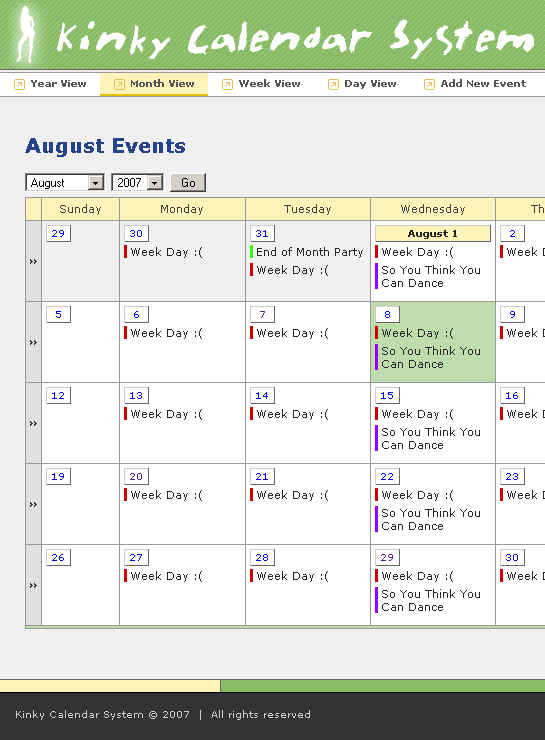
I have made some more updates to my Kinky ColdFusion calendar system. In addition to adding minor color coding (selectable by the user on event input - thanks Rob!), I have also added the day view and the ability to delete events. When you delete an event, it also deleted all exceptions for that event as well. I have also tried to keep jumping from Year to Month to Week to Day views as "smart" as possible; if the current view contains "today", then jumping to any other view will also contain "today". However, if the current view does not contain "today", then jumping to any other view will start at the beginning of the previous view.
The color coding is denoted by a small 3-pixel left border on the event. I tried to keep it as non-intrusive as possible, but still usable.
| |
|
|
||
| |
 |
|
||
| |
|
|
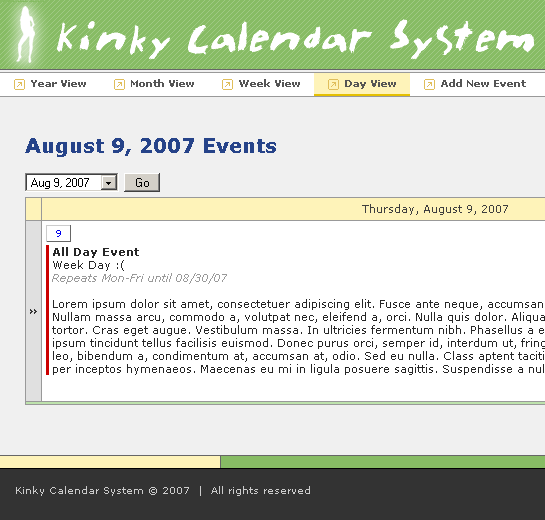
The Day view contains complete information about the event including its description.
| |
|
|
||
| |
 |
|
||
| |
|
|
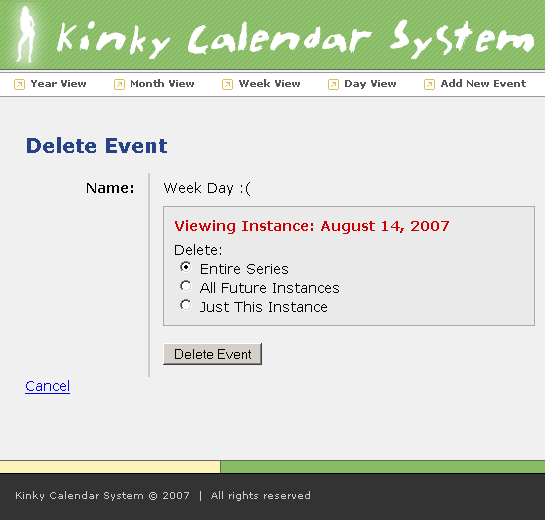
The Delete confirmation page works much like updating an event. When you delete, you have the option to delete the entire calendar series, the future instances (inclusive), or just the current instance. Deleting all future instances just adjusts the end date of the current event to end on the previous day. Deleting just the current instance simply adds an event exception for the given day.
| |
|
|
||
| |
 |
|
||
| |
|
|
It's not the most perfect calendar, but it has some cool stuff going on and the querying is actualy super simplistic which means that this system should work on just about any database management system (even Microsoft ACCESS!). I am just going to clean up the code and then it should be ready for release... who knows, Peter Bell might even sprinkle some OOP magic on it :)

Reader Comments
Have you ever used Google Cal? I really like the way they color code everything and allow for dynamic labeling. Not to say you are doing anything wrong, just thought it might be a nice idea for your calendar as well. Keep up the great work!
@Dan,
I've put a solid 3-4 nights of work into this baby, but I think Google calendar probably had more people working on it :) ... just kidding around. To be honest, I don't really use a lot of calendaring. I have tried Google calendar, but not for some time. I will pop in and see if I can steel some good ideas. Clearly, I will never have the functionality that they have, but certainly some usability tips never hurt anyone.
Completely understandable Ben! Just check it out for version 3 or 4 ;)
It's really coming along nicely now. Lots of nice features. One thing I noticed that doesn't appear to be working (at least not for me) is the grey bar on the left hand side of the "week" view. I click it but it doesn't do anything (other than reload the same page). Other than that, great job.
@Gareth,
Hmmm, that's strange. The "link" doesn't span the entire vertical of the gray bar. The link is only like 80px high. Make sure you are clicking on the [>>] symbol. It should always link the "Week View" for whatever day/week you are clicking on.
@Dan,
Most definitely. Right now, I want to just clean up the code and get it to a point where I am comfortable putting in my "Projects". Then, from there, people can give me all sorts of feedback... also, I hope I didn't come off as making fun of your suggestion - I was just being goofy. I would love to make this a kick-ass "sub" app that can be integrated easily with other things.
Nice work! Is this open source or just a personal project?
This will all be available "as-is" from my Projects area, coming soon. All the stuff on my site is free to use.
**NOTE: If you are getting an error in the calendar, please post it here. I seem to be getting some data-truncation errors mailed to me, but I don't get good details... I think it is TIME based (start time, end time), but not sure.
@Ben
I was definitely clicking on the linkable area, but it didn't seem to do anything...I guess I should ask, what should it be doing (in case I'm trying to get it to do something that it shouldn't :) ). I was in the week view, and clicked on it, but it just seemed to keep going to the same week view. If that's correct, then that's what it was doing and I thought it would do something else (like switch to the next week, or switch to month view), if that's incorrect, then I guess I found a bug :)
@Gareth,
Good point... going from week to week would be confusing. Do you have a suggestion? Right now, it always jumps to week-view. When you are in the week, you think it should jump to Month view?
Hmmm...I'm not sure. Perhaps it could be a way to jump from year view to month view to day view and back to year view (like the tabs up top). It just confused me in week view about what it was supposed to do (especially as the day view takes the user back to week view once it is clicked).
@Gareth,
Maybe Week goes to month and day goes to week... Hmmm. Also, I have no easy way to click INTO a day without adding an event. Gotta figure that one out to.
Ben, that looks very promising.
Before releasing that calendar, I suggest implementing some sort of settings useful for us europeans:
- first day of week
- 24 hours time format on/off
- resource file with all used text-labels for easy translation (as Ray Camden uses in his BlogCFC app).
@Raphael,
While I really like those ideas, I think that would definitely be part of a 2nd release. I have not stuff of that nature before and I don't want to let my ignorance in that area to hold this up too much. I figure let me get something out for people who don't necessarily need that, and then I can add it in aftewards.
Thanks for the good suggestions!
Ben,
I couldn't help but notice, you seem to spell 'Colour' incorrectly throughout the entire application :-p
Rob
Your mom misspells color :P (oh no he didn't)
You mean 'mum'..... right? :-p
I just got a client that needs a calendar with recurring events that I have just started on. Can't wait to compare code! Looks very nice.
Kevin