ColdFusion Calendar Event Scripting - The Theory Of Handling Event Updates And Exceptions
In the previous post on ColdFusion calendar event scripting, I went over the basic architecture of adding single and repetitive events using just one database table and some clever struct-based indexing techniques for processing efficiency. Now, we are going to make the ColdFusion calendar system even more useful by allowing us to edit existing events. When it comes to editing an existing event, single-day, non-repeating events are nothing to worry about; these are basic single-record updates that 99% of our applications are composed of. Updating a repeating event is a different ball of wax altogether.
When we updated (or delete for that matter) a repeating event or "series", there are three types of updates that we can do:
- Update Entire Series
- Update Future Instances Of Series
- Update Just This Instance In Series
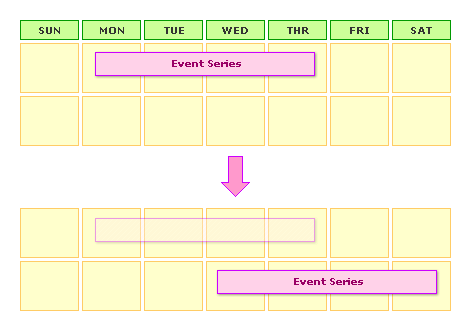
Like the single-event updates, updating an entire event series does not cause us any problems; we are just updating the record in the database with potentially new values. No other actions need to be taken, with the possible exception of handling existing exceptions to the given event (but we can discuss that later). This type of move can be seen in the following diagram:
| |
|
|
||
| |
 |
|
||
| |
|
|
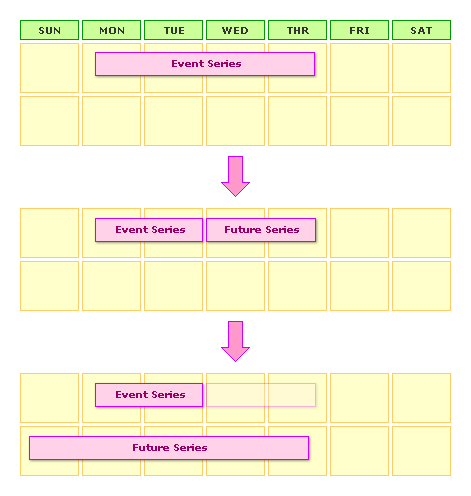
Updating all future instances of a series (including the currently viewed date) is easiest to handle if we break up the existing event into two different events. The first of these two events will be the existing event with a modified end-date that falls just before the currently viewed date. The second of these two events will be a NEW event with the information the user entered. Theoretically, the new event (second event) should start where the existing event (first event) left off; however, there is nothing other than business rules that says it has to be that way.
It might be easier to think of "Future" instances of an event action as just: Truncate existing event at this point and then create a new event with user-entered details (that default to those details provided by existing event). When we look at ti this way, it's likely that our existing event and our new event will line up in some fashion, but we can see that there is nothing the must enforce this. This type of move can be seen in the following diagrams:
| |
|
|
||
| |
 |
|
||
| |
|
|
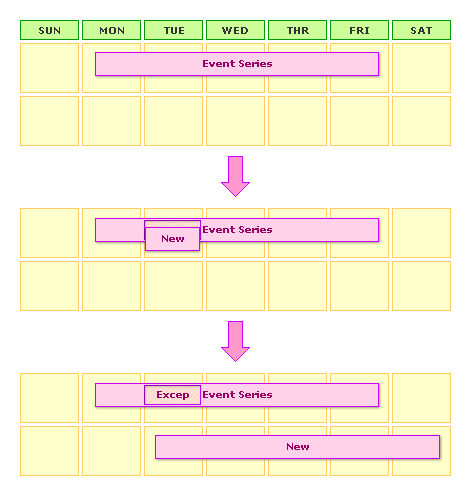
Updating just the currently viewed instance of an event series requires us to create a new table in the database: event_exception. This table is very simple and has just two columns:
Date - The date on which the exception occurs.
Event_ID - The foreign key to the event series in which the exception is taking place.
Like the future updates, updating just the current event instance requires us to add a new event. However, unlike the future event updates, this action does not require us to modify the existing event in any way. Instead, what we do is create an entirely new event with the user-entered data and then insert an event_exception record for the existing event series on the given day. Traditionally, the new event (current instance) is usually on the same day as the exception (with modified details), but there is nothing other than business logic that needs to enforce that. This type of move can be seen in the following diagram:
| |
|
|
||
| |
 |
|
||
| |
|
|
Once we have an exception in place for the given-instance update, we have to make sure not to show that event instance in the calendar. Therefore, the calendar event-populating algorithm becomes something like this:
- Check for event recurrence on given date
- Check for exception of event on given date
- If no exception,
- show event
- Else if exception
- do Not show event
Once we have exceptions in place, here is where the "best practices" become a little hairy. To be honest, I am not sure how to best handle it. My gut feeling is that exceptions should stay in the database until the originating series is deleting from the calendar system. Furthermore, I don't think that event exceptions should ever move around. Therefore, if you have a week long event that has a mid-week exception on Wednesday and then you move that entire event series to start in the next week - that Wednesday exception no longer appears in the middle of the event. This is because the exception was for the previous week, not the current week. However, if you were to then move the event series back to the original week, the exception would again present itself. This makes sense because exceptions are not really series based, they are date-based.
Now that we have examined how we are going to handle event updates and exceptions, we see that the high-level code is rather simple to update. The pseudo code for the update page looks something like this:
- If We have Existing event
- If we are updating entire series
- Then just update record
- If we are updating future series
- Then
- Put end date on existing event
- Insert new event with user-data
- Then
- If we are updating single instance
- Then
- Insert exception for existing event
- Insert new event with user-data
- Then
- If we are updating entire series
- Else
- New event series; just insert record
Not so complicated right? In fact, while this blog post is just on the "theory" of this, you can actually see this in practice already. Last night, I create a new ColdFusion calendar event system demo that allows you to edit existing events in this manner. As always, my Add / Edit screen is totally lame and not intuitive and was done quickly to examine the algorithms required and to populate the database.
Warning: The Add /Edit Event page was mad quick and dirty and might not have the best error handling. The labelling also sucks! I really just needed that page to populate a database table to test with.
As a final note, one thing we have to be careful of is that are event editing is date-specific. If we are editing a series and then make a "current instance" modification to it - we have to know the date of the current instance. To handle this, I pass in a "viewas" date to the edit page. This signifies the date-based-instance of the event we are trying to edit.
Hopefully, I will be able to clean up the code and share it with you shortly.

Reader Comments
Hi Ben,
I'm building an event calendar for the first time and I'm trying to get my mind wrapped around recurring events.
I am not familiar with the techniques used in other systems but a recurring event I assume would be the same base event called repeatedly and not physically duplicated (as in not having a record for each repeated event placement)?
Let's say for argument sake that one of the occurrences of the repeated event (somewhere in the middle) was altered, then the previous event date would need to end then two new event entries would be created; one for the altered event within the series and one for the continuation of the original event instance coming after the altered event? I hope this is making sense. Is this the basic idea behind your example?
Thanks,
Hussein
@Hussein,
Yeah, that's exactly the idea. The events are not stored physically because they might go on forever. There is the start event with its repeat type and then exception and splits and what not. It's cool stuff, but can get tricky.
@Ben,
Thanks for the confirmation. Yes, recurring events can get a bit tricky indeed. I was reading through some php development forums earlier about this same topic and was astonished by the long lines of developers having similar challenges coming up with an adequate events calendar model that is both robust and efficiently designed.
It can't be that hard, right? One guy said he built one for a Company before and don't EVER want to again. That made me chuckle.
I was toying with the idea of using some sort of xml/json structure stored with the event record to describe the recurring content while making provisions for any recurring variances throughout the series. This keeps the database absolutely lean but there are some down-sides to this approach too. It's mostly conceptual at the moment.
@Hussein,
Yeah, it's something I would like to explore more. There are so many different kinds of repeat options that go beyond the day of the week. "First Monday", "Last Friday", "Every Other Wednesday" and things like that. As the number of items grows, I wonder if there is a more efficient way to store that information. Like a "repeat type" record that gets associated with the event.
Hi ben,
I need to show the default date as present date only but in the format below:
Suppose today is 2009/10/30...Now() fucntion gives me this.
But i need to show 30 as 1...What I mean is the day shuould be the first day of the current month...........Please advise me on this....
Thanks,
Abhijit
@Abhijit,
I think what you are asking is - from a given date, how can I get the first day of the month? To do so, you would simply use the createDate() method:
createDate( year( now() ), month( now() ), 1 )
... this way, you use the Year and the Month from the now() method, but then force the first day of the month.
Thanks Ben,Actually I did the same thing...Just was thinking if I can get the day too dynamically........
thanks a ton anyways
Ben,
I am going to post something not related to this topic.........Forgive me on this...
Ben I have sql stuff to be shown in a dynamic table in javascript.............
Propably I am using cfajaxproxy with serialiseJson and pulling the data from cfc and load it into the javascript table.........And also there are lots of onclick events in the table....
Please advise me on this..........
Where I am stucked up is showing the data in java script dynamically in a table format and also adding onclick events to each row...............
Thanks,
Abhijit
@Abhijit,
What you probably want to do is some for of event delegation. Rather than attaching event handlers on each row - you attach your event handlers to the table itself. Then, you let the click events bubble up to the table itself and check to see what element triggered the event. This way, you don't have to worry about initializing the rows and just worry about initializing the greater table. This allows the rows to be very dynamic without having to bind new event handlers.
I would recommend looking at jQuery's new live() and die() methods - they work in this fashion.