
Select Any XML Node With A Given Value Using ColdFusion And XPath
Earlier today, on the CF-Talk list, Brad Wood was asking about selecting any node from an XML document based on its text value (text child node). In my ColdFusion, XmlSearch, and XPath tutorial I did a bunch of stuff with "any node" examples and also with text-based examples, but I didn't do anything that combined the two. I didn't know if ColdFusion's XmlSearch() method would hiccup if you tried to use "//*" in conjunction with a text() predicate:
<!--- Build an XML document object. --->
<cfxml variable="xmlData">

	<root>
		<a1>Meep</a1>
		<a2>Meep</a2>
		<a3>
			<b1>Dink</b1>
			<b2>Meep</b2>
		</a3>
		<a4>Blam</a4>
	</root>

</cfxml>


<!---
	Get all nodes in the XML document that have the
	child text node, "Meep". We don't care where the
	node is or they are related... we only care about
	this inner text value.
--->
<cfset arrNodes = XmlSearch(
	xmlData,
	"//*[ text() = 'Meep' ]"
	) />

<!--- Dump out results. --->
<cfdump
	var="#arrNodes#"
	label="All Nodes By Text Value"
	/>
I was pleased to see that this functions exactly like I hoped it would, giving us the following CFDump output:
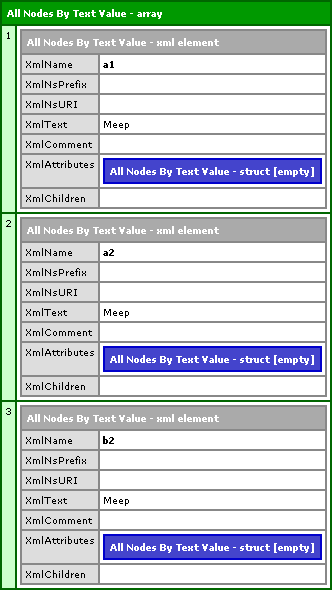
Notice that it found the a1, a2, and b2 element nodes based purely on their nested text node. Good stuff.
Want to use code from this post? Check out the license.

Reader Comments
Good stuff! FYI - There is a great Firefox extension called "Xpather" that is great for displaying the Xpath info for elements on a page...
Yeah, I think someone else mentioned XPather too. I really gotta check that out. FireFox is the most badass browser.
firebug does a nice job of showing xpath - open the console and click the 'dom' tab. when you mouseover the elements (in blue) in the list on the right, the xpath is displayed, and the element is hilited on the page. right click to copy the xpath.
@DB,
Good call. I just tried it (in the email I got) and it works like a charm:
/html/body/div[2]/div[2]/div[3]/table/tbody/tr/td/div/div[2]/div[4]/
table/tbody/tr/td/div/div/div/p[2]
... I gMail as a lot of stuff going on in it's pages :)
What would I do without FireBug??
Sweet - I think Xpather is easier to use - it's more direct - I select the element, right-click and select "Show in Xpather" - with Firebug I have to dig a bit - but thats useful for finding elements that may not be visible on the page. Good stuff!
yeah, those lists can be too much information, sometimes. if you right click on the page and select 'inspect element', you get more specific info. a bar at the top of the console has the element and its parents, and the xpath info.
if you right click on the page and select 'inspect element', you get more specific info. a bar at the top of the console has the element and its parents, and the xpath info.