
A client recently called me complaining that their pages weren't printing correctly. This had never been a problem before. But apparently, now that the site has been up for a while and has some good content, the pages stopped printing correctly. After trying it for myself, I was irked to see that indeed, the first page printed but then none of the other pages printed. And, on top of that, the first page didn't even print properly; the first page's content overflowed right into the margin and off the page entirely. And then, nothing after that.
I had never seen this behavior before. After a few hours of Google searching, I didn't quite find the answer, but I found the right path. All suggestions to dealing with this content overflow print problem talked about taking away FLOAT styles and making displays "static" and even trying to put in some MS word "always break after" type of directives. None of that worked for me, but it got me thinking about the display.
Before I talk about the solution, let's see the problem in action. Imagine having a really simple page that has two DIV elements; one to define the width of the page and one to define the content area:
<!DOCTYPE html PUBLIC "-//W3C//DTD XHTML 1.0 Transitional//EN" "http://www.w3.org/TR/xhtml1/DTD/xhtml1-transitional.dtd">
<html>
<head>
	<title>Print Style Cutoff Overflow Issues</title>
	<style type="text/css">

		div#pagewidth {
			margin: 0px auto 0px auto ;
			overflow: hidden ;
			width: 500px ;
			}

		div#sitecontent {}

	</style>
</head>
<body>

	<!-- BEGIN: Page Width. -->
	<div id="pagewidth">

		<!-- BEGIN: Site Content. -->
		<div id="sitecontent">

			<!---
				Make some really long content so that when we
				go to print, we will definitely be requiring
				more than once page.
			--->
			<cfloop
				index="intPara"
				from="1"
				to="20"
				step="1">

				<p>
					Strings of lights above the bed Curtains
					drawn and a glass of red All I ever get for
					Christmas is blue Saxophone on the radio
					Recorded forty years ago All I ever get for
					Christmas is blue When you play my song,
					play it slowly Play it like I'm sad and
					lonely Maybe you can solve my mystery, Wrap
					me in your arms and whisper You miss me With
					a man sex is miserable, But the snow is so
					beautiful All I ever get for christmas is
					blue It would take a miracle To get me out
					to a shopping mall All I really want for
					Christmas is you Let them ring the bells
					They won't miss us I'll be drinking down
					your kisses Deep into the night we'll go
					stealing Underneath the starry ceiling
					Revealing White lights on the Christmas tree
					Thank God you are here with me All I ever
					get for Christmas is blue
				</p>

			</cfloop>

		</div>
		<!-- END: Site Content. -->

	</div>
	<!-- END: Page Width. -->

</body>
</html>
Now, if we try to go print this page, we get a really strange content overflow problem:
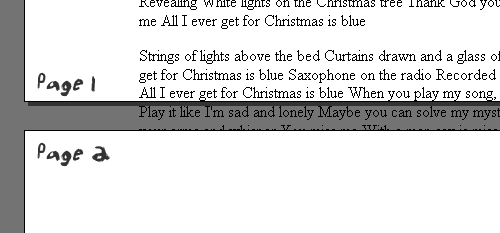
Notice that going from page 1 to page 2, the content completely overflows the margins of the page and then does not even proceed onto the second page. No wonder my client was a bit peeved! This is entirely unacceptable.
The problem stems from the nested DIVs, PageWidth and SiteContent. I am not sure why the nesting seems to cause problems, but I know that if I remove the parent PageWidth DIV, the page with the SiteContent DIV alone will print just fine. I think it has something to do with the fact that both elements are block-level elements. A block level element inside of another block level element must have a hard time figuring out when to break because, from the parent element's point of view, there is no "page break" to accommodate. It's only when the parent element itself can wrap nicely that the inner block level element must also break nicely (... this is all theory here folks, but it's how I got to my solution).
So, to overcome this problem, we simply need to change the way the parent DIV, PageWidth, displays. Using a print-only style sheet definition (as denoted by the media="print" attribute in the STYLE tag), we will change the display of PageWidth to be "inline" when in the context of a print job. A display of "inline" will force the PageWidth DIV tag to act much like a SPAN or STRONG element that, by its nature, will naturally wrap from page to page when required.
<head>
	<title>Print Style Cutoff Overflow Issues</title>
	<style type="text/css">

		div#pagewidth {
			margin: 0px auto 0px auto ;
			overflow: hidden ;
			width: 500px ;
			}

		div#sitecontent {}

	</style>

	<!-- Print styles. -->
	<style type="text/css" media="print">

		div#pagewidth {
			display: inline ;
			}

	</style>
</head>
Because the STYLE tag has the media = "print" attribute, we don't have to worry about those styles affecting the run-time look and feel of the page. This is only for print scenarios. Having this in place, when we go to print:
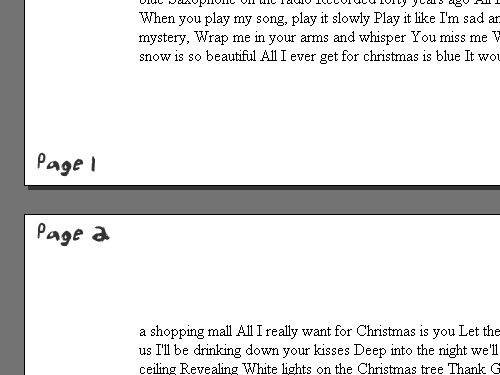
... you will see that all the content wraps appropriately. Not only that, since we changed the DIV to be an inline element, it means that all Width rules on it no longer apply (most inline elements don't like have explicit widths). This is actually a good thing since the print version of a page probably shouldn't have any set height and width, other than the layout of the print paper itself.
Note: Content of page is composed of lyrics from the Over The Rhine song, All I Ever Get For Christmas Is Blue - a fantastic song!

Reader Comments
Ben:
Just glancing at it, I would guess that what is happening has to do with the overflow hidden definition...
If your outside div is set to 500px wide, and the only thing inside it are div's, what is the reason for having the overflow definition at all?
In any case... print stylesheets are geat tools! I always define one to get rid of things such as content navigation (side menu's) and other items that interfere with the actual content.
Thanks for the post!
@Ken,
The overflow: hidden is meant to stop the page from breaking if someone puts in inappropriate content (ie. pasting a table from MS word that is like 900px wide). This example doesn't demonstrate that need very much, but if you think of this being part of a multi-column layout of a content management system, then the overflow: hidden will be much more important.
And yes, you are correct about removing the overflow: hidden. If I remove that for the Print style sheet, it works as well. Just another way to alter the DIV in someway for printing. I like the "inline" rule though because it will also get rid of height / width definitions (which don't really work well inline elements). But certainly, two correct answers to the same problem.
I had the same Firefox problem with page truncation and found I had an overflow:hidden in a nested div. However, setting display:inline did not have an effect. Changing to overflow:visible for print style though fixed my problem.
Hey I'd just like to thank you for taking the time to write this article. You helped me solve a problem I was trying to fix.
So thank you very much and all the best.
Keep up the great work.
Richard
@Richard,
Glad I could help. Although, I just came across a situation with Internet Explorer 7 where this didn't fix the problem! Same page works great in IE6 and FireFox, but noooo, IE7 had to be different :(
I'm having this problem since a week ago. I've been searching trough the web for several days, finding "very confusing" solutions that didn't worked.
Keep taking a minute for explaining the error clearly, that's more important that knowing the solution. When I read why was happening, I understood what should I do.
Thanks for being so precise and concise, that is what people need, you are my man.
@Leandro,
Glad to help. Since posting this, I have run into some situations where this didn't help in IE7. But, for the most part, this type of fix seems to work nicely.
Thanks, great tip.
Thanks a lot for the great knack.
I am trying to print out some contents hidden in the div tag that is set with overflow property. Tried many times but failed always. Finally I find you blog and it works now. Great stuff.
I had a similar issue but when I tried applying the method on this page I could get it working fine in IE 7, but then everything was mangled in Firefox.
I finally noticed that whoever created the print.css placed a style for the main containing div (called #uber) and gave it a width of auto. I removed this line and it cleared-up my issue in IE and FireFox.
I'm not a CSS guru, so I have no idea throwing a width of auto on the main container div would do this, but the actual content div was nested within (3 or 4 levels) so this ultimately affected my content when printing.
I'd spent all my time focusing on the styles for the content div not thinking that the issue could have come from one of its ancestor divs.
Can we go back to text-based browsers? ;)
@Jay,
I hear you man. When I started testing in IE7, this whole task became even harder! I was so irritated to find out that things that would not print ok in IE6 were messing up in IE7. Arrrg!
Thanx a bunch, I can't believe I didnt tried display inline with my css, LOL save me
Buddha Soumpholphakdy
Downstairz Entertainment
Hey Ben,
This fix worked great in Firefox 3, but like you said, not in IE7.
Have you had any luck yet in IE7?
@Ted,
It works sometimes but not others. I guess it's just one of the tools you can use when trying to fix printing problems, but it's not the end-all, be-all.
Thanks, this took care of the problem perfectly!
this not work with height of div.
i have fix height of div and overflow to hidden then when i m printing page it is printing the over flowed conent.
so anyone can help me?
thank you,
manan shah
Thanks for posting this
My problem was solved by using:
* {
overflow: visible !important;
}
div#name {
display: inline;
}
Thanks! The solution posted works for me--I didn't need to do any of the gyratins listed below.
Thanks again!
thank you for sharing, overflow: visible !important; solved the problem. love your work!
@Dan, @Moshaver,
Sweeeet :)
I can't use overflow: visible !important; because on my search results I am using overflow:hidden on a div containing a preview photo of the items.
This makes the preview images all appear to be the same size and gives a nice appearance.
* { overflow: visible !important; }
would obviously break that and a few other things like it.
Also some people use overflow:hidden to make parent divs expand around their floating children.
CSS needs an official way to make parent divs expand around their floating children without needing clearing hacks like clear:both on spans at the bottom of the parent div or the misuse of overflow:hidden
The solution works fine to some extent on firefox. but IE its still giving problem.. :(.. anyone figured out the solution for this??
thanks in advance
Have come across this a few times I find simplifying the layout and taking off overflows, positioning and floats (either entirely or to some degree) fixes the problem.
Debugging is a pain but you can try adding borders to see what is going on best as possible, ideally strip the print layout to bare bones and explain to client print stylesheet isn't meant to mimic the site but to provide main content in a print efficient fashion.
Hope that helps,
Dave
I removed Div tried putting table cell. and removing float... tried different values for overflow.. doesn't work... [:(].. badly in need of solution..
Thanks in advance for any replies, suggestions & solutions
@Parag,
It definitely takes some serious debugging sometimes! Such a pain. I only ever try to figure this out when a client specifically asks for it; otherwise, I typically create secondary, print-friendly versions of pages.
Many thanks, your post helped me fix the same type of issue that a company I'm working with had on their pages too. You definitely helped guide me in the right direction to get this fixed!
@Matt,
Awesome - glad it's working well for you.
Important new information about the CSS property "overflow".
Having just gotten an iPad, I've been using multi-touch Safari a lot more lately (that is, Safari for iPod Touch, iPhone and iPad). I discovered something that had escaped my notice on the iPod: Multi-touch Safari doesn't support overflow:auto or overflow:scroll! It behaves the same as overflow:hidden.
Just FYI, as this will probably become an issue as iPads become more common.
@Steve,
Really?? That is too odd. That seems like such a core CSS thing; and Safari has always been so cutting edge with CSS. Thanks for bringing this to my attention.
Apple just announced that there's iPad help at the bottom of iPad Safari's bookmarks. I went there and navigated to Safari > Zooming and Scrolling. There they mentioned that the way to scroll a frame is with 2 fingers, not 1 finger like the rest of the page.
Just in case, I went back to the scrollable div (the one with style="overflow:auto") and tried it. Sure enough, it worked. So the problem is that Safari doesn't TELL YOU that the content is scrollable by putting up scroll bars. Without that feedback, the user continues to use one finger to scroll and doesn't know that there's content they aren't seeing!
It's like putting white text on a white background. The content is there, but the user doesn't know it's there.
It's still a violation of CSS2 that Safari doesn't put up scroll bars. But at least, if you're familiar with a site, and you know that there's content there that you're not seeing, and you know that you're supposed to switch over to 2 fingers, the content won't be inaccessible.
I still think it's a bug. But I hope it helps to know what the real problem is and how to do the 2 finger workaround. (That sounds so naughty.)
It gets worse. 2 finger scrolling a frame DOESN'T work. (I just found one to check with.) Starting to get very unhappy with multi-touch Safari.
Sorry for cluttering up this post with iPad stuff, but it really is CSS2-overflow-property-related. If you have an iPad, try the following (and then on a PC/Mac browser to see how it's supposed to look):
http://www.webmanwalking.org/library/experiments/dsp_frames_outer_document.html
@Steve,
I know what you mean about the scrollable things not having scrollbars sometimes. I've played around a bit with the iPad and it is definitely NOT clear that some things are scrollable. I find this even to be true in core apps like the App Store app and other news-related apps.
I like nice design as much as the next guy - but interfaces should *still* be intuitive.
Thank you very much, Ben!
We had the quite a similar problem, two nested divs with long content.
All Browsers except Firefox just truncated the content when printing.
Now we are using just one div and a different css for print media with your "display:inline;" fix - and it just works ;)
This solution seems to be accepted by Firefox and all WebKit-based browsers...
So thanks again,
Udo
@Udo,
Glad to help out :)
@Ben,
I sent in the Safari-for-iOS overflow problem to Apple back in mid-April, when we were discussing this. Guess what? Just YESTERDAY Apple finally got back to me that it was a "known problem".
I'm used to talking to a tech in less than a minute on AppleCare, so this seven-month response delay was somewhat surprising. :-)
@WebManWalking,
Ha ha ha, 7-month turn around time. Hey, at least they area aware of the problem.
Sir,
I am creating a application in that when am trying to none of the styles printed but in web page all styles were reflected, it is specific to IE alone. could you provide your thoughts?
Sir,
Ignore my previous comment.
I am creating a application in that when am trying to print none of the styles printed but in web page all styles were reflected, it is specific to IE alone. could you provide your thoughts?
Hey Ben, nice tip. Thanks.
GG, good code for IE.
Well observed! Still accurate after 6 years...
Thanks for sharing this great tips
You saved my life.
Thanks for the post!