
Just a minor note that I thought I would post up here (since I didn't know this before and I had to test it for myself). When it comes to web development, pretty much all of my file names are purely alpha-numeric with underscores for spaces. As such, I have never come up against a problem in ColdFusion where I needed to used space-containing file names in conjunction with the CFHeader content-disposition value. In fact, I've never even thought about it.
In my post on using additional path information to alter the browser's Save-As behavior, Elliott Sprehn pointed out to me that in order to handle spaces in file names, you have to quote the file names. And, not only do you have to quote it, you have to use double quotes, NOT single quotes - single quotes do nothing to help you out and the first single quote actually shows up in the file name (before the name gets truncated).
Here is my test ColdFusion template. All it does is try to server up a file as an attachment:
<!--- Kill extra output. --->
<cfsilent>

	<cfheader
		name="content-disposition"
		value="attachment; filename=""This Is A Test.txt"""
		/>

	<cfcontent
		type="text/plain"
		variable="#ToBinary( ToBase64( 'Test Data' ))#"
		/>

</cfsilent>
Notice that in order to get the quotes to work, you have to double them up (otherwise ColdFusion will think you are ending the string). You could also use single quotes for the value attribute, but that's not my style.
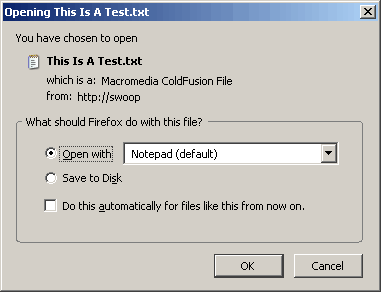
Running the above template directly, I am correctly prompted by FireFox to download the file with the proper name:
I probably won't switch over to using file names with spaces, but in something like a document management system, I can see where knowing this would be super helpful.

Reader Comments
I think you have triple quotes at the end there...
Sami, the third quote is closing the one started at:
value="attachment
Another reason not to use spaces in filenames. Would it work if you substituted them with %20 ?
@Duncan,
I just tried it and the %20 actually shows up in the file name.
Is this actually ColdFusion doing this, or the browser?
@Peter,
When I look at the http headers that get sent back with the file request (Thanks god for FireBug!!), the double quotes are coming back in the actual header value:
filename="your file name"
Therefore, I assume it is the browser that requires them. If it was ColdFusion handling it, I am sure the use of double OR single quotes wouldn't matter.
You're welcome Ben!
@Peter
It's the browser. http://kb.mozillazine.org/Filenames_with_spaces_are_truncated_upon_download
Did you know that IE7 puts underscores in the name of the file when you use the double quote method? I have an Intranet Document Management System that has been working great until we upgraded to IE7. If you take out the double quotes, it works perfectly for IE7.
Any ideas other than recognizing the browser and placing separate code for each? I'm thinking I have no choice at this point.
JC
@JC,
Sorry, no ideas. I haven't even upgraded to IE7 yet, so I wouldn't even know how to test.
Thanks for this, never thought of putting double quotes - was putting single quotes and of course they didn't work.
Another few hours saved because of your excellent blog - thanks!
@Felix,
Glad to help out :)
Thanks! Always had this problem and I was stripping the spaces to the consternation of the users who wanted to preserve the file name.
Thanks a ton Ben!!!
Google + Ben Nadel save the day again!
@Mac, @Will,
Glad to help out fellas.
I actually did it this way;
<cfheader name="Content-Disposition" value="attachment;filename=#chr(34)##getimage.originalfile##chr(34)#">
@Mark,
Nice, that should work. By using the chr() method, you don't have to escape the quotes by doubling them up. Good thinking.
Thanks Ben, this was super helpful ..
@Ram,
No problem - glad I could help.
I am try to use this code with in a cfdiv submit and it is not working.
Can you please advice.
Anyone tried japanese/chinese characters in filename. It works in FF, Safari and Chrome but IE returns a garbage characters. I used charset="shift_jis" and charset="utf-8".
Nobody found any solution with this problem:
japanese/chinese characters in filename. It works in FF, Safari and Chrome but IE returns a garbage characters. I used charset="shift_jis" and charset="utf-8".
<cfheader name="content-disposition" needs to do some improvement, I saw this fix in php...
Found some alternative way to display the filename with japanese/chinese characters
<cfset str_file_name="????????.txt">
<cfset is_ie=IIF(findnocase("MSIE", cgi.HTTP_USER_AGENT,1) is 0, de("false"), de("true"))>
<cfif is_ie>
<cfset str_file_ext=listlast(str_file_name, '.')>
<cfset str_file_title=replaceNoCase(str_file_name, "#str_file_ext#", "", "all")>
<cfset str_file_title=replaceNoCase(str_file_title, ".", "", "all")>
<cfheader name="content-disposition" charset="utf-8" value= "attachment; filename =#chr(34)##URLEncodedFormat('#str_file_title#')#.#str_file_ext##chr(34)#;" />
<cfelse>
<cfheader name="content-disposition" charset="utf-8" value= "attachment; filename =#chr(34)##str_file_name##chr(34)#;" />
</cfif>
@Nelgraine,
Interesting - you are url-encoding the file name. I have never tried that before.
Here is my question, where can I find everything that cfheader can do for me? I've found bits and pieces but there must be more. Do I have to look for just headers or what? My googling fingers are wearing out.
@Don,
There's not inherent limit to what you can send in headers. I think the only technical limit is that headers can't have line-breaks (otherwise the client interprets the post-line-break content as a new header value or the body)... but I might be off-base on that assumption.
So, you can send any application-specific headers that you like.
That said, there are a number of very common headers that have to do with things like caching/expiration, redirections, authorization (oAuth, Basic, etc.), content length, content type, content disposition (as demonstrated in this blog post).
Is there something you were looking for in particular? Or were you just getting ideas for what was capable?
@Ben,
Primarily I was looking for what is available. Another one of those times when I was looking at one thing and thought "what else?" I am doing 2 things, no caching and force the download box to come up for PDFs.
I finally found a place that showed a lot of what is routinely done with headers such as size etc. Not sure how much of it is really useful except the caching stuff.
@Don,
One of the most important headers that you can set it he content-type header, which can be set implicitly using the CFContent tag. Other than that, I really only use headers an as-needed basis.
I am working on something like skybox, I am trying to use
to allow the user to download a file but how would I use this if their is more than one file.
What ever I do result in only one file being downloaded.
Also. Thanks for making this site available. It real help when I get stuck.
Is there a way to tell what the user clicked, or even IF the user clicked something in the browser download (open/save) dialog box? Or when the download dialog box is closed? I have js code that changes the submit button to disabled (and it says 'Please Wait'), so that the user can't click and submit it more than once. The trouble is that when the download/save is finished (or the user clicks open/cancel, or closes the download box), the submit button still says 'Please Wait'. Is there a way to trigger code enabling and changing the submit button text back?