
Ask Ben: Displaying A Modified Detroit Calendar Schedule
Our shift pattern is actually called a modified Detroit schedule. The actual shift pattern is CACBCBABA. Check out this link to see an actual printed calendar. http://www.ladder54.com/schedule.htm. If we look at October 1st then follow the pattern of CACBCBABA you will see what I mean, I work the red days, all 110 to 112 days a year at 24 hours a shift. We would need to trap for leap years as well all though I don't think that is much of a problem, I could be wrong though....
While I have never heard of the Modified Detroit style schedule, the problem here is one of pattern calculation. We have a pattern that starts on a given date, October 1, 2001 and repeats going forward and backward with the pattern CACBCBABA. By now, anyone who sees the phrase "repeating pattern" should immediatly think of our good friend, the Modulus operator. Using the modulus operator, we can figure out how many times the pattern can be fully applied to the difference in days between a given day and the base date.
To help demonstrate that, let's create a ColdFusion user defined function that will take a date and return either "shifta", "shiftb", or "shiftc" depending on how the Modified Detroit patterns gets applied:
<cffunction
	name="GetDetroitShift"
	access="public"
	returntype="string"
	output="false"
	hint="Returns the given Modified Detroit shift schedule (shifta, shiftb, shiftc).">

	<!--- Define arguments. --->
	<cfargument
		name="Date"
		type="numeric"
		required="true"
		hint="The numeric date/time in question."
		/>

	<!--- Define the local scope. --->
	<cfset var LOCAL = StructNew() />

	<!---
		The Modified Detroit schedule has a base date of
		October 1, 2001. On that date, the following
		schedule pattern began: CACBCBABA. This schedule
		then repeats going forward and backwards. Get our
		base date.
	--->
	<cfset LOCAL.BaseDate = CreateDate( 2001, 10, 1 ) />

	<!--- Create a map for the shift. --->
	<cfset LOCAL.ShiftMap = ArrayNew( 1 ) />
	<cfset LOCAL.ShiftMap[ 1 ] = "shiftc" />
	<cfset LOCAL.ShiftMap[ 2 ] = "shifta" />
	<cfset LOCAL.ShiftMap[ 3 ] = "shiftc" />
	<cfset LOCAL.ShiftMap[ 4 ] = "shiftb" />
	<cfset LOCAL.ShiftMap[ 5 ] = "shiftc" />
	<cfset LOCAL.ShiftMap[ 6 ] = "shiftb" />
	<cfset LOCAL.ShiftMap[ 7 ] = "shifta" />
	<cfset LOCAL.ShiftMap[ 8 ] = "shiftb" />
	<cfset LOCAL.ShiftMap[ 9 ] = "shifta" />

	<!---
		Make sure that we are working with a numeric
		date that has no time.
	--->
	<cfset ARGUMENTS.Date = Fix( ARGUMENTS.Date ) />

	<!--- Get the day difference. --->
	<cfset LOCAL.DayDiff = (ARGUMENTS.Date - LOCAL.BaseDate ) />

	<!---
		Now that we know the number of days that have
		elapsed since the base date, we can figure out
		how many times the pattern has repeated, or
		rather, after the pattern has repeated, where
		are we within it.
	--->
	<cfset LOCAL.DayMod = (LOCAL.DayDiff MOD ArrayLen( LOCAL.ShiftMap )) />

	<!--- Check to see if mod is possitive. --->
	<cfif (LOCAL.DayMod GTE 0)>

		<!--- Return the given shift. --->
		<cfreturn LOCAL.ShiftMap[ LOCAL.DayMod + 1 ] />

	<cfelse>

		<!--- Return the given shift. --->
		<cfreturn LOCAL.ShiftMap[ ArrayLen( LOCAL.ShiftMap ) + LOCAL.DayMod + 1 ] />

	</cfif>
</cffunction>
The thing you have to be careful of with the modulus operator is that taking the modulus of a negative number can result in a negative number. Therefore, when our given day falls before our base date, we need to apply the modulus in a slightly different manner - starting at the end of the pattern map rather than at the beginning.
Now that we have our ColdFusion user defined function for getting the modified detroit style schedule, let's apply that to the CSS classes of our standard calendar display:
<!--- Kill extra output. --->
<cfsilent>

	<cffunction
		name="GetDetroitShift"
		access="public"
		returntype="string"
		output="false"
		hint="Returns the given Modified Detroit shift schedule (shifta, shiftb, shiftc).">

		<!--- Define arguments. --->
		<cfargument
			name="Date"
			type="numeric"
			required="true"
			hint="The numeric date/time in question."
			/>

		<!--- Define the local scope. --->
		<cfset var LOCAL = StructNew() />

		<!---
			The Modified Detroit schedule has a base date of
			October 1, 2001. On that date, the following
			schedule pattern began: CACBCBABA. This schedule
			then repeats going forward and backwards. Get our
			base date.
		--->
		<cfset LOCAL.BaseDate = CreateDate( 2001, 10, 1 ) />

		<!--- Create a map for the shift. --->
		<cfset LOCAL.ShiftMap = ArrayNew( 1 ) />
		<cfset LOCAL.ShiftMap[ 1 ] = "shiftc" />
		<cfset LOCAL.ShiftMap[ 2 ] = "shifta" />
		<cfset LOCAL.ShiftMap[ 3 ] = "shiftc" />
		<cfset LOCAL.ShiftMap[ 4 ] = "shiftb" />
		<cfset LOCAL.ShiftMap[ 5 ] = "shiftc" />
		<cfset LOCAL.ShiftMap[ 6 ] = "shiftb" />
		<cfset LOCAL.ShiftMap[ 7 ] = "shifta" />
		<cfset LOCAL.ShiftMap[ 8 ] = "shiftb" />
		<cfset LOCAL.ShiftMap[ 9 ] = "shifta" />

		<!---
			Make sure that we are working with a numeric
			date that has no time.
		--->
		<cfset ARGUMENTS.Date = Fix( ARGUMENTS.Date ) />

		<!--- Get the day difference. --->
		<cfset LOCAL.DayDiff = (ARGUMENTS.Date - LOCAL.BaseDate ) />

		<!---
			Now that we know the number of days that have
			elapsed since the base date, we can figure out
			how many times the pattern has repeated, or
			rather, after the pattern has repeated, where
			are we within it.
		--->
		<cfset LOCAL.DayMod = (LOCAL.DayDiff MOD ArrayLen( LOCAL.ShiftMap )) />

		<!--- Check to see if mod is possitive. --->
		<cfif (LOCAL.DayMod GTE 0)>

			<!--- Return the given shift. --->
			<cfreturn LOCAL.ShiftMap[ LOCAL.DayMod + 1 ] />

		<cfelse>

			<!--- Return the given shift. --->
			<cfreturn LOCAL.ShiftMap[ ArrayLen( LOCAL.ShiftMap ) + LOCAL.DayMod + 1 ] />

		</cfif>
	</cffunction>


	<!---
		Param the form variables. Since these are numeric,
		they might throw validation errors.
	--->
	<cftry>

		<cfparam
			name="FORM.year"
			type="numeric"
			default="#Year( Now() )#"
			/>

		<cfparam
			name="FORM.month"
			type="numeric"
			default="#Month( Now() )#"
			/>

		<!--- Catch any validation errors. --->
		<cfcatch>

			<!--- Default to this year/month. --->
			<cfset FORM.year = Year( Now() ) />
			<cfset FORM.month = Month( Now() ) />

		</cfcatch>
	</cftry>


	<!---
		Try to create a date/time value for the first day
		in the given month. If the year/month are out of
		range or invalid, we need to trap errors.
	--->
	<cftry>

		<cfset dtThisMonth = CreateDate(
			FORM.year,
			FORM.month,
			1
			) />

		<!--- Catch any errors. --->
		<cfcatch>

			<!--- Default to this month. --->
			<cfset dtThisMonth = CreateDate(
				Year( Now() ),
				Month( Now() ),
				1
				) />

		</cfcatch>
	</cftry>


	<!---
		Now that we have the actual month, let's get the
		first day of the calendar month (displayed date,
		not necessarily in the current month).
	--->
	<cfset dtFirstDayOfMonth = (
		dtThisMonth -
		DayOfWeek( dtThisMonth ) +
		1
		) />

	<!--- Get the first day of the next month. --->
	<cfset dtNextMonth = DateAdd( "m", 1, dtThisMonth ) />

	<!--- Now, get the last day of the current month. --->
	<cfset dtLastDayOfMonth = (dtNextMonth - 1) />

	<!---
		Now, make sure that the last day of the month
		is the displayed date (not necessarily in the
		current month).
	--->
	<cfset dtLastDayOfMonth = (
		dtLastDayOfMonth +
		(7 - DayOfWeek( dtLastDayOfMonth ))
		) />


	<!---
		ASSERT: At this point, we have the first and last
		displayed dates on the displayed calendar. These
		are not actual date/time stamps; since we applied
		math to them, they are now numbers that represent
		a given date.
	--->

</cfsilent>

<!DOCTYPE html PUBLIC "-//W3C//DTD XHTML 1.0 Transitional//EN" "http://www.w3.org/TR/xhtml1/DTD/xhtml1-transitional.dtd">
<html>
<head>
	<title>Ladder 54 Modified Detroit Schedule</title>

	<style type="text/css">

		form {
			margin: 0px 0px 20px 0px ;
			}

		table.calendar {
			border: 1px solid #666666 ;
			}

		table.calendar td {
			border: 1px solid #666666 ;
			font-family: verdana ;
			font-size: 11px ;
			padding: 5px 8px 4px 8px ;
			text-align: center ;
			}

		table.calendar tr.header td {
			font-weight: bold ;
			}

		table.calendar tr.day td {
			color: #FFFFFF ;
			}

		table.calendar tr.day td.shifta {
			background-color: #00FF00 ;
			}

		table.calendar tr.day td.shiftb {
			background-color: #FF0000 ;
			}

		table.calendar tr.day td.shiftc {
			background-color: #0000FF ;
			}

	</style>
</head>
<body>

	<cfoutput>

		<form action="#CGI.script_name#" method="post">

			<select name="month">
				<cfloop
					index="intMonth"
					from="1"
					to="12"
					step="1">

					<option value="#intMonth#"
						<cfif (intMonth EQ FORM.month)>selected="true"</cfif>
						>#MonthAsString( intMonth )#</option>

				</cfloop>
			</select>

			<select name="year">
				<cfloop
					index="intYear"
					from="#(Year( Now() ) - 10)#"
					to="#(Year( Now() ) + 2)#"
					step="1">

					<option value="#intYear#"
						<cfif (intYear EQ FORM.year)>selected="true"</cfif>
						>#intYear#</option>

				</cfloop>
			</select>

			<input type="submit" value="View Month" />

		</form>


		<table cellspacing="1" cellpadding="0" class="calendar">
		<tr class="header">
			<td>
				Sun
			</td>
			<td>
				Mon
			</td>
			<td>
				Tue
			</td>
			<td>
				Wed
			</td>
			<td>
				Thr
			</td>
			<td>
				Fri
			</td>
			<td>
				Sat
			</td>
		</tr>
		<tr class="day">

			<!--- Now, loop over the days to display. --->
			<cfloop
				index="dtDay"
				from="#dtFirstDayOfMonth#"
				to="#dtLastDayOfMonth#"
				step="1">

				<td class="#GetDetroitShift( dtDay )#">
					#Day( dtDay )#
					(#Right( GetDetroitShift( dtDay ), 1 )#)
				</td>

				<!---
					Check to see if we need to start a new row.
					Only do this if there are more days left
					to iterate over.
				--->
				<cfif (
					(dtDay LT dtLastDayOfMonth) AND
					(NOT (DayOfWeek( dtDay ) MOD 7))
					)>

					</tr>
					<tr class="day">

				</cfif>

			</cfloop>

		</tr>
		</table>

	</cfoutput>

	<p>
		Pattern starting 10/01/2001: CACBCBABA
	</p>

</body>
</html>
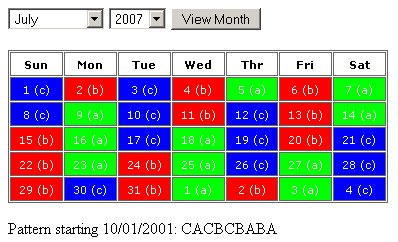
Here, we are looping over the days in a given month, but we are using our GetDetroitShift() ColdFusion UDF to get both the CSS class for our calendar day as well as the displayed letter (A,B,C). By default, the calendar starts on the current month:
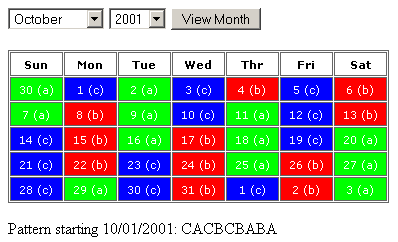
And, if we jump over to the base month, October 2001, you will se that 10/01/2001 does indeed start our CACBCBABA pattern:
To try out the demo for yourself, click here.
Want to use code from this post? Check out the license.

Reader Comments
Ben,
Don't forget to trap whitespace. Check the source at the beginning and at the end in your example at www.bennadel.com/resources/demo/modified_detroit/index.cfm
Dmitriy
Thanks dude. I just added a:
<cfcontent
type="text/html"
reset="true"
/>
... before the content. Trimmed the leading white space nicely.
This is just awesome, now to only apply this to the number of the day and not the background, this way we can see the events that we want to list on each day.
THANK YOU THANK YOU,
Jim
@Jim,
My pleasure to help. Please let me know if you need any help modifying this.
@Ben: How about at the end of the document?
Actually if we could set this so only the date/number was color coded along with the shift designator, the next thing is what would be the best to way to plug in the events on the appropriate day. I will try to follow your code from the previous calendar example.
So you would have the day color code (number only) white background of the day grid/block and events on each day in its respective block/grid say blue in color, in this case of the staffing calendar would show who is off and on what type of leave are they using, sick, vacation etc., with these events being hyperlinked to a detail page.
Thanks so much for your help
Jim
Hmmm, the end of document white space must be caused by the OnRequestEnd() Application.cfc method.... I will look into it.
Ben:
I am always amazed at how much energy you put into these posts. Way to go!
You know... you could probably charge for these kinds of things!
LOL
I am amazed as well, what Ben did in a couple of hours, would have taken me me months to figure out if I could even figure it out.
Jim
Ben THANK YOU
Yeah! Three cheers for Ben!
As I started reading this solution, I said, out loud, "man, this guy is so smart!" Of course, I always think that when reading this blog.
Now I'm thinking of 1984, the novel. Something about reading a good book and feeling as though you must have already read it because everything in it is so familiar. When reading Ben's solutions, I'm thinking. . ."yes, yes, that makes perfect sense. . .and so simple too! I would have done the same thing--after hacking for days rather than hours and only if I took the time to rethink and rewrite my thousands of lines of code down to the tens or hundreds that would make it more efficient, readable and reusable."
hip hip hooray!
Oh you guys! :) Thanks for the kind words!
How hard would it be to add another shift and could this be downloaded to an HTC touch phone? I am so computer illiterate it's not even funny. The schedual I'm looking for is acbadbcda. 1 day on 2 days off 1 day on 4 days off. If this could be done how then would I download it to my phone? Thanks.
@Travis,
I am sure adding a shift would not be considered too much effort; downloading to a phone, however, I wouldn't know about.