
Passing ColdFusion Structs Through Form Submissions
During Selene Bainum's CFUNITED presentation on using Structs and CFCs, she discussed the fact that while you can have structs in ColdFusion, you cannot submit structural data via a form submission. While this is technically true, it occurred to me that this is something that would be way too easy to "fake." Below, I will create a Contact structure, submit it through the Form scope, and get it back as a full structure.
<!--- Kill extra output. --->
<cfsilent>

	<cfparam
		name="FORM.Contact"
		type="struct"
		default="#StructNew()#"
		/>

	<cfparam
		name="FORM.Contact.Phone1.Type"
		type="string"
		default=""
		/>

	<cfparam
		name="FORM.Contact.Phone1.Number"
		type="string"
		default=""
		/>

	<cfparam
		name="FORM.Contact.Phone2.Type"
		type="string"
		default=""
		/>

	<cfparam
		name="FORM.Contact.Phone2.Number"
		type="string"
		default=""
		/>

</cfsilent>

<cfoutput>

	<!DOCTYPE html PUBLIC "-//W3C//DTD XHTML 1.0 Transitional//EN" "http://www.w3.org/TR/xhtml1/DTD/xhtml1-transitional.dtd"><html>
	<head>
		<title>ColdFusion Form Deserialization</title>
	</head>
	<body>

		<form
			action="#CGI.script_name#"
			method="post">

			<!-- Phone 1 is the home phone. --->
			<input
				type="hidden"
				name="contact.phone1.type"
				value="Home"
				/>


			<label for="contact.phone1.number">
				Home Phone:
			</label>

			<input
				type="text"
				name="contact.phone1.number"
				id="contact.phone1.number"
				value="#FORM.contact.Phone1.Number#"
				/>

			<br />

			<!-- Phone 2 is the cell phone. -->
			<input
				type="hidden"
				name="contact.phone2.type"
				value="Mobile"
				/>


			<label for="contact.phone2.number">
				Mobile Phone:
			</label>

			<input
				type="text"
				name="contact.phone2.number"
				id="contact.phone2.number"
				value="#FORM.contact.Phone2.Number#"
				/>

			<br />

			<input
				type="submit"
				value="Update Phone Numbers"
				/>

		</form>

	</body>
	</html>

</cfoutput>
In the above code, notice that I am CFParam'ing the Contact structure within the FORM scope. Then, the really important part is that when I output the form fields, notice that name of the form fields are using the full struct notation of the Contact within the FORM scope. Doing this alone will not cut it. If I submit the form in this style, I will get these very same form fields in the FORM struct:
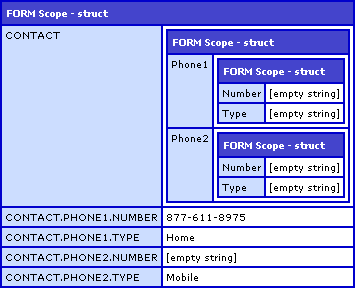
As you can see, the form field names contain the full struct paths. This doesn't help us as they are still flat text values, not actual ColdFusion structures. The remedy for this is easy. All we have to do is put a little bit of code in our Application.cfc/cfm that checks for FORM scope values and cleans them up:
<!---
	Check to see if the FORM scope is empty. If it is
	not empty, then we have a form submission that we
	might have to clean.
--->
<cfif NOT StructIsEmpty( FORM )>

	<!---
		Loop over the form keys. We are looking for
		keys that contain a period which would denote
		an embedded structure.
	--->
	<cfloop
		item="Key"
		collection="#FORM#">

		<!--- Check for struct notation. --->
		<cfif Find( ".", Key )>

			<!--- Get the value of the form field. --->
			<cfset Value = FORM[ Key ] />

			<!---
				Delete the key from the form. Remember,
				we don't really want this key, we want
				the structure that it represents.
			--->
			<cfset StructDelete( FORM, Key ) />

			<!---
				Now, we want to param the structure/value
				within the FORM. Since ColdFusion can store
				data into dynamic variable names, all we
				have to do is refer to the same exact value
				using dot notation rather than struct notation.

				For example, the key, "contact.phone1.type",
				the "FORM.#Key#" would become:

				FORM.contact.phone1.type

				Since ColdFusoin will create nested structs
				if they don't exist, this will create both
				the Contact and Phone1 struct into which it
				will then store the Type value from the
				submitted form field.
			--->
			<cfset "FORM.#Key#" = Value />

		</cfif>

	</cfloop>

</cfif>
There's really not a lot going on in this code. If there are any values in the FORM scope, the algorithm loops over them looking for FORM keys that have periods in them. Assuming that these periods stand for ColdFusion structure notation, the algorithm deletes them from the FORM scope as they are, but then saves them right back in using dynamic variable name. The real magic is in this line:
<cfset "FORM.#Key#" = Value />
ColdFusion allows for us to use dynamic variable names in such a way that we can use the FORM key:
"CONTACT.PHONE1.NUMBER"
... to create a dynamic variable name:
"FORM.CONTACT.PHONE1.NUMBER"
Into which will store the deleted FORM value. Now, since ColdFusion will create nested structs that do not yet exist (a feature which I usually feel is very bad form to use), it will recreate the submitted Contact struct data into a FORM-scoped Contact struct:
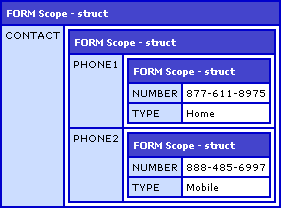
Pretty easy hack. The only thing that is strange is that the FieldNames key that gets passed through with the form submission has all the large field names (removed prior to CFDump for better display). Of course, if you actually use the FieldNames key, you should probably re-think the way you are performing your actions.
At first, I was concerned that the dot notation within the form field names would break things like the Label tag functionality or DOM traversing. However, since pretty much anything in Javascript can use quoted names and IDs, then all you have to do is be a little bit more careful about how you refer to DOM values and everything should work just fine.
Want to use code from this post? Check out the license.

Reader Comments
Dude - even your banners are X rated . . . "ColdFusion 8 - playing with it feels so good" :->
Nice technique. I'd also run into this issue but hadn't thought to write the code to parse form variables for periods. Nice!
@Pete,
Glad to help out.
And, try not to read too much into those ads... I am just saying ColdFusion 8 is really awesome, nothing more ;)
Well, I didn't think you were starting an escort business, but on the other hand the rather fetching lady in the left hand corner of the ad suggested that the performance boosts provided by CF8 might not go to waste . . .
This technique is awesome, for master-details interfaces it simply rocks...
Using a bit of javascript it's really easy to add order rows, affecting the name of the form inputs in it so it matches this naming convention then submit the whole thing just to loop over rows server-side.
BTW, your blog is the best I've ever seen on CF... it's almost a must-read for anyone in the CF business.
...even the ads are cool... ;)
@Patrick,
Thanks a lot for the very kind words. Always glad to help :)
Here is an updated version that returns an array for, say, the order lines of an order.
I basically use your code to get some structures created, then I loop over the FORM collection to check which struct element is a struct itself, then convert it to an array.
We do it 3 levels deep: order.orderlines.(qty,itemID,etc)
I haven't found a way to do it in one cfloop pass... :(
<cfloop item="key" collection="#formData#">
<cfif Find( ".", key )>
<cfset Value = formData[ key ] />
<cfset StructDelete( formData, key ) />
<cfset "formData.#Key#" = Value />
</cfif>
</cfloop>
<cfloop item="key" collection="#formData#">
<cfif isStruct(formData[Key])>
<cfset newArray = StructKeyArray(formData[Key])>
<cfloop from="1" to="#arrayLen(newArray)#" index="i">
<cfset newArray[i] = evaluate("formData[Key].#newArray[i]#")>
</cfloop>
<cfset StructDelete( formData, Key ) />
<cfset "formData.#Key#" = newArray />
</cfif>
</cfloop>
@Patrick,
That looks cool. Don't worry about trying to do it all in one pass - you need to build up your struct to get the array of keys first, so I don't even think one pass would be possible.
Ben,
I've encountered this issue myself and I have tested a solution using wddx packets. I use wddx to transform the struct and then put that into a form variable. Then on the form action page I transform the wddx package back into a struct. This has worked well for multiple nested structs.
Have you seen this? Or encountered any issues with this.
-RRS
@Rudi,
I have not played around with form-based WDDX at all. Sounds like an interesting approach. My only problem with it is that I am not sure it is as intuitive as just using dot-notation.
Awesome! I combined this lesson with the one about using the Cf 9 multi file uploader (http://www.coldfusionjedi.com/index.cfm/2009/11/20/Quick-example-of-jQueryColdFusion-9-multifile-uploader) to create a photo gallery uploader. It was exactly what I needed.
You is genius. This working automatically in railo, but not working in coldfusion 9. thanks!