
Ask Ben: Hiding / Encrypting ColdFusion CFID And CFTOKEN Values
It appears that ColdFusion sets a JSESSIONID cookie for you. However, our pages all use SSL (https) for security. XXXX XXXXX, where I work, is now submitting our code to WebInspect for security vulnerabilities. The one problem that I haven't been able to resolve is that this JSESSIONID cookie is not secure. How do I make it secure? (Hope that explains the problem.) I'm a web developer, but I don't have a highly technical background, so I need a solution that is relatively easy to understand and implement.
I have never had to deal with a problem like this, nor do I use any JSESSIONID stuff explicitly, so this might not be the best answer. It seems to me, however, that the easiest way to deal with this security issue is to simply not set client cookies. Ok, that's a little bit easier said than done since ColdFusion uses the CFID and CFTOKEN values stored in the COOKIE scope to maintain user sessions.
ColdFusion allows you to pass in the CFID and CFTOKEN values via the URL/FORM scopes if you are not using cookies (these are two of the scopes ColdFusion will search for unscoped variable names), but from what it sounds like, using this methodology would be considered just as, if not more insecure than the JSESSIONID cookie.
So, if we can't store CFID and CFTOKEN values in the cookie and we cannot pass the CFID and CFTOKEN through the URL / FORM scopes, what do we have left? A compromise: encrypting the CFID and CFTOKEN values in a cookie and then manually associating subsequent page requests with the encrypted cookie values. Since we will be encrypting the CFID and CFTOKEN values, we cannot rely on ColdFusion to automatically associate each subsequent page request with the initial user session. This means that for every page request, we have to manually take the encrypted cookie values, decrypt them, and then store them into the COOKIE scope (and in such a way that the cookies will NOT get stored in the browser).
For this demo, we are going to have two pages, the Application.cfc and the index.cfm. The index page just outputs a hit count (the number of page requests the user has made):
<html>
<head>
	<title>Hide ColdFusion CFID / CFTOKEN Demonstration</title>
</head>
<body>

	<cfoutput>

		<p>
			Hit count: #SESSION.HitCount#
		</p>

	</cfoutput>

</body>
</html>
As you can see, nothing much going on here.
The real magic happens in the Application.cfc. Before we look at the code, it is important to understand how Application.cfc (and every other ColdFusion component) is executed. Within the ColdFusion component body (inside of the CFComponent tags), there are the functions (CFFunction tags) and the code that exists outside of the functions. The code that exists outside of the functions is executed just once at the time of component instantiation. The code inside of the functions, obviously, only gets executed when the methods of the component are invoked. This is really important to understand because, in the context of the Application.cfc ColdFusion component, it is gives us the ability to set application / session information at the time of instantiation (for each page request) before any of the application-level event methods are invoked.
That being said, let's take a look at the code:
<cfcomponent>

	<!---
		Define the application. Notice that we have turned
		ON the session management, but we are NOT writing the
		session cookies to the browser.
	--->
	<cfset THIS.Name = "HideCFIDApp" />
	<cfset THIS.ApplicationTimeout = CreateTimeSpan( 0, 0, 5, 0 ) />
	<cfset THIS.SessionManagement = true />
	<cfset THIS.SessionTimeout = CreateTimeSpan( 0, 0, 5, 0 ) />
	<cfset THIS.SetClientCookies = false />

	<!--- Set page settings. --->
	<cfsetting
		showdebugoutput="false"
		/>


	<!---
		NOTE: The code we are about to run below this comment
		but BEFORE the first CFFunction tag is known as the
		pseudo constructor (technically includes the code above
		as well). This code will run as part of the
		Application.cfc initialization and will run before any
		of the other methods are evaluated. Therefore, we can
		do stuff in this code (such as turn on or affect
		session management) that will affect the way the
		application invokes the functions that succeed it.
	--->


	<!---
		Check to see if the encrypted ID is availabe in
		the cookie scope. If so, we are going to grab it and
		use it to set the current session information.
	--->
	<cfif StructKeyExists( COOKIE, "ID" )>

		<!--- Decrypt the values. --->
		<cfset THIS.DecryptedID = Decrypt(
			COOKIE.ID,
			"nice-butt!",
			"CFMX_COMPAT",
			"HEX"
			) />

		<!---
			Set the decrypted CFID and CFTOKEN values into
			the COOKIE and scope. We don't need to worry about
			storing the CFID / CFTOKEN into the SESSION scope
			because once ColdFusion hooks up the association,
			they should already be there.

			When storing the CFID and CFTOKEN into the cookies,
			be sure to tell the cookie that it expires right
			now so that this cookie does not get stored to the
			user's browser as a session cookie (expires when
			user closes the browser).
		--->
		<cfcookie
			name="CFID"
			value="#ListFirst( THIS.DecryptedID )#"
			expires="NOW"
			/>

		<cfcookie
			name="CFTOKEN"
			value="#ListRest( THIS.DecryptedID )#"
			expires="NOW"
			/>

	</cfif>


	<!---
		NOTE: The pseudo-constructor code is done. The functions
		below this are hooks into the application-level events.
	--->


	<cffunction
		name="OnSessionStart"
		access="public"
		returntype="void"
		output="false"
		hint="Runs when the session starts.">

		<!--- Define the local scope. --->
		<cfset var LOCAL = StructNew() />

		<!---
			Instead of writing the CFID and CFTOKEN as plain
			text cookies, we are going to write an encrypted
			ID based on both the CFID and CFTOKEN.
		--->

		<!---
			Create the CFID/CFTOKEN string and then encrypt it
			using the default CFMX encryption such that we end
			up with a HEX value string.
		--->
		<cfset LOCAL.EncryptedID = Encrypt(
			"#SESSION.CFID#,#SESSION.CFTOKEN#",
			"nice-butt!",
			"CFMX_COMPAT",
			"HEX"
			) />

		<!--- Set this encrypted cookie. --->
		<cfcookie
			name="ID"
			value="#LOCAL.EncryptedID#"
			expires="NEVER"
			/>


		<!--- Initialize some session variables. --->
		<cfset SESSION.HitCount = 0 />

		<!--- Return out. --->
		<cfreturn />
	</cffunction>


	<cffunction
		name="OnRequestStart"
		access="public"
		returntype="boolean"
		output="false"
		hint="Fires when a page is requested.">

		<!--- Define arguments. --->
		<cfargument
			name="Template"
			type="string"
			required="true"
			/>

		<!--- Increase the Hit count. --->
		<cfset SESSION.HitCount = (SESSION.HitCount + 1) />

		<!--- Return out. --->
		<cfreturn true />
	</cffunction>

</cfcomponent>
Notice that we have session management enabled in this application, but we have disabled client cookies. This prevents the CFID and CFTOKEN values from been sent to the browser. Then, in the OnSessionStart() event method, we are combining the CFID and CFTOKEN into a string, encrypting it with a secret key, and then setting that as a cookie in the browser. Since it is encrypted, this is theoretically much more secure than the previously readable CFID and CFTOKEN values. This will take care of the first page request by a given user, but not subsequent requests.
For subsequent page requests, in the Application.cfc pseudo constructor (code outside of the CFFunction tags), we are checking the COOKIE scope to see if the encrypted ID exists. If it does, we are decrypting it and using it to store the CFID and CFTOKEN values back into the COOKIE scope. Notice that when we store the session cookies, we are setting the cookie expiration to NOW. This will allow ColdFusion to use the cookie session data for the duration of the page request but will prevent the cookie data from being written to the browser.
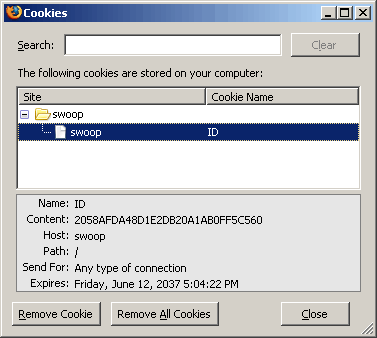
This is not an elegant solution - elegant is using standard ColdFusion session cookies - but if security is an issue, this gives you total control over how the session information can be viewed. And, if you look at my FireFox cookies, you will see that the only thing I can see is the encrypted CFID/CFTOKEN string:
Running the above index page a few times, I get the following output:
Hit count: 1
Hit count: 2
Hit count: 3
Works like a charm. Now, I have never worked with JSESSIONID values, only CFID / CFTOKEN. I assume that it works in a similar way, but forgive me if I am way off base on that point.
Want to use code from this post? Check out the license.

Reader Comments
A few suggestions for your example...
Encrypting your cookies is a good idea but why use the weak CFMX_COMPAT encryption when you can use something stronger such as AES encryptions in CF7 (which I'm assuming you have since your using an Application.cfc). See my blog entry here for the pro's and cons of each encryption algorithm choice: http://www.petefreitag.com/item/222.cfm
Also you probably want to add secure="true" to the cfcookie attribute, which will prevent the browser from sending the cookie over an unsecured connection.
@Pete,
Honestly, I know just a little bit more than nothing about encryption :) I use CFMX_COMPAT because it is the default CF encryption algorithm and I need to supply an algorithm in order to get to the fourth argument - charset - to set that I want HEX encryption. I like HEX :)
Your post looks good. I will check it out to get a better understanding as to what the different algorithms do.
As far as a secure connection, 1) I didn't even know you could set that as an attribute and 2) I am not sure that that can be used in conjunction with what ever the user was asking me (some auto-bot that checks security). That's a neat little attribute though, and can be super useful. Thanks!
My company has a similar setup: SSL/J2EE Sessions, and we don't have any cookie problems.
On the CF Admin (We are using v7.02), in the "Server Settings > Client Variables " section, Under the "Select Default Storage Mechanism for Client Sessions" section, select "None".
This will create a "session cookie" that is not physically stored on the users machine.
We used this method for security purposes (we were audited by our clients to a financial-grade security level), so that we didn't leave a footprint on the users machine, and so the users session would automatically die when the user closes their browser.
If you want, you can email me at davidmartinomalley AT yahoo for more information.
Cheers,
David
@Dave,
I don't much about the Admin when it comes to setting up session storage. However, I was under the impression that "session cookies" still get stored on the client machine. Maybe they still show up in FireFox, but not on the file server? I will have to check that out. Thanks for the tip.
Also, I can't remember offhand, but if you do CFCookie and leave a blank Expires attribute, doesn't this also create a "session cookie"?
Ben,
Yeah, I'm not sure about CFCookie - I always assumed that would save a cookie to file storage, and reading the CFML reference supports that assumption for me (unless I'm reading it wrong).
Maybe it's just me, but if I was asked to create a web app with a high level of security, I would not be using CFCOOKIE in any way shape or form.
I'm not sure what you mean by "Maybe they still show up in FireFox" - is there a way to track cookies in Firefox that I don't know about? My company has tested Firefox also, and confirmed that no footprint is left on the user machine when using our site.
I hope I've helped some, like I said, if I need to clarify more, please reply.
Cheers,
David
Maybe I can clear up the confusion a bit.
When you set a cookie with <cfcookie> and you do not include the "expires" attribute, then this will create a "session" cookie stored in browser memory while the browser window is open. As soon as the browser is closed, the cookie will not be persisted to the file system so it is gone.
You can however still see these "session" cookie values in Firefox, click "tools" > "options" > "privacy" > "show cookies". When you click on the cookie the expires value is listed as "at end of session"
From a security perspective I don't think having a cookie stored on the client system is in any way a security risk in itself, it just depends what you store in the cookie.
If the information is benign like the user's email address but not the password then it doesn't reveal anything significant. If you encrypt that data with AES like Pete mentioned there is very little chance of even raising a red flag.
As for myself I also use a form of protecting the CFID/CFTOKEN that adds a nice little twist to think about.
What I do is take a hash of the CFID+CFTOKEN+HTTP_USER_AGENT and pass that as part of the original token value. This gives me an easy way to test if the value has been tampered with and also invalidates the token if it is used by another web browser. That is important because I make my web applications work even when cookies are disabled. So in those cases the token is appended to all of the URLs, which can sometimes be scooped up by caches, spiders or sent in emails from one user to another.
Cheers,
Jordan
Hope that helps,
Jordan
I just did a test and what Jordan says is correct. A "session only" does not get committed to the file system. I checked this in IE (I don't know where FireFox actually stores the cookie txt files) and indeed IE's cookie folder is empty. However, you can still view the cookie information using FireFox's security information.
Ben/Jordan - that does indeed help. Thanks.
A nice tool that you can use to see exactly what's happening with a request in firefox is Live HTTP Headers.
http://livehttpheaders.mozdev.org/
And as far as cookie storage for FF on windows try looking at the following
C:\Documents and Settings\<user>\Application Data\Mozilla\Firefox\Profiles\<profile directory>\cookies.txt
Ben, no one has mentioned another option that your reader(s) may want to consider, when concerned about the security (relative insecurity) of CFID/CFTOKEN. It's not quite what he was looking for, but it is indeed true that they're both really short values which could be rather easily guessed by a bot (to find a valid session on a server).
But one quick solution to this is a feature added in CFMX 6: in the Admin, you can choose to set CFTOKEN as a UUID. That doesn't give your reader the encryption they sought, but it does at least make it a very complex 35-character long string (combination of letters and numbers). That's a lot harder to guess and would take a bot a LOT longer to try all possible combinations with CFID. Hope that's helpful.
@Charlie,
I was not aware of that. I didn't know you could just change the session ID like that. I have heard of the jsessionid stuff, but I also know very little about that and have never used it.
[shameless plug] Charlie, is this the kind of stuff that you teach in your one day intensive "Hidden Gems" class that covers the dozens of CF6 and CF7 features that people are not aware of ;)
Thanks, Ben. Why, yes it is. :-) I presented it at CFUnited and am thinking of offering it as an online class. People often are amazed to learn of new things (and there are over a hundred) that came in 6, 6.1, 7, 7.01, and 7.02. I list them all.
But I will say that most (though not all) of it is also out on the web. It's just that people may not have been paying attention to the new features at the time (and maybe never noticed them since).
For instance, I wrote about both the J2EE sessions (jsessionid) stuff and the CFOKEN as UUID in an Aug 2002 CFDJ article at http://cfdj.sys-con.com/read/41646.htm.
If anyone's interested in hearing more about the class, drop me a note at charlie at carehart.org.
@Charlie,
Yeah, its probably all out there on the net, but like the product manager at the CFUNITED FAQ session said, when it's all said and done, the online documentation for ColdFusion is over 4,000 pages. So, yeah, it's out there, but sometimes it takes a well thought out class to really bring it together for people.
For example, I only recently found out about the HtmlEditFormat() method. In my documentation it has no "History" entry, so I assume it was either there from the start or there since MX7?? Either way, what are the best practices? When do people use this?... knowing about a hidden gem is not just knowing that it is there, but understanding how to apply it. And, when it comes to how/why to apply it, I find that the CF documentation really falls short on that.
Thanks again for the indirect plug. I couldn't agree with you more about the value of having someone guide you through the rich waters of CF. :-) Of course, all your readers will gladly thank you for the many, many tours you yourself have been offering on your blog here.
Now, as for HTMLEditFormat, it's indeed an old function, and a powerful one (along with HTMLCodeFormat). Each has their place. As for best practices using such things, well, this is really starting to get far afield from the blog entry above. I have simply regarded it as one of the many, many tools in CF. One uses it when they need it. I really can't think of pros or cons regarding it (though some may exist). Hope that helps.
I am an unexperienced web developer and was wondering if you could clarify the following. I am setting up a site which uses jsessionid. I am not planning on using cookies, but if I do then they will only store information that does not need to be secured ( for example, whether the user prefers 20 or 30 or 40 rows in his results pages) This being the case, do I need to take any further steps or is my site secure enough (with regard to sessions) just be virtue of the fact that I am using jsessionid. Do I need for example to encrypt my cookies or do I need to select none in CF Admin for "Select Default Storage Mechanism for Client Sessions"
Thanks
I know this is an old post but I've just come across this and I'll throw in my 2 cents as to what I think is the solution.
I'm assuming that the original Q was about predictable cookies. I just had pci scan done using "new & improved" scanning (thx TJX) with the results:
"Description: The remote web application is using predictable cookie-based session IDs. Ideally, session IDs are randomly generated numbers that cannot be guessed by attackers. If the session ID is predictable, an attacker could hijack an active victim's session, allowing the attacker to interact with the server as though they were the victim. If the session ID is used to track the state of authentication, the session ID of an authenticated user could be guessed, bypassing any need for a username or password. In the case of this server, the session ID was found to have an insignificant number of changes between session IDs, which makes guessing very easy.
Remediation: The software needs to be either configured or modified to generate random session IDs."
Prior to the scan I had set my server to use J2EE session variables. I was suprised to be flagged for this as I was under the impression that J2EE Variables -are- secure and a quick double check at owasp confirms this
OWASP says "Best practice calls for J2EE session management. In the event that only ColdFusion session management is available, strong security identifiers must be used. Enable this setting to change the default 8-character CFToken security token string to a UUID."
http://www.owasp.org/index.php/Configuration
I also had set cftoken to use UUID previously to using J2EE sessions so that was still enabled. What I did -not- do was change my cfapplication tag params to
clientmanagement="no"
setclientcookies="no"
I was -pretty sure- that once Use J2EE Variables was set the ID/Token pair was ignored but even though CF was using the secure J2EE variable, cftoken and CFID were being set.
I believe the reason for the PCI flag is that the scan (at least the one from the service we use) was looking at CFID alone. I assume this because cftoken -was- set to use uuid so it should have been secure. The scan probably doesn't know that cfid and cftoken are used in conjunction. So in a way this is a false positive. Based on the new standards coming in it is enough to be out of compliance.
I'm guessing the asker of the original question was fooled into thinking that the J2EE variable was insecure by this as well.
So the solution to be in compliance is to set clientmanagement="no" and setclientcookies="no" so that cfid and cftoken are not set at all By using only the jsessionid, you are following best practices from OWASP and also get the benefits of session end on browser close
I would like to second JayB's comment on being PCI Compliant. We were getting caught on our CFID cookies.
To use jsession we and not set cfid:
-enabled j2ee sessions in the administrator
-in application.cfc set this.clientManagement = false
-in application.cfc set this.setClientCookies = false
Now it only sets jsessionid, which is encrypted
In response to the original question, you can set a secure-attribute JSESSIONID cookie (meaning the cookie is only sent when using SSL) by adding the following line to C:\JRun4\servers\yourservername\cfusion-ear\cfusion-war\WEB-INF\jrun-web.xml.
Put this after the </persistence-config> element.
<cookie-config>
<cookie-secure>true</cookie-secure>
</cookie-config>
This answer cost us $500 after speaking to Adobe Tech Support. It turns out that this is documented on http://livedocs.adobe.com/jrun/4/Programmers_Guide/techniques_servlet13.htm
This page also has a lot of other useful JRun info.
I have read a number of your posts and they are quite good including this one. However there is a scenario that I have been thinking about that I cannot resolve. Imagine a user is at a public computer and they don't really know anything about clearing the history or cookies etc. I can already delete the client side cookies easy enough, but what about the browser history? My testing in Firefox leaves a fully valid web url in the history complete with the CFID and CFTOKEN values intact. Without logging in, another person within the 20 minute time limit can have the previous user's access. Granted they would have to append the CFID and CFTOKEN to each request so it would dent the attack but it is still not ideal. Have you run across any way around that scenario?
I apologize if this should be in the programming question forum.
My apologies for wasting this list's time. My coworker hit me over the head with the proverbial dummy hammer. "addtoken='no'"
@Dan,
No worries - glad you got it worked out.
Ben, you are a lifesaver! What a clever solution!
I too had the PCI-compliance nonsense, and I think this will take care of it. I did make a few changes, for my purposes:
1) Used AES encryption because the CFMX_COMPAT yielded strings with a lot of similar characters every time (so they might not have _looked_ very random to the PCI-compliance bot). Had some trouble with that: the trick is to output GenerateSecretKey somewhere and copy-and-paste it as the key in both encrypt and decrypt.
2) If someone monkeys with the cookie, the Decrypt function will either fail (if using AES algorithm) or return a blank string. I check it with cfTry-cfcatch in case it fails. Your code above magically takes care of blank strings so in cfcatch you can just set it blank.
Again, thanks for sharing your ideas!
I just went through PCI compliance with a web site. The site is using UUID for CFToken yet was failing PCI compliance tests from securitymetrics.com.
I sent them an email with a link to an Adobe Tech note explaining that CFID and CFTOKEN are always used together to identify a session and that UUIDs in the cftoken variable are randomly generated. Security Metrics was nice enough to then give the site a passing grade.
I spent a lot of time pondering everyone's comments on this blog post.
@Chuck,
I tend to use the CFMX_COMPAT algorithm simply because it is the one that is used by default (and from what I'm told, the weakest). Really, the only time I ever explicitly set it is when I just want to get to the next argument in the Encrypt / Decrypt methods - the Encoding (which I generally select as HEX).
Sounds like you got a good thing going over there.
@Joel,
Glad they let that through!
I enjoyed this post and hope it solves my own PCI compliance issues with random session ID's. If not, then I'll try Joel's solution and email security metrics and hope for the best.
Thanks for the post Ben!
@Pedro,
Good luck. I've also heard that using J2EE session tokens helps with PCI compliance (although I have no experience with them).
@ben
Yes, using J2EE session vars helped, along with using UUID for CFTokens, setting client management and set client cookies to false in application.cfc, setting default storage mechanism to "none" in the administrator and having an SSL ticket ...
All that was just for the website. We also had to change several settings on our server as well. Long story short, hours and hours of coding and research, several calls to hosting.com and enough coffee to kill a small horse and we finally passed.
Would have saved myself a lot of time had I found this blog post sooner!
@Pedro,
Sounds like an adventure! Glad I was able to provide some help on some of it at least.
This may be slightly off-topic but I got here looking for help with HTMLEditFormat, which is mentioned here.
I'm using HTMLEditFormat to encode some strings passed in hidden form fields - but before I write the data to a table field I would like to remove the encoding in order to store the raw text. It seems unlikely but I can't find an inverse function to HTMLEditFormat - does such a thing exist?
I have been doing the CFid, CFToken, jsessionid, cookies, etc dance lately myself. I noticed that if SessionManagemnent="Y" and SetClientCookies="NO", it creates an in-memory cookie and it does not write to the Cookie or Temp directories on teh hard drive. But if you use IE Developer Toolbar to read cookies, it will write the cookie to the Temp directory. And it stays there until the browser is closed.
@Mike,
After your form fields get re-submitted, they should be in a non-escaped format... I think. I could be wrong.
@John,
By default, ColdFusion stores a cookies that Never expires. By turning off cookie management and then setting the cookies ourselves without any Expires attribute, what we're creating is known as a "session cookie". This is a cookie that exists only for the duration of the browser and will expire automatically when the browser is closed.
Great post Ben.
I have been struggling with this for quite sometime. I disagree that jsessionID is secure. In testing my application I have chrome open and log in as an admin and have firefox open and log in as a limited admin. Go into the content settings of Chrome view the cookies that have been set for my website. copy the value of the jsessionID go over to firefox pop open firebug and go to my Cookies tab. Edit the firefox jsession cookie value and paste in the admin's jsessionID from chrome. Refresh the page and it gives me the admin's session.
Granted this scenario makes the assumption that the malicious user can guess/obtain a valid jsessionID. However, this does seem to me that it would be a major concern that @jayB may not have tested for.
I will try to implement your solution with my own ID cookie and see if that prevents the session from being hijacked in this same fashion.
Thanks,
Tim
I tested it using your example as a model and was able to hijack a valid session. Once again this is based on the assumption that a user can (possibly) guess (using UUID for tokens as @carehart said makes this more difficult, but still possible ) and/or obtain your secret value in the cookie.ID through physical access to the computer (public computer) it is fairly simple to spoof the session. This only allows the hijacking of active sessions. If the victim logs out the hijacker is also logged out therefore locking them out. However, since you have set your ID cookie to never expire rather than to be a session variable the next time the victim logs back in the hijacker's session will be re-enabled.
With all of this said I think that your solution will work for me with the omission of the expires attribute to ensure the unique ID is only valid for the duration of the browser session.
Any thoughts and comments would be much appreciated.
@Tim,
Every single time I go to encrypt a cookie, I tend to use a different approach :) One of the newest things I've been playing with is creating a small struct that has the user's ID, their IP address, the date the session was created in mm/dd/yy format, and the numeric date equivalent. Then, I take that struct, serialize it as JSON, and encrypt it as a HEX cookie value.
Then, when the user makes the request, I can decrypt, deserialize the JSON into a struct, and compare the values:
- Do the incoming IP addresses match.
- Does the mm/dd/yy date match the numeric date.
The reason I go about this is that it makes the encrypted value really hard to play with. Change any character and the decryption will likely not lead to valid JSON which will not be able to be deserialized properly (invalidating the current session).
My latest approach is more "fun" than anything else; but, including IP address and/or user-agent is probably a good idea, perhaps as part of the encryption key. This way, switching browsers or IP addresses will invalidate the cookie.
Apparently, this can cause issues with AOL customers who's IP address can change mid-session... but, that's a risk I'm willing to take ;)
Hi Ben,
I've been using a design based on yours to encrypt my CFID and CFTOKEN values for added security, however, it always bugged me that Coldfusion still sends the CFID and CFTOKEN to the client in the Set-Cookie HTTP header. I know they are session-only cookies that don't get written to the file system... but with a separate encrypted cookie that stores their values, they just don't need to be sent in the first place. Plus: apparently their presence can cause you to fail PCI compliance. :)
I found that if you set the CFID and CFTOKEN values in the FORM or URL scope instead of the Cookie scope, Coldfusion picks them up from there and hooks the session successfully. And since they're not present in the Cookie scope, they do not get sent to the client.
So where you have
you could alternatively use
That will prevent Coldfusion from setting the CFID and CFTOKEN cookies at all. Less information for those dirty session hijackers. :)
Thanks Ben for your work; I use your site all the time!
Hey Ben,
I have been trying to do the same thing with jsessionid, but decrypting and setting jsessionid to either url or cookie doesn't work. CF always generates a new jsessionid. What's weird is if I simply pass it in the url it works just fine.
What I want to do is encrypt the session.urltoken and pass to an external domain, then the external domain pings us back with that token to check if the user is logged in before it displays any content.
Thanks,
Sumit
thanks fro the great code
Respectfully, I think some are missing the point, or the question. The developer that asked the original question just needs to make his cookie secure. I used webinspect and had the exact same issue. What they are saying is that the cookie should be sent via https(since he's on an https site) not that it needs its values encrypted. If I can intercept your cookie and target the site in question, it really doesn't matter that you encrypted the token or not. When I save the cookie in my browser and hit your web page you will simply decrypt it for me and Ill still hijack your session. I don't care if the cfid is 1104, a uuid, or some encrypted mumbo jumbo as long as I know its what YOU USE to maintain session. Ill use it too and jack your session. You dig it?
I tried this and it works nicely on CF 9 server, but doesn't work on a CF 8 server. If I do any kind of assignment to CFID/CFTOKEN, ColdFusion creates new session. Admin settings are the same on both servers.
Any clue, why this might be happening?