
Earlier today, I talked about helping someone grab HTML form data and then resubmitting it with the existing form data. As an introduction to that, I talked about taking an HTML tag and parsing it into a ColdFusion structure. Now, we are going to build on that and actually grab the forms out of a page, parse the inputs, and resubmit the data with a combination of existing form fields and our own form field data. This demo does not cover all aspects of form scrapping, nor does it cover maintaining sessions across CFHttp calls, but it should be sufficient to give some direction.
Just a reminder from the previous post, we are going to use the ColdFusion user defined function, ParseHTMLTag(), to take HTML tag data and create a ColdFusion structure:
<cffunction
	name="ParseHTMLTag"
	access="public"
	returntype="struct"
	output="false"
	hint="Parses the given HTML tag into a ColdFusion struct.">

	<!--- Define arguments. --->
	<cfargument
		name="HTML"
		type="string"
		required="true"
		hint="The raw HTML for the tag."
		/>

	<!--- Define the local scope. --->
	<cfset var LOCAL = StructNew() />

	<!--- Create a structure for the taget tag data. --->
	<cfset LOCAL.Tag = StructNew() />

	<!--- Store the raw HTML into the tag. --->
	<cfset LOCAL.Tag.HTML = ARGUMENTS.HTML />

	<!--- Set a default name. --->
	<cfset LOCAL.Tag.Name = "" />

	<!---
		Create an structure for the attributes. Each
		attribute will be stored by it's name.
	--->
	<cfset LOCAL.Tag.Attributes = StructNew() />


	<!---
		Create a pattern to find the tag name. While it
		might seem overkill to create a pattern just to
		find the name, I find it easier than dealing with
		token / list delimiters.
	--->
	<cfset LOCAL.NamePattern = CreateObject(
		"java",
		"java.util.regex.Pattern"
		).Compile(
			"^<(\w+)"
			)
		/>

	<!--- Get the matcher for this pattern. --->
	<cfset LOCAL.NameMatcher = LOCAL.NamePattern.Matcher(
		ARGUMENTS.HTML
		) />

	<!---
		Check to see if we found the tag. We know there
		can only be ONE tag name, so using an IF statement
		rather than a conditional loop will help save us
		processing time.
	--->
	<cfif LOCAL.NameMatcher.Find()>

		<!--- Store the tag name in all upper case. --->
		<cfset LOCAL.Tag.Name = UCase(
			LOCAL.NameMatcher.Group( 1 )
			) />

	</cfif>


	<!---
		Now that we have a tag name, let's find the
		attributes of the tag. Remember, attributes may
		or may not have quotes around their values. Also,
		some attributes (while not XHTML compliant) might
		not even have a value associated with it (ex.
		disabled, readonly).
	--->
	<cfset LOCAL.AttributePattern = CreateObject(
		"java",
		"java.util.regex.Pattern"
		).Compile(
			"\s+(\w+)(?:\s*=\s*(""[^""]*""|[^\s>]*))?"
			)
		/>

	<!--- Get the matcher for the attribute pattern. --->
	<cfset LOCAL.AttributeMatcher = LOCAL.AttributePattern.Matcher(
		ARGUMENTS.HTML
		) />


	<!---
		Keep looping over the attributes while we
		have more to match.
	--->
	<cfloop condition="LOCAL.AttributeMatcher.Find()">

		<!--- Grab the attribute name. --->
		<cfset LOCAL.Name = LOCAL.AttributeMatcher.Group( 1 ) />

		<!---
			Create an entry for the attribute in our attributes
			structure. By default, just set it the empty string.
			For attributes that do not have a name, we are just
			going to have to store this empty string.
		--->
		<cfset LOCAL.Tag.Attributes[ LOCAL.Name ] = "" />

		<!---
			Get the attribute value. Save this into a scoped
			variable because this might return a NULL value
			(if the group in our name-value pattern failed
			to match).
		--->
		<cfset LOCAL.Value = LOCAL.AttributeMatcher.Group( 2 ) />

		<!---
			Check to see if we still have the value. If the
			group failed to match then the above would have
			returned NULL and destroyed our variable.
		--->
		<cfif StructKeyExists( LOCAL, "Value" )>

			<!---
				We found the attribute. Now, just remove any
				leading or trailing quotes. This way, our values
				will be consistent if the tag used quoted or
				non-quoted attributes.
			--->
			<cfset LOCAL.Value = LOCAL.Value.ReplaceAll(
				"^""|""$",
				""
				) />

			<!---
				Store the value into the attribute entry back
				into our attributes structure (overwriting the
				default empty string).
			--->
			<cfset LOCAL.Tag.Attributes[ LOCAL.Name ] = LOCAL.Value />

		</cfif>

	</cfloop>


	<!--- Return the tag. --->
	<cfreturn LOCAL.Tag />
</cffunction>
Now, we are going to use that function from within a new ColdFusion user defined function, GetPageForms(). This function will iterate over the Forms in a target page (given the URL or its actual HTML content) and will parse each form into a ColdFusion structure then return each form object in an array:
<cffunction
	name="GetPageForms"
	access="public"
	returntype="array"
	output="false"
	hint="Takes a URL or page content and parsed the forms and form fields.">

	<!--- Define arguments. --->
	<cfargument
		name="HTML"
		type="string"
		required="true"
		hint="Page HTML or URL to page with the target HTML."
		/>

	<!--- Define the local scope. --->
	<cfset var LOCAL = StructNew() />


	<!---
		Check to see if we are dealing with page content or
		a target url. For our purposes, if the text is a valid
		URL then we are going to assume that this is NOT the
		page data.
	--->
	<cfif IsValid( "url", ARGUMENTS.HTML )>

		<!--- We are going to grab the URL file content. --->
		<cfhttp
			url="#ARGUMENTS.HTML#"
			method="get"
			useragent="Mozilla/5.0 (Windows; U; Windows NT 5.1; en-US; rv:1.8.1.4) Gecko/20070515 Firefox/2.0.0.4"
			resolveurl="true"
			result="LOCAL.HttpGet">

			<!---
				Pass in the referrer. This is just to help
				ensure that we are served the proper page data.
			--->
			<cfhttpparam
				type="CGI"
				name="referer"
				value="#GetDirectoryFromPath( ARGUMENTS.HTML )#"
				/>

		</cfhttp>


		<!---
			Store the returned file content back into our
			HTML argument so that we can treat it uniformly
			going forward.
		--->
		<cfset ARGUMENTS.HTML = LOCAL.HttpGet.FileContent />

	</cfif>


	<!---
		ASSERT: At this point, whether we were given page
		content or a URL, we now have page HTML in our
		HTML argument. The HTML may not be valid (200 OK)
		response, or it might.
	--->


	<!---
		Create our return array to hold the form data.
		Each form found on the page will be a different
		index in this array.
	--->
	<cfset LOCAL.Forms = ArrayNew( 1 ) />


	<!---
		Create a pattern to search for the forms. This
		will start with the open form tag, then grab all
		the content before the close form tag, and then the
		close form tag.
	--->
	<cfset LOCAL.FormPattern = CreateObject(
		"java",
		"java.util.regex.Pattern"
		).Compile(
			<!--- Open form tag. --->
			"(?i)(<form" &

			<!--- Form tag attributes. --->
			"(?:\s+\w+(?:\s*=\s*(?:""[^""]*""|[^\s>]*))?)*" &

			<!--- Close bracket of form tag. --->
			"[^>]*>)" &

			<!---
				Form content. Here, we are doing a non greedy
				search for any chacacter until we match the
				close form tag.
			--->
			"([\w\W]*?)" &

			<!--- Close form tag. --->
			"</form[^>]*>"
			)
		/>

	<!--- Get the matcher for our form pattern. --->
	<cfset LOCAL.FormMatcher = LOCAL.FormPattern.Matcher(
		ARGUMENTS.HTML
		) />


	<!---
		Keep looping over the form matcher while there
		are forms to parse in the target HTML.
	--->
	<cfloop condition="LOCAL.FormMatcher.Find()">

		<!---
			Create a structure to store this form instance. We
			are going to capture the form tag information, the
			raw form content and the form inputs.
		--->
		<cfset LOCAL.Form = StructNew() />

		<!--- Create an array to capture the inputs. --->
		<cfset LOCAL.Form.Fields = ArrayNew( 1 ) />

		<!--- Parse the form tag data. --->
		<cfset LOCAL.Form.Tag = ParseHTMLTag(
			LOCAL.FormMatcher.Group( 1 )
			) />

		<!--- Store the raw content. --->
		<cfset LOCAL.Form.HTML = LOCAL.FormMatcher.Group() />


		<!---
			Now, let's find the inputs. These are not just the
			INPUT tags, but also textareas and select fields.
			Create a pattern to find the field tags. Now, the
			selects and the textareas are not going to have
			such nice name and value attributes (like hidden
			form fields do), but to keep this simple, I am just
			going to grab the open tags for these form fields.
		--->
		<cfset LOCAL.FieldPattern = CreateObject(
			"java",
			"java.util.regex.Pattern"
			).Compile(
				<!--- The tag name. --->
				"(?i)<(input|select|textarea)" &

				<!--- The tag attributes. --->
				"(?:\s+\w+(?:\s*=\s*(?:""[^""]*""|[^\s>]*))?)*" &

				<!--- The close tag. --->
				"[^>]*>"
				)
			/>

		<!--- Get the pattern matcher for the form fields. --->
		<cfset LOCAL.FieldMatcher = LOCAL.FieldPattern.Matcher(
			LOCAL.Form.HTML
			) />

		<!---
			Keep looping over the field matcher while there
			are inputs left to parse in the target form.
		--->
		<cfloop condition="LOCAL.FieldMatcher.Find()">

			<!---
				Add this input to the array. As we add
				this field entry, parse the HTML tag into a
				ColdFusion structure.
			--->
			<cfset ArrayAppend(
				LOCAL.Form.Fields,
				ParseHTMLTag(
					LOCAL.FieldMatcher.Group( 0 )
					)
				) />

		</cfloop>


		<!---
			Now that we have captured all the information
			about this form that we can, add this form to
			the results array.
		--->
		<cfset ArrayAppend( LOCAL.Forms, LOCAL.Form ) />

	</cfloop>


	<!--- Return the form data. --->
	<cfreturn LOCAL.Forms />
</cffunction>
There's a lot going on in that function. Basically, it creates patterns for both the form tags and the nested form field tags and then uses ParseHTMLTag() to parse each into a usable ColdFusion structure. The algorithm will parse Select and Textarea tags, but these are not as easy to use. For our purposes, in order to keep this demo as simple as possible, we are just going to grab the opening tag of the Select and Textarea inputs. As it turns out, this won't cause too many problems as we are going to demo this on a form that only has input fields and buttons.
And, for that demo, we are going to submit a keyword search on the Flickr.com homepage. To start off, let's just grab the forms off of Flickr.com using our GetPageForms() method. This method can take either a URL or actual HTML page content. Since we need to get the page content anyway, we might as well just send in the Flickr.com url:
<!---
	Let's get the form off of the Flickr.com homagepage.
	This should be the search form. We could do the CFHttp
	ourselves, but the GetPageForms() function will do this
	for us if we pass in a URL (instead of page content).
--->
<cfset arrForms = GetPageForms(
	"http://www.flickr.com/"
	) />


<!--- Dump out the Flickr.com form data. --->
<cfdump
	var="#arrForms#"
	label="Flickr.com Form Data"
	/>
When we run that, GetPageForms() is performing a CFHttp to get the Flickr.com page data. Then, it is parsing the resultant page content and will return an array of the Form objects on that page. Running that, we get the following CFDump output:
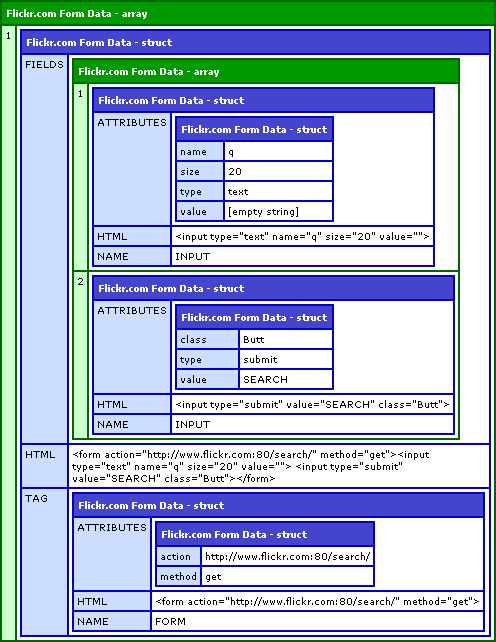
As you can see, the Flickr.com homepage search form is quite simple; it has the search button, the search criteria, and a small form tag. Now that we have that, we are going to mimic the form submission using ColdFusion's CFHttp tag. We have to be careful when doing this; the field we really care about is the "Q" field, for the search criteria. We don't want to end up submitting this twice, so when we mimic our form fields using CFHttpParam, we have to be careful to customize that one, rather than just echoing it back.
<!---
	Get the form that we are referring to. In theory, we could
	have multiple form here, but I know that it is the first
	one, so that is the one I am going to grab.
--->
<cfset objForm = arrForms[ 1 ] />


<!---
	Post the search request to Flickr.com. When we do this,
	we are going to post the fields that Flickr.com already
	has there, but instead of posting the search criteria,
	we are going to post that one custom.
--->
<cfhttp
	url="#objForm.Tag.Attributes.Action#"
	method="#objForm.Tag.Attributes.Method#"
	useragent="#CGI.http_user_agent#"
	resolveurl="true"
	result="objGet">

	<!---
		Now, let's loop over the form field that we got
		back in our form data.
	--->
	<cfloop
		index="intField"
		from="1"
		to="#ArrayLen( objForm.Fields )#"
		step="1">

		<!--- Get a short hand to the current field. --->
		<cfset objField = objForm.Fields[ intField ] />

		<!---
			Check to see if we are dealing with a form field
			of some kind (remember, we might be dealing with
			input, selects, or textareas). Not all of those
			will have name and value, but for our purposes
			and to keep this demo simple, I am just going to
			include the hidden and standard inputs.
		--->
		<cfif (
			StructKeyExists( objField.Attributes, "Name" ) AND
			StructKeyExists( objField.Attributes, "Value" )
			)>

			<!---
				We wand to include the form fields, however,
				if this is the "Q" input, then we want to put
				in our own data, not the existing form data.
			--->
			<cfif (objField.Attributes.Name EQ "q")>

				<!---
					For the Q field, we are going to send in
					our own search criteria.
				--->
				<cfhttpparam
					type="FORMFIELD"
					name="q"
					value="Sexy Smile"
					/>

			<cfelse>

				<!---
					Just include the form field as it already
					existed in the returned form data.
				--->
				<cfhttpparam
					type="FORMFIELD"
					name="#objField.Attributes.Name#"
					value="#objField.Attributes.Value#"
					/>

			</cfif>

		</cfif>

	</cfloop>

</cfhttp>


<!---
	Now, assuming that everything properly, we should have
	the resultant page request content in the File Content
	variable of our CFHttp result. Let's output it, rather
	than CFDumping it so that we can actually see the
	displayed content.
--->
#objGet.FileContent#
As you can see, we are merely looping over the form fields returned from the GetPageForms() and echoing them back in our form submission. It is slightly complicated because we have to treat the Q field specially. However, we could have possibly simplified the process by actually altering the form structure data before we looped over it (update the objField.Attributes.Value attribute for the Q field before we iterated over the fields); then, we could have just treated all the form fields uniformly.
When we run the above code, we output the returned Flickr.com data directly into our page so that it will render properly:
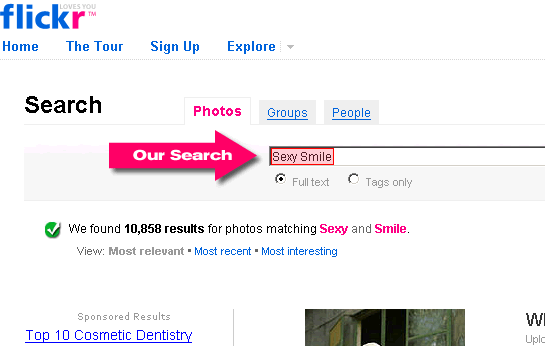
Worked like a charm. I have pointed out where our search criteria is echoed back in the Flickr.com form. And, again, things get more complicated if you want to really deal with Select and Textarea inputs. But, for a simple demo like this, I wanted to try and keep it as simple as possible.

Reader Comments
I know the color coding is getting messed up (from the HTML tags in the quoted arguments). I am working on fixing that. Thanks for your patience.
Quick question on your regex.
Is that going to capture the tags that are using single quotes? From a quick read it looks like you're just testing for double quotes. But then again, sometimes when I read some of you're regex it makes my poor little brain hurt. :\
@Dustin,
You are right. I did not check for single quotes. I totally forgot that people even use them :) I think you could update part of the regex:
(?:""[^""]*""|[^\s>]*)
To be:
(?:""[^""]*""|'[^']*'||[^\s>]*)
.... at least I think. This should handle both types of quotes.
fun with regex IDE
(?:""[^""]*""|'[^']*'||[^\s>]*)
when I drop your single quote or double quote regex into Expresso and click to the analyzer it crashes! woohoo. . .probably just a typo in the regex. . .
I accidentally put a double pipe in there :
||
It might be messing it up. The double pipe should just be single pipe:
|
Oh, and also, I have double quotes ("") as an escaped quote within the ColdFusion code. If you run this in a RegEx engine, you don't need to escape the quotes:
"" becomes just "
is there a particular reason why you keep redundant information in the array shown by cfdump ? I can't see the need for any of the 'HTML' fields.
@Jax,
I had it in as a debugging mechanism as I was building the script. And then, I just left it in. But you are correct, it does not serve a real purpose. I suppose if you were messing with AJAXy type stuff, you could use it for some innerHTML work, but that was not my intent.
Ben - thx for your blogs, this topic is plaguing me right now - and THIS post comes close to my needs - but it seems to have a stumbling point for me...
I want to parse 'whole' files, such as parsing an htm file and look for 'deprecated' tags or some such - I don't want to be 'limited' to finding a '<form' tag...
the java objects are foreign to me and I cant seem to modify your code to get what I need - might you consider doing a broader function for an example?
Great tutorial, but flicker prevents this from working now.
"We're sorry, Flickr doesn't allow embedding within frames."