
Parsing HTML Tag Data Into A ColdFusion Structure
I am in the middle of helping someone use ColdFusion's CFHttp tag to submit form data. In the process of doing this, we needed to be able grab the form fields from a target URL, parse them out, and then submit our own form values. As a result, it became important to be able to parse individual HTML tags into ColdFusion structures so that we could read in the attributes and then use them in our ColdFusion CFHttpParam tags.
When it comes to parsing an HTML tag in ColdFusion, there are two things we are looking for:
- The tag name
- The tag attributes
Both of these things follow textual patterns that can be parsed using regular expressions. The tag name is quite easy - it's simply the first "word" that comes after the open bracket of the tag. The attributes, on the other hand, are a little bit more challenging. While it is XHTML compliant to use quoted attributes, looking at people's source code, you will notice that not everyone uses quotes. And, to complicate things even more, people will even use a mixture of quoted and non-quoted attributes. Therefore, we need to be able to handle both situations.
The following ColdFusion user defined function (UDF), ParseHTMLTag(), uses some nifty regular expressions (Steve, I did my best :)) to allow for both attributes types. It parses the given HTML tag and returns a structure with the keys:
HTML - The raw HTML that was passed in (echoed back).
Name - The tag name (ex. Input, H1, Textarea).
Attributes - A structure containing the name-value attribute pairs. Each name-value pair is stored in the structure by its attribute name.
Here is the ColdFusion UDF, ParseHTMLTag():
<cffunction
	name="ParseHTMLTag"
	access="public"
	returntype="struct"
	output="false"
	hint="Parses the given HTML tag into a ColdFusion struct.">

	<!--- Define arguments. --->
	<cfargument
		name="HTML"
		type="string"
		required="true"
		hint="The raw HTML for the tag."
		/>

	<!--- Define the local scope. --->
	<cfset var LOCAL = StructNew() />

	<!--- Create a structure for the taget tag data. --->
	<cfset LOCAL.Tag = StructNew() />

	<!--- Store the raw HTML into the tag. --->
	<cfset LOCAL.Tag.HTML = ARGUMENTS.HTML />

	<!--- Set a default name. --->
	<cfset LOCAL.Tag.Name = "" />

	<!---
		Create an structure for the attributes. Each
		attribute will be stored by it's name.
	--->
	<cfset LOCAL.Tag.Attributes = StructNew() />


	<!---
		Create a pattern to find the tag name. While it
		might seem overkill to create a pattern just to
		find the name, I find it easier than dealing with
		token / list delimiters.
	--->
	<cfset LOCAL.NamePattern = CreateObject(
		"java",
		"java.util.regex.Pattern"
		).Compile(
			"^<(\w+)"
			)
		/>

	<!--- Get the matcher for this pattern. --->
	<cfset LOCAL.NameMatcher = LOCAL.NamePattern.Matcher(
		ARGUMENTS.HTML
		) />

	<!---
		Check to see if we found the tag. We know there
		can only be ONE tag name, so using an IF statement
		rather than a conditional loop will help save us
		processing time.
	--->
	<cfif LOCAL.NameMatcher.Find()>

		<!--- Store the tag name in all upper case. --->
		<cfset LOCAL.Tag.Name = UCase(
			LOCAL.NameMatcher.Group( 1 )
			) />

	</cfif>


	<!---
		Now that we have a tag name, let's find the
		attributes of the tag. Remember, attributes may
		or may not have quotes around their values. Also,
		some attributes (while not XHTML compliant) might
		not even have a value associated with it (ex.
		disabled, readonly).
	--->
	<cfset LOCAL.AttributePattern = CreateObject(
		"java",
		"java.util.regex.Pattern"
		).Compile(
			"\s+(\w+)(?:\s*=\s*(""[^""]*""|[^\s>]*))?"
			)
		/>

	<!--- Get the matcher for the attribute pattern. --->
	<cfset LOCAL.AttributeMatcher = LOCAL.AttributePattern.Matcher(
		ARGUMENTS.HTML
		) />


	<!---
		Keep looping over the attributes while we
		have more to match.
	--->
	<cfloop condition="LOCAL.AttributeMatcher.Find()">

		<!--- Grab the attribute name. --->
		<cfset LOCAL.Name = LOCAL.AttributeMatcher.Group( 1 ) />

		<!---
			Create an entry for the attribute in our attributes
			structure. By default, just set it the empty string.
			For attributes that do not have a name, we are just
			going to have to store this empty string.
		--->
		<cfset LOCAL.Tag.Attributes[ LOCAL.Name ] = "" />

		<!---
			Get the attribute value. Save this into a scoped
			variable because this might return a NULL value
			(if the group in our name-value pattern failed
			to match).
		--->
		<cfset LOCAL.Value = LOCAL.AttributeMatcher.Group( 2 ) />

		<!---
			Check to see if we still have the value. If the
			group failed to match then the above would have
			returned NULL and destroyed our variable.
		--->
		<cfif StructKeyExists( LOCAL, "Value" )>

			<!---
				We found the attribute. Now, just remove any
				leading or trailing quotes. This way, our values
				will be consistent if the tag used quoted or
				non-quoted attributes.
			--->
			<cfset LOCAL.Value = LOCAL.Value.ReplaceAll(
				"^""|""$",
				""
				) />

			<!---
				Store the value into the attribute entry back
				into our attributes structure (overwriting the
				default empty string).
			--->
			<cfset LOCAL.Tag.Attributes[ LOCAL.Name ] = LOCAL.Value />

		</cfif>

	</cfloop>


	<!--- Return the tag. --->
	<cfreturn LOCAL.Tag />
</cffunction>
To test it, I am going to build an HTML Input tag that has line returns, quoted attributes, non-quoted attributes, and attributes that have no value:
<!--- Store our HTML tag. --->
<cfsavecontent variable="strHTML">

	<input
		type="input"
		name=name
		value=Hello
		disabled
		readonly = true
		maxlength="35"
		class="inputfield"
		/>

</cfsavecontent>


<!---
	Parse the INPUT tag and dump out the resultant structure.
	This should demonstrate that the parsing can handle white
	space as well as a mix of quotes and non-quoted attributes.
--->
<cfdump
	var="#ParseHTMLTag( Trim( strHTML ) )#"
	label="ParseHTMLTag() For Input"
	/>
Running the above, we get the following CFDump output:
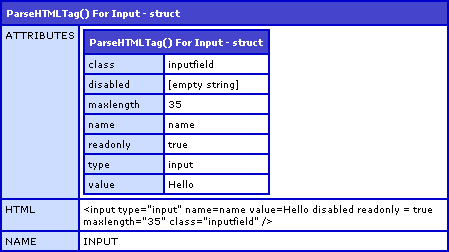
As you can see, the attributes that had no value (disabled) were stored with an empty string. Since all struct members need a value, this is the best default we can give it. Additionally, since ColdFusion treats NULL values as empty strings, this keeps in line with that idea (as a non-existent attribute value can be thought of as null).
This ColdFusion UDF is just part of a smaller form parsing algorithm that I am working on. Hopefully, I will post that up when it is done.
Want to use code from this post? Check out the license.

Reader Comments
This will come in handy. Thanks dude!
@Boyan,
Hopefully, I can get the next part up at lunch - the algorithm that actually uses this as a sub-function. But, I might need to flesh that one out a bit more.
@ben - It might be overkill for what you are doing, but have you thought about using jTidy or something of the like to parse the HTML instead of using regex?
It makes it super easy once your content is converted to it's DOM to pick off target elements and their attributes, and its fairly performant. I've been using it on on my site as the primary parsing strategy (with a regular expression failover when jTidy can't convert the page to it's object model) for finding links pointing to mp3s.
This post has some info on using it.
http://jeffcoughlin.com/?pg=9&fn=3&id=1
@Justin,
I have not heard of jTidy before. I will definitely check it out. One of the nice things about encapsulating this functionality is that I can swap out sub-components and it should be all good.
Thanks for bringing jTidy to my attention.
"(Steve, I did my best :))"
Very funny. You are, of course, rather masterful with regexes yourself. ;-)
One thing you might also want to account for is single-quoted attribute values. Unlike unquoted values (which are valid in HTML4, but not XHTML), I believe single-quoted values are valid even in XHTML.
@Steve,
Oh crap, I totally forgot about single quotes! D'oh!
As far as all the regular expression stuff to grab the attributes, I think I learned most of that from looking at your regular expression (esp. for nested patterns). Obviously, not exactly the same, but inspiring nonetheless.
"Oh crap, I totally forgot about single quotes! D'oh!"
. . .and don't forget about nesting of quoted, using a nesting of single within double or double within single such as
value="david 'the big bad' dad"
or
value='devin "little man" his son'
will your regex and UDF get these right?
does anyone know where XHTML comes down on this sort of thing? are you supposed to escape certain characters or something like that?
@Macbuoy,
The nesting of quotes should be ok because when ever it comes to a double quote, it searches for [^"] which will search until it finds another double quote (allowing single quotes to be part of that data)... and of course, vise-versa for the double quotes within single quotes.
As far as the XHTML stuff, I am not sure of. I use double-quotes for all my attributes, that much I can tell you.
If your content is well formed XHTML (XML in other words) then you can use XPATH (using CF XmlSearch() function) to easily get all tags and attributes.
In my testing with standard CF regex functions (not java as you have used) I found parsing slowed down rapidly as the content length grows.
However XPATH, whilst it did get slightly slower, was significantly faster.
XPATH is also robust - it is designed to do this.
Hi Ben,
I have tried to use this code for parsing table data in a html table.
Its not working out so good :)
I am looping over each TR tag and passing the contents to your function. In some cases it works correctly, in others it gets TD data contents confused with attributes.
Can you verify if this script will work correctly in this fashion ?
Best regards and thanks for the contribution.
Tim
@Tim,
This is a kind of old post, so there might be some bugs in the code. Are you using single quotes do wrap your attribute values at all? That would definitely break this. Also, if you have escaped quotes in any JS code in your attributes, it might break it.
@Ben,
Well, i was using this to parse another web sites information.
Unfortunately that site did not use quotes at all.
I ended up just writing it myself.
Thanks again for getting back.
Tim
@Tim,
No quotes at all - dangy :)
what needs to be changed that it should work with an href?? it actually works its just missing the title eg. a href="http://abc.com">Title</a
thanks
@Abe,
That's a tricky question because an Anchor tag can contain more than just simple text - it can, itself, have a whole host of markup within it. This was mean purely for the tag itself.
If you need to get more thorough HTML parsing, you might want to try to see if you can get an HTML-XHTML converter so you can parse the HTML into an actual XML document where it can queried based on its markup.
I played around with this concept a while back when playing with Groovy:
www.bennadel.com/blog/1723-Parsing-Invalid-HTML-Into-XML-Using-ColdFusion-Groovy-And-TagSoup.htm
I hope that helps a bit.
Hey Ben, super old post, but I wanted to let you and anyone else know;
After upgrading to jdk 7u1, this function was failing with the error message "java.lang.IllegalArgumentException: No group with name <1>"
Something to do with java7 now supporting named groups for the regex package.
Simply setting JavaCast('int',x) to your Group(1) calls seems to have fixed it.
Thanks again for your function and generally all your contributions to the community.
@Don Quist - the fix worked for me as well...thank you for posting that!
@ben = thanks for the original post...still works great!