
Storing Float Values In An Integer Column Of A ColdFusion Query
ColdFusion query of queries are amazing; hands down, one of the best features of the language. 98% of the time, they rock, 2% of the time they drive you crazy. Today, I ran into one of those 2% times, which again, just goes to demonstrate how important it is to understand the underlying Java implementation and data types.
I was performing a very complex query and was storing a constant value into one column so that I could then update it using ColdFusion after the query was done (the calculation was too complex to figure out in SQL). After that, I went to get an average of that column via a ColdFusion query of queries. The value didn't make any sense. After I finally went downstairs to get my lunch, it dawned on me - I forgot to checking my data types. Let me demonstrate:
<!---
	Query for our top 5 pivot IDs. We are going to
	get the value as zero and then set it afterwards.
--->
<cfquery name="qID" datasource="#REQUEST.DSN.Source#">
	SELECT TOP 5
		id,
		( 0 ) AS value
	FROM
		pivot100
</cfquery>


<!---
	Now that we have our IDs, let's loop over the
	query and set the value column values. These will
	all be fractions of a number (floats).
--->
<cfloop query="qID">

	<cfset qID[ "value" ][ qID.CurrentRow ] = JavaCast(
		"float",
		(id / 10)
		) />

</cfloop>


<!--- Dump out the query. --->
<cfdump
	var="#qID#"
	label="Original Query w/ New Value"
	/>
After running that code, we get the following query CFDump output:
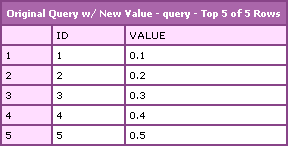
Notice that the ColdFusion query object does show up as having float values in the "value" column. Now, let's try to get an average of that value using both ColdFusion array functionality as well as it's query of queries functionality:
<!---
	Use ColdFusion's array funcitonality to get an
	average of the value column.
--->
<cfset flAverage = ArrayAvg( qID[ "value" ] ) />


<!--- Output the array calculated average. --->
Array Average: #flAverage#


<!---
	Use ColdFusion's query of query functionality
	to get the average of the column type.
--->
<cfquery name="qAverage" dbtype="query">
	SELECT
		AVG( [value] ) AS average
	FROM
		qID
</cfquery>


<!--- Output the query calcualted average. --->
Query Average: #qAverage.average#
Running that, we get the following output:
Array Average: 0.30000000447
Query Average: 0
Notice that the ArrayAvg() method worked just fine but the ColdFusion query of queries seemed to truncate the decimal place. Since the array averaging worked, we know that the query object does, indeed, have the proper values. So what's going on? It's the way we stored the constant zero in the first query:
( 0 ) AS value
This tells ColdFusion to treat the value column as if it were an integer type field (I think it's technically a BIG INT). Then, when ColdFusion goes to perform the query of queries, it tries to convert all the values in that column to integers before it works on them. This is where we are losing our decimal places.
My first thought to fix this was, no problem, I will just store the constant as a decimal zero:
( 0.0 ) AS value
I was hoping the use of the ".0" would signal to ColdFusion (or rather to the SQL server) that it was not an integer type field. This does not work. In fact, this throws a ColdFusion error:
null null
Useful error right? The problem here is not with the query that is storing the value, it is again with the ColdFusion query of queries. If you look at the stack trace of the ColdFusion exception, you see:
java.lang.ClassCastException at coldfusion.sql.imq.rttExprNumAggr.aggrGroup( rttExprNumAggr.java:172 )
It's a casting exception. I am not sure what the cause of this is, but clearly, it didn't know how to handle my "0.0." When I dump out the meta data on the query, it shows the data type of the value column to be "numeric." I guess ColdFusion query of queries cannot handle the data type "numeric". Or rather, it cannot figure out how to cast my explicit float values to a numeric data type?
My next option was to try telling the original query to cast the value explicitly as a float:
( CAST( 0.0 AS FLOAT ) ) AS value
Running the code with this, we get a much better output:
Array Average: 0.30000000447
Query Average: 0.30000000447
This is such a subtle issue and hopefully it drives home the point that, while ColdFusion is typeless, data types are still very much an important aspect of the language.
Want to use code from this post? Check out the license.

Reader Comments
Hi Ben
Maybe I'm just slow on the uptake in only noticing this now, but it seems you've dispensed with the misogynistic slant on your sample code ("cutest Girl = blonde", and suchlike).
Thank-you, and well done.
--
Adam
@Adam,
Ha ha... no one style defines me :)