
Passing Users From One ColdFusion Application To Another
NOTE: I was not expecting this to work. This was merely an exploration of what could be possible according to someone else.
Someone recently mentioned to me that they pass users from one ColdFusion application to another and are able to maintain session information. I have never heard of this, but I have also never tried to do that. So, I figured I would give it a try.
I started off by creating a very simple ColdFusion Application.cfc:
<cfcomponent>

	<!--- Define application. --->
	<cfset THIS.Name = "AppA" />
	<cfset THIS.ApplicationTimeout = CreateTimeSpan( 0, 0, 0, 20 ) />
	<cfset THIS.SessionManagement = true />
	<cfset THIS.SessionTimeout = CreateTimeSpan( 0, 0, 0, 20 ) />

	<!--- Define page settings. --->
	<cfsetting
		showdebugoutput="false"
		/>


	<cffunction
		name="OnSessionStart"
		access="public"
		returntype="void"
		output="false"
		hint="Fires when a user's session first begins.">

		<!---
			Set a single session value so that we
			know from which application the session
			has originated.
		--->
		<cfset SESSION.App = THIS.Name />

		<!--- Return out. --->
		<cfreturn />
	</cffunction>

</cfcomponent>
The only thing of importance here is that the application's name is AppA and that in the OnSessionStart() application event method, I am storing the name of the application into the session. This way, I can dump out the session and see where it originated.
Then, I have a simple index page which merely throws the user, via a CFLocation tag, up a directory and into another application:
<!---
	Set up URL complete with session information
	including CFID and CFTOKEN. We will see if this
	carries over to the other application.
--->
<cfset strURL = (
	"../AppB/index.cfm?" &

	<!--- Add session info. --->
	"CFID=#SESSION.CFID#" &
	"&CFTOKEN=#SESSION.CFTOKEN#"
	) />


<!---
	Throw user to the next application but pass
	along this application's session information.
--->
<cflocation
	url="#strURL#"
	addtoken="false"
	/>
The user then lands in this second ColdFusion application, which is almost exactly the same as the first ColdFusion application:
<cfcomponent>

	<!--- Define application. --->
	<cfset THIS.Name = "AppB" />
	<cfset THIS.ApplicationTimeout = CreateTimeSpan( 0, 0, 0, 20 ) />
	<cfset THIS.SessionManagement = true />
	<cfset THIS.SessionTimeout = CreateTimeSpan( 0, 0, 0, 20 ) />

	<!--- Define page settings. --->
	<cfsetting
		showdebugoutput="false"
		/>


	<cffunction
		name="OnSessionStart"
		access="public"
		returntype="void"
		output="false"
		hint="Fires when a user's session first begins.">

		<!---
			Set a single session value so that we
			know from which application the session
			has originated.
		--->
		<cfset SESSION.App = THIS.Name />

		<!--- Return out. --->
		<cfreturn />
	</cffunction>

</cfcomponent>
Notice that the only difference is that this application's name is AppB (the first one was named AppA). This application's index page then just CFDumps out the URL and the SESSION scopes to see how this application interacts with the application that passed off the user:
<!--- Dump out the URL. --->
<cfdump
	var="#URL#"
	label="URL Variables"
	/>

<!--- Dump out the SESSION. --->
<cfdump
	var="#SESSION#"
	label="SESSION Variables"
	/>
When we run AppA's index page and then get passed to AppB's index page, we get the following CFDump or the URL and the SESSION scopes:
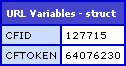
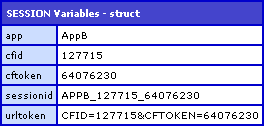
Notice that the CFID and CFTOKEN values are the same in the URL and in the SESSION scope (127715 and 64076230 respectively). Also notice that the SESSION.App value is AppB, NOT AppA. Because the session App value is different, it means that the second application, AppB, was the one that created the user session dumped out in the index page. However, it is peculiar that the CFID and CFTOKEN passed in the URL were copied into the SESSION ID information.
This seems odd to me. I understand that ColdFusion is designed to accept CFID and CFTOKEN values passed in the URL, but the CFID and CFTOKEN passed in this case were not created by the ColdFusion application that created the destination session. Interesting, I would assume there would be somesort of validation here, but I guess the CFID / CFTOKEN values are more of an ID marker rather than systems integration value.
In conclusion, it seems that the SESSION memory scope is tied to an application, not just to a CFID / CFTOKEN combination. It would be cool if this worked as one might hope (as I can see the benefit of passing users from one application to another), but in the long run, it might cause more problems than benefits.
Want to use code from this post? Check out the license.

Reader Comments
Nice tricks.
I tried same concept for one of my ecommerce site which required to have "HTTPS" -----(https://sequre.kholabazar.com). When I tried to pass from "HTTP" (http://www.KholaBazar.com) to "HTTPS" https://sequre.KholaBazar.com - I loose the session cart and also it assign a new CFID and CFTOKEN.
Any idea or thoughts.
Thanks in advance.
Abul
I think you are making this too complex. There is one user here, but 2 applications. Your session scope is unique per application.
So the user came in to App A. His session.name was set correctly. YOu then sent him to App B. Here he has ANOTHER session, so session.name gets set to app B.
If you go back to App A, session.name will say A again, not B.
So again - one user - 2 unique session scopes.
Also, when you did the cflocation, why did you bother passing along CFID/CFTOKEN? You could have left it off and CF would work just fine. Or you could have used addToken=true.
Ben - Your intro paragraph "pass users from one ColdFusion application to another and are able to maintain session information" led me to believe that what you were going to attempt was to display session variables created in the first application (AppA) after transferring the user to the second application (AppB).
Try creating a session variable in AppA's Application.cfc that is not named the same as any session veriables in AppB.
What happens when you're in AppB (after transferring the user to AppB from AppA) and try to access the session variable that is created in AppA?
In my test, the attempt to access the session variable that is create in AppA causes an error since that session variable doesn't exist in AppB.
So as Ray pointed out. Each Application has its own unique session scope.
I guess if you want to pass session data between application you could probably just use the CFID/CFTOKEN to do it. You'd just need some logic and just before sending the user over to the second app you serialize the session scope to JSON, save the data to the DB and use the CFID/CFTOKEN as the key/identifier. When you get into the second ap, you use the session CFID/CFTOKEN to retrieve the info in the DB and deserialize it into the session scope of the new app. Doesn't seem to complicated, although I might be forgetting something.
@Ray and others,
I was not expecting this to work. Someone had mentioned to me that this is how they did something, so the reason I tested it was because I have never tried it (you never no it won't work till you try it out).
I would not expect the sessions to carry across from app to app even if the session ID and TOKEN were the same.
Errr, well the session data isn't being passed over per se. CF is recognizing you as the same person, but it separates the session data into application bins I guess you could call it.
I may be a bit confused as to what you thought should happen here.
Ben - To avoid some confusion you may want to change your first paragraph to clearly state what you're testing and change your last paragraph to clearly state your conclusion from running this test.
@Ray,
"I may be a bit confused as to what you thought should happen here."
... I had no expectations :) I guess I was expecting it to start a new session as it did, but I was prepared to handle it if it worked the opposite as well.
@Bruce,
That is a good idea. I didn't really mean to imply anything here other than that I explored the issue and found that different session exist.
@Abul,
The problem is the two different hostnames, not the https. Try SetDomainCookies=true in your cfapplication tag.
I have a similar situation and am having a problem "knowing" where to start! This seems to be a similar problem as mine.
I have a legacy CF app (application.cfm) very complex and too many cooks have spoiled this broth (...in a manner of speaking).
I am developing a Flex App for additional functionality with CF remoting. This is why I decided to make a sub-dir with Application.cfc
Now I'm having trouble tackling the session issue. I need to check if the user is logged in, has a "live" session and then allow functionality from Flex App.
I need to be able to "migrate" the original apps session into the this [sub]application and I was thinking of something similar.
However I have no way of knowing when the parent app's session expires !
Any help on session migration to another app would be greatly apprecited!
@Aphtk,
Is there anyway to just make a sub-directory for your API code, but use the root Application.cfc? What problems are you using the sub-directory Application.cfc to solve?
@Ben,
The app is in a subdirectory but I needed to use a new application.cfc
However, this may help someone... I named "this.name = {app_name}" in new-app/application.cfc same as the parent <cfapplication name="{app_name}" .../>
Now I have access to all client variables stored by the application's top level app.
Would work even better if you let coldfusion put client variables in db !
@Aphtk,
Yes - using two Application.cfc's with the same, "name", they'll be able to access the same Application and Session variables. Just remember that if you take that approach, you need to replicate all of the critical information in each Application.cfc.
Thank you to both Aphtk and Ben. The situation you described (i.e. hired to create a new application and then integrate it with legacy CF code relying upon application.cfm and nested subfolders structure) matches my current situation perfectly, and giving both applications the same name gives me the ability to "share" the session details between both apps that I need.
You might have just saved my holiday afternoon, gentlemen. :)
To me, this seems like it should be possible - I mean, how is this any different than load balancing on a server?
I am using two physical servers for the same app with an external load balancing software (not a CF server cluster). The code is the same, including the app name. The load balancing software decides which server to send to ,for each request. In such a setup, can I expect the session from one server to be available in the second server?