
Zipping All Code Snippets With ColdFusion Zip Utility Component
Yesterday, Boyan Kostadinov suggested that I provide a way to zip all the code snippets for a given blog entry and provide it for easier download. I thought this was brilliant, and is only one of several great recommendations that Boyan has given to me (thanks dude!). ColdFusion 8 (Scorpio) is going to provide awesome Zip functionality but until then, I have to roll my own zip functionality.
But, when thinking about the zipping features I wanted, I have to remember what I am doing - I have to remember what the context is. Most zipping functionality that I have come across deals with file or directory entries. That is good, but it is not really useful for my scenario. I am going to be taking chunks of textual data out of my blog entry and zipping those together. Now, I could write each code snippet to its own text file and then zip all those text files together, but that seems unnecessary.
What I really want to be able to do is grab the text of the code snippets and add those directly to the resultant zip archive file. It's not done yet, but I am on my way. What I have created is a very simple ColdFusion Zip Utility that can have entries added to it in three different way:
File path entries in which you just add system file paths.
Text entries in which you can add a chunk of text and give it a file name.
Byte array entries in which you can add binary data directly to the zip file and give it a name.
I figure this will give me the flexibility that I need to handle the code snippet zipping. Here is a demo of how it can be used:
<!--- Create an instance of the Zip utility. --->
<cfset objZip = CreateObject( "component", "ZipUtility" ).Init() />


<!---
	Zip entries can be added as file paths. This
	is pretty starndard. Here we can add N file
	path arguments.
--->
<cfset objZip.AddFileEntry(
	ExpandPath( "./data/file_a.jpg" ),
	ExpandPath( "./data/file_c.jpg" )
	) />


<!---
	Zip entries can be also be added as actual text
	entries that will be stored as text files.
--->
<cfset objZip.AddTextEntry(
	Text = "This is a text file.",
	Name = "text_entry.txt"
	) />


<!---
	In addition to text data, we can also add binary
	data directly to the zip file. In this demo, we are
	going to read in the image binary and then add it
	as a zip entry.
--->
<cffile
	action="READBINARY"
	file="#ExpandPath( './data/file_b.jpg' )#"
	variable="binFileData"
	/>

<!--- Add binary image data directly to zip file. --->
<cfset objZip.AddByteEntry(
	ByteArray = binFileData,
	Name = "file_b.jpg"
	) />


<!---
	ASSERT: At this point, we have defined what files,
	text and binary data is going to end up in the Zip
	file. The Zip file has NOT yet been written.
--->


<!--- Compress this zip file. This will write the file. --->
<cfset objZip.Compress(
	ExpandPath( "./files.zip" )
	) />
Notice that in the above code, the text and the image binary are added directly to the zip (not written to intermediary files). Running the code above produces the zip archive file, files.zip. If I open that file (as well as the resultant text entry and the resultant byte array entry to prove that it worked), we get the following:
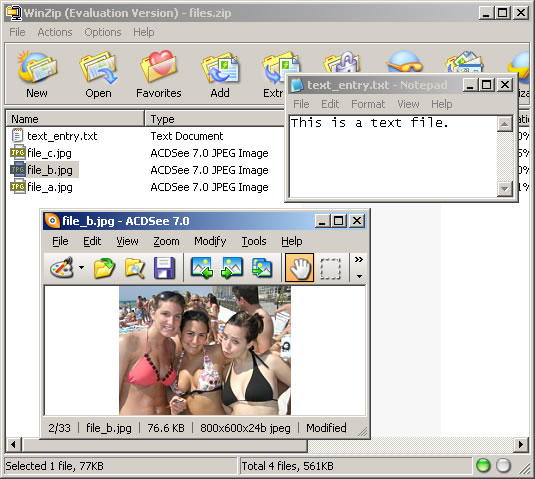
Notice that the text entry translated perfectly into our text_entry.txt and our byte array entry translated perfectly into out file_b.jpg.
Here is the code for the ZipUtility.cfc ColdFusion component that makes creating zip archives with ColdFusion possible through the magic which is Java:
<cfcomponent
	output="false"
	hint="Handles the zipping of files.">

	<!---
		Set up an instance struct to hold instance-
		specific data values.
	--->
	<cfset VARIABLES.Instance = StructNew() />

	<!---
		This will hold the array of all target files to
		be included in the resultant zip file.
	--->
	<cfset VARIABLES.Instance.FileEntries = ArrayNew( 1 ) />

	<!---
		This will hold an array of byte structures. Each
		array entry will hold a byte array and a name
		of the designated file.
	--->
	<cfset VARIABLES.Instance.ByteEntries = ArrayNew( 1 ) />


	<cffunction
		name="Init"
		access="public"
		returntype="any"
		output="false"
		hint="Returns an initialized component instance.">

		<!--- Return This reference. --->
		<cfreturn THIS />
	</cffunction>


	<cffunction
		name="AddByteEntry"
		access="public"
		returntype="void"
		output="false"
		hint="Adds a byte array entry with the given name to the zip file ">

		<!--- Define arguments. --->
		<cfargument
			name="ByteArray"
			type="any"
			required="true"
			hint="The byte array data entry."
			/>

		<cfargument
			name="Name"
			type="string"
			required="true"
			hint="The name of the file used to store the byte array."
			/>


		<!---
			Store the arguments directly into the byte entries.
			As long as it can be referenced like a struct AND
			it already exists, no need to create a new struct.
		--->
		<cfset ArrayAppend(
			VARIABLES.Instance.ByteEntries,
			ARGUMENTS
			) />

		<!--- Return out. --->
		<cfreturn />
	</cffunction>


	<cffunction
		name="AddFileEntry"
		access="public"
		returntype="void"
		output="false"
		hint="Adds one or more file paths to the resultan zip file.">

		<!--- Define arguments. --->
		<cfargument
			name="File"
			type="any"
			required="true"
			hint="File to be added. This can be a file or an array of files."
			/>


		<!--- Define the local scope. --->
		<cfset var LOCAL = StructNew() />

		<!---
			For this method, we are going to allow the
			flexability of adding multiple files at once. The
			first argument can be a file path or an array of
			file paths. If the first argument is a string, then
			we will assume the entire arguments array might be
			more than one file.
		--->
		<cfif IsSimpleValue( ARGUMENTS.File )>

			<!---
				Since the first argument is a string, let's
				assume the person may have passed in more than
				one argument where each argument is a file path
				to be added.
			--->
			<cfloop
				item="LOCAL.File"
				collection="#ARGUMENTS#">

				<cfset ArrayAppend(
					VARIABLES.Instance.FileEntries,
					ARGUMENTS[ LOCAL.File ]
					) />

			</cfloop>

		<cfelse>

			<!---
				Since the first argument is NOT a string, we
				are going to assume that it is an array of
				file paths. Therefore, add the entire array
				to the files list.
			--->
			<cfset VARIABLES.Instance.FileEntries.AddAll(
				ARGUMENTS.File
				) />

		</cfif>


		<!--- Return out. --->
		<cfreturn />
	</cffunction>


	<cffunction
		name="AddTextEntry"
		access="public"
		returntype="void"
		output="false"
		hint="Adds a text entry with the given name to the zip file ">

		<!--- Define arguments. --->
		<cfargument
			name="Text"
			type="string"
			required="true"
			hint="The text data entry."
			/>

		<cfargument
			name="Name"
			type="string"
			required="true"
			hint="The name of the file used to store the byte array."
			/>


		<!---
			Grab the byte array from the text data entry
			and just hand it off to the byte entry.
		--->
		<cfset THIS.AddByteEntry(
			ByteArray = ARGUMENTS.Text.GetBytes(),
			Name = ARGUMENTS.Name
			) />

		<!--- Return out. --->
		<cfreturn />
	</cffunction>


	<cffunction
		name="Compress"
		access="public"
		returntype="void"
		output="false"
		hint="Compresses the files and entries into the given file archive.">

		<!--- Define arguments. --->
		<cfargument
			name="File"
			type="string"
			required="true"
			hint="The file path of the destination archive file."
			/>


		<!--- Define the local scope. --->
		<cfset var LOCAL = StructNew() />


		<!---
			Create the zip output stream. This will wrap
			around an output stream that writes to our
			destination archive file.
		--->
		<cfset LOCAL.ZipOutputStream = CreateObject(
			"java",
			"java.util.zip.ZipOutputStream"
			).Init(

				<!--- Wrap Zip IO around file IO. --->
				CreateObject(
					"java",
					"java.io.FileOutputStream"
					).Init(

						<!---
							Initialized the file IO object
							with the given file path of the
							target ZIP file.
						--->
						ARGUMENTS.File

						)
				) />


		<!---
			Create a buffer into which we will read file data
			and from which the Zip output stream will read its
			data. The easiest way to create a byte array buffer
			is just to build a large string and return it's
			byte array.
		--->
		<cfset LOCAL.Buffer = RepeatString( " ", 1024 ).GetBytes() />


		<!---
			We need to add both the file entries and the byte
			array entries. Let's start out with the files.
		--->
		<cfloop
			index="LOCAL.Index"
			from="1"
			to="#ArrayLen( VARIABLES.Instance.FileEntries )#"
			step="1">

			<!---
				Get a short hand to the file path that we are
				working with.
			--->
			<cfset LOCAL.FilePath = VARIABLES.Instance.FileEntries[ LOCAL.Index ] />

			<!---
				Create a new zip entry for this file. To
				keep things simple, we are going to store
				all the files by their file name alone (no
				nesting of directories).
			--->
			<cfset LOCAL.ZipEntry = CreateObject(
				"java",
				"java.util.zip.ZipEntry"
				).Init(
					GetFileFromPath( LOCAL.FilePath )
					) />


			<!---
				Tell the Zip output that we are going to start
				a new zip entry. This will close all previous
				entries and move the output to point to the new
				entry point.
			--->
			<cfset LOCAL.ZipOutputStream.PutNextEntry(
				LOCAL.ZipEntry
				) />


			<!---
				Now that we have zip entry read to go, let's
				create a file input stream object that we can
				use to read the file data into a buffer.
			--->
			<cfset LOCAL.FileInputStream = CreateObject(
				"java",
				"java.io.FileInputStream"
				).Init(
					LOCAL.FilePath
					) />

			<!---
				Read from the file into the byte buffer. This
				will read as much as possible into the buffer
				and return the number of bytes that were read.
			--->
			<cfset LOCAL.BufferSize = LOCAL.FileInputStream.Read(
				LOCAL.Buffer
				) />


			<!---
				Now, we want to keep writing the buffer data
				to the zip output stream until the file read
				returns a length less than 1 indicating that
				no data was read into the buffer.
			--->
			<cfloop condition="(LOCAL.BufferSize GT 0)">

				<!---
					Write the contents of the buffer to the
					zip output steam.
				--->
				<cfset LOCAL.ZipOutputStream.Write(
					LOCAL.Buffer,
					JavaCast( "int", 0 ),
					JavaCast( "int", LOCAL.BufferSize )
					) />

				<!---
					Perform the next read of the file data
					into the buffer.
				--->
				<cfset LOCAL.BufferSize = LOCAL.FileInputStream.Read(
					LOCAL.Buffer
					) />

			</cfloop>


			<!---
				Now that we have finished writing this file to
				the zip output as the given zip entry, we
				need to close both the zip entry and the file
				output stream. This will prevent the system from
				locking the resources.
			--->
			<cfset LOCAL.ZipOutputStream.CloseEntry() />
			<cfset LOCAL.FileInputStream.Close() />

		</cfloop>


		<!---
			Now that all the files have been added, we need
			to add the byte array entries.
		--->
		<cfloop
			index="LOCAL.Index"
			from="1"
			to="#ArrayLen( VARIABLES.Instance.ByteEntries )#"
			step="1">

			<!---
				Get a short hand to the byte entry that we are
				working with. This will contain both the byte
				array and the name of the resultant file.
			--->
			<cfset LOCAL.ByteEntry = VARIABLES.Instance.ByteEntries[ LOCAL.Index ] />

			<!---
				Create a new zip entry for this file. This entry
				will be stored in the top level directory at the
				given name.
			--->
			<cfset LOCAL.ZipEntry = CreateObject(
				"java",
				"java.util.zip.ZipEntry"
				).Init(
					LOCAL.ByteEntry.Name
					) />


			<!---
				Tell the Zip output that we are going to start
				a new zip entry. This will close all previous
				entries and move the output to point to the new
				entry point.
			--->
			<cfset LOCAL.ZipOutputStream.PutNextEntry(
				LOCAL.ZipEntry
				) />


			<!---
				Write the contents of the byte array to the zip
				output steam. Since we have our entire byte
				array entry in memory, we don't have to deal
				with repeated reads.
			--->
			<cfset LOCAL.ZipOutputStream.Write(
				LOCAL.ByteEntry.ByteArray,
				JavaCast( "int", 0 ),
				JavaCast( "int", ArrayLen( LOCAL.ByteEntry.ByteArray ) )
				) />


			<!---
				Now that we have finished writing this byte
				entry to the zip output as the given zip entry,
				we need to close the zip entry.
			--->
			<cfset LOCAL.ZipOutputStream.CloseEntry() />

		</cfloop>


		<!---
			We have now written all of our file and byte
			entries to the zip archive file. Close the zip
			output stream so that it can be used.
		--->
		<cfset LOCAL.ZipOutputStream.Close() />


		<!--- Return out. --->
		<cfreturn />
	</cffunction>

</cfcomponent>
Now, some notes of caution: Adding the file path entries is a no brainer. Those get read and zipped at the time of compression so that they do not have any memory overhead issues. Adding the text and byte array entries is another beast altogether; these entries get stored in the private scope of the ZipUtility.cfc ColdFusion component. That means that all text and byte array entry data gets stored in the RAM of the computer. This can be a problem is you go nuts and start zipping HUGE text files and binary objects in this manner.
That is not what that was intended for. In my use case, I will be zipping very small code snippets - several hundred lines MAX! This will not put the server in harm's way.
Also, for ease of use, I am storing all files in a single directory. I am sure this would cause problems for most people, but for now, for this scenario, it works quite nicely. More to come on this topic later.
Want to use code from this post? Check out the license.

Reader Comments
I am using this to zip up tif images and it works fine on the application tier, but for some reason I get the object instantation exception when I try to run it from the web tier. Any suggestions?
@Ahoskie,
I am not sure what you mean by "Web tier". Can you explain a little more?
the application on apache and when you run the code from apache the zip function errors out, put when I run it on the application server everything works fine. I was just wondering if this was a common issue or not.
@Ahoskie,
It might be?? To be quite honest, I am not that familiar with Apache. I just know about things when I run them in ColdFusion. I know ColdFusion sits on top of a web service like Apache or IIS, but I am not sure how to do anything outside of ColdFusion.
Thank you. I thought it was worth a shot if I asked.
What kind of modifications to the code could be made to allow pulling files from different directories?
I get a Object Instantiation Exception. error, that I think is caused by files that are expected to exist locally but don't..
Thanks.
@Nick,
You can add any file paths you want. You just need to give it the proper Expanded path.
When I try to run your code I get:
An exception occurred when instantiating a Java object. The class must not be an interface or an abstract class. Error: ''.
The error occurred in D:\Web\MasterWebSystem\CF_Tags\Components\Corp\ZipUtility.cfc: line 220
Called from D:\Web\MasterWebSystem\ProcurementStatus\TestUpdateMsProjDate.cfm: line 24
Called from D:\Web\MasterWebSystem\CF_Tags\Components\Corp\ZipUtility.cfc: line 220
Called from D:\Web\MasterWebSystem\ProcurementStatus\TestUpdateMsProjDate.cfm: line 24
218 : target ZIP file.
219 : --->
220 : ARGUMENTS.File
221 :
222 :
Any Idea as to why?
@Bret,
Are you giving it a fully expanded file path?
I am using:
<cfset objZip.AddFileEntry(ExpandPath( "D:/WebDocuments/MasterWebSystem/Acmds/CDFiles/ADL1583AS100B/CDROOT/*.*" )) />
and
<cfset objZip.Compress(ExpandPath( "D:/Web/MasterWebSystem/TemporaryFileLocation/files.zip" )) />
@Bret,
You are being redundant. If you have a full path already (ex D:\....), you don't need ExpandPath() as well. In your case, take out the ExpandPath().
Taking the Expandpath did not get rid of the error. So I replaced the *.* with a specific file name and then the program worked. So I assume the each file has to be named in the:
<cfset objZip.AddFileEntry( "D:/WebDocuments/MasterWebSystem/Acmds/CDFiles/ADL1583AS100B/CDROOT/*.*" ) />
<cfset objZip.AddFileEntry( "D:/WebDocuments/MasterWebSystem/Acmds/CDFiles/ADL1583AS100B/CDROOT/diststmt.txt" ) />
I was hoping a wildcard would work as I am in need of several files being zipped at once.
@Bret,
Corrent, right now you need to specify all the file names.
Hi Ben,
I trying to use your code to zip some files(data) from a form that takes customer details and them email them to our client - This seems to work fine but I would like to password protect them. Any ideas?
Thanks
Hello,
i'm wondering if it's possible to zip a complete directory with sub directories and keep the structure inside the zip file.
I must use CF7 and I can't upgrade to the new version.
I know it's an old post but I hope you can help me.
best regards