
Simple ColdFusion Calendar Month Display With Monday As First Day Of Week
A few days ago, I demoed a small page that output a calendar month in ColdFusion by looping over the dates in a rather slick index loop. This calendar, as all calendars that I have built, start with Sunday as the first day of the week. Apparently, this is not how the entire world does it, and in response to a question posed by Macbuoy, I created a ColdFusion user defined function called MyDayOfWeek() which wraps around ColdFusion's built-in DayOfWeek() method. This UDF translates the traditional day of week calculation into the day of week of your choice.
There were some issues for people trying to applying this ColdFusion UDF to the calendar month display, so I thought I would just demo how it works. The steps to do this were quite easy:
Change all DayOfWeek() method calls to be MyDayOfWeek() method calls.
Change the order of the calendar header. Since our calendar headers (Sun-Sat) are hard coded, this has to be altered manually.
Then, as before, I have to start off by building my SQL query to test with:
<!---
	Build a query of events that we will be able to
	test with. Some of these dates will span multiple
	days and overlap with each other.
--->
<cfquery name="qEvent" datasource="#REQUEST.DSN.Source#">
	DECLARE
		@event TABLE (
			id INT,
			date_started DATETIME,
			date_ended DATETIME
		)
	;


	INSERT INTO @event (
		id,
		date_started,
		date_ended
	)(
		SELECT
			1,
			<cfqueryparam value="#Now()#" cfsqltype="CF_SQL_TIMESTAMP" />,
			<cfqueryparam value="#Now() + 5#" cfsqltype="CF_SQL_TIMESTAMP" />

		UNION ALL

		SELECT
			2,
			<cfqueryparam value="#CreateDateTime( 2007, 04, 15, 0, 0, 0 )#" cfsqltype="CF_SQL_TIMESTAMP" />,
			<cfqueryparam value="#CreateDateTime( 2007, 04, 15, 23, 59, 59 )#" cfsqltype="CF_SQL_TIMESTAMP" />

		UNION ALL

		SELECT
			3,
			<cfqueryparam value="#CreateDateTime( 2007, 04, 8, 10, 30, 0 )#" cfsqltype="CF_SQL_TIMESTAMP" />,
			<cfqueryparam value="#CreateDateTime( 2007, 04, 10, 4, 45, 0 )#" cfsqltype="CF_SQL_TIMESTAMP" />

		UNION ALL

		SELECT
			4,
			<cfqueryparam value="#CreateDateTime( 2007, 04, 4, 12, 0, 0 )#" cfsqltype="CF_SQL_TIMESTAMP" />,
			<cfqueryparam value="#CreateDateTime( 2007, 04, 5, 12, 0, 0 )#" cfsqltype="CF_SQL_TIMESTAMP" />

		UNION ALL

		SELECT
			5,
			<cfqueryparam value="#CreateDateTime( 2007, 04, 29, 9, 0, 0 )#" cfsqltype="CF_SQL_TIMESTAMP" />,
			<cfqueryparam value="#CreateDateTime( 2007, 04, 29, 12, 0, 0 )#" cfsqltype="CF_SQL_TIMESTAMP" />
	);


	SELECT
		*
	FROM
		@event
	;
</cfquery>
And, here is the modified code. For demo purposes, I am including the ColdFusion user defined function, MyDayOfWeek(), in the file itself, but this could be included with your standard UDFs:
<!---
	We are going to override the default settings of
	ColdFusion's DayOfWeek() method by wrapping in this
	UDF that will tranlsate the "traditional" date of the
	week to one suited for our business logic.
--->
<cffunction
	name="MyDayOfWeek"
	access="public"
	returntype="numeric"
	output="false"
	hint="Returns our proxy day of week value.">

	<!--- Define arguments. --->
	<cfargument
		name="Date"
		type="date"
		required="true"
		hint="The date that we are using to get the day of week."
		/>

	<cfargument
		name="FirstDayOfWeek"
		type="numeric"
		required="false"
		default="2"
		hint="This is the day (1 = Sunday) that we are treating as the first day of the week."
		/>


	<!---
		Translate the actual day of the week to the pseudo
		day of the week using the passed in FirstDayOfWeek.
	--->
	<cfreturn
		(
			(
				(
					DayOfWeek( ARGUMENTS.Date ) +
					(7 - ARGUMENTS.FirstDayOfWeek)
				) MOD 7
			) +
			1
		) />
</cffunction>


<!---
	Get the month that we are going to be showing the
	events for (April 2007).
--->
<cfset dtThisMonth = CreateDate( 2007, 4, 1 ) />

<!---
	Because the calendar month doesn't just show our
	month - it may also show the end of last month and
	the beginning of next month - we need to figure out
	the start and end of the "calendar" display month,
	not just this month.
--->
<cfset dtMonthStart = (dtThisMonth + 1 - MyDayOfWeek( dtThisMonth )) />

<!--- Get the last day of the calendar display month. --->
<cfset dtMonthEnd = (dtThisMonth - 1 + DaysInMonth( dtThisMonth )) />
<cfset dtMonthEnd = (dtMonthEnd + (7 - MyDayOfWeek( dtMonthEnd ))) />


<!---
	ASSERT: At this point, not only do we know what month
	we are going to display, we also know the first and last
	calendar days that are going to display. We do not need
	to know what numeric month those actually fall on.
--->


<!---
	Create an object to hold the dates that we want to
	show on the calendar. Since our calendar view doesn't
	have any real detail other than event existence, we
	don't have to care about event details. We will use
	this struct to create an index of date DAYS only.
--->
<cfset objEvents = StructNew() />


<!---
	Let's populate the event struct. Here, we have to
	be careful not just about single day events but also
	multi day events which have to show up more than once
	on the calendar.
--->
<cfloop query="qEvent">

	<!---
		For each event, we are going to loop over all the
		days between the start date and the end date. Each
		day within that date range is going to be indexed
		in our event index.

		When we are getting the date of the event, remember
		that these dates might have associated times. We
		don't care about the time, we only care about the
		day. Therefore, when we grab the date, we are Fixing
		the value. This will strip out the time and convert
		the date to an integer.
	--->
	<cfset intDateFrom = Fix( qEvent.date_started ) />
	<cfset intDateTo = Fix( qEvent.date_ended ) />


	<!---
		Loop over all the dates between our start date and
		end date. Be careful though, we don't care about days
		that will NOT show up on our calendar. Therefore,
		using our are Month Start and Month End values found
		above, we can Min/Max our loop.

		When looping, increment the index by one. This will
		add a single day for each loop iteration.
	--->
	<cfloop
		index="intDate"
		from="#Max( intDateFrom, dtMonthStart )#"
		to="#Min( intDateTo, dtMonthEnd )#"
		step="1">

		<!---
			Index this date. We don't care if two different
			event dates overwrite each other so long as at
			least one of the events registers this date.
		--->
		<cfset objEvents[ intDate ] = qEvent.id />

	</cfloop>

</cfloop>


<cfoutput>
<!DOCTYPE HTML PUBLIC "-//W3C//DTD HTML 4.01 Transitional//EN">
<html>
<head>
	<title>Calendar Month</title>

	<style type="text/css">

		body,
		td {
			font: 11px verdana ;
			}

		table.month {}

		table.month tr.dayheader td {
			background-color: ##454545 ;
			border: 1px solid ##000000 ;
			border-bottom-width: 2px ;
			color: ##FFFFFF ;
			font-weight: bold ;
			padding: 5px 0px 5px 0px ;
			text-align: center ;
			}

		table.month tr.day td {
			background-color: ##CCCCCC ;
			border: 1px solid ##000000 ;
			color: ##000000 ;
			padding: 5px 0px 5px 0px ;
			text-align: center ;
			}

		table.month tr.day td.othermonth {
			background-color: ##F0F0F0 ;
			color: ##999999 ;
			}

		table.month tr.day td.event {
			background-color: ##640000 ;
			color: ##FFFFFF ;
			font-weight: bold ;
			}

	</style>
</head>
<body>

	<h2>
		#DateFormat( dtThisMonth, "mmmm yyyy" )#
	</h2>

	<table width="100%" cellspacing="2" class="month">
	<colgroup>
		<col width="15%" />
		<col width="15%" />
		<col width="15%" />
		<col width="15%" />
		<col width="15%" />
		<col width="13%" />
		<col width="12%" />
	</colgroup>

	<!---
		Other than changing the DayOfWEek() function calls,
		the ONLY other thing we had to change was the order
		of headers in the calendar output. All other changes
		take place automatically! Noitce that below, Monday
		is the first displayed day.
	--->
	<tr class="dayheader">
		<td>
			Mon
		</td>
		<td>
			Tus
		</td>
		<td>
			Wed
		</td>
		<td>
			Thr
		</td>
		<td>
			Fri
		</td>
		<td>
			Sat
		</td>
		<td>
			Sun
		</td>
	</tr>
	<tr class="day">

		<!---
			Now, we need to loop over the days in the
			calendar display month. We can use the start
			and end days we found above. When looping, add
			one to the index. This will add a single day
			per loop iteration.
		--->
		<cfloop
			index="intDate"
			from="#dtMonthStart#"
			to="#dtMonthEnd#"
			step="1">


			<!---
				Check to see which classes we are going to
				need to assign to this day. We are going to
				use one class for month (this vs. other) and
				one for whether or not there is an event.
			--->
			<cfif (Month( intDate ) EQ Month( dtThisMonth))>
				<cfset strClass = "thismonth" />
			<cfelse>
				<cfset strClass = "othermonth" />
			</cfif>

			<!---
				Check to see if there is an event scheduled
				on this day. We can figure this out by checking
				for this date in the event index.
			--->
			<cfif StructKeyExists( objEvents, intDate )>
				<cfset strClass = (strClass & " event") />
			</cfif>

			<td class="#strClass#">
				#Day( intDate )#
			</td>


			<!---
				Check to see if we need to start a new row.
				We will need to do this after every Saturday
				UNLESS we are at the end of our loop.
			--->
			<cfif (
				(MyDayOfWeek( intDate ) EQ 7) AND
				(intDate LT dtMonthEnd)
				)>
				</tr>
				<tr class="day">
			</cfif>

		</cfloop>
	</tr>
	</table>

</body>
</html>
</cfoutput>
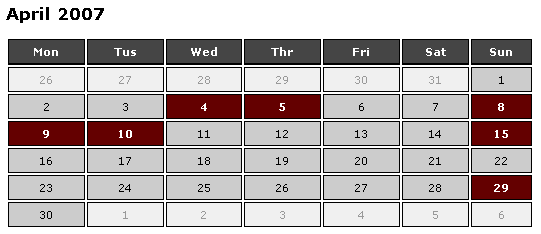
Running the above, we get the updated calendar month output with Monday leading off the week:
Now, I should really figure out how to get the headers to be output based on the day of the week method :) Then we would be all set.
Want to use code from this post? Check out the license.

Reader Comments
Works like a charm.
For the header row, I'm gonna looped over the list (2,3,4,5,6,7,1)--along with DayOfWeekAsString without a similar UDF shift.
Sweeet. Sounds good to me, to handle the headers that way.
that's exactly how i've done it in the past. You could probably use some combination of list functions to get the order of that list starting with your first day of week variable. something like:
list = 1,2,3,4,5,6,7;
firstdayofweek = 2;
for i = 1; i < firstdayofweek; i++
{
shift = listgetat(list, i);
list = listrest(list);
list = listappend(list, shift);
}
that wouldn't work obviously, as the first line would always be out of sync as we're updating the list in the loop. if we made a copy of the list and updated that instead...
Sweet.
How about include all Federal Holidays and highlighting it like blue maybe?
@Sgamuk,
You'd have to check the date within the loop to some collection of holidays.