
Ray's Friday Puzzler: Listing All Possibilities Of A Set
I finally got a chance to work on Ray's puzzler for April 27, 2007. It builds the result set by viewing the array as a table that has rows (set values) and columns (characters within a value). When you look at this way, you can build the array using a simple nested loop. The complicated part is using this RxC (row by column) index to figure out which character we are supposed to be using.
After analyzing the possible outcomes you will see that there are N^X possible values where N is the number of characters in the passed in set and X is the length of the each resultant item. This becomes our number of rows. Then, of course, the number of character columns is equal to the length of the set items (also passed id).
The alternating is a bit trickier to see. The last column has a new value for every row. The second to last column has a new value for every N rows (where N is the number of available characters). The third to last column has a new value for every N * N rows since it can only alternate after the second to last row has alternated.
You might begin to see the pattern is that a given column value alternates based on the length of the sets (X), the current column (C) and the number of characters (N) using this rule:
N^(X - C)
Once we know that, we can figure out which letter we are looking at based on the number of times our sequence has repeated and the current row. That equation is a bit complicated, so see the code below:
<cffunction
	name="AllSets"
	access="public"
	returntype="array"
	output="false"
	hint="Given the list of characters and the desired length, an array of all possible value combinations will be returned.">

	<!--- Define arguments. --->
	<cfargument
		name="Values"
		type="string"
		required="true"
		hint="A comma delimited list of values."
		/>

	<cfargument
		name="Length"
		type="numeric"
		required="true"
		hint="The length of the resultant set values."
		/>

	<!--- Define the local scope. --->
	<cfset var LOCAL = StructNew() />


	<!---
		Check to see if we have a valid set and a valid length.
		We can only return resultant value if we have a value
		set and length that is bigger than zero.
	--->
	<cfif (
		(NOT Len( ARGUMENTS.Values )) OR
		(ARGUMENTS.Length LTE 0)
		)>

		<!---
			We have an invalid set or target length. To work
			with this, just return an empty array.
		--->
		<cfreturn ArrayNew( 1 ) />


	<!---
		Check to see if the length is one. If it's just one,
		then we don't have to do any work; just convert the
		set to an array.
	--->
	<cfelseif (ARGUMENTS.Length EQ 1)>

		<!--- Create and return an array from the list. --->
		<cfreturn ListToArray(
			ARGUMENTS.Values
			) />

	</cfif>


	<!---
		ASSERT: At this pointer, we know that we definitely
		have a valid set of values and a valid target length
		that is greater than one (this will actually require
		value combinations).
	--->


	<!---
		Convert the set to an array so that we can more eaily
		access each letter.
	--->
	<cfset LOCAL.Values = ListToArray(
		ARGUMENTS.Values
		) />


	<!--- Create an array to hold the set values. --->
	<cfset LOCAL.Set = ArrayNew( 1 ) />


	<!---
		Loop over the rows to start populating each record.
		We are going to be building one row at a time by
		looping over each possible character. We know how
		many records we have since each letter can be in
		each spot.
	--->
	<cfloop
		index="LOCAL.RowIndex"
		from="1"
		to="#(ListLen( ARGUMENTS.Values ) ^ ARGUMENTS.Length)#"
		step="1">

		<!---
			Create a set value that will be added to the set
			we are building. We are going to build the value
			out of the set first to make the code more readable.
		--->
		<cfset LOCAL.Value = "" />

		<!---
			Loop over each character in the string. We know
			how many characters we need based on the length
			that was passed in.
		--->
		<cfloop
			index="LOCAL.ColumnIndex"
			from="1"
			to="#ARGUMENTS.Length#"
			step="1">

			<!---
				Get the MOD Toggle index for this column. Each
				column value toggles (switches to the next
				character) based on a MOD index.
			--->
			<cfset LOCAL.ModIndex = (
				ArrayLen( LOCAL.Values ) ^
				(ARGUMENTS.Length - LOCAL.ColumnIndex)
				) />


			<!---
				Get the bucket that we are in. By bucket, I mean
				which "iteration" are we in, in which this value
				is different form the previous letter.
			--->
			<cfset LOCAL.Bucket = Ceiling(
				LOCAL.RowIndex / LOCAL.ModIndex
				) />

			<!---
				Once we have the bucket, we can use that and the
				number of available values to figure out which
				letter we should be pointing to.
			--->
			<cfset LOCAL.ValueIndex = (((LOCAL.Bucket - 1) MOD ArrayLen( LOCAL.Values )) + 1) />


			<!---
				Get the new value character out of our working
				set based on the value index we just calculated.
			--->
			<cfset LOCAL.Value = (
				LOCAL.Value &
				LOCAL.Values[ LOCAL.ValueIndex ]
				) />

		</cfloop>


		<!--- Append the value to the results array. --->
		<cfset ArrayAppend(
			LOCAL.Set,
			LOCAL.Value
			) />

	</cfloop>


	<!--- Return the results array. --->
	<cfreturn LOCAL.Set />
</cffunction>
This uses two loops and no recursion, but is certainly a bit verbose. And now, to test; running this:
<cfset arrSet = AllSets(
	"A,B,C",
	3
	) />

<cfdump
	var="#arrSet#"
	label="Ray's Friday Puzzler - All Sets"
	/>
... we get the following CFDump output:
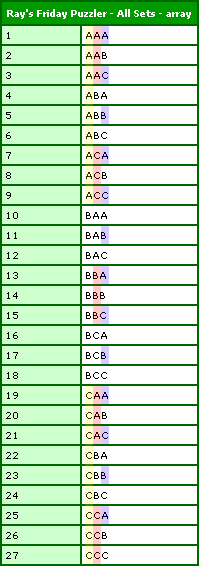
I have color coded the alternating rows to help see where things are changing.
Want to use code from this post? Check out the license.

Reader Comments
Nice solution. I was working on something very similar by using the exponent to determine total possibilities and two loops, but I got a little stuck towards the end... I'm glad you solved it this way so that I can see where I went wrong.
Dan
@Dan,
Thanks. Yeah, that MOD equation was driving me CRAZY for a while. I kept getting the sequence "1,2,0,1,2,0" and I wanted "1,2,3,1,2,3"!!!!
Very elegant!
Unfortunately, it crashes before finishing if the armuments are too large. I'm trying to find a solution for 7 values with a length of 8 (~5.7 million possibilities).
I was looking for a way that would allow me to calculate all of the possible hex colors. However, as chuck alluded to this would result in a VERY large number of combinations. Any thoughts on such a task 16 character list by 6 characters long? I'll let you know if i have any luck...
By the way, your blog is full of practical, easy to follow examples that have saved me countless hours. Thanks for all the tips and tricks that you take the time to share with other developers.