Function Scope Binding Depends On Invoking Custom Tag, Not Defining Custom Tag
As I am learning more about ColdFusion custom tags, I wanted to play around with defining user defined functions within a ColdFusion custom tag. To test this out, I set up a parent tag that has a function called AddName(). This function is invoked by each child tag (where by the child tag stores one of its attributes into the parent tag's data scopes).
Here is the main page (index.cfm) that defines the custom tags:
<!--- Impor the tag libraries. --->
<cfimport taglib="./" prefix="tag" />

<tag:parent>

	<tag:child name="Libby" />
	<tag:child name="Andrea" />
	<tag:child name="Kate" />
	<tag:child name="Sam" />
	<tag:child name="Sarah" />

</tag:parent>
As you can see, each child tag has a single attribute, Name. This is the attribute value that we will store into the parent. Here is the parent tag (parent.cfm):
<!---
	Check to see which execution mode the tag is running in.
	We won't have access to the child tag data until we are
	in the End tag mode.
--->
<cfswitch expression="#THISTAG.ExecutionMode#">

	<cfcase value="Start">

		<!--- Define the tag-based functions. --->

		<cffunction
			name="AddName"
			access="public"
			returntype="void"
			output="false"
			hint="Adds a name to this tag's names array.">

			<!--- Define arguments. --->
			<cfargument
				name="Name"
				type="string"
				required="true"
				hint="A nested tag name attribute to add."
				/>

			<!---
				Add this name to our internal names array
				that we defined below.
			--->
			<cfset ArrayAppend(
				THISTAG.Names,
				ARGUMENTS.Name
				) />

			<!--- Return out. --->
			<cfreturn />
		</cffunction>


		<!---
			Define the array or names that will house the Name
			attribute values our child (nested) tags.
		--->
		<cfset THISTAG.Names = ArrayNew( 1 ) />

	</cfcase>


	<cfcase value="End">

		<!---
			Output the names that we have collected from the
			child tags.
		--->
		<p>
			Names:
		</p>

		<!--- Loop over our names array. --->
		<cfloop
			index="intName"
			from="1"
			to="#ArrayLen( THISTAG.Names )#"
			step="1">

			<p>
				#intName#) #THISTAG.Names[ intName ]#
			</p>

		</cfloop>

	</cfcase>

</cfswitch>
As you can see, in the Start mode of the parent tag, I am defining a user defined function named AddName() and an array named "Names". The AddNames() UDF takes a name argument and appends it to the Name array that we defined within the THISTAG scope. Then, in the End mode of the tag, we are simply looping over the names.
Here is the child tag (child.cfm) that invokes the parent's method:
<!---
	Check to see which execution mode the tag is running in.
	We won't have access to the child tag data until we are
	in the End tag mode.
--->
<cfswitch expression="#THISTAG.ExecutionMode#">

	<cfcase value="Start">

		<!--- Get the base tag. --->
		<cfset THISTAG.Parent = GetBaseTagData( "cf_parent" ) />

		<!---
			Define the tag attributes. Our only attribute is
			the Name attribute. Since we are not defining a
			default value, this is a REQUIRED attribute.
		--->
		<cfparam
			name="ATTRIBUTES.Name"
			type="string"
			/>


		<!---
			Now that we have the parent tag (base tag) pointer,
			let's add this tag's Name attribute value to the
			parent's name array.
		--->
		<cfset THISTAG.Parent.AddName( ATTRIBUTES.Name ) />

	</cfcase>

</cfswitch>
As you can see, the child tag gets a pointer to the parent tag using the GetBaseTagData() method. It then defines the required Name attribute and invokes the parent tag's AddName() method using the Parent tag pointer.
This should work fine, but when I run the index page above, I get this ColdFusion error:
Element NAMES is undefined in THISTAG.
What is going on? Well, we know that this error is definitely happening inside of the UDF AddName() as this is the only place that reference this NAMES element. But how could this be? We are explicitly defining the Names array within the THISTAG scope - why wouldn't it exist?
To investigate what was going on, I added these lines of code to the AddName() UDF right before the line that was causing the error:
<!---
	Dump out the THISTAG scope so that we can get
	a better of sense of where we are.
--->
<cfdump
	var="#THISTAG#"
	label="THISTAG From Within AddName() UDF."
	top="2"
	/>

<!---
	Abort page processing so the previous error
	event doesn't fire.
--->
<cfabort />
After adding that code and then rerunning the index page again, we get the following CFDump output:
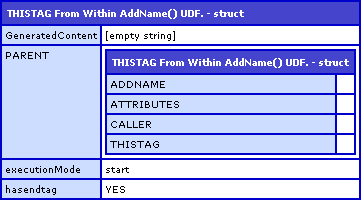
As you can see, this CFDump contains a structure called "Parent". Well, who has this structure? Not the Parent tag. The only ColdFusion custom tag that has this Parent structure defined is the Child tag.
So what does this mean about the UDF AddName()? It means that when it was invoked, the VARIABLES scope of the UDF binded to the VARIABLES scope of the invoking custom tag at run time, not at compile time. This means that while the UDF was defined within in the context of the Parent tag, since it was invoked by the Child tag, the UDF acted as if it were part of the Child tag and not the Parent tag.
This is a little strange, but when I think about ColdFusion components, it kind of makes sense and kind of doesn't make sense. If you have two ColdFusion components and one has a pointer to a method of the other one and then invokes that method, the method acts as if it were defined within the invoking component, not within the defining component. In that case, the VARIABLES and THIS scopes of the ColdFusion component bind dynamically at invocation time, not at compile time.
For this custom tag example, it is not quite like that. In this case, the invoking tag is not treating the UDF as if it were its own; in fact, it is passing the Name attribute value to the method with an explicit scoping to the Parent object. But, even though it is not quite a parallel situation, perhaps there is something like that going on at the ColdFusion custom tag level as well.
Want to use code from this post? Check out the license.

Reader Comments
Once again a very interesting post. Thanks for writing this stuff down and providing such clear explanations.
No problem. Just learning this stuff as I go.
Whilst this might initially make you go "huh?" it ought to be expected behavior - functions are evaluated in the calling context in all cases and variable name binding occurs in that context.
Consider this code (I don't know how it'll look in comments):
parent.cfm:
<cfset foo = "parent">
<cffunction name="getFoo">
<cfreturn foo>
</cffunction>
<cf_child fn="#getFoo#">
<cfdump label="variables" var="#variables#" />
child.cfm:
<cfset foo = "child">
<cfset caller.result = attributes.fn()>
What will result be in the dump? Since foo inside getFoo is not bound by the definition - it is bound by the calling context - getFoo must return the foo in the child context.
@Sean,
The difference in our two examples is that your example passes the Function object to the child then invokes, while mine invokes the method as an attribute of the parent tag.
The funny thing is that BOTH of our examples lead to the same outcome. However, if you look at ColdFusion components, A and B.... A.Foo() called from within the context of B will bind to A (think getters and setters) but Foo passed from A to B and then invoked in B will bind to B.
Obviously ColdFusion components and ColdFusion custom tags are two different beasts, but both have their own memory scopes and their own rules of visibility... but until it was explored, I think it would not be obvious which scope binds when/where.
Like I say, it still seems obvious to me. A component method invocation binds in the dynamic context of the component because, well, that's how objects work. Custom tags are just regular pages so they're not going to work that way.
That's why you can copy function references in and out of components and have them bind <tt>variables</tt> scope to that calling context regardless. Components are objects, everything else is a page.
Now, of course, technically components are pages too and functions all compile out to separate objects but the object-style binding only occurs for components...
My Closures library would allow you to "fix" the custom tag behavior. You could create a closure in your parent tag and bind <tt>variables</tt> scope into it (under an alias) and then invoke the closure from the child tag and have it "correctly" reference the parent's <tt>variables</tt> scope (via the bound alias).
Hmm, your blog doesn't recognize <tt>..</tt> as "teletype" markup to create monospaced text! :)
@Sean,
I see what you are saying, and I agree. I guess since ColdFusion custom tags behave slightly differently than a standard page template, I just thought maybe the properties of it might be different. But you are quite right - it is just page like anything else.
Oh yeah, I have also been lazy about what the comments on my blog recognize. I will update one of these days.
Also, this is all just for experimentation's sake. What was not obvious to me before will now be obvious to me in the future :)
... wearing dark glasses, getting good grades, the future's so bright, I gotta wear shades :)