Six Degrees Of Ben Forta
Based on the popular game, "Six Degrees of Kevin Bacon," I have created a much smaller version for Ben Forta in which you can enter your domain name and find the blog reference chain that leads to your domain (ie. Ben Forta references a blog that references a blog that references your blog). Due to the huge size of the web, I have selected a very small population of blogs to work with. These include all the blogs "on tap" over on Full As A Goog. If I didn't do this, I would have NO idea how to even go about creating something like this.
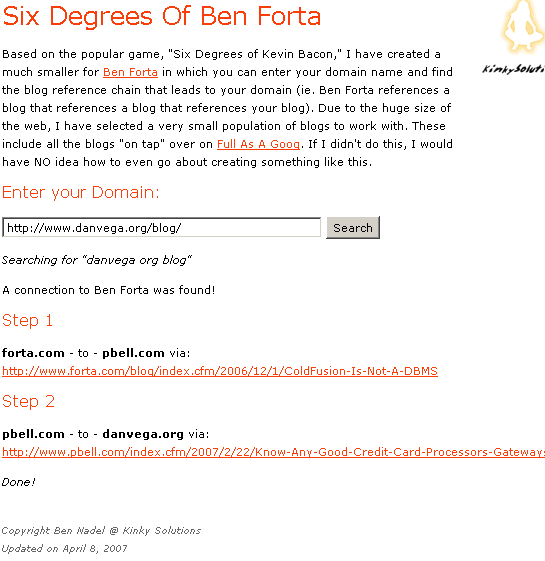
Click here to give it a go (as seen in the screen shot below):
Try some random blogs:
Peter Bell
Sean Corfield
Kay Smoljak
Tony Weeg
Building the application was actually fairly simple - much more so than I thought it would be. What took a long time (I let the spider run over the weekend) was amassing all the blog reference links (finding pages in which one blog refers to another blog). There are over 400 blogs on-tap on Full As A Goog. In order to find all the references, I basically had to create a 400 x 400 grid in which every blog was tested for references to every other blog. To find the references, I used CFHttp and grabbed site-specific search results off of Google.
Two database tables were involved:
forta_web
This was a table that housed the blog URLs spidered off of Full As A Goog:
- id - INT
- url - VARCHAR( 100 )
- search_url - VARCHAR( 100 )
- is_root - TINYINT
The url field was the http url for the blog. The search_url field was the "google-friendly" url that was being searched for. This stripped out HTTP, www, and other URL elements that were too narrowing. is_root was a flag for Ben Forta's web blog.
forta_web_jn
This was the join table that kept track of the blog-to-blog references that were found on Google:
- id - INT
- title - VARCHAR( 500 )
- url - VARCHAR( 500 )
- url_id_1 - INT
- url_id_2 - INT
The title and url fields were the search result elements returned in the Google search results. The url ID fields were the foreign keys referencing the forta_web table.
Step 1: Spidering Full As A Goog
Before I could do anything, I had to grab all of the blog URLs off of Full As A Goog. To do this, I used CFHttp to grab the "on-tap" page. Then I used a Java pattern matcher to find the blog urls:
<!---
Grab the on-tap page on Full as a Goog. This lists out all
the blogs that are currently being aggregated.
--->
<cfhttp
url="http://fullasagoog.com/blogsontap.cfm"
method="GET"
useragent="#CGI.http_user_agent#"
result="objHTTP"
/>
<!---
Create a pattern to find the blog links in the page
content. From viewing the source of the page, I can
see that each blog URL is preceeded by A tag with
CSS class cssbtnnaugth.
--->
<cfset objPattern = CreateObject(
"java",
"java.util.regex.Pattern"
).Compile(
"(?i)<a class=""cssbtn btnauth"" href=""([^""]+)""><strong> URL"
) />
<!---
Get the matcher for our page content against the content
returned from the CFHTTP call. We will use this to loop
through all the matching URLs (an surrounding HTML).
--->
<cfset objMatcher = objPattern.Matcher(
objHTTP.FileContent
) />
<!--- Keep looping over the matching links. --->
<cfloop condition="objMatcher.Find()">
<!---
Get the actual Url in the link. If you look at the
pattern above, you will see that that is the first
group reference. Once we get this URL, we want to
strip out the http and www and and sub directories.
We are doing this to simplify the URL (even though
this may give us some less-than-perfect results).
--->
<cfset strLink = objMatcher.Group( 1 ).ReplaceFirst(
"(?i)^https?://(www\.)?([^\\\/]+).*", "$2"
).Trim()
/>
<!---
In addition to the actual link, we want to get the
Google-friendly search url. This is the one we will
be using for the cross-blog linking. This link is
created by stripping out the leading protocol and
sub-domain (www) as well as any file name and all
url punctuation (. and /).
--->
<cfset strSearchLink = objMatcher.Group( 1 ).ReplaceFirst(
"(?i)^https?://(www\.)?",
""
).ReplaceFirst(
"([\\\/]{1})[^\\\/]+\.[\w]{2,4}$",
"$1"
).ReplaceAll(
"[^\w]+",
" "
).Trim()
/>
<!---
Check to see if this is the root Url (Forta's blog).
If it is, then we are going to see the root flag.
--->
<cfif REFindNoCase( "forta.com", strLink )>
<cfset intRoot = 1 />
<cfelse>
<cfset intRoot = 0 />
</cfif>
<!--- Insert the blog url into the database. --->
<cfquery name="qInsert" datasource="#REQUEST.DSN.Source#">
DECLARE
@id INT,
@url VARCHAR( 100 ),
@search_url VARCHAR( 100 ),
@is_root TINYINT
;
<!--- Set bindings. --->
SET @url = <cfqueryparam value="#strLink#" cfsqltype="CF_SQL_VARCHAR" />;
SET @search_url = <cfqueryparam value="#strSearchLink#" cfsqltype="CF_SQL_VARCHAR" />;
SET @is_root = <cfqueryparam value="#intRoot#" cfsqltype="CF_SQL_TINYINT" />;
<!--- See if this blog is already in the database. --->
SET @id = ISNULL(
(
SELECT
f.id
FROM
forta_web f
WHERE
url = @url
),
0
);
<!--- Check to see if we need to insert this one. --->
IF (@id = 0)
BEGIN
INSERT INTO forta_web
(
url,
search_url,
is_root
) VALUES (
@url,
@search_url,
@is_root
);
END
</cfquery>
</cfloop>
Done.
Notice that for each blog URL I get two values - the URL and the "Search Url". From some quick trial and error, I found that Google would strip out certain values of a URL when searching for URLs. In order to get better Google search results, I did this as I spidered the blog URLs.
Step 2: Building The Blog-to-Blog References
This was by far the most time consuming aspect of the experiment. For this, I had to use CFHttp Google to find all the references from every blog to every other blog. I am not sure if this is the best way to do it, but this was all I could come up with. If I estimate that there are 400 blogs on Full As A Goog, then that means I had to check for around 160,000 blog-to-blog references. Yikes!
<!---
	Set page request settings. We are going to be checking
	for URLs in blocks of 100 each using a CFHttp call, so
	this page might be running for a while.
--->
<cfsetting
	requesttimeout="350"
	/>


<!--- Param the URL variables. --->
<cfparam name="URL.id1" type="numeric" default="0" />
<cfparam name="URL.id2" type="numeric" default="0" />


<!--- Check to see if we have an ID 1. --->
<cfif NOT URL.id1>

	<!---
		Since we don't have an ID1, let's start with the
		root domain - get Forta.com.
	--->
	<cfquery name="qID1" datasource="#REQUEST.DSN.Source#">
		SELECT
			f.id,
			f.url,
			f.search_url,
			f.is_root
		FROM
			forta_web f
		WHERE
			f.is_root = 1
	</cfquery>

<cfelse>

	<!--- We were passed an ID, so get that URL. --->
	<cfquery name="qID1" datasource="#REQUEST.DSN.Source#">
		SELECT
			f.id,
			f.url,
			f.search_url,
			f.is_root
		FROM
			forta_web f
		WHERE
			f.id = <cfqueryparam value="#URL.id1#" cfsqltype="CF_SQL_INTEGER" />
	</cfquery>

</cfif>


<!--- Store the id for use. --->
<cfset URL.id1 = Val( qID1.id ) />


<!--- Check to see if we have an ID 2. --->
<cfif NOT URL.id2>

	<!---
		Since we don't have an ID2, get first 100 non-forta
		links. Be sure NOT to get any IDs that match the
		first ID (obtained above) - we don't care about how
		a site links to itself.
	--->
	<cfquery name="qID2" datasource="#REQUEST.DSN.Source#">
		SELECT TOP 100
			f.id,
			f.url,
			f.search_url,
			f.is_root
		FROM
			forta_web f
		WHERE
			f.is_root = 0
		AND
			f.id != <cfqueryparam value="#URL.id1#" cfsqltype="CF_SQL_INTEGER" />
		ORDER BY
			f.id ASC
	</cfquery>

<cfelse>

	<!---
		We were passed a second ID. Get the next 100 IDs
		greater than or equal to the one passed. Again, make
		sure we don't get the ID defined above.
	--->
	<cfquery name="qID2" datasource="#REQUEST.DSN.Source#">
		SELECT TOP 100
			f.id,
			f.url,
			f.search_url,
			f.is_root
		FROM
			forta_web f
		WHERE
			f.id >= <cfqueryparam value="#URL.id2#" cfsqltype="CF_SQL_INTEGER" />
		AND
			f.id != <cfqueryparam value="#URL.id1#" cfsqltype="CF_SQL_INTEGER" />
		AND
			f.is_root = 0
		ORDER BY
			f.id ASC
	</cfquery>

</cfif>


<!--- Store the id for use. --->
<cfset URL.id2 = Val( qID2.id ) />


<!--- Check to make sure we have both IDs. --->
<cfif (qID1.RecordCount AND qID2.RecordCount)>


	<!---
		Loop over all the qID2. For each ID in the second query,
		we want to see if the web site for ID 1 references it.
	--->
	<cfloop query="qID2">

		<!---
			Check to see if the link exists in Google. We
			are doing a site-specific search and passing in
			the second URL. Notice that we are passing in the
			search_url, not the actual domain. This seems to
			get better results.

			Also notice that we are passing in the Mozilla /
			FireFox useragent. This actually gets Google to
			return different HTML than if the user agent was
			IE. Using the Mozilla-based source code, there are
			more HTML elements that will help us parse the
			search results.
		--->
		<cfhttp
			url="http://www.google.com/search?num=10&hl=en&lr=&as_qdr=all&q=site%3A#UrlEncodedFormat( qID1.url )#+%22#UrlEncodedFormat( qID2.search_url )#%22&btnG=Search"
			method="GET"
			useragent="Mozilla/5.0 (Windows; U; Windows NT 5.1; en-US; rv:1.8.1.3) Gecko/20070309 Firefox/2.0.0.3"
			result="objHTTP"
			/>


		<!---
			Check to see if there were any results. If there
			were not, there will be a sentence in the source
			code alerting us that no documents were found.
		--->
		<cfif NOT FindNoCase( "did not match any documents", objHTTP.FileContent )>

			<!---
				We found some sort of match! Create a pattern
				to that will help us grab the search reasults.
				Going back to what I said above, its the
				"<!--m-->" that only shows up in the Mozilla-
				based user agent requests. Not sure why, but we
				can leverage it none the less. In this pattern,
				we are matching both the link title (group 2)
				and the link (group 1).
			--->
			<cfset objPattern = CreateObject(
				"java",
				"java.util.regex.Pattern"
				).Compile(
					"(?i)<!--m-->.+?href=""([^""]+)""[^>]*>(.+?)</a>"
					) />

			<!---
				Get a pattern matcher for our pattern against
				the Google search results.
			--->
			<cfset objMatcher = objPattern.Matcher(
				objHTTP.FileContent
				) />


			<!--- Keep looping while we have matches. --->
			<cfloop condition="objMatcher.Find()">

				<!---
					Get the elements of the Google
					search results.
				--->
				<cfset strLink = objMatcher.Group( 1 ) />
				<cfset strText = objMatcher.Group( 2 ) />


				<!---
					Check to see if that blog-to-blog join
					already exists. No need to add the same
					thing twice.
				--->
				<cfquery name="qExists" datasource="#REQUEST.DSN.Source#">
					SELECT
						id
					FROM
						forta_web_jn
					WHERE
						url_id_1 = <cfqueryparam value="#qID1.id#" cfsqltype="CF_SQL_INTEGER" />
					AND
						url_id_2 = <cfqueryparam value="#qID2.id#" cfsqltype="CF_SQL_INTEGER" />
					AND
						LOWER( url ) = <cfqueryparam value="#LCase( strLink )#" cfsqltype="CF_SQL_VARCHAR" />
				</cfquery>


				<!---
					If this is a new link, let's add it into
					the forta_web_jn table.
				--->
				<cfif NOT qExists.RecordCount>

					<!--- Insert the join. --->
					<cfquery name="qInsert" datasource="#REQUEST.DSN.Source#">
						INSERT INTO forta_web_jn
						(
							title,
							url,
							url_id_1,
							url_id_2
						) VALUES (
							<cfqueryparam value="#strText#" cfsqltype="CF_SQL_VARCHAR" />,
							<cfqueryparam value="#strLink#" cfsqltype="CF_SQL_VARCHAR" />,
							<cfqueryparam value="#qID1.id#" cfsqltype="CF_SQL_INTEGER" />,
							<cfqueryparam value="#qID2.id#" cfsqltype="CF_SQL_INTEGER" />
						);
					</cfquery>

					Link Inserted

				</cfif>

			</cfloop>

		</cfif>


	</cfloop>

</cfif>


<!---
	Now that we have checked the linking of blog ID1 to all
	the blogs in the ID2 query, let's see what we are doing
	next... Try to grab the next URL id for ID2. There might
	be more blogs to check against the ID1 blog. This will
	later result in upto the next 100 urls upon page refresh.
--->
<cfquery name="qNextID2" datasource="#REQUEST.DSN.Source#">
	SELECT TOP 1
		f.id,
		f.url,
		f.search_url
	FROM
		forta_web f
	WHERE
		<cfif qID2.RecordCount>
			f.id > <cfqueryparam value="#ArrayMax( qID2[ 'id' ] )#" cfsqltype="CF_SQL_INTEGER" />
		<cfelse>
			f.id > <cfqueryparam value="#URL.id2#" cfsqltype="CF_SQL_INTEGER" />
		</cfif>
	AND
		f.id != <cfqueryparam value="#URL.id1#" cfsqltype="CF_SQL_INTEGER" />
	AND
		f.is_root = 0
	ORDER BY
		f.id ASC
</cfquery>


<!--- Check to see if have do NOT have a next ID2. --->
<cfif NOT qNextID2.RecordCount>

	<!---
		Since we did not find a new ID for ID2, we have to
		increment the ID1, refresh the page, and start checking
		the new ID1 against all the other blogs in the
		forta_web database.
	--->
	<cfquery name="qNextID1" datasource="#REQUEST.DSN.Source#">
		SELECT TOP 1
			f.id,
			f.url,
			f.search_url
		FROM
			forta_web f

		WHERE
			f.is_root = 0

		<!--- Check to see if we are currently using the root id. --->
		<cfif Val( qID1.is_root )>

			AND
				f.id > 0

		<cfelse>

			AND
				f.id > <cfqueryparam value="#URL.id1#" cfsqltype="CF_SQL_INTEGER" />

		</cfif>

		ORDER BY
			f.id ASC
	</cfquery>


	<!--- Check to see if we have another ID1. --->
	<cfif qNextID1.RecordCount>

		<cfoutput>

			<script type="text/javascript">
				setTimeout(
					function(){
						location.href = "#CGI.script_name#?id1=#qNextID1.id#";
					},
					1500
					);
			</script>

		</cfoutput>

	<cfelse>

		<!---
			We have neither a next ID1 or ID2. We are done
			looking for blog-to-blog references.
		--->
		Done.

	</cfif>


<cfelse>

	<!---
		WE have a next ID2. Check for the next set
		of blog-to-blog links.
	--->
	<cfoutput>

		<script type="text/javascript">
			setTimeout(
				function(){
					location.href = "#CGI.script_name#?id1=#URL.id1#&id2=#qNextID2.id#";
				},
				1500
				);
		</script>

	</cfoutput>

</cfif>
Notice that at the end of the page, I am refreshing using Javascript setTimeout() calls. This has two reasons behind it: 1, it gave the server a tad bit of rest between bouts of processing (1.5 seconds). And 2, I get uncomfortable running CFLocation after CFLocation after CFLocation. Something about it just rubs me the wrong way. Plus, I think sometimes the browser doesn't like this, and I didn't want the browser killing the refreshes while I wasn't here (remember, I let this run over the weekend).
Step 3: Finding The Referential Blog Chain
Finding the blog referral chain proved much easier than I thought it was going to be. We know how many steps we can have (six), we know which blog we need to end with (your blog), and we know which blog we need to start with (Ben Forta's). Finding the chain was as easy and starting with yours and walking backwards until we found Forta's:
<form action="#CGI.script_name#" method="post">

	<h3>
		Enter your Domain:
	</h3>

	<p>
		<input
			type="text"
			name="domain"
			value="#FORM.domain.ReplaceAll( "("")", "$1$1" )#"
			size="50"
			/>

		<input
			type="submit"
			value="Search"
			/>
	</p>

</form>


<!--- Check to see if we have a domain to search for. --->
<cfif Len( FORM.domain )>

	<!---
		Get a clean domain. This is like the google-
		friendly search URL that we used when
		building the blog-to-blog web.
	--->
	<cfset strCleanDomain = FORM.domain.ReplaceFirst(
		"(?i)^(https?://)?(www\.)?",
		""
		).ReplaceFirst(
			"([\\\/]{1})[^\\\/]+\.[\w]{2,4}$",
			"$1"
			).ReplaceAll(
				"[^\w]+",
				" "
				).Trim() />


	<p>
		<em>Searching for "#strCleanDomain#"</em>
	</p>


	<!---
		Give the user some visual feedback while we are
		building the blog reference chain.
	--->
	<cfflush />


	<!---
		Try to find this domain in our database.
		Remember, this will only work if the blog we
		are searching for is in Full As A Goog's Blogs
		on Tap page.
	--->
	<cfquery name="qTargetDomain" datasource="#REQUEST.DSN.Source#">
		SELECT
			f.id,
			f.url,
			f.search_url,

			<!--- Also get the root domain ID. --->
			(
				SELECT TOP 1
					f2.id
				FROM
					forta_web f2
				WHERE
					f2.is_root = 1
				ORDER BY
					f2.id ASC
			) AS root_id
		FROM
			forta_web f
		WHERE
			f.is_root = 0
		AND
			(
					f.search_url LIKE <cfqueryparam value="%#strCleanDomain#%" cfsqltype="CF_SQL_VARCHAR" />
				OR
					f.url LIKE <cfqueryparam value="%#strCleanDomain#%" cfsqltype="CF_SQL_VARCHAR" />
			)
	</cfquery>


	<!--- Check to see if a target was found. --->
	<cfif qTargetDomain.RecordCount>


		<!---
			Set the path we took. This will be an array
			of site definitions. In the end, Forta's
			blog will be at index 1 (or least ONE of
			the blogs at index 1).
		--->
		<cfset arrPath = ArrayNew( 1 ) />


		<!---
			Create a path item for the target domain.
			For each step, we are going to keep a
			struct of ID-based keys where the key is
			the ID of the blog.
		--->
		<cfset objNodes = StructNew() />

		<!---
			Set the target domian ID. This first
			step will consist only of the blog we
			are seeking a chain to.
		--->
		<cfset objNodes[ qTargetDomain.id ] = StructNew() />
		<cfset objNodes[ qTargetDomain.id ].JoinID = 0 />
		<cfset objNodes[ qTargetDomain.id ].TargetID = 0 />

		<!--- Add this node to the path. --->
		<cfset ArrayAppend( arrPath, objNodes ) />


		<!---
			Keep looping until we break or hit the max
			depth (6 - six degrees of sepparation) or
			until we find a step that contains Forta's
			blog ID (will CFBreak below).
		--->
		<cfloop
			index="intDepth"
			from="2"
			to="6"
			step="1">


			<!---
				Get the domains we are searching for.
				For each step, we want to find blogs
				that link to the blog in the step
				before.
			--->
			<cfset lstIDs = StructKeyList( arrPath[ 1 ] ) />

			<!--- Query for matching domains. --->
			<cfquery name="qNodeDomain" datasource="#REQUEST.DSN.Source#">
				SELECT
					fwjn.id,
					fwjn.url_id_1,
					fwjn.url_id_2
				FROM
					forta_web_jn fwjn
				WHERE
					fwjn.url_id_2 IN ( <cfqueryparam value="#lstIDs#,0" cfsqltype="CF_SQL_INTEGER" list="yes" /> )
			</cfquery>


			<!--- Create the node structure. --->
			<cfset objNodes = StructNew() />

			<!---
				Loop over each source node domain and
				set the path node structure.
			--->
			<cfloop query="qNodeDomain">

				<!--- Store the join. --->
				<cfset objNodes[ qNodeDomain.url_id_1 ] = StructNew() />
				<cfset objNodes[ qNodeDomain.url_id_1 ].JoinID = qNodeDomain.id />
				<cfset objNodes[ qNodeDomain.url_id_1 ].TargetID = qNodeDomain.url_id_2 />

			</cfloop>


			<!--- Add node to path. --->
			<cfset ArrayPrepend( arrPath, objNodes ) />


			<!---
				Check to see if we should stop. We are going
				to stop if any of the current keys is that root
				domain, or if this node is empty.
			--->
			<cfif (
				StructKeyExists( objNodes, qTargetDomain.root_id ) OR
				(NOT StructCount( objNodes ))
				)>

				<cfbreak />

			</cfif>

		</cfloop>


		<!---
			We are done searching. If the root id is in the
			first path node, then we were successful.
		--->
		<cfif StructKeyExists( arrPath[ 1 ], qTargetDomain.root_id )>


			<p>
				A connection to Ben Forta was found!
			</p>


			<!---
				When displaying the blog chain, we want to
				start with the root ID and then work forwrads
				(now that we built the chain going backwards).
			--->
			<cfset intSourceID = qTargetDomain.root_id />


			<!--- Loop over the entire array of steps --->
			<cfloop
				index="intStep"
				from="1"
				to="#ArrayLen( arrPath )#"
				step="1">


				<!--- Get the current node (step). --->
				<cfset objNode = arrPath[ intStep ] />


				<!--- Get the step logic. --->
				<cfset objStep = objNode[ intSourceID ] />

				<!---
					Query for step information. We want to
					find the blog information regarding the
					JOIN ID of the two blogs from the current
					step and source ID.
				--->
				<cfquery name="qStep" datasource="#REQUEST.DSN.Source#">
					SELECT
						fwjn.url,
						fwjn.title,
						fwjn.url_id_1,
						fwjn.url_id_2,
						( f1.url ) AS source_url,
						( f2.url ) AS target_url
					FROM
						forta_web_jn fwjn
					INNER JOIN
						forta_web f1
					ON
						fwjn.url_id_1 = f1.id
					INNER JOIN
						forta_web f2
					ON
						fwjn.url_id_2 = f2.id
					WHERE
						fwjn.id = <cfqueryparam value="#objNode[ intSourceID ].JoinID#" cfsqltype="CF_SQL_INTEGER" />
				</cfquery>


				<h3>
					Step #intStep#
				</h3>

				<p>
					<strong>#qStep.source_url#</strong> - to -
					<strong>#qStep.target_url#</strong> via:<br />
					<a href="#qStep.url#" target="_blank">#qStep.url#</a>
				</p>

				<!---
					Set new source ID. On the next loop
					iteration, we want to find the join that
					resulted from the current join.
				--->
				<cfset intSourceID = qStep.url_id_2 />


				<!---
					Check to see if the target ID is the new
					source id. If so, than we have finished
					building our blog-to-blog reference chain.
				--->
				<cfif (intSourceID EQ qTargetDomain.id)>

					<p>
						<em>Done!</em>
					</p>

					<cfbreak />

				</cfif>

			</cfloop>


		<cfelse>

			<!---
				Forta's blog ID was NOT contained in the
				first step of the blog chain. No connection
				could be found.
			--->
			<p>
				<em>No connection to Ben Forta could be found :(</em>
			</p>

		</cfif>


	<cfelse>


		<!--- Target domain could not be found. --->
		<p>
			<em>That domain was not found on FullAsAGoog's Blogs on Tap.</em>
		</p>


	</cfif>

</cfif>
That's all there is to it. This was a neat little experiment done on a small scale. It's not the most accurate and certainly not comprehensive; I have absolutely no idea how you would accomplish something like this on a more grand scale. I have no idea how you would even update the "web" of blog-to-blog references. I guess that is why Google has a bazillion computers all spidering the web all the time.
Want to use code from this post? Check out the license.

Reader Comments
What a creative idea Ben! I dig it.
Thanks Dave. Can't let Kevin Bacon have all the fun ;)
Ben's ma daddy.
I win
Small and nice game. Thanks!
You make a lot of fun little aps man. :) 2 steps away -- through Peter Bells blog here!
@Adam,
Thanks man. I like to have a lot of fun with this ColdFusion stuff. The scope of this app is fairly small when you consider that like 3 new blogs are created every second. I can't even imagine how something like this would be maintained on a large scale.
Good information thanks..
Thank you very much Dave,
Nice work.
A similar thing has been done with friend on fb by the Institute for Statistics and Mathematics, Vienna University of Economics and Business, not sure if it's CF, but here's the link
http://www.kakadu-works.com/myfnetwork/welcome.html