
What If ColdFusion Looked Like jQuery
I am a Huge fan of jQuery. I love the method chaining and the ability to apply methods to each element in a jQuery collection object. I was wondering if I would want ColdFusion to be able to do that. When I started to experiment, I realized that ColdFusion has two limitations that stop it from being like jQuery:
The biggest limitation is simply the ability to create on-the-fly, nameless functions. It can be done, but it's hard and not very elegant. These anonymous functions are half of what make jQuery (and Javascript in general) so amazingly powerful.
ColdFusion does not have a very solid structure like the browser's Document Object Model (DOM) over which actions can be taken. This is not a limitation of ColdFusion itself, but merely a fact of the sever-side world.
But, I figured there could be jQuery-like structures for ColdFusion. These turned out to be more like data type wrappers, but still, I thought they were very interesting. Here is a demo:
<!---
	Create a strcut with value keys. This is to
	demonstrate that our data wrapper allows the
	adding of STRUCTs to a simple list.
--->
<cfset objValues = StructNew() />
<cfset objValues[ "testa" ] = "likes" />
<cfset objValues[ "testb" ] = "Nancy." />


<!---
	Create an array of values. This is to
	demonstrate that our data wrapper allows the
	adding of ARRAYs to a simple list.
--->
<cfset arrValues = ListToArray( "Nancy,is" ) />


<!---
	Create a jQuery-like wrapper for a ColdFusion
	list value. I am using the $ signe just to drive
	home that this is modelled on jQuery.
--->
<cfset $List = CreateObject( "component", "$List" ).Init() />


<!---
	Now that we have our jQuery-like data wrapper,
	let's start manipulating the list using chained
	methods and an Each method call.
--->
#$List.Prepend( "Ben" )
.Append( "naughty" )
.InsertAt( 2, objValues )
.InsertAt( 4, arrValues )
.Each( EachHandler )
.ToString()#


<!--- This defines the Each Handler for the calls above. --->
<cffunction
	name="EachHandler"
	access="public"
	returntype="string"
	output="false"
	hint="Handles manipulation of each list item. Must return the item.">

	<!--- Define arguments. --->
	<cfargument
		name="Value"
		type="string"
		required="true"
		/>

	<!--- Return cammel-case value. --->
	<cfreturn REReplace(
		ARGUMENTS.Value,
		"^([a-z])",
		"\U\1",
		"ONE"
		) />
</cffunction>
The 6 chained method calls on $List result in the following output:
Ben,Likes,Nancy.,Nancy,Is,Naughty
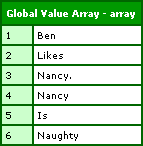
This demonstrates an Each method that takes a list value and returns an updated value. However, just as in jQuery / Javascript, there is no requirement for the Each method to actually update the list. In this example, we can use the Each method as an iterator that populates a global, REQUEST-scoped value array:
<!--- Create out global values array. --->
<cfset REQUEST.Values = ArrayNew( 1 ) />

<!---
	Build the global array using the Each
	method of the list data wrapper.
--->
<cfset $List.Each( EachHandler2 ) />


<!--- Dump out the global array. --->
<cfdump
	var="#REQUEST.Values#"
	label="Global Value Array"
	/>


<!--- This defines the Each method handler for use above. --->
<cffunction
	name="EachHandler2"
	access="public"
	returntype="void"
	output="false"
	hint="Takes each value and adds it to a REQUEST-scope array.">

	<!--- Define arguments. --->
	<cfargument
		name="Value"
		type="string"
		required="true"
		/>

	<!--- Append this value to our global array. --->
	<cfset ArrayAppend( REQUEST.Values, ARGUMENTS.Value ) />

	<!--- Return void. --->
	<cfreturn />
</cffunction>
CFDumping out the REQUEST.Values array, we get:
I like the idea. I think it has some merit, I am just not sure that ColdFusion is the proper place to apply this type of methodology. Does anyone have any thoughts on this type of thing?
Here is the code that created the $List.cfc ColdFusion component / jQuery-like data wrapper:
<cfcomponent
	output="false"
	hint="Creates functionality around a list.">


	<!---
		Create an instance struct to hold
		instance specific data.
	--->
	<cfset VARIABLES.Instance = StructNew() />

	<!--- Store the list internally as an array. --->
	<cfset VARIABLES.Instance.Values = ArrayNew( 1 ) />

	<!--- Set the default delimiter. --->
	<cfset VARIABLES.Instance.Delimiter = "," />


	<!--- This is a hack to get better naming for functions. --->
	<cfset THIS.ToString = THIS.$ToString />


	<cffunction
		name="Init"
		access="public"
		returntype="any"
		output="false"
		hint="Returns an initialized list object.">

		<!--- Define the local scope. --->
		<cfset var LOCAL = StructNew() />

		<!--- Set up the default value array. --->
		<cfset VARIABLES.Instance.Values = ArrayNew( 1 ) />

		<!--- Set up the default delimiter. --->
		<cfset VARIABLES.Instance.Delimiter = "," />


		<!---
			Check to see if a second argument, the delimiter,
			has been passed in.
		--->
		<cfif (
			StructKeyExists( ARGUMENTS, "2" ) AND
			Len( ARGUMENTS[ 2 ] )
			)>

			<!--- Store the passed in delimiter. --->
			<cfset VARIABLES.Instance.Delimiter = ARGUMENTS[ 2 ] />

		</cfif>


		<!--- Check to see if we had a values set passed in. --->
		<cfif StructKeyExists( ARGUMENTS, "1" )>

			<!--- Append the values to our list. --->
			<cfset THIS.Append(
				Values = ARGUMENTS[ 1 ],
				Delimiters = VARIABLES.Instance.Delimiter
				) />

		</cfif>


		<!--- Return This reference. --->
		<cfreturn THIS />
	</cffunction>


	<cffunction
		name="Append"
		access="public"
		returntype="any"
		output="false"
		hint="Appends list items to the list.">

		<!--- Define arguments. --->
		<cfargument
			name="Values"
			type="any"
			required="true"
			hint="These are the values that you are appending. Can be list, array, struct."
			/>

		<cfargument
			name="Delimiters"
			type="string"
			required="false"
			default="#VARIABLES.Instance.Delimiter#"
			hint="The characters use for list delimiters."
			/>


		<!---
			Append the new values to the end of our
			ineternal value array.
		--->
		<cfset VARIABLES.Instance.Values.AddAll(
			THIS.ToValueArray(
				ArgumentCollection = ARGUMENTS
				)
			) />

		<!--- Return This reference. --->
		<cfreturn THIS />
	</cffunction>


	<cffunction
		name="Delete"
		access="public"
		returntype="any"
		output="false"
		hint="This takes values (list, array, struct) and deletes them from the list.">

		<!--- Define arguments. --->
		<cfargument
			name="Values"
			type="any"
			required="true"
			hint="These are the values that you are deleting. Can be list, array, struct."
			/>

		<cfargument
			name="Delimiters"
			type="string"
			required="false"
			default="#VARIABLES.Instance.Delimiter#"
			hint="The characters use for list delimiters."
			/>


		<!---
			Create an array of the values and then remove
			them all from our internal list.
		--->
		<cfset VARIABLES.Instance.Values.RemoveAll(
			THIS.ToValueArray(
				ArgumentCollection = ARGUMENTS
				)
			) />

		<!--- Return This reference. --->
		<cfreturn THIS />
	</cffunction>


	<cffunction
		name="Each"
		access="public"
		returntype="any"
		output="false"
		hint="Applies the given function to each list item.">

		<!--- Define arguments. --->
		<cfargument
			name="Method"
			type="any"
			required="true"
			/>

		<!--- Define the local scope. --->
		<cfset var LOCAL = StructNew() />

		<!--- Loop over list items to apply method. --->
		<cfloop
			index="LOCAL.Index"
			from="1"
			to="#VARIABLES.Instance.Values.Size()#"
			step="1">

			<!--- Get an updated value. --->
			<cfset LOCAL.Value = ARGUMENTS.Method(
				VARIABLES.Instance.Values[ LOCAL.Index ]
				) />

			<!---
				Theoretically, each of the methods *should*
				return a value. However, this function might
				NOT be returning a value. Therefore, check to
				see if value exists locally before saving it
				back into our list.
			--->
			<cfif StructKeyExists( LOCAL, "Value" )>

				<!--- We have a valid value. --->
				<cfset VARIABLES.Instance.Values[ LOCAL.Index ] = LOCAL.Value />

			</cfif>

		</cfloop>

		<!--- Return This reference. --->
		<cfreturn THIS />
	</cffunction>


	<cffunction
		name="InsertAt"
		access="public"
		returntype="any"
		output="false"
		hint="Inserts the given values at the given index.">

		<!--- Define arguments. --->
		<cfargument
			name="Index"
			type="numeric"
			required="true"
			hint="The index at which to insert the values. LTE 1 will prepend."
			/>

		<cfargument
			name="Values"
			type="any"
			required="true"
			hint="These are the values that you are inserting. Can be list, array, struct."
			/>

		<cfargument
			name="Delimiters"
			type="string"
			required="false"
			default="#VARIABLES.Instance.Delimiter#"
			hint="The characters use for list delimiters."
			/>


		<!--- Define the local scope. --->
		<cfset var LOCAL = StructNew() />


		<!--- Create a local values array. --->
		<cfset LOCAL.Values = THIS.ToValueArray(
			ArgumentCollection = ARGUMENTS
			) />


		<!--- Check the index to see if we are prepending. --->
		<cfif (ARGUMENTS.Index LTE 1)>

			<!--- Return prepending result. --->
			<cfreturn THIS.Prepend(
				ArgumentCollection = ARGUMENTS
				) />

		<cfelseif (ARGUMENTS.Index GT VARIABLES.Instance.Values.Size())>

			<!--- Return appending result. --->
			<cfreturn THIS.Append(
				ArgumentCollection = ARGUMENTS
				) />

		<cfelse>

			<!---
				We actually need to insert the values. In order
				to do that, lets get local copies of the array
				to mess with.
			--->
			<cfset LOCAL.PreValues = VARIABLES.Instance.Values />
			<cfset LOCAL.PostValues = VARIABLES.Instance.Values />


			<!--- Trim the pre-value list. --->
			<cfloop
				index="LOCAL.Index"
				from="#VARIABLES.Instance.Values.Size()#"
				to="#ARGUMENTS.Index#"
				step="-1">

				<!--- Delete the post non-pre values. --->
				<cfset ArrayDeleteAt(
					LOCAL.PreValues,
					LOCAL.Index
					) />

			</cfloop>


			<!--- Trim the post-value list. --->
			<cfloop
				index="LOCAL.Index"
				from="#(ARGUMENTS.Index - 1)#"
				to="1"
				step="-1">

				<!--- Delete the pre non-post values. --->
				<cfset ArrayDeleteAt(
					LOCAL.PostValues,
					LOCAL.Index
					) />

			</cfloop>


			<!--- Add the new value to the pre values. --->
			<cfset LOCAL.PreValues.AddAll(
				LOCAL.Values
				) />

			<!--- Add the post values to that. --->
			<cfset LOCAL.PreValues.AddAll(
				LOCAL.PostValues
				) />

			<!--- Store the new list back into the instance. --->
			<cfset VARIABLES.Instance.Values = LOCAL.PreValues />

			<!--- Return This reference. --->
			<cfreturn THIS />

		</cfif>
	</cffunction>


	<cffunction
		name="Prepend"
		access="public"
		returntype="any"
		output="false"
		hint="Prepends list items to the list.">

		<!--- Define arguments. --->
		<cfargument
			name="Values"
			type="any"
			required="true"
			hint="These are the values that you are prepending. Can be list, array, struct."
			/>

		<cfargument
			name="Delimiters"
			type="string"
			required="false"
			default="#VARIABLES.Instance.Delimiter#"
			hint="The characters use for list delimiters."
			/>


		<!--- Define the local scope. --->
		<cfset var LOCAL = StructNew() />


		<!--- Create a local values array. --->
		<cfset LOCAL.Values = THIS.ToValueArray(
			ArgumentCollection = ARGUMENTS
			) />

		<!---
			At this point, we should have an array of values
			that we need to prepend. To accomplish this, we
			are going to append the exiting list to this new
			list and then save the resultant back into the
			list object.
		--->
		<cfset LOCAL.Values.AddAll( VARIABLES.Instance.Values ) />

		<!--- Store the new list back into our list. --->
		<cfset VARIABLES.Instance.Values = LOCAL.Values />

		<!--- Return This reference. --->
		<cfreturn THIS />
	</cffunction>


	<cffunction
		name="$ToString"
		access="public"
		returntype="string"
		output="false"
		hint="Returns a string representation of the list.">

		<!--- Join all values. --->
		<cfreturn ArrayToList(
			VARIABLES.Instance.Values,
			VARIABLES.Instance.Delimiter
			) />
	</cffunction>


	<cffunction
		name="ToValueArray"
		access="public"
		returntype="array"
		output="false"
		hint="Takes some sort of value (list, array, struct), and returns an array of values.">

		<!--- Define arguments. --->
		<cfargument
			name="Values"
			type="any"
			required="true"
			hint="These are the values that are being converted to an array. Can be list, array, struct."
			/>

		<cfargument
			name="Delimiters"
			type="string"
			required="false"
			default="#VARIABLES.Instance.Delimiter#"
			hint="The characters use for list delimiters."
			/>


		<!--- Define the local scope. --->
		<cfset var LOCAL = StructNew() />


		<!---
			Check to see which type of data is being prepended
			to the list. We can take a string, an array,
			or a struct (from which we will take the values).
		--->
		<cfif IsSimpleValue( ARGUMENTS.Values )>

			<!--- Create a local copy of the new values. --->
			<cfset LOCAL.Values = ListToArray(
				ARGUMENTS.Values,
				ARGUMENTS.Delimiters
				) />

		<cfelseif IsArray( ARGUMENTS.Values )>

			<!---
				The passed in value is an array. Just store it
				locally for now.
			--->
			<cfset LOCAL.Values = ARGUMENTS.Values />

		<cfelseif IsStruct( ARGUMENTS.Values )>

			<!--- Create a local values array. --->
			<cfset LOCAL.Values = ArrayNew( 1 ) />

			<!---
				The passed in value is a struct. We need
				to get the values out of it. Loop over the
				struct to get all the simple values for
				our internal array.
			--->
			<cfloop
				item="LOCAL.Key"
				collection="#ARGUMENTS.Values#">

				<!---
					Check to see if this value is simple.
					We only want simple values since our
					eventual list can only be a string.
				--->
				<cfif IsSimpleValue( ARGUMENTS.Values[ LOCAL.Key ] )>

					<!--- Add to array. --->
					<cfset ArrayAppend(
						LOCAL.Values,
						ARGUMENTS.Values[ LOCAL.Key ]
						) />

				</cfif>

			</cfloop>

		<cfelse>

			<!---
				The values passed in did not match an valid data
				type. Just create an empty array to pass back.
			--->
			<cfset LOCAL.Values = ArrayNew( 1 ) />

		</cfif>


		<!--- Return the values array. --->
		<cfreturn LOCAL.Values />
	</cffunction>

</cfcomponent>
Want to use code from this post? Check out the license.

Reader Comments
JQuery is fun, no doubt. Certainly returning the jQuery object allows some great chaining and very concise syntax.
Your experiment with CF in a jQuery style is interesting though to be true, I'd be happy if I could define arrays and structs using a native notation rather than a series of tags.
Ex.
aStruct{ key1: 'value1', key2: 'value2' }
anArray[ 'one', 'and', 'uh', 'two', 'and', 'uh']
"The 6 chained method calls on $List result in"
code that is impossible to read.
Sorry, but I just don't like the syntax, and can't see the benefit.
Yes, having a 'for each' loop construct would be nice, but no more than that.
Ben--you are a madman and I mean this as a compliment.
@Dan:
Here are 2 functions that give you almost what you want:
<cffunction name="arrayCreate" returntype="array" output="false">
<cfset var aReturn = arrayNew(1) />
<cfset var i = 0 />
<cfloop index="i" from="1" to="#arrayLen(arguments)#">
<!---//
you might want to using duplicate(arguments[i])
if you plan on using complex array items
//--->
<cfset arrayAppend(aReturn, duplicate(arguments[i])) />
</cfloop>
<cfreturn aReturn />
</cffunction>
<cfdump var='#arrayCreate("one", "two", "three", "four")#'>
<cfdump var='#arrayCreate()#'>
<cffunction name="structCreate" returntype="struct" output="false">
<cfset var stReturn = structNew() />
<cfset var sKey = 0 />
<cfloop item="sKey" collection="#arguments#">
<cfset stReturn[sKey] = duplicate(arguments[sKey]) />
</cfloop>
<cfreturn stReturn />
</cffunction>
<cfdump var='#structCreate(key1="value1", key2="value2")#'>
<cfdump var='#structCreate()#'>
@Dan,
I'm with you. I hate typing in TONS of tags to programmatically build a structure or array.
You could easily define you're arrays and structures in JSON format and avoid all the tags by using the JSON encode/decode library for CF to convert the JSON notation to a native CF data structure.
I've thought about doing this for a project I'm working on. I haven't done it yet, but there's on reason it shouldn't work.
CFJSON
http://www.epiphantastic.com/cfjson/
@Kurt:
I'd certainly stay away from using a string to define native CF variables. String parsing is notoriously slow in Java/CF.
@Tom,
I agree with you. At first the jQuery method chaining is awesome. But then, I quickly realize that I am not sure how to best format it.... and to me, when I don't know how to best format the code itself, that is red flag that it needs to be much more simple.
In jQuery, I tend to create the jQuery object and keep a reference to it. Then, I just make multiple calls on it:
o = $( "..." );
o.attr();
o.attr();
o.each();
I find not only is this easier to read, it actually pays off in the end because in the Each() methods, I now have a reference to stuff that might be needed later.
@Rob,
:) The mad scientist is always hard at work.
@Dan G.,
Good stuff. I would like to experiment with that.
@Kurt,
I am with Dan on this one. Plus, by using a string, you are forced to only use data structures that can fit into a string value.
Mostly, I just want the EACH() ability. But since ColdFusion is compiled, I guess this is not possible - seems to only be possible in interpreted scripting languages.
@Dan and @Ben,
My point was simply that sometimes there's a need to build a data structure within CF for whatever reason and that as long as all you're storing at the very end nodes of the data structure is simple data such as strings, JSON is a very clean and simple way to do it. It requires MUCH less typing than a bunch of CFSETs and is MUCH easier to understand.
Yes, string parsing is slow, but I'm guessing that most places this technique would be used is to convert a JSON string that never changes into a native CF value. In this case you could simply cache the data structure after it was initially parsed and decoded.
Sorry I wasn't clearer earlier.