
I am soaking up your work with Excel spreadsheets. I am stuck on this question. I have followed your instructions for creating the multi sheet spreadsheet on meals and I can read the spreadsheet using your POIutility and I can dump out the array. I want to be able to use the data from the spreadsheet and write it into a database. You wrote "all values from the Excel are stored in the resultant ColdFusion queries as CF_SQL_VARCHAR values" - how do I access these?
Getting the data from an Excel using my POI Utility ColdFusion component is just a matter of understanding how the data gets read in from the Excel and how to access it once it is read in. The POI Utility reads each sheet of an Excel workbook into a "Sheet" object. All of these sheet objects are returned in a single array that looks like this (using my previous Meals example):
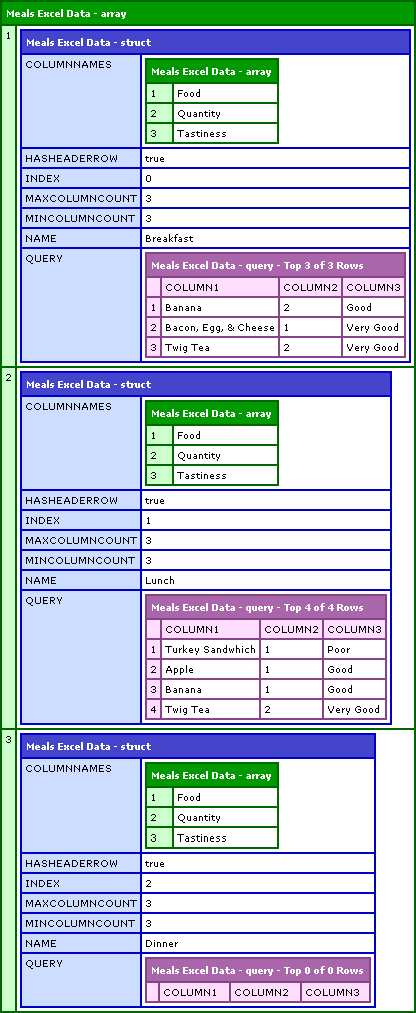
As you can see each index of the above array contains a single sheet object that looks like this:
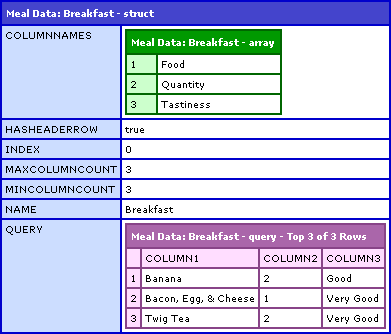
Within that sheet object, there is the Query object (struct key: Query). This is the query object that contains the actual grid data from the Excel sheet. Now, taking that query object and using it to insert into a database could be done as follows:
<!--- Create a new instance of the POI utility. --->
<cfset objPOIUtility = CreateObject(
	"component",
	"POIUtility"
	).Init()
	/>

<!---
	Get the path to our Excel document. Our Excel document
	workbook contains three sheets with information regarding
	three meals (Breakfast, lunch, and dinner).
--->
<cfset strFilePath = ExpandPath( "./meals.xls" ) />

<!---
	Read the Excel document into an array of Sheet objects.
	Each sheet object will contain the data in the Excel
	sheet as well as some other property-type information.
	We are telling the POI Utility to expect the first row
	of the Excel document to function as a header row.
--->
<cfset arrSheets = objPOIUtility.ReadExcel(
	FilePath = strFilePath,
	HasHeaderRow = true
	) />


<!---
	We want to get the data from the Excel document into our
	local database. The first thing we are going to want to
	do is loop over each sheet and attach each set of
	data individually.
--->
<cfloop
	index="intSheet"
	from="1"
	to="#ArrayLen( arrSheets )#"
	step="1">

	<!---
		Let's get a pointer to the current sheet object. We
		could continue to refer to the sheet as an index of
		the sheets array, but this is more convenient and
		breaks it up into easier to read code.
	--->
	<cfset objSheet = arrSheets[ intSheet ] />

	<!---
		The data from the excel object is stored in a query
		within this "sheet" object and can be accessed at the
		key "query." For ease of use and short hand, let's
		get a pointer to that query.
	--->
	<cfset qSheetData = objSheet.Query />

	<!---
		We can treat this query just like any old ColdFusion
		query because it is just a plain old ColdFusion query.
		Let's loop over it to get at each row.

		NOTE: Since we told the POI Utility to use the first
		row as a header row, the first row has already been
		stripped off and returned as part of the sheet object.
		We will not encounter it in THIS query.
	--->
	<cfloop query="qSheetData">

		<!---
			For ease of demonstration, let's get the values
			out of the query that we want to use for our
			database insert. This is step that is not required,
			but helps clarify how things are working.

			NOTE: Remember that the POI Utility auto names the
			columns as it encounters them as COLUMN1, COLUMN2,
			COLUMN3, .... etc.

			We are throwing the second column (quantity) into a
			Val() method call as we need to get it as a number.
			The POI Utility reads in everything as a string.
		--->
		<cfset strFood = qSheetData.column1 />
		<cfset flQuantity = Val( qSheetData.column2 ) />
		<cfset strTastiness = qSheetData.column3 />


		<!---
			Now that we have the values we are going after, we
			can insert them into our database.
		--->
		<cfquery name="qInsert" datasource="#App.DSN.Source#">
			INSERT INTO food_diary
			(
				meal,
				food,
				quantity,
				tastiness,
				date_created
			) VALUES (
				<cfqueryparam value="#objSheet.Name#" cfsqltype="CF_SQL_VARCHAR" />,
				<cfqueryparam value="#strFood#" cfsqltype="CF_SQL_VARCHAR" />,
				<cfqueryparam value="#flQuantity#" cfsqltype="CF_SQL_FLOAT" />,
				<cfqueryparam value="#strTastiness#" cfsqltype="CF_SQL_VARCHAR" />,
				<cfqueryparam value="#Now()#" cfsqltype="CF_SQL_TIMESTAMP" />
			);
		</cfquery>

	</cfloop>

</cfloop>
At this point, each record of each query of each sheet has been inserted into the local database. I hope that that helps. Please let me know if you have any further questions.

Reader Comments
Ben,
I have to write something very similar to that today. It has to read a bunch of excel files and import just certain columns/rows into a database. Normally, I would do that in C# but since I've seen this post I'm now wondering if doing it in CF would be faster. Basically, I have to read a directory with about 3500 excel files and import just some data from each one. Any thoughts/suggestions?
Boyan,
I don't have much experience with scalability and speed of the POI system. However, if you know the exactly cell columns/rows that you need to extract, the POI has a great API for reaching right into the sheets and reading that data.
However, if you have a C# solution that is working and is fast, I guess go with that. But of course, POI has some fun learning :)
Ben,
all right. I'll probably end up with C# this time but I'll be using your POI library in the future. Keep up the good work!
Ben,
quick suggestion on your posts that contain code: maybe you can have a a link to generate a file with the code inside the code viewer so people can directly download the code you have posted. If you end up writing something of that sort, send it over (or post it), it would be useful to have for many people.
Boyan,
At the top of every code snippet there is a link to open the code up in a new window. The new window uses code-coloring (as best it can) and at the bottom there is a text area where you can copy-n-paste the code.
I of course do not advertise that, so unless you have seen it before, there is no way you would know that there is a cut-n-paste box at the bottom :) My bad.
Ben,
I have seen what you are talking about and I have used it. My suggestion was to put another link next to the "Launch code in a new windows >>" link. When clicking on the new link, instead of opening a new window, pass the code snippet to a cf code that sticks it into a new file and prompts you to download the snippet. You know what I'm saying? Or is it just a stupid idea?
Boyan, that is stupid only if you think brilliance is stupid! I think that is a wicked awesome idea! Why are you such a badass?
He, he...you are going a bit over board with the "brilliance" and "badass" stuff :-) Funny enough, I named my PC "badass" since I just upgraded it to Core 2 Duo E6600 with 2GB ram and Radion X1950XT (and the guys at work were making fun of me). Anyway, the idea came to me as part of the CodeSnippets web application I want to develop, so you wouldn't mind sharing what you write, that would be awesome!
No problemo :)
Ben,
I'm getting this error when I read your cfc:
Element SHEETDATA.QUERY.RECORDCOUNT is undefined in LOCAL.
What can I be doing wrong?
Thanks for a great component.
Sophek,
Oh man! I know I have seen this error before. I can't remember where. I think someone contacted me about getting the same error. Oh wait, I found it. Check in the comments of this post:
www.bennadel.com/index.cfm?dax=blog:484.view
Take a look at the comments that Josh G made. He was getting the same problem. I cannot remember what the solution was, but I think he realized that he was using an outdated version of the POI package or something.
I wish I could find his email back to me. Perhaps if you send me the data file, I can give it a go on my end and see what I can do.
Ben,
Thanks for the fast reply, I downloaded the latest version 1-23-07 version, and it's still getting that error message.
Thanks
Sophek
Please send me the XLS file you are working with: ben [ at ] bennadel [ dot ] com. Thanks.
i am getting this error while using ur component "The selected method GetSheetName was not found. "
Great component! It works perfectly for me! Thank you!
@GP,
Glad you like it. Here is the most up-to-date version of it:
www.bennadel.com/index.cfm?dax=blog:624.view
This is great, I am able to run queries now, however, for some reason it is reading from all tabs when I try to output some data, basically I am not able to specify which sheetindex is should be reading from. I may not want all sheets read together.
<cfset arrSheets = objPOIUtility.ReadExcel(
FilePath = strFilePath,
HasHeaderRow = true
) />
When I tried to modify the above code to add SheetIndex = 0
<cfset arrSheets = objPOIUtility.ReadExcel(
FilePath = strFilePath,
HasHeaderRow = true,
SheetIndex = 0
) />
I get an error
Object of type class coldfusion.runtime.Struct cannot be used as an array
What should I do?
Thank you
Does the error give you a line number in the POIUtility.cfc that is breaking? Also, make sure you have the most up-to-date POI Utility.cfc:
www.bennadel.com/projects/poi-utility.htm
Thanks Ben, I figured it out, it was my fault. it is working like a charm. Thank you and good work.
Hey Feras Nabulsi i'm getting the same problem, what did you do to sort it out? also thanks Ben this is awesome!
Hi,
All I did was download Ben's latest code, and it works fine.
Thanks
Sophek
HI, ben when i try to upload the excel, i am getting this error:
7:34:00.000 - Expression Exception - in C:\ColdFusion8\CustomTags\POIUtility.cfc : line 1157
Value must be initialized before use.
07:34:01.001 - Expression Exception - in C:\Inetpub\wwwroot\Alex2\emailtest.cfm : line 40
Object of type class coldfusion.runtime.Struct cannot be used as an array
i am using in the page as:
<cfset arrSheets = objPOI.ReadExcel(
FilePath = "#filename#",
HasHeaderRow = true,
SheetIndex = 0
) />
i am using the updated version of the poi utility.
@Mat,
And line 40 is that ReadExcel() method call? The Struct as array error doesn't make sense in the POI Utility since that is an internal use of an internal variable.
hey ben Thanks, i modified the code and try to use it very simple like removing the cfloop tag in which it counts the sheets..
<cfset arrSheets = objPOI.ReadExcel(FilePath = "#filename#",HasHeaderRow = true, SheetIndex = 0) />
<cfset qSheetData = arrSheets.Query />
<cfloop query="qSheetData">
<cfset firstname = qSheetData.column1>
<cfset surname = qSheetData.column2>
instead of doing it like this:
<cfloop
index="intSheet"
from="1"
to="#ArrayLen( arrSheets )#"
step="1"> --->
<!--- Get a short hand to the current sheet. --->
<!--- <cfset objSheet = arrSheets[ intSheet ] /> --->
<cfset qSheetData = arrSheets.Query />
<cfloop query="qSheetData">
<cfset firstname = qSheetData.column1>
<cfset surname = qSheetData.column2>
but even removing the cfloop still it generates the error:
intiliazilation erro as above
@Mat,
If you comment out everything BUT the ReadExcel() line, do you still get an error? I am just trying to narrow down where the error is coming from.
yes i stll get error at line 1157:
Expression Exception - in C:\ColdFusion8\CustomTags\POIUtility.cfc : line 1157
Value must be initialized before use.
@Mat,
Are you still having issues with this or did you get it figured out?
Like what I've seen so far with your POIutility.cfc...thank you for creating it! My question is: How can you dynamically reference the columns without using EVALUATE?
(c = loop index)
this works:
#evaluate("objSheet.Query.column" & c)#
this errors:
#objSheet.Query["column#c#"]#
(error = Complex object types cannot be converted to simple values.)
this errors:
#objSheet[Query["column#c#"]]#
(error = Variable QUERY is undefined.)
I tried assigning objSheet.Query to a new query and referencing that...no luck.
I'm sure it's something simple I'm overlooking...and I can always fall back to EVALUATE...but I try to avoid it whenever possible.
Whoops...figured it out.
Forgot you had to reference the current row of the loop:
(r = current row, c = current column)
#objSheet.Query["column#c#"][r]#
Thanks again.
@JD,
Try objSheet[ "column#c#" ][ objSheet.CurrentRow ]
Sir why is it that xls file exported from crystal report 9 cannot be read by POIUtility. it creates an error Object Instantiation Exception.
Ben, I am running against an Excel spreadsheet I am working with, and I get this error:
Object Instantiation Exception.
An exception occurred when instantiating a Java object. The class must not be an interface or an abstract class. Error: ''.
The error occurred in E:\Web\CFC\POIUtility.cfc: line 871
Called from E:\Web\Index.cfm: line 33
Called from E:\Web\POIUtility.cfc: line 871
Called from E:\Web\Index.cfm: line 33
869 :
870 : // Create a file input stream to the given Excel file.
871 : LOCAL.FileInputStream = CreateObject( "java", "java.io.FileInputStream" ).Init( ARGUMENTS.FilePath );
872 :
873 : // Create the Excel file system object. This object is responsible
My environment is:
Windows Server 2003 64 Bit
ColdFusion 8
Excel spreadsheet is pre 2007
Thanks,
Bruce
I'm having issues with running queries of the sheet queries. For instance, I have:
<cfset qUsers = arrSheets[ intSheet ].Query >
<!--- User must be unique --->
<cfquery name="qErr1" dbtype="query">
SELECT column1 as email
FROM qUsers
</cfquery>
This gives me an error of:
Unsupported Cast Excpetion: Casting to type NULL is unsupported.
As you can see, column1 is an email address - a string is fine, which I believe the default conversion is.
Help?
I love this, thanks. However, I have noticed a bit of a problem that is driving me crazy. If I do this:
<cfset dataQuery = arrExcel.query>
and then dump it, no problem, query as expected. I can also loop through the query. However I am getting an error when trying to do a query of this query . . .
This simple query fails:
<cfquery name="thisData" dbtype="query">
select column1 from dataQuery
</cfquery>
I am getting an error that it can't convert a value to a number.
The reason I want to do this is because my data columns may be in varying order and am trying to query 'o query the data to put things in back with the correct column names to efficiently insert the data into the db (one query, as opposed to a loop line by line). Here is my complete code . . .
<cfset columnArray = arrExcel.columnnames>
<cfset dataQuery = arrExcel.query>
<cfset columnorderList="">
<!--- just gets my columns back to names using the colum name array --->
<cfloop list="STYLENAME,SELLCOMPNAME,CUTPRICE" index="thisColumn">
<cfloop from="1" to="#arraylen(columnArray)#" index="foo">
<cfif ucase(columnArray[foo]) is thisColumn>
<cfset columnOrderlist=listappend(columnOrderlist," COLUMN#foo# as #foo#")>
</cfif>
</cfloop>
</cfloop>
<!--- build the query --->
<cfset strQuery="select #columnOrderlist# from dataQuery">
<!--- execute --->
<cfquery name="thisData" dbtype="query">
#strQuery#
</cfquery>
This is a simple query but it generates the error above, about the conversion.
Hi Ben
I have downloaded the POI Utility and I am using the ReadExcel utility for importing data from an excel sheet. There is a column in the excel sheet which contains dates. When I import the rows the date values are getting converted in to a number. Is there any code change required from my end?
Kindly help
Thanks
Parag
@Parag,
Reading dates is a funny thing. Really, dates are stored in the Excel file as a number (they are simply formatted to look like dates). ColdFusion should be able to handle these properly, you just have to format them:
#DateFormat( qExcel.date_column )#
I am working on trying improve the reading in of Excel files. I have been concentrating lately on the creating of Excel files, so I have been distracted.
If anyone can figure out how to pass the Euro currency symbol to Excel, please let me know. Yen and Pound go through perfectly, while the Euro gets turned into a funky character (¬ when I save the Excel as MHT).
I'm outputting my page with the poi tags to the screen by changing all <poi's to -poi and putting an abort at the end. The Euro is correctly getting passed to the utility.
I can't figure out why the Euro of all things won't display properly.
Hi Ben -
I am working on reading the excel sheet using POI, I am running into an issue because the XLS that I have has datalist in the first row. I mean the drop downs on which I can filter data in XLS.
This throws an error having something "cannot instantiate the class"...null value.....
looking forwrad for your support.
Regards,
Vipul
Is there an easy way to use the column names (from the header row) as the column names for the query instead of column1, column2, etc...? I tried using the following code:
LOCAL.HeaderRow = LOCAL.Sheet.GetRow(
JavaCast( "int", 0 )
);
colname = LOCAL.HeaderRow.GetCell( LOCAL.ColumnIndex).GetStringCellValue();
//"column#LOCAL.ColumnIndex#"
QueryAddColumn(
LOCAL.SheetData.Query,
"#colname#",
"CF_SQL_VARCHAR",
ArrayNew( 1 )
);
But I keep receiving this error:
Value must be initialized before use.
Its possible that a method called on a Java object created by CreateObject returned null.
1077 :
1078 : colname = LOCAL.HeaderRow.GetCell(
1079 : LOCAL.ColumnIndex).GetStringCellValue();
1080 :
1081 : //"column#LOCAL.ColumnIndex#"
Weird part is if I change LOCAL.HeaderRow, to get row 1, it seem to work fine until it hits a value of D. (someone's middle name in the excel sheet). then I get this error:
The column name D. is invalid.
Column names must be valid variable names. They must start with a letter and can only include letters, numbers, and underscores.
So any ideas on how I can get the actually column names from the header row for the column in the query instead of using column1, column2, etc...?
Thanks,
- Eugene
I'm pretty sure I figured out how to change the column names, now I am having an issue, I guess, populating the query. I get this error message:
An error occurred while trying to modify the query named class coldfusion.sql.QueryTable.
Query objects cannot be modified, they can only be displayed.
1333 : LOCAL.SheetData.column_name = LOCAL.SheetData.ColumnNames[LOCAL.ColumnIndex + 1];
1334 : //WriteOutput(column_name & "<br />");
1335 : LOCAL.SheetData.Query[#LOCAL.SheetData.column_name#][ LOCAL.SheetData.Query.RecordCount ] = JavaCast( "string", LOCAL.CellValue );
1336 :
1337 : }
Any input would be greatly appreciated. Thanks again.
I'm trying read and excel file using the POIUtility.cfc on CF8 but i'm comming up on this error.
Object Instantiation Exception. An exception occurred when instantiating a Java object. The class must not be an interface or an abstract class. Error: ''.
The error occurred on line 89
Any Ideas? Am i missing something?
---------------------------------------
<cfset objPOIUtility = CreateObject(
"component",
"POIUtility"
).Init()
/>
<cfset strFilePath = ExpandPath( "../../merchants/stored/mytestfile.xls) />
<cfset arrSheets = objPOIUtility.ReadExcel(
FilePath = strFilePath,
HasHeaderRow = true
) />
hey..
I'm getting the same error:
"Object Instantiation Exception.
An exception occurred when instantiating a Java object. The class must not be an interface or an abstract class. Error: ''. "
here:
// Get the workbook from the Excel file system.
LOCAL.WorkBook = CreateObject(
"java",
"org.apache.poi.hssf.usermodel.HSSFWorkbook"
).Init(
LOCAL.ExcelFileSystem
);
only when trying to load certain files... any ideas anyone?
thanks!
-dave.
Hi Guys -
Three steps to investigate -
1) check if you are able to create the object of the java class
2) check if can read the XLS from the same path using simple cffile
3) check if your XLS holds data filters
I hope the above helps.
Thanks,
Vipul Suri
hey!
I updated my POI version from the packaged 2.5 to 3.6 and it reads the files in fine.
thanks!
-dave.
@Dave,
Ah, good stuff. Yeah, if you have things in the XLS document that are not compatible with the older version, it will definitely throw a hissy fit.
Does this POIUtility work with XLSX Files? I'm trying to read an Excel file with .xlsx and it doesn't seem to work. Any thoughts?
@Malik,
For that, you would need to upgrade the POI JAR file behind the scenes. The JAR that ships with ColdFusion doesn't support 2007+ file types.
Hi,
We ended up getting CF9 and that has the <cfspreadsheet> tag which seems to handle 2007 formats out-of-the-box so I'm glad Adobe added that into CF9.
Thanks for the reply.
To all the folks who like me wished the header row column names were used instead of column1, column2, etc. you can do something like the following at the beginning of looping through rows, to put the values you'll use into a struct.
Oops I think this bit should have gone after the first </cfloop>:
@Spencer,
Did you ever get an answer to inserting the Euro symbol via CF and POI?
When I try to use readExcel I get this error "Query objects cannot be modified, they can olny be displayed."
I am using ColdFusion 8 and the version of POI that comes with it. I can't change the version of POI. Is there something I can do to get around this problem?
I figured out my problem that I posted above.
I am Using CF 8 and using ur tag awesome,
How do i skip the first 10 rows and start reading from 10th row onwards
is there any way to do that kind of stuff
@Ben
How can add functionality of reading .xlsx files in your POI utility ?
Iftkhar.
@Ben
Still waiting for response.
@Muhammad,
I think he already answered that question in the comments above, in an answer about Malik's question:
Malik
May 27, 2010 at 12:27 PM // reply »
3 Comments
31 Points
Does this POIUtility work with XLSX Files? I'm trying to read an Excel file with .xlsx and it doesn't seem to work. Any thoughts?
Ben Nadel
Jun 7, 2010 at 10:59 PM // reply »
10,845 Comments
71,202 Points
@Malik,
For that, you would need to upgrade the POI JAR file behind the scenes. The JAR that ships with ColdFusion doesn't support 2007+ file types.
Hi,
I am importing data from a spreadsheet to a database and need to validate the spreadsheet data. How would skip that row if data?
thanks!
Hi Ben, Used this Utility to Move Records which were around 50000 per sheet to DB in few minutes, Just i had to use the cfsetting tag to increase the timeout, But it works only in XLS not in XLSX
Can i know why it is only preferring XLS, not XLSX
Hi Ben,
I have some queries for storing excel data in database using apache POI,
1.how to get the cell contents in list
2.how to store in batch wise
3.what is I am storing the data and DB goes down
4.some sample code to throw the exception saying record numbers to the user
5.what if two users try to upload the same file at the same time in database
I am preparing the use cases,
Please let me know your valueable inputs,
Tha