Creating An XML Representation Of A Directory (And Sub-Directories) Using ColdFusion
A while back, I had read about replacing CFDirectory functionality with Java over on ColdFusion Muse. This is a cool idea and I have never played around with it, so I figure I might as well sit down and do a little demo for myself.
I happen to Love CFDirectory. I think it's a fabulous tag. The one thing I really hate about it though, is that it is not really structured in any useful way. It returns the whole directory structure in ONE massive query. As part of my File Explorer project (yes, I WILL finish that one day), I would love the ability to get a representation of a directory and sub-directories / files in some sort of structure that made more sense in my head.
To accomplish this, I have created a ColdFusion user defined function, GetDirectoryXML(), that recurses over a directory (the recursion itself is optional) and creates an XML document in this format:
<directory
	name="..."
	path="...">

	<directories>

		<directory
			name="..."
			path="...">

			--[ RECURSIVE AREA ]--

		</directory>

	</directories>

	<files>

		<file
			name="..."
			path="..."
			bytes="..."
			/>

	</files>

</directory>
For things like the Name and Path attributes, I opted for using XML node attributes over text nodes because XPath searches are much easier on attributes (at least at my low-xml-xpath-skill level). I like the above structure because it becomes very clear where all the files and directories belong. Also, If I wanted to render this XML it provides a great structure that has sub-structures that I could pass off to a recursive function for rendering.
Here is the code for the GetDirectoryXml() ColdFusion function:
<cffunction
	name="GetDirectoryXml"
	access="public"
	returntype="string"
	output="false"
	hint="Gets directory information from a directory File object and returns it in XML format.">

	<!--- Define arguments. --->
	<cfargument
		name="Directory"
		type="any"
		required="true"
		hint="The Java FILE object representing a directory."
		/>

	<cfargument
		name="Recurse"
		type="boolean"
		required="false"
		default="false"
		hint="Determines whether we will get child directory information recursively."
		/>

	<cfargument
		name="Buffer"
		type="any"
		required="false"
		default=""
		hint="This is the string buffer to which the result is written before being returned."
		/>

	<cfscript>

		// Set up local scope.
		var LOCAL = StructNew();

		// Create an array for files.
		LOCAL.Files = ArrayNew( 1 );

		// Create an array for directories.
		LOCAL.Directories = ArrayNew( 1 );

		// Get the children for this directory.
		LOCAL.Children = ARGUMENTS.Directory.ListFiles();

		// Set up a flag for returning the buffer. If the buffer
		// is a simple value then we want to return the buffer.
		// If it is a complex value, then either we are part
		// of the recursive call or a buffer was passed in.
		// Either way, don't return anything in that case.
		LOCAL.ReturnBuffer = IsSimpleValue( ARGUMENTS.Buffer );


		// Check to see if we have a buffer yet to which we
		// will be writing the result.
		if (IsSimpleValue( ARGUMENTS.Buffer )){

			// Create the string buffer.
			ARGUMENTS.Buffer = CreateObject(
				"java",
				"java.lang.StringBuffer"
				).Init();

		}


		// Loop over the children objects to figure out which
		// array they should go in: File or Directory.
		for (
			LOCAL.ChildIndex = 1 ;
			LOCAL.ChildIndex LTE ArrayLen( LOCAL.Children ) ;
			LOCAL.ChildIndex = (LOCAL.ChildIndex + 1)
			){

			// Check for file type.
			if (LOCAL.Children[ LOCAL.ChildIndex ].IsDirectory()){

				// Add to directory array.
				ArrayAppend(
					LOCAL.Directories,
					LOCAL.Children[ LOCAL.ChildIndex ]
					);

			} else {

				// Add to directory array.
				ArrayAppend(
					LOCAL.Files,
					LOCAL.Children[ LOCAL.ChildIndex ]
					);

			}

		}


		// ASSERT: At this point, we have two fully populated
		// arrays for Files and Directories. These are populated
		// with actual Java FILE objects, not just paths.


		// Start the directory node.
		ARGUMENTS.Buffer.Append(
			"<directory name=""" &
			XmlFormat( ARGUMENTS.Directory.GetName() ) &
			""" path=""" &
			XmlFormat( ARGUMENTS.Directory.GetPath() ) &
			""">"
			);


		// Start the directory node.
		ARGUMENTS.Buffer.Append(
			"<directories>"
			);

		// Loop over the directories to output xml data.
		for (
			LOCAL.DirectoryIndex = 1 ;
			LOCAL.DirectoryIndex LTE ArrayLen( LOCAL.Directories ) ;
			LOCAL.DirectoryIndex = (LOCAL.DirectoryIndex + 1)
			){

			// Get short hand.
			LOCAL.Directory = LOCAL.Directories[ LOCAL.DirectoryIndex ];

			// Check to see if we are recursing. If we are then
			// we can send this directory object right back to
			// this function (hello recursion). If not, we can
			// just output the basic data.
			if (ARGUMENTS.Recurse){

				// Since we are recursing, send back to self.
				GetDirectoryXml(
					Directory = LOCAL.Directory,
					Recurse = ARGUMENTS.Recurse,
					Buffer = ARGUMENTS.Buffer
					);

			} else {

				// Since we are not recursing, just output
				// simple data.
				ARGUMENTS.Buffer.Append(
					"<directory name=""" &
					XmlFormat( LOCAL.Directory.GetName() ) &
					""" path=""" &
					XmlFormat( LOCAL.Directory.GetPath() ) &
					""">"
					);

			}

		}

		// End the directory node.
		ARGUMENTS.Buffer.Append(
			"</directories>"
			);

		// Start the files node.
		ARGUMENTS.Buffer.Append(
			"<files>"
			);

		// Loop over the files to output xml data.
		for (
			LOCAL.FileIndex = 1 ;
			LOCAL.FileIndex LTE ArrayLen( LOCAL.Files ) ;
			LOCAL.FileIndex = (LOCAL.FileIndex + 1)
			){

			// Get short hand.
			LOCAL.File = LOCAL.Files[ LOCAL.FileIndex ];

			// Write file node.
			ARGUMENTS.Buffer.Append(
				"<file name=""" &
				XmlFormat( LOCAL.File.GetName() ) &
				""" path=""" &
				XmlFormat( LOCAL.File.GetPath() ) &
				""" bytes=""" &
				XmlFormat( LOCAL.File.Length() ) &
				"""/>"
				);

		}

		// Start the files node.
		ARGUMENTS.Buffer.Append(
			"</files>"
			);

		// Close the directory node.
		ARGUMENTS.Buffer.Append(
			"</directory>"
			);


		// Check to see if we should return the buffer.
		if (LOCAL.ReturnBuffer){

			// Return the directory Xml data.
			return( ARGUMENTS.Buffer.ToString() );

		} else {

			// Just return the empty string.
			return( "" );

		}

	</cfscript>
</cffunction>
You might notice that one of the arguments is an optional Java StringBuffer object. Internally, the UDF writes all the directory XML to a String Buffer which it then passes around recursively. This is done to minimize the amount of string concatenation that is being done. If you pass in a String Buffer object, the GetDirectoryXml() UDF will not return anything as you will already have a pointer to the String Buffer object. I like this flexibility, but not sure that it would be useful (other than for performance).
Calling the GetDirectoryXml() UDF on a simple directory might return something like this:
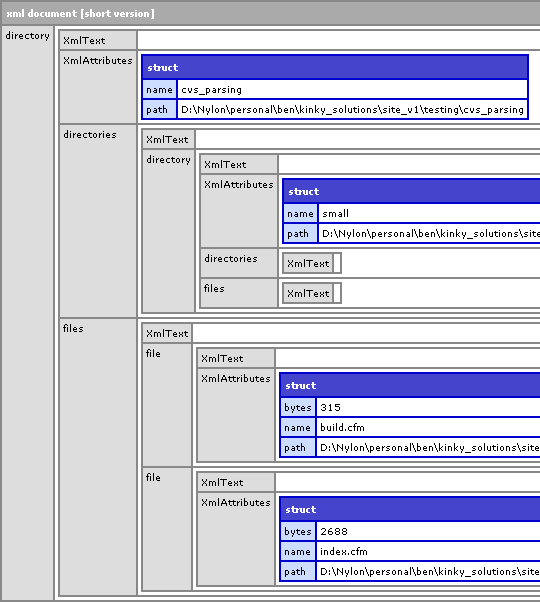
Notice the highly structured data. Even though it is structured in this nested way, you can still use XPath to search for files just as you could with a ColdFusion query of queries using CFQuery:
<!--- Search for the file "set.cfm". --->
<cfset arrFind = XmlSearch(
	xmlDir,
	"//file[@name='set.cfm']"
	) />
This will return an array of File XML nodes whose name attribute is "set.cfm" regardless of where in the structure it is.
Now, I mentioned that a highly structured XML directory representation could be easily rendered. This is another ColdFusion UDF that I have created in order to render the XML generated by GetDirectoryXml(). It's called RenderDirectoryXml():
<cffunction
	name="RenderDirectoryXml"
	access="public"
	output="true"
	returntype="void"
	hint="Graphically renders the XML created via GetDirectoryXml().">

	<!--- Define arguments. --->
	<cfargument
		name="Xml"
		type="xml"
		required="true"
		hint="The XML object created via GetDirectoryXml()."
		/>

	<cfargument
		name="Indent"
		type="string"
		required="false"
		default=""
		hint="The left hand buffer (in spaces)"
		/>

	<!--- Define local scope. --->
	<cfset var LOCAL = StructNew() />

	<!---
		Get current directory element. This might be the full
		XML object, or it might be a sub directory.
	--->
	<cfif StructKeyExists( ARGUMENTS.Xml, "XmlRoot" )>

		<!---
			We have a full on ColdFusion XML document object.
			Grab the root and use that.
		--->
		<cfset LOCAL.Root = ARGUMENTS.Xml.XmlRoot />

	<cfelse>

		<!---
			We are dealing with an actual XML directory
			node. Just use that as the root.
		--->
		<cfset LOCAL.Root = ARGUMENTS.Xml />

	</cfif>


	<!--- Get the sub directories. --->
	<cfset LOCAL.Directories = LOCAL.Root.directories.XmlChildren />

	<!--- Get the files. --->
	<cfset LOCAL.Files = LOCAL.Root.files.XmlChildren />


	<!--- Safe guard for indent. --->
	<cfif (Len( ARGUMENTS.Indent ) GT 20)>

		<cfthrow
			type="Too.Much.Recursion"
			message="We have recursed to many times."
			/>

	</cfif>


	<!--- Output the name of the current directory. --->
	<pre>#ARGUMENTS.Indent##LOCAL.Root.XmlAttributes.Name#/</pre>

	<!--- Loop over directories to output recursively. --->
	<cfloop
		index="LOCAL.DirectoryIndex"
		from="1"
		to="#ArrayLen( LOCAL.Directories )#"
		step="1">

		<!---
			Render sub directories. Notice that we are adding
			".." to the indent to show that we are in a sub-
			directory.
		--->
		<cfset RenderDirectoryXml(
			Xml = LOCAL.Directories[ LOCAL.DirectoryIndex ],
			Indent = (ARGUMENTS.Indent & "..")
			) />

	</cfloop>


	<!--- Loop over files to output. --->
	<cfloop
		index="LOCAL.FileIndex"
		from="1"
		to="#ArrayLen( LOCAL.Files )#"
		step="1">

		<pre>#ARGUMENTS.Indent#..#LOCAL.Files[ LOCAL.FileIndex ].XmlAttributes.Name#</pre>

	</cfloop>

	<!--- Return out. --->
	<cfreturn />
</cffunction>
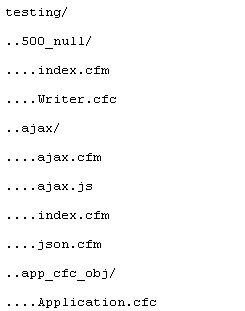
This produces an output that looks like:
I think this is going to come in quite handy for finishing my blasted File Explorer. Thanks Mark Kruger!
Want to use code from this post? Check out the license.

Reader Comments
Hi
I noticed that you were looking to create a file/directory explorer and thought this might be of help (it's free).
I had to put it together for a recent client and it is prettey polished.
Here is the link: http://www.netgrow.com.au/assets/files/explorer/explorer.zip
Shuns,
It is hard kicking so much ass? Cause that's probably the cleanest, coolest file explorer I have ever seen. I had a tiny bit of trouble figuring out how to set up the path, but got it going. You might want to throw a comment in there or a little demo snippet so people know what you are talking about. Very cool though!
Yeah I know but I was just trying to send it quick otherwise I would have documented it.
No worries dude, it was way cool.
There is a call to fx called ListFiles. Where does that come from?
Derek,
It is a method of the Java File Object:
http://java.sun.com/j2se/1.4.2/docs/api/java/io/File.html#listFiles(java.io.FileFilter)
It returns an array of File objects that live within that directory.
hmm....well i get this error on it...
"The selected method ListFiles was not found"
Hmmm. That's odd. You are probably not passing in a File object to the method. The argument [Directory] needs a File object, NOT a file path:
Directory = CreateObject( "java", "java.io.File" ).Init( ExpandPath( "./directory_name_here/") )
You might be passing in just the ExpandPath() stuff in.
Am I close?
just getting back to this now. Yes, that was the problem.
I have one small problem though. When I run it through the renderer, if I have a structure like this in my FS...
Folder_DOCS
--doc1
--doc2
----Folder_DOCS_Sub
------doc1
------doc2
----------Folder_DOCS_Sub_sub
------------doc1
------------doc2
it ends up outputting like this
Folder_DOCS
----Folder_DOCS_Sub
----------Folder_DOCS_Sub_sub
------------doc1
------------doc2
------doc1
------doc2
--doc1
--doc2
how can i make it exactly replicate the FS stucture?
Derek,
I will make a folder structure as you describe and try running it. I am sure it's a minor bug. Thanks for the heads up. I will get back to you.
Obrigado!
from Brazil.