
Earlier today I posted about how to parse CSV values into an array while allowing for embedded field qualifiers, field delimiters, and row delimiters. That all went quite nicely (for the 4th or 5th attempt at the problem). Now, I am taking that solution and extending it to convert the CSV values into a ColdFusion query object.
I am actually taking the previous algorithm and tacking on (and modifying) the query conversion. Now, you might think that that is a waste of time; why convert to an array first when you are about to convert to a query. Two reasons:
-
I have a CSV to Array algorithm that works quite nicely already.
-
Until we parse the entire CSV value into some sort of intermediary container, we won't know how big to make the query (in terms of columns and rows). And, since we are going to need an intermediary container anyway, might as well go with what already works.
Ok, so here it the ColdFusion user defined function, CSVToQuery(), in typical Kinky Solutions "robust commenting for teaching purposes" style:
<cffunction
	name="CSVToQuery"
	access="public"
	returntype="query"
	output="false"
	hint="Converts the given CSV string to a query.">

	<!--- Define arguments. --->
	<cfargument
		name="CSV"
		type="string"
		required="true"
		hint="This is the CSV string that will be manipulated."
		/>

	<cfargument
		name="Delimiter"
		type="string"
		required="false"
		default=","
		hint="This is the delimiter that will separate the fields within the CSV value."
		/>

	<cfargument
		name="Qualifier"
		type="string"
		required="false"
		default=""""
		hint="This is the qualifier that will wrap around fields that have special characters embeded."
		/>


	<!--- Define the local scope. --->
	<cfset var LOCAL = StructNew() />


	<!---
		When accepting delimiters, we only want to use the first
		character that we were passed. This is different than
		standard ColdFusion, but I am trying to make this as
		easy as possible.
	--->
	<cfset ARGUMENTS.Delimiter = Left( ARGUMENTS.Delimiter, 1 ) />

	<!---
		When accepting the qualifier, we only want to accept the
		first character returned. Is is possible that there is
		no qualifier being used. In that case, we can just store
		the empty string (leave as-is).
	--->
	<cfif Len( ARGUMENTS.Qualifier )>

		<cfset ARGUMENTS.Qualifier = Left( ARGUMENTS.Qualifier, 1 ) />

	</cfif>


	<!---
		Set a variable to handle the new line. This will be the
		character that acts as the record delimiter.
	--->
	<cfset LOCAL.LineDelimiter = Chr( 10 ) />


	<!---
		We want to standardize the line breaks in our CSV value.
		A "line break" might be a return followed by a feed or
		just a line feed. We want to standardize it so that it
		is just a line feed. That way, it is easy to check
		for later (and it is a single character which makes our
		life 1000 times nicer).
	--->
	<cfset ARGUMENTS.CSV = ARGUMENTS.CSV.ReplaceAll(
		"\r?\n",
		LOCAL.LineDelimiter
		) />


	<!---
		Let's get an array of delimiters. We will need this when
		we are going throuth the tokens and building up field
		values. To do this, we are going to strip out all
		characters that are NOT delimiters and then get the
		character array of the string. This should put each
		delimiter at it's own index.
	--->
	<cfset LOCAL.Delimiters = ARGUMENTS.CSV.ReplaceAll(
		"[^\#ARGUMENTS.Delimiter#\#LOCAL.LineDelimiter#]+",
		""
		)

		<!---
			Get character array of delimiters. This will put
			each found delimiter in its own index (that should
			correspond to the tokens).
		--->
		.ToCharArray()
		/>


	<!---
		Add a blank space to the beginning of every theoretical
		field. This will help in make sure that ColdFusion /
		Java does not skip over any fields simply because they
		do not have a value. We just have to be sure to strip
		out this space later on.

		First, add a space to the beginning of the string.
	--->
	<cfset ARGUMENTS.CSV = (" " & ARGUMENTS.CSV) />

	<!--- Now add the space to each field. --->
	<cfset ARGUMENTS.CSV = ARGUMENTS.CSV.ReplaceAll(
		"([\#ARGUMENTS.Delimiter#\#LOCAL.LineDelimiter#]{1})",
		"$1 "
		) />


	<!---
		Break the CSV value up into raw tokens. Going forward,
		some of these tokens may be merged, but doing it this
		way will help us iterate over them. When splitting the
		string, add a space to each token first to ensure that
		the split works properly.

		BE CAREFUL! Splitting a string into an array using the
		Java String::Split method does not create a COLDFUSION
		ARRAY. You cannot alter this array once it has been
		created. It can merely be referenced (read only).

		We are splitting the CSV value based on the BOTH the
		field delimiter and the line delimiter. We will handle
		this later as we build values (this is why we created
		the array of delimiters above).
	--->
	<cfset LOCAL.Tokens = ARGUMENTS.CSV.Split(
		"[\#ARGUMENTS.Delimiter#\#LOCAL.LineDelimiter#]{1}"
		) />


	<!---
		Set up the default records array. This will be a full
		array of arrays, but for now, just create the parent
		array with no indexes.
	--->
	<cfset LOCAL.Rows = ArrayNew( 1 ) />

	<!---
		Create a new active row. Even if we don't end up adding
		any values to this row, it is going to make our lives
		more smiple to have it in existence.
	--->
	<cfset ArrayAppend(
		LOCAL.Rows,
		ArrayNew( 1 )
		) />

	<!---
		Set up the row index. THis is the row to which we are
		actively adding value.
	--->
	<cfset LOCAL.RowIndex = 1 />


	<!---
		Set the default flag for wether or not we are in the
		middle of building a value across raw tokens.
	--->
	<cfset LOCAL.IsInValue = false />


	<!---
		Loop over the raw tokens to start building values. We
		have no sense of any row delimiters yet. Those will
		have to be checked for as we are building up each value.
	--->
	<cfloop
		index="LOCAL.TokenIndex"
		from="1"
		to="#ArrayLen( LOCAL.Tokens )#"
		step="1">


		<!---
			Get the current field index. This is the current
			index of the array to which we might be appending
			values (for a multi-token value).
		--->
		<cfset LOCAL.FieldIndex = ArrayLen(
			LOCAL.Rows[ LOCAL.RowIndex ]
			) />

		<!---
			Get the next token. Trim off the first character
			which is the empty string that we added to ensure
			proper splitting.
		--->
		<cfset LOCAL.Token = LOCAL.Tokens[ LOCAL.TokenIndex ].ReplaceFirst(
			"^.{1}",
			""
			) />


		<!---
			Check to see if we have a field qualifier. If we do,
			then we might have to build the value across
			multiple fields. If we do not, then the raw tokens
			should line up perfectly with the real tokens.
		--->
		<cfif Len( ARGUMENTS.Qualifier )>


			<!---
				Check to see if we are currently building a
				field value that has been split up among
				different delimiters.
			--->
			<cfif LOCAL.IsInValue>


				<!---
					ASSERT: Since we are in the middle of
					building up a value across tokens, we can
					assume that our parent FOR loop has already
					executed at least once. Therefore, we can
					assume that we have a previous token value
					ALREADY in the row value array and that we
					have access to a previous delimiter (in
					our delimiter array).
				--->

				<!---
					Since we are in the middle of building a
					value, we replace out double qualifiers with
					a constant. We don't care about the first
					qualifier as it can ONLY be an escaped
					qualifier (not a field qualifier).
				--->
				<cfset LOCAL.Token = LOCAL.Token.ReplaceAll(
					"\#ARGUMENTS.Qualifier#{2}",
					"{QUALIFIER}"
					) />


				<!---
					Add the token to the value we are building.
					While this is not easy to read, add it
					directly to the results array as this will
					allow us to forget about it later. Be sure
					to add the PREVIOUS delimiter since it is
					actually an embedded delimiter character
					(part of the whole field value).
				--->
				<cfset LOCAL.Rows[ LOCAL.RowIndex ][ LOCAL.FieldIndex ] = (
					LOCAL.Rows[ LOCAL.RowIndex ][ LOCAL.FieldIndex ] &
					LOCAL.Delimiters[ LOCAL.TokenIndex - 1 ] &
					LOCAL.Token
					) />


				<!---
					Now that we have removed the possibly
					escaped qualifiers, let's check to see if
					this field is ending a multi-token
					qualified value (its last character is a
					field qualifier).
				--->
				<cfif (Right( LOCAL.Token, 1 ) EQ ARGUMENTS.Qualifier)>

					<!---
						Wooohoo! We have reached the end of a
						qualified value. We can complete this
						value and move onto the next field.
						Remove the trailing quote.

						Remember, we have already added to token
						to the results array so we must now
						manipulate the results array directly.
						Any changes made to LOCAL.Token at this
						point will not affect the results.
					--->
					<cfset LOCAL.Rows[ LOCAL.RowIndex ][ LOCAL.FieldIndex ] = LOCAL.Rows[ LOCAL.RowIndex ][ LOCAL.FieldIndex ].ReplaceFirst( ".{1}$", "" ) />

					<!---
						Set the flag to indicate that we are no
						longer building a field value across
						tokens.
					--->
					<cfset LOCAL.IsInValue = false />

				</cfif>


			<cfelse>


				<!---
					We are NOT in the middle of building a field
					value which means that we have to be careful
					of a few special token cases:

					1. The field is qualified on both ends.
					2. The field is qualified on the start end.
				--->

				<!---
					Check to see if the beginning of the field
					is qualified. If that is the case then either
					this field is starting a multi-token value OR
					this field has a completely qualified value.
				--->
				<cfif (Left( LOCAL.Token, 1 ) EQ ARGUMENTS.Qualifier)>


					<!---
						Delete the first character of the token.
						This is the field qualifier and we do
						NOT want to include it in the final value.
					--->
					<cfset LOCAL.Token = LOCAL.Token.ReplaceFirst(
						"^.{1}",
						""
						) />

					<!---
						Remove all double qualifiers so that we
						can test to see if the field has a
						closing qualifier.
					--->
					<cfset LOCAL.Token = LOCAL.Token.ReplaceAll(
						"\#ARGUMENTS.Qualifier#{2}",
						"{QUALIFIER}"
						) />

					<!---
						Check to see if this field is a
						self-closer. If the first character is a
						qualifier (already established) and the
						last character is also a qualifier (what
						we are about to test for), then this
						token is a fully qualified value.
					--->
					<cfif (Right( LOCAL.Token, 1 ) EQ ARGUMENTS.Qualifier)>

						<!---
							This token is fully qualified.
							Remove the end field qualifier and
							append it to the row data.
						--->
						<cfset ArrayAppend(
							LOCAL.Rows[ LOCAL.RowIndex ],
							LOCAL.Token.ReplaceFirst(
								".{1}$",
								""
								)
							) />

					<cfelse>

						<!---
							This token is not fully qualified
							(but the first character was a
							qualifier). We are buildling a value
							up across differen tokens. Set the
							flag for building the value.
						--->
						<cfset LOCAL.IsInValue = true />

						<!--- Add this token to the row. --->
						<cfset ArrayAppend(
							LOCAL.Rows[ LOCAL.RowIndex ],
							LOCAL.Token
							) />

					</cfif>


				<cfelse>


					<!---
						We are not dealing with a qualified
						field (even though we are using field
						qualifiers). Just add this token value
						as the next value in the row.
					--->
					<cfset ArrayAppend(
						LOCAL.Rows[ LOCAL.RowIndex ],
						LOCAL.Token
						) />


				</cfif>


			</cfif>


			<!---
				As a sort of catch-all, let's remove that
				{QUALIFIER} constant that we may have thrown
				into a field value. Do NOT use the FieldIndex
				value as this might be a corrupt value at
				this point in the token iteration.
			--->
			<cfset LOCAL.Rows[ LOCAL.RowIndex ][ ArrayLen( LOCAL.Rows[ LOCAL.RowIndex ] ) ] = Replace(
				LOCAL.Rows[ LOCAL.RowIndex ][ ArrayLen( LOCAL.Rows[ LOCAL.RowIndex ] ) ],
				"{QUALIFIER}",
				ARGUMENTS.Qualifier,
				"ALL"
				) />


		<cfelse>


			<!---
				Since we don't have a qualifier, just use the
				current raw token as the actual value. We are
				NOT going to have to worry about building values
				across tokens.
			--->
			<cfset ArrayAppend(
				LOCAL.Rows[ LOCAL.RowIndex ],
				LOCAL.Token
				) />


		</cfif>


		<!---
			Check to see if we have a next delimiter and if we
			do, is it going to start a new row? Be cautious that
			we are NOT in the middle of building a value. If we
			are building a value then the line delimiter is an
			embedded value and should not percipitate a new row.
		--->
		<cfif (
			(NOT LOCAL.IsInValue) AND
			(LOCAL.TokenIndex LT ArrayLen( LOCAL.Tokens )) AND
			(LOCAL.Delimiters[ LOCAL.TokenIndex ] EQ LOCAL.LineDelimiter)
			)>

			<!---
				The next token is indicating that we are about
				start a new row. Add a new array to the parent
				and increment the row counter.
			--->
			<cfset ArrayAppend(
				LOCAL.Rows,
				ArrayNew( 1 )
				) />

			<!--- Increment row index to point to next row. --->
			<cfset LOCAL.RowIndex = (LOCAL.RowIndex + 1) />

		</cfif>

	</cfloop>


	<!---
		ASSERT: At this point, we have parsed the CSV into an
		array of arrays (LOCAL.Rows). Now, we can take that
		array of arrays and convert it into a query.
	--->


	<!---
		To create a query that fits this array of arrays, we
		need to figure out the max length for each row as
		well as the number of records.

		The number of records is easy - it's the length of the
		array. The max field count per row is not that easy. We
		will have to iterate over each row to find the max.

		However, this works to our advantage as we can use that
		array iteration as an opportunity to build up a single
		array of empty string that we will use to pre-populate
		the query.
	--->

	<!--- Set the initial max field count. --->
	<cfset LOCAL.MaxFieldCount = 0 />

	<!---
		Set up the array of empty values. As we iterate over
		the rows, we are going to add an empty value to this
		for each record (not field) that we find.
	--->
	<cfset LOCAL.EmptyArray = ArrayNew( 1 ) />


	<!--- Loop over the records array. --->
	<cfloop
		index="LOCAL.RowIndex"
		from="1"
		to="#ArrayLen( LOCAL.Rows )#"
		step="1">

		<!--- Get the max rows encountered so far. --->
		<cfset LOCAL.MaxFieldCount = Max(
			LOCAL.MaxFieldCount,
			ArrayLen(
				LOCAL.Rows[ LOCAL.RowIndex ]
				)
			) />

		<!--- Add an empty value to the empty array. --->
		<cfset ArrayAppend(
			LOCAL.EmptyArray,
			""
			) />

	</cfloop>


	<!---
		ASSERT: At this point, LOCAL.MaxFieldCount should hold
		the number of fields in the widest row. Additionally,
		the LOCAL.EmptyArray should have the same number of
		indexes as the row array - each index containing an
		empty string.
	--->


	<!---
		Now, let's pre-populate the query with empty strings. We
		are going to create the query as all VARCHAR data
		fields, starting off with blank. Then we will override
		these values shortly.
	--->
	<cfset LOCAL.Query = QueryNew( "" ) />

	<!---
		Loop over the max number of fields and create a column
		for each records.
	--->
	<cfloop
		index="LOCAL.FieldIndex"
		from="1"
		to="#LOCAL.MaxFieldCount#"
		step="1">

		<!---
			Add a new query column. By using QueryAddColumn()
			rather than QueryAddRow() we are able to leverage
			ColdFusion's ability to add row values in bulk
			based on an array of values. Since we are going to
			pre-populate the query with empty values, we can
			just send in the EmptyArray we built previously.
		--->
		<cfset QueryAddColumn(
			LOCAL.Query,
			"COLUMN_#LOCAL.FieldIndex#",
			"CF_SQL_VARCHAR",
			LOCAL.EmptyArray
			) />

	</cfloop>


	<!---
		ASSERT: At this point, our return query LOCAL.Query
		contains enough columns and rows to handle all the
		data that we have stored in our array of arrays.
	--->


	<!---
		Loop over the array to populate the query with
		actual data. We are going to have to loop over
		each row and then each field.
	--->
	<cfloop
		index="LOCAL.RowIndex"
		from="1"
		to="#ArrayLen( LOCAL.Rows )#"
		step="1">

		<!--- Loop over the fields in this record. --->
		<cfloop
			index="LOCAL.FieldIndex"
			from="1"
			to="#ArrayLen( LOCAL.Rows[ LOCAL.RowIndex ] )#"
			step="1">

			<!---
				Update the query cell. Remember to cast string
				to make sure that the underlying Java data
				works properly.
			--->
			<cfset LOCAL.Query[ "COLUMN_#LOCAL.FieldIndex#" ][ LOCAL.RowIndex ] = JavaCast(
				"string",
				LOCAL.Rows[ LOCAL.RowIndex ][ LOCAL.FieldIndex ]
				) />

		</cfloop>

	</cfloop>


	<!---
		Our query has been successfully populated.
		Now, return it.
	--->
	<cfreturn LOCAL.Query />

</cffunction>
To demonstrate that this works with both simple values and with embedded delimiters (both field and record), as well as records with variable length fields, let's build a CSV value that has it all:
<!---
	Build the CSV string value. This value should contain
	both functional and character-literal delimiters.
--->
<cfsavecontent variable="strCSV">
Name,Nickname,Best Asset
Sarah,"""Stubbs""",Butt
Ashley,"Value with
embedded line break",Smile
Heather
"Kat",",",
</cfsavecontent>
Now, let's take that CSV value and pass it to the ColdFusion UDF, CSVToQuery():
<!---
	Send the CSV value to the UDF. Be sure to trim the value
	(leading and trailing spaces). We are going to leave the
	default delimiter (,) and qualifier (").
--->
<cfset qResult = CSVToQuery(
	CSV = strCSV.Trim()
	) />

<!--- Dump out the resultant query. --->
<cfdump
	var="#qResult#"
	label="CSV Results Query"
	/>
This gives us the following CFDump output:
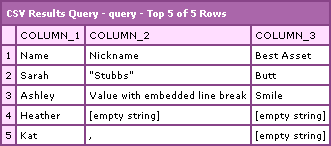
Notice that rows 4 and 5 which did not have a full 3 columns worth of data are filled out with empty strings. This is thanks to the fact that we built the initial query as all empty values based on a ROW x COLUMN set up that would house all existing CSV data. I think this is the best way to go because there is no hard-fast rule that says a CSV file has to contain a set number of fields per row (or is there????).
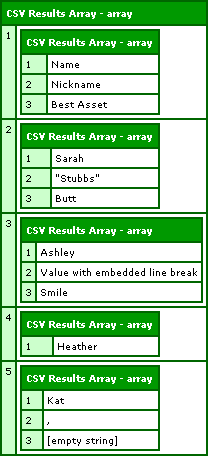
Now, if you want to compare this to the intermediary array of arrays value, here is the graphic from the previous post:
Next step, I am going to integrate this functionality with my POI Utility ColdFusion component. Sweeeeet!

Reader Comments
What a fabulous little function, thanks Ben, you've saved me hours of messing around!!
No worries dude, always happy to help out.
Very helpful!! Thanks a lot for posting this
Great stuff man, thanx for this nice function. Very helpful! Much appreciated! Keep up the great work!!
Nice work!
Is there a way to flag the first row data as column names?
@Josh,
Not currently, but I am gonna be trying to move this function into some sort of Project in my projects section. So hopefully soon.
Bummer.
This would be a nice addition to allow arguments to be passed to flag the first row as column names.
Josh,
Changing the column names to reflect the first row of the csv file is very easy to do, using another of Bens functions incidently.
<cfloop query="csv_query" startrow="1" endrow="1" >
<cfloop list="#csv_query.columnlist#" index="col_name">
<cfset field = evaluate("csv_query.#col_name#")>
<cfset field = replace(field,"-","","ALL")>
<cfset QueryChangeColumnName(csv_query,"#col_name#","#field#") >
</cfloop>
</cfloop>
Thanks Ben!
Great stuff Ben! I have a large csv file (126 columns) which this has worked great with. This is used on many files, which I need to dump into my sqlserver daily. I have my clients upload with a easy to use file and then this runs after the upload. I have one client which has 640 rows, which made this function time out. Any thoughts? (other than training my users;)
@Matt,
Sorry, I don't have any suggestions off hand. I have not tested this thing on any larger files. If things get big, you might just have to find a real, third-party piece of software. Good luck!
Ben,
Thanks for such a quick response. For anyone else that has had this problem, I changed things just a bit and made it all work great. I used your csv to array script and insead of adding the array into the master array and having an array with 650 records, I inserted each row seperatly into the table. Thanks for the great script! You saved me tons of time!
Matt
@Matt,
Glad to have helped in some way.
very helpful code.thanks
Hello all, i'm really new to coldfusion, and i was looking at this function and is very good, exactly what i need because i'm writing a billing solution for my company VoIP-OS (Over satellite) service and the Server it's giving me DAT files for each call, these files are like CSV files but it's using semicolons, viewing at youyr code i think is possible to read these files and save them into a DB.
so, i understand everything so far, but i got one little question, How can i use The function? i've search in the Adobe livedocs , and can't understand where to save it, and how to call it / include it in my template...
Any help would be appreciated
Thank you!
Hi Ben
Great work, one things stop using (local) as variable name. It cause issues in QoQ.
Thanks
@Sana,
Where is the conflict? I should be able to fix that, especially since the functionality is wrapped up in a user defined function, you shouldn't have to worry about the Query of Queries.
Also, there is now a faster version of this algorithm that uses regular expressions:
www.bennadel.com/index.cfm?dax=blog:991.view
It creates an array of arrays rather than a query, but this, I think, is a better approach than creating a query.
please let me know whether this will work in coldfusion 5 version.
@swamy,
I am not sure. I haven't used or even seen ColdFusion 5 in years.
you're a genius (and a good parent probably) thanks for sharing your code
Thanks for a great function Ben.
As a follow-up to the "first row is headings" issue, this is a solution.
Add the following argument:
<cfargument
name="FirstRowIsHeadings"
type="boolean"
required="false"
default="true"
hint="Set to false if the heading row is absent"
/>
I mostly have headings but if you dont, default it to "false"
Then right at the end, just before the query is returned add:
<!--- If the first row contains column headings,
loop through the first row and use the values to change the column headings.
This needs Ben's QueryChangeColumnName function
at www.bennadel.com/blog/357-Ask-Ben-Changing-ColdFusion-Query-Column-Names.htm
Then, use Java to remove the first row of the query ie row 0
--->
<cfif FirstRowIsHeadings>
<cfloop query="LOCAL.Query" startrow="1" endrow="1" >
<cfloop list="#LOCAL.Query.columnlist#" index="col_name">
<cfset field = evaluate("LOCAL.Query.#col_name#")>
<cfset field = replace(field,"-","","ALL")>
<cfset QueryChangeColumnName(LOCAL.Query,"#col_name#","#field#") >
</cfloop>
</cfloop>
<cfset LOCAL.Query.RemoveRows( JavaCast( "int", 0 ), JavaCast( "int", 1 ) ) />
</cfif>
Works for me.
Cheers,
Murray
@Murray,
Interesting solution. Glad you got it working nicely for your needs.
When i use this UDF i get an error that says
The ReplaceAll method was not found.
Either there are no methods with the specified method name and argument types, or the ReplaceAll method is overloaded with argument types that ColdFusion cannot decipher reliably. ColdFusion found 0 methods that matched the provided arguments. If this is a Java object and you verified that the method exists, you may need to use the javacast function to reduce ambiguity.
what am i doing wrong?
@Faisal,
That usually means that a value is not being cast properly for the Java method, ReplaceAll(). This method takes two strings. Double check to make sure that both arguments are properly using:
JavaCast( "string", VALUE )
The above demo is not doing that. That was a sloppy of me, but this was a long time ago :)
SUGGESTION
Just a quick fixer-upper suggestion,
instead of that last replace you do:
<cfif FirstRowIsHeadings>
<cfloop query="LOCAL.Query" startrow="1" endrow="1" >
<cfloop list="#LOCAL.Query.columnlist#" index="col_name">
<cfset field = evaluate("LOCAL.Query.#col_name#")>
<cfset field = replace(field,"-","","ALL")>
I got a file from a client that had all sorts of column names with spaces, brackets, etc. So you can use this:
<cfif FirstRowIsHeadings>
<cfloop query="LOCAL.Query" startrow="1" endrow="1" >
<cfloop list="#LOCAL.Query.columnlist#" index="col_name">
<cfset field = evaluate("LOCAL.Query.#col_name#")>
<cfset field = REReplace(field,"[^a-zA-Z0-9_]","","ALL")>
Minor fix, but it'll basically change the name to a more SQL friendly column name. Enjoy! ;)
Sorry, that last post (above) was in regards to Murray's post ( just a bit further above). Apologies! :\
@Mailman
Thanks! That's better!
Murray
@Mailman,
Good tip. This is one of the reasons that I tend to shy away from naming columns based on user-input; I just feel it leaves too much up to user choices (which are often not great) :) That's why, in the POI, I auto-name the columns COLUMN1, COLUMN2.
Guys I know this is an old post, but I just wanted to let you all know that I have been able to use this function without a problem on large files. I work with CSV files that have 4500+ rows and so far everything has worked well and performed well.
this query is working fine. i tested that with 56MB csv files.this code was very much helpful .I did that for a mls script. that script is working daily.
in the last 1 years that code is working with out any interruption.
Glad this has been working well!
thanks Ben Nadel. this script is very good work. thanks for the post
Thanks for this Ben, it has been very useful. I recently ran into a bug with my code that was using this function. As I looked through this code and mine, I noticed this line of code:
<cfset QueryAddColumn(
LOCAL.Query,
"COLUMN_#LOCAL.FieldIndex#",
"CF_SQL_VARCHAR",
LOCAL.EmptyArray
) />
I use "CF_SQL_VARCHAR" in <cfqueryparam> and didn't remember using it with this function. When I looked at the CF docs for QueryAddColumn() function it lists other values for the third argument (Integer, BigInt, ... VarChar, ...).
I changed it to "VarChar" in my copy of the function and my code still has a bug, so this wasn't causing my problem.
Just wondering if "CF_SQL_VARCHAR" is equivalent with "VarChar" for this function as it appears to work either way.
Incidentally, my bug involves removing any rows that have no values for any columns. The last row will sometimes be empty. I noticed that you addressed this problem (with Trim argument) in your updated version that creates an array of arrays instead of a query.
www.bennadel.com/index.cfm?dax=blog:991.view
@Scott,
Yes, CF_SQL_VARCHAR is equivalent to VARCHAR. They let you use both the abbreviated and full SQL type notations.
Ben, I have completed a project using this function and it all works perfectly!
However.....
In some cases, a CSV file can contain weird and wonderful headers which will definately happen for example :
Number $
Short, Text (Test)
Long Text?
Date's
Time #
Yes/No "Maybe"
List-Single
List-Multiple
List-Radio
List-Checkbox
You can see that some headers will contain characters that you normally wouldn't see.
How can I modify the CSVToQuery function to allow headers like above to work properly?
Running it as it is will give me column headers as:
LISTCHECKBOX
LISTCHECKBOX
LISTMULTIPLE
LISTRADIO
LISTSINGLE
LONG_TEXT?
NUMBER_$
SHORT
TIME_#
YES/NO_MAYBE""
_TEXT_(TEST)
I have searched everywhere to find a different solution but cannot seem to find one yet :(
Are you able to help?
It's working really fine, thanks a lot.
Any idea how I can force the code to display full numbers (or numbers as strings) instead of recovering the scientific notation (ie : 5.05174E+12)
@Toto,
That's odd. Are you sure it's not like that in the actual CSV data?
Ben, I know its been a long time since you wrote this function, but I found a better csvtoquery function. It uses less lines of code and allows you to include column headers. Here it is: http://cflib.org/udf/CSVToQuery
@Ricky,
I am glad you like that one, but I would say that "better" is rather subjective. For example, I am not sure that the UDF you found will handle embedded delimiters in field values, Exmaple:
"some value, same field"
This single field has an embedded "," character that is *not* a field delimiter.
In a more recent post, I found, with the help of Steve Levithan, that using Regular Expressions are even faster and more effective for parsing CSV values:
www.bennadel.com/blog/978-Steven-Levithan-Rocks-Hardcore-Regular-Expression-Optimization-Case-Study-.htm
But of course, if your data is less complex, you won't need more complex parsing.
@Ben Nadel,
Ben, you're right. I have embedded delimiters, which this function does not handle. I also need to specify the column headers, which yours does not handle. Decisions, decisions.
@Ricky,
You can always just parse it in, as-is, then perform a query of queries to rename the columns.
i tried this in coldfusion version 5.0 but its failed. Any idea?
@Comel,
I went directly from 4.5 to ColdFusion 6. I haven't used CF5 in years; I wouldn't even be able to hazard a guess as to why this isn't working for you. I am sorry.
Hi Ben,
Your script works fine, but for some reason I get a lot of extra rows when I dump my query out. I see my data which is what I want, but for some reason I see extra rows of empty records. My CSV file contains 5 rows including column headers but when I convert it to a query using your function CSVTOQuery I see extra rows in my query dump. Any idea why?
Thanks,
@Malik,
Make sure you are trimming the entire data set to get rid of any extra line-returns at the bottom. That said, I've seen others get extra rows at the end before and I am not sure I ever got to the bottom of it.
I updated your function to allow for "FirstRowIsHeader"... thought your readers might interested in it.
This Gets Added to the arguments
<cfargument name="FirstRowHeader" type="boolean" required="false" default="true" hint="Set this to false if the first row of your CSV string doesn't containe header info."/>
This Gets Added just before the the LOCAL.Query = QueryNew('')
<cfif FirstRowHeader>
<cfset LOCAL.RowHeader = LOCAL.Rows[1] />
<cfset ArrayDeleteAt(LOCAL.EmptyArray, ArrayLen(LOCAL.EmptyArray)) />
<cfset ArrayDeleteAt(LOCAL.Rows, 1) />
</cfif>
This Gets Added Just Before the Return
<cfif FirstRowHeader>
<cfset Local.Query.setColumnNames(LOCAL.RowHeader) />
</cfif>
What about passing a CSV file to this function rather than a string?
@Justin,
You could do that - you'd just have to the File-Read within the function itself. The only thing to consider is that this limits the ways in which the function can be used. For example, you wouldn't be able to parse CSV data posted to a page or pulled down via CFHTTP without first writing it to a file.
However, if you only use files, there's nothing wrong with making it more convenient by moving the file-read internally.
@Greg,
Good stuff - thanks for sharing your modifications.
Thank you very much! I cant tell you how much of a help you have been and how much of my time you have saved!
You willingness to help is simply superb!
@Justin,
Any time my man :)
@Greg:
Your solution is not for all situations.
1. If one row have more columns then the header row have, you can't access this values nor see it in the dump of the result query.
2. Same problem is an empty column header.
3. GetMetaData() of the result query contains the old columnnames like COLUMN_...
Thats my way:
Of course an argument
<cfargument name="HasHeaderRow" type="boolean" required="false" default="false">
insert before <cfset LOCAL.Query = QueryNew( "" ) />
<cfif ARGUMENTS.HasHeaderRow>
<cfset LOCAL.ColumnNames = LOCAL.Rows[1] />
<cfset ArrayDeleteAt(LOCAL.EmptyArray, ArrayLen(LOCAL.EmptyArray)) />
<cfset ArrayDeleteAt(LOCAL.Rows, 1) />
<cfelse>
<cfset LOCAL.ColumnNames = LOCAL.EmptyArray[1] />
</cfif>
insert in the pre-populate loop before QueryAddColumn()
<cfif LOCAL.FieldIndex GT ArrayLen(LOCAL.ColumnNames) OR NOT Len(LOCAL.ColumnNames[LOCAL.FieldIndex])>
<cfset LOCAL.ColumnNames[LOCAL.FieldIndex] = "COLUMN_#LOCAL.FieldIndex#">
</cfif>
finally replace
the 2 upcoming
"COLUMN_#LOCAL.FieldIndex#"
with
LOCAL.ColumnNames[LOCAL.FieldIndex]
I hope I did not missed anything in this description:)
I'm trying to parse a csv file using a comma delimiter. (The csv file has about 8000 rows and 80 columns.) When I do that I get an error:
javax.servlet.ServletException: ROOT CAUSE:
java.lang.OutOfMemoryError: Java heap space
When I run it using a semicolon as the delimter cfdump shows only column_1 with 80 comma separated values. I also noticed a trailing comma which I removed..but still no love... Any thoughts?
Thank you so much! I am a big fan :-)
I'm pretty sure the problem I'm having arises from the size of the document. Rather than changing memory allocation on the server, because I'm not sure what else that will affect. I'm going to TRY to split this into 3 or 4 sections and loop over by RowIndex.
Again, thank you so much for all you do :-)
Howdy Ben,
I'm using your function here over at www.teamworkpm.net for importing user CSV files. It's been great.
We got an error report today that the CSV import was broken for 1 user. It turns out his CSV file was just using "\r" for newlines instead of "\r\n" or "\n".
I had to modify line 73 as follows:
<cfset ARGUMENTS.CSV = ARGUMENTS.CSV.ReplaceAll(
"\r?\n|\r",
LOCAL.LineDelimiter
) />
This might help somebody.
Thanks again for the great function. Love the blog.
Years later, another modification, based on Greg's comment above. This time, I needed to specify -which- row of the csv data contains the header. (I use "0" if no header, same as "False" in Greg's example.)
This Gets Added to the arguments
This Gets Added just before the the LOCAL.Query = QueryNew('')
It deletes all rows up to the header row from the data
This Gets Added Just Before the Return
@Michael,
Very cool!
Amazing, truly amazing. Once again, Ben saves the day.
@Murray,
awesome addition, thank you soooo much