
Using XML Style Name Space Attributes In ColdFusion
I was just reading over on Truths and Lies a post by Christ Scott about using Meta Data in ColdFusion. I have used meta data before and it is pretty sweet-ass. But what was very interesting to me about this post was a comment by Scott Arbeitman who states that you could use XML style name space attribute notation (as in "cs:" for Cold Spring) in ColdFusion. This is pretty interesting. To test this out, I did a little demo for myself:
<!---
	Define a standard ColdFusion user defined function but
	add some "kinky" name space attributes to the declaration.
--->
<cffunction
	name="Test"
	access="public"
	returntype="string"
	output="false"
	hint="Returns a string"

	<!--- Add custon attributes for kinky name space. --->
	kinky:author="Ben Nadel"
	kinky:datecreated="2007/01/30"
	>

	<cfreturn "This is a test for XML style attributes" />
</cffunction>
Notice that the Author and DateCreated attributes are for the "kinky" name space only. Now, if I dump out the function object:
<!--- Dump out the UDF. --->
<cfdump
	var="#VARIABLES.Test#"
	label="Test() UDF"
	/>
... you will see that nothing has changed:
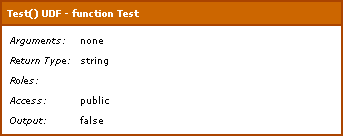
However, if you dump out the meta data for the UDF:
<!--- Dump out meta data. --->
<cfdump
	var="#GetMetaData( VARIABLES.Test )#"
	label="Test() UDF Meta Data"
	/>
... you will see that the XML style attributes are keys in the meta data structure:
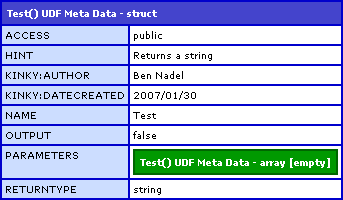
Very interesting. Once it is in the meta data object, it is very easy to access as a structure key:
<!--- Get the UDF meta data. --->
<cfset objMetaData = GetMetaData( VARIABLES.Test ) />

<!--- Get the author. --->
<cfset strAuthor = objMetaData[ "kinky:author" ] />
Now, I know ZERO about name spaces (and not much more about XML) and in fact, I just wrote a blog entry about stripping them out, so I don't know what this would be used for. But I do like the idea of being able to have attributes that don't get confused with the inherent ColdFusion attributes (which I guess might be the whole idea behind name spaces).
Want to use code from this post? Check out the license.

Reader Comments
Excellent use of the 'kinky' namespace! I was discussing this strategy a while back with Peter Farrell and suggested using the 'titties' namespace. You can be 100% positive adobe's never ever ever gonna use that!
Exactly. Namespaces like that future-proof your code in case adobe wants to attributes later. Also, its also more obvious that you are doing something special (kinky) when you prefix your attributes like this.
It also allows you to use the name attribute names as built-in Coldfusion attributes.
I've seen a framework (Transfer, I believe) that has two attributes for return types of functions. One is always "any", probably for performance reasons, and the other is the real CFC type, probably for documentation.
@Chris,
Ha ha ha ha ha ha ha. Excellent :)
@Scott,
That makes sense to me. I guess my confusion has always been in that things that are "name-spaced" are things that don't conflict as-is. However, the future-proofing makes much more sense.
You don't happen to know why name-spaces complicated things like XPath searches do you??
XML namespaces are supposed to prevent clashes within tag and attributes in different contexts. For example, in a soap request, some data is related to the soap protocol while most of it is probably the data you need.
If you strip out namespaces and search for elements, there is a chance you will find data that don't care about.
Searching for nodes with namespace prefixes is as simple as using XPath with the prefix included in your search string. For example: "//myprefix:mynode".
ColdFusion's XPath implementation has a "feature" where empty namespaces must be prefixed with the empty namespace prefix. For example: ":/mynode". You'll know you're dealing with an empty namespace as compared to no namespace at all if you see the attribute xmlns="URI" in your document.
Scott,
I have taken a look at your comments and the comments made on my previous post... and I still cannot get it to work. If you take a look at this:
www.bennadel.com/index.cfm?dax=blog:494.view
.. and the example in it, can you please help me out. I cannot figure out why this expression is not working:
//:searchFor
is not finding the non-namespaced xml node. I get this error:
An error occured while Transforming an XML document. Prefix must resolve to a namespace:
Any suggestions?
Awesome.
I have a question that I'm hoping someone can help me with.
I'm reading in an RSS feed and creating a fresh one using CF8, compliant with iTunes namespace for podcasting.
I need to add in ns details like "itunes:author" but CF isn't liking the way I'm doing it.
The feed compiles perfectly until I start placing these in, but I hope there is a way around it.
A sample code is below. Thank you very much in advance for any help you can provide.
<cfset tempxml.rss.XmlChildren[1].XmlChildren[i].enclosure = XmlElemNew(tempXml, "enclosure")>
<cfset tempxml.rss.XmlChildren[1].XmlChildren[i].enclosure.XmlAttributes["url"] = "#blogPosts.linkhref[i]#">
<cfset tempxml.rss.XmlChildren[1].XmlChildren[i].enclosure.XmlAttributes["length"] = "#blogPosts.linklength[i]#">
<cfset tempxml.rss.XmlChildren[1].XmlChildren[i].enclosure.XmlAttributes["type"] = "#blogPosts.linktype[i]#">
<cfset tempxml.rss.XmlChildren[1].XmlChildren[i].itunes:duration = XmlElemNew(tempXml, "itunes:duration")>
<cfset tempxml.rss.XmlChildren[1].XmlChildren[i].itunes:duration.XmlText = "#Trim("#XMLFormat(blogPosts.itunes_duration[i])#")#">
Many thanks,
Matt
@Matt,
While I love XML more than chocolate, I am not very good at all with namespaces. What if you tried this:
<cfset tempxml.rss.XmlChildren[1].XmlChildren[i][ "itunes:duration" ] = XmlElemNew(tempXml, "itunes:duration")>
<cfset tempxml.rss.XmlChildren[1].XmlChildren[i][ "itunes:duration" ].XmlText = "#Trim("#XMLFormat(blogPosts.itunes_duration[i])#")#">
Notice that I am putting "itunes:duration" in a quoted struct-key. Not sure if that will work, but it should be a step in the more correct direction.