
I want to start this off saying that I don't know all that much about XML standards. All I know is that sometimes they get in my way. In particular, XML name spaces and tag prefixes can make searching ColdFusion XML objects using XPath very difficult (at least for the layman like me). For instance, take a look at this chunk of XML SOAP request that is generated by the XStandard WYSIWYG editor (I am sorting it for later use):
<!--- Store the XStandard SOAP XML. --->
<cfsavecontent variable="strXml">

	<?xml version="1.0" encoding="UTF-8"?>
	<soap:Envelope
		xmlns:xsi="http://www.w3.org/2001/XMLSchema-instance"
		xmlns:xsd="http://www.w3.org/2001/XMLSchema"
		xmlns:soap="http://schemas.xmlsoap.org/soap/envelope/">

		<soap:Body>

			<doDirectorySearch
				xmlns="http://xstandard.com/2004/web-services">

				<lang>en</lang>
				<searchFor>Smith</searchFor>
				<filterBy>staff</filterBy>

			</doDirectorySearch>

		</soap:Body>

	</soap:Envelope>

</cfsavecontent>
Notice that several of the XML node tags begin with "soap:". Also notice that the "soap" name space is defined as "http://schemas.xmlsoap.org/soap/envelope/". Now, I have absolutely NO idea what this does. I don't understand name spaces, I don't understand prefixed tags. All I know is that because of the prefixed tags and name spaces, this ColdFusion XML search does NOT work:
<!---
	Parse the XStandard SOAP request XML into a ColdFusion XML
	document object. Be sure to trim the XML so that it
	parses properly.
--->
<cfset xmlRequest = XmlParse(
	strXml.Trim()
	) />


<!--- Search for the "searchFor" XML node using XPath. --->
<cfset arrSearchNodes = XmlSearch(
	xmlRequest,
	"//searchFor"
	) />
If I went to dump this out, the arrSearchNodes ColdFusion array is EMPTY. However, if you look at the w3schools XPath tutorial you will see that "//" should select all nodes in the document no matter where they are (it doesn't say anything about name spaces).
Clearly there is a node "searchFor", so why is the XPath search for "//searchFor" not working? It must have to do with the name spaces and the tag prefixes. When I asked about this on CF-Talk (a looooong time ago), someone suggested just searching for the tag name with this notation:
<!--- Search for "searchFor" XML nodes using XPath. --->
<cfset arrSearchNodes = XmlSearch(
	xmlRequest,
	"//*[name()='searchFor']"
	) />
Now, this DOES work because it is searching for nodes whose node name returned by the function name() is "searchFor". Yeah, it works, but that just look / feels / tastes nasty to me. I just want to be able to search for the node using standard XPath notation (yes I know the above IS standard, but you get my point).
In order to have it my way, I am forced to use regular expressions to strip out the XML name space attributes and tag prefixes from the raw XML data before I parse it into a ColdFusion XML document:
<!---
	Strip out the tag prefixes. This will convert tags from the
	form of soap:nodeName to JUST nodeName. This works for both
	openning and closing tags.
--->
<cfset strXml = strXml.ReplaceAll(
	"(</?)(\w+:)",
	"$1"
	) />

<!---
	Remove all references to XML name spaces. These are node
	attributes that begin with "xmlns:".
--->
<cfset strXml = strXml.ReplaceAll(
	"xmlns(:\w+)?=""[^""]*""",
	""
	) />
Doing that converts the original XML SOAP request XML to this:
<?xml version="1.0" encoding="UTF-8"?>
<Envelope>

	<Body>

		<doDirectorySearch>

			<lang>en</lang>
			<searchFor>Smith</searchFor>
			<filterBy>staff</filterBy>

		</doDirectorySearch>

	</Body>

</Envelope>
Notice that the only information that I am left with is the important information (at least, the way my unfrozen cave man lawyer brain sees it). Once we have the XML in this format, we can easily run nice looking XPath searches on the ColdFusion XML document object:
<!---
	Parse the XStandard SOAP request XML into a ColdFusion XML
	document object. Be sure to trim the XML so that it
	parses properly.
--->
<cfset xmlRequest = XmlParse(
	strXml.Trim()
	) />

<!--- Search for the "searchFor" XML node using XPath. --->
<cfset arrSearchNodes = XmlSearch(
	xmlRequest,
	"//searchFor"
	) />

<!--- Dump out the search results. --->
<cfdump
	var="#arrSearchNodes#"
	label="searchFor XPath Search Results"
	/>
This gives us the following CFDump output:
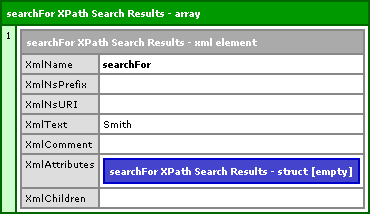
Now, again, I don't know all that much about XML and its standards, but I can look at code and tell you that this search:
//searchFor
... looks MUCH better than this search:
//*[name()='searchFor']
Of course, if anyone knows of a way to handle XPath searches elegantly (should read "Using the //searchFor" notation) without stripping out the name space and all that jazz, please let me know.

Reader Comments
Hey Ben,
This article might help.
<http://www.talkingtree.com/blog/index.cfm/2005/11/18/XmlSearchNoNameNamespace>;
I'm not sure about this since I have not tried to do what you are doing.
What Ive experienced with this is if it DOES have a namespace then Erat's Blog entry will work fine. I am never sure if the XML im working with contains a namespace or not, and if it does not contain a namespace and you use the //:node syntax, it will generate an error. This is at least what I have experienced.
I use Ben's first method
"//*[name()='searchFor']". Yes it isnt pretty, but it handles the XML searching better for me. XPath is great, you can do a lot with it.
It just seems a bit of an overkill to use a regex to do what the XPath equivilant will do. Having a regex do everything is nice, but to me it still looks "nasty". When was a regex ever pretty?
You can search for an xml element regardless of whether it has a namespace using local-name() in an XPath search.
i.e. find all elements named "Response" regardless of namespace and location in the document's parent-child hierarchy:
<cfset MyArray = XMLSearch(MyXMLDoc, "//*[local-name()='Response']"
See more here: http://aftergeek.blogspot.com/2006/08/xmlsearch-xpath-and-xml-namespaces-in.html
Matthew,
That's a good point... why does it have to look pretty. I guess, when i use the method () it just feels like I am hacking something together. It feels like a work around. But if the consensus is that it is ok, well then, I am ok with that.
You could just clear out the namespace attribute (xmlns) with StructClear() or StructDelete() and then you can just go in and use the //search/term.
I dont claim to know much about namespaces myself, but this would be a workaround if you are sure you do not need the namespace. I dont know if the XML will validate without a namespace. As before, the inital way I normally do things disregards the namespace attribute, and I think that is why I lean towards this way of doing things.
nice workaround, but it's much cleaner and simpler (once you get the hang of it) to XmlTransform() and XSLT to transform the original XML into the XML formatted the way you want.
@Aaron,
I have never really done XSLT before. Is there a very generic way to create a document that has no name spaces?
Glad you made me research this. Simply use the XSLT in #41 at http://www.dpawson.co.uk/xsl/sect2/N5536.html#d7594e1750. XmlTransform() your XML doc with it, using the sample on http://www.cfquickdocs.com/?getDoc=XmlSearch#XmlTransform as a guide. I tested, and it works perfectly against the sample in your blog entry here. Let me know if you want the test code I put together.
cheers. ;D
@Aaron,
Back when you posted this, it made no sense to me. But this was a few weeks ago. I've been doing some learning on XSLT and actually did an introductory presentation this morning at my office. Now, looking at the link you provided, it actually makes sense. Rock on.
@Ben -
Yes, I noticed your XSLT Intro post today during my morning blog reading, and you did an excellent job explaining to newbies and vets alike. The beauty of it once it's starts to click is a wonderful thing. Thanks for all your continuing efforts for the CF community! (I still want to know how you have time, after blogging so much, to get much real work done... ;-)
@Aaron,
Thanks! Glad that you think it was a good job :) It was a lot of information for me to absorb, try to understand, and then try to explain to other people. Luckily, most them were totally uninterested, so no hard questions were asked ;)
As far as time, a presentation like that takes a while. I stayed in the office from 5:30pm to 10:45pm, so that was a bit of a bear. Most things I write don't take nearly that long. But, this, unlike a lot of other stuff, was on company time since it was for a staff meeting - sweeet!
Thanks for your article.
It has the perfect solution I implemented
(although I brute forced the namespace removal in a specific xml)
Now I can use your function globally!
However, with your code it leaves spaces after the nodename...
<Envelope ><Body><GetSOListByCustomerIdResult ><List>
So I added a space before "xmlns" to make it
<cfset strXml = strXml.ReplaceAll(
" xmlns(:\w+)?=""[^""]*""",
""
) />
now my tags seem to come out correctly,
Did I fix a typo, or will this bite me in the rear somewhere later?
My xml seems to come out right now...
<Envelope><Body><GetSOListByCustomerIdResult><List>
P.S.
Lets hope I get this captcha math problem right :)
@Steve,
Not sure why you were getting the white space. But, glad you got it working out now.
You are just great man...
Thank you so much you have helped out twice. I agree with everyone else YOU R GREAT!!!
@Sheme,
This can definitely be put into a CFC.
This had me stumped.. thanks alot!
Nice work. This helped me in a project.
Thanks Ben...
Thanks for the post. Don't know if this is related, but I had the following problem code in CF8 :
<cfxml variable="validxHTML3Str">
<html xmlns="http://www.w3.org/1999/xhtml" xml:lang="en">
<head>
<meta
name="generator"
content="HTML Tidy for Java (vers. 2009-12-01), see jtidy.sourceforge.net" />
<meta
http-equiv="Content-Type"
content="text/html; charset=utf-8" />
<title>My Title</title>
</head>
</html>
</cfxml>
<cfset xmldocObj=
xmlParse( trim( validxHTML3Str) ) />
<cfset arrSearchNodes = XmlSearch(
xmldocObj,
"//html/head/meta" ) />
<cfdump var="#arrSearchNodes#"
label="meta XPath Search Results" />
<!--- ERROR: arrSearchNodes is empty. TO FIX PROBLEM, I had to remove the xmlns and xml:lang from the <html> tag. Like so: --->
<cfxml variable="validxHTML3Str">
<html>
<head>
<meta
name="generator"
content="HTML Tidy for Java (vers. 2009-12-01), see jtidy.sourceforge.net" />
<meta
http-equiv="Content-Type"
content="text/html; charset=utf-8" />
<title>My Title</title>
</head>
</html>
</cfxml>
Thank you, thank you, thank you!!!!!!!!!!!!!!
i racked my brain trying to find a solution, thank you your article really helped me understand namespace.
another way to strip namespacesm you can do with XSLT.
step 1.
save this as such as "removenamespace.xsl"
<?xml version="1.0" encoding="utf-8"?>
<xsl:stylesheet version="1.0"
xmlns:xsl="http://www.w3.org/1999/XSL/Transform">
<xsl:output method="xml" indent="no"/>
<xsl:template match="/|comment()|processing-instruction()">
<xsl:copy>
<!-- go process children (applies to root node only) -->
<xsl:apply-templates/>
</xsl:copy>
</xsl:template>
<xsl:template match="*">
<xsl:element name="{local-name()}">
<!-- go process attributes and children -->
<xsl:apply-templates select="@*|node()"/>
</xsl:element>
</xsl:template>
<xsl:template match="@*">
<xsl:attribute name="{local-name()}">
<xsl:value-of select="."/>
</xsl:attribute>
</xsl:template>
</xsl:stylesheet>
step 2.
and apply to your xml
<cffile action="read" file="removenamespace.xsl" variable="xmltrans">
<cfset StrippedXMLFile=XmlParse(XmlTransform(XMLFile, xmltrans))>