
I have been working with ColdFusion and POI to read and write Microsoft Excel files. It has completely opened up a new world for me. I have begun to formalize a methodology for using it that I have wrapped in to a beta ColdFusion component, POIUtility.cfc. I have just started using it, so I am not sure how bullet-proof it is - I can almost assure you that there are bugs :) I will be using it intensively for the next week or so as I work on a TON of reporting from ColdFusion to Excel. I am sure this will be more fine-tuned in a week or two.
There are several main functions:
GetNewSheetStruct()
This returns a structure that defines the Excel sheet object. Write functions expect either an array of these types of object (one per sheet) or a single instance (defining a one-sheet document).
ReadExcel()
This reads an Excel file into an array of structures that contains the Excel file information OR if a specific sheet index is passed in, only that sheet object is returned.
ReadExcelSheet()
This takes a given WorkBook instance and reads the given sheet into a Sheet structure. It can be access by the public, but is meant to be used primarily by the ReadExcel() method.
WriteExcel()
This takes an array of Sheet structure objects and writes each of them to a tab in the resulting Excel file OR it takes a single Sheet object and writes that to the first tab of the resulting Excel file.
WriteExcelSheet()
This takes a workbook and writes the given sheet data to the Sheet of an Excel file. This can be used by the public but is meant to be used primarily by WriteExcel() method.
WriteSingleExcel()
This allows the user to write a single query to an Excel file without having to create an intermediary Sheet object. This is just a convenient short hand that allows you to bypass the intermediary "Sheet" structure - underneath, it just packages the data and, in-turn, calls the WriteExcel() method.
Here is the code for the beta POI utiltiy ColdFusion component, POIUtility.cfc:
<cfcomponent
	displayname="POIUtility"
	output="false"
	hint="Handles the reading and writing of Microsoft Excel files using POI and ColdFusion.">


	<cffunction name="Init" access="public" returntype="POIUtility" output="false"
		hint="Returns an initialized POI Utility instance.">

		<!--- Return This reference. --->
		<cfreturn THIS />
	</cffunction>


	<cffunction name="GetNewSheetStruct" access="public" returntype="struct" output="false"
		hint="Returns a default structure of what this Component is expecting for a sheet definition when WRITING Excel files.">

		<!--- Define the local scope. --->
		<cfset var LOCAL = StructNew() />

		<cfscript>

			// This is the query that will hold the data.
			LOCAL.Query = "";

			// THis is the list of columns (in a given order) that will be
			// used to output data.
			LOCAL.ColumnList = "";

			// These are the names of the columns used when creating a header
			// row in the Excel file.
			LOCAL.ColumnNames = "";

			// This is the name of the sheet as it appears in the bottom Excel tab.
			LOCAL.SheetName = "";

			// Return the local structure containing the sheet info.
			return( LOCAL );

		</cfscript>
	</cffunction>


	<cffunction name="ReadExcel" access="public" returntype="any" output="false"
		hint="Reads an Excel file into an array of strutures that contains the Excel file information OR if a specific sheet index is passed in, only that sheet object is returned.">

		<!--- Define arguments. --->
		<cfargument
			name="FilePath"
			type="string"
			required="true"
			hint="The expanded file path of the Excel file."
			/>

		<cfargument
			name="HasHeaderRow"
			type="boolean"
			required="false"
			default="false"
			hint="Flags the Excel files has using the first data row a header column. If so, this column will be excluded from the resultant query."
			/>

		<cfargument
			name="SheetIndex"
			type="numeric"
			required="false"
			default="-1"
			hint="If passed in, only that sheet object will be returned (not an array of sheet objects)."
			/>

		<cfscript>

			// Define the local scope.
			var LOCAL = StructNew();

			// Create the Excel file system object. This object is responsible
			// for reading in the given Excel file.
			LOCAL.ExcelFileSystem = CreateObject(
				"java",
				"org.apache.poi.poifs.filesystem.POIFSFileSystem"
				).Init(

					// Create the file input stream.
					CreateObject(
						"java",
						"java.io.FileInputStream"
						).Init(

							ARGUMENTS.FilePath

							)
					);


			// Get the workbook from the Excel file system.
			LOCAL.WorkBook = CreateObject(
				"java",
				"org.apache.poi.hssf.usermodel.HSSFWorkbook"
				).Init(
					LOCAL.ExcelFileSystem
					);


			// Check to see if we are returning an array of sheets OR just
			// a given sheet.
			if (ARGUMENTS.SheetIndex GTE 0){

				// We just want a given sheet, so return that.
				return(
					ReadExcelSheet(
						LOCAL.WorkBook,
						ARGUMENTS.SheetIndex,
						ARGUMENTS.HasHeaderRow
						)
					);

			} else {

				// No specific sheet was requested. We are going to return an array
				// of sheets within the Excel document.

				// Create an array to return.
				LOCAL.Sheets = ArrayNew( 1 );

				// Loop over the sheets in the documnet.
				for (
					LOCAL.SheetIndex = 0 ;
					LOCAL.SheetIndex LT LOCAL.WorkBook.GetNumberOfSheets() ;
					LOCAL.SheetIndex = (LOCAL.SheetIndex + 1)
					){

					// Add the sheet information.
					ArrayAppend(
						LOCAL.Sheets,
						ReadExcelSheet(
							LOCAL.WorkBook,
							LOCAL.SheetIndex,
							ARGUMENTS.HasHeaderRow
							)
						);

				}

				// Return the array of sheets.
				return( LOCAL.Sheets );

			}

		</cfscript>
	</cffunction>


	<cffunction name="ReadExcelSheet" access="public" returntype="struct" output="false"
		hint="Takes an Excel workbook and reads the given sheet (by index) into a structure.">

		<!--- Define arguments. --->
		<cfargument
			name="WorkBook"
			type="any"
			required="true"
			hint="This is a workbook object created by the POI API."
			/>

		<cfargument
			name="SheetIndex"
			type="numeric"
			required="false"
			default="0"
			hint="This is the index of the sheet within the passed in workbook. This is a ZERO-based index (coming from a Java object)."
			/>

		<cfargument
			name="HasHeaderRow"
			type="boolean"
			required="false"
			default="false"
			hint="This flags the sheet as having a header row or not (if so, it will NOT be read into the query)."
			/>

		<cfscript>

			// Define the local scope.
			var LOCAL = StructNew();

			// Set up the default return structure.
			LOCAL.SheetData = StructNew();

			// This is the index of the sheet within the workbook.
			LOCAL.SheetData.Index = ARGUMENTS.SheetIndex;

			// This is the name of the sheet tab.
			LOCAL.SheetData.Name = ARGUMENTS.WorkBook.GetSheetName(
				JavaCast( "int", ARGUMENTS.SheetIndex )
				);

			// This is the query created from the sheet.
			LOCAL.SheetData.Query = "";

			// This is a flag for the header row.
			LOCAL.SheetData.HasHeaderRow = ARGUMENTS.HasHeaderRow;

			// An array of header columns names.
			LOCAL.SheetData.ColumnNames = ArrayNew( 1 );

			// This keeps track of the min number of data columns.
			LOCAL.SheetData.MinColumnCount = 0;

			// This keeps track of the max number of data columns.
			LOCAL.SheetData.MaxColumnCount = 0;


			// Get the sheet object at this index of the
			// workbook. This is based on the passed in data.
			LOCAL.Sheet = ARGUMENTS.WorkBook.GetSheetAt(
				JavaCast( "int", ARGUMENTS.SheetIndex )
				);


			// Loop over the rows in the Excel sheet. For each
			// row, we simply want to capture the number of
			// physical columns we are working with that are NOT
			// blank. We will then use that data to figure out
			// how many columns we should be using in our query.
			for (
				LOCAL.RowIndex = 0 ;
				LOCAL.RowIndex LT LOCAL.Sheet.GetPhysicalNumberOfRows() ;
				LOCAL.RowIndex = (LOCAL.RowIndex + 1)
				){

				// Get a reference to the current row.
				LOCAL.Row = LOCAL.Sheet.GetRow(
					JavaCast( "int", LOCAL.RowIndex )
					);

				// Get the number of physical cells in this row. While I think that
				// this can possibly change from row to row, for the purposes of
				// simplicity, I am going to assume that all rows are uniform and
				// that this row is a model of how the rest of the data will be
				// displayed.
				LOCAL.ColumnCount = LOCAL.Row.GetPhysicalNumberOfCells();

			// Check to see if the query variable we have it actually a query.
				// If we have not done anything to it yet, then it should still
				// just be a string value (Yahoo for dynamic typing!!!). If that
				// is the case, then let's use this first data row to set up the
				// query object.
				if (NOT IsQuery( LOCAL.SheetData.Query )){

					// Create an empty query. Doing it this way creates a query
					// with neither column nor row values.
					LOCAL.SheetData.Query = QueryNew( "" );

					// Now that we have an empty query, we are going to loop over
					// the cells COUNT for this data row and for each cell, we are
					// going to create a query column of type VARCHAR. I understand
					// that cells are going to have different data types, but I am
					// chosing to store everything as a string to make it easier.
					for (
						LOCAL.ColumnIndex = 0 ;
						LOCAL.ColumnIndex LT LOCAL.ColumnCount ;
						LOCAL.ColumnIndex = (LOCAL.ColumnIndex + 1)
						){

						// Add the column. Notice that the name of the column is
						// the text "column" plus the column index. I am starting
						// my column indexes at ONE rather than ZERO to get it back
						// into a more ColdFusion standard notation.
						QueryAddColumn(
							LOCAL.SheetData.Query,
							"column#(LOCAL.ColumnIndex + 1)#",
							"CF_SQL_VARCHAR",
							ArrayNew( 1 )
							);


						// Check to see if we are using a header row. If so, we
						// want to capture the header row values into an array
						// of header column names.
						if (ARGUMENTS.HasHeaderRow){

							// Try to get a header column name (it might throw
							// an error).
							try {

								ArrayAppend(
									LOCAL.SheetData.ColumnNames,
									LOCAL.Row.GetCell(
										JavaCast( "int", LOCAL.ColumnIndex )
										).GetStringCellValue()
									);

							} catch (any ErrorHeader){

								// There was an error grabbing the text of the header
								// column type. Just add an empty string to make up
								// for it.
								ArrayAppend(
									LOCAL.SheetData.ColumnNames,
									""
									);

							}

						}

					}

					// Set the default min and max column count based on this first row.
					LOCAL.SheetData.MinColumnCount = LOCAL.ColumnCount;
					LOCAL.SheetData.MaxColumnCount = LOCAL.ColumnCount;

				}


				// ASSERT: Whether we are on our first Excel data row or
				// our Nth data row, at this point, we have a ColdFusion
				// query object that has the proper columns defined.


				// Update the running min column count.
				LOCAL.SheetData.MinColumnCount = Min(
					LOCAL.SheetData.MinColumnCount,
					LOCAL.ColumnCount
					);

				// Update the running max column count.
				LOCAL.SheetData.MaxColumnCount = Max(
					LOCAL.SheetData.MaxColumnCount,
					LOCAL.ColumnCount
					);


				// Add a row to the query so that we can store this row's
				// data values.
				QueryAddRow( LOCAL.SheetData.Query );


				// Loop over the cells in this row to find values.
				for (
					LOCAL.ColumnIndex = 0 ;
					LOCAL.ColumnIndex LT LOCAL.ColumnCount ;
					LOCAL.ColumnIndex = (LOCAL.ColumnIndex + 1)
					){

					// When getting the value of a cell, it is important to know
					// what type of cell value we are dealing with. If you try
					// to grab the wrong value type, an error might be thrown.
					// For that reason, we must check to see what type of cell
					// we are working with. These are the cell types and they
					// are constants of the cell object itself:
			//
					// 0 - CELL_TYPE_NUMERIC
					// 1 - CELL_TYPE_STRING
					// 2 - CELL_TYPE_FORMULA
					// 3 - CELL_TYPE_BLANK
					// 4 - CELL_TYPE_BOOLEAN
					// 5 - CELL_TYPE_ERROR

					// Get the cell from the row object.
					LOCAL.Cell = LOCAL.Row.GetCell(
						JavaCast( "int", LOCAL.ColumnIndex )
						);

					// Get the type of data in this cell.
					LOCAL.CellType = LOCAL.Cell.GetCellType();

					// Get teh value of the cell based on the data type. The thing
					// to worry about here is cell forumlas and cell dates. Formulas
					// can be strange and dates are stored as numeric types. For
					// this demo, I am not going to worry about that at all. I will
					// just grab dates as floats and formulas I will try to grab as
					// numeric values.
					if (LOCAL.CellType EQ LOCAL.Cell.CELL_TYPE_NUMERIC) {

						// Get numeric cell data. This could be a standard number,
						// could also be a date value. I am going to leave it up to
						// the calling program to decide.
						LOCAL.CellValue = LOCAL.Cell.GetNumericCellValue();

					} else if (LOCAL.CellType EQ LOCAL.Cell.CELL_TYPE_STRING){

						LOCAL.CellValue = LOCAL.Cell.GetStringCellValue();

					} else if (LOCAL.CellType EQ LOCAL.Cell.CELL_TYPE_FORMULA){

						// Since most forumlas deal with numbers, I am going to try
						// to grab the value as a number. If that throws an error, I
						// will just grab it as a string value.
						try {

							LOCAL.CellValue = LOCAL.Cell.GetNumericCellValue();

						} catch (any Error1){

							// The numeric grab failed. Try to get the value as a
							// string. If this fails, just force the empty string.
							try {

								LOCAL.CellValue = LOCAL.Cell.GetStringCellValue();

							} catch (any Error2){

								// Force empty string.
								LOCAL.CellValue = "";

			}
						}

					} else if (LOCAL.CellType EQ LOCAL.Cell.CELL_TYPE_BLANK){

						LOCAL.CellValue = "";

					} else if (LOCAL.CellType EQ LOCAL.Cell.CELL_TYPE_BOOLEAN){

						LOCAL.CellValue = LOCAL.Cell.GetBooleanCellValue();

					} else {

						// If all else fails, get empty string.
						LOCAL.CellValue = "";

					}


					// ASSERT: At this point, we either got the cell value out of the
					// Excel data cell or we have thrown an error or didn't get a
					// matching type and just have the empty string by default.
					// No matter what, the object LOCAL.CellValue is defined and
					// has some sort of SIMPLE ColdFusion value in it.


					// Now that we have a value, store it as a string in the ColdFusion
					// query object. Remember again that my query names are ONE based
					// for ColdFusion standards. That is why I am adding 1 to the
					// cell index.
					LOCAL.SheetData.Query[ "column#(LOCAL.ColumnIndex + 1)#" ][ LOCAL.SheetData.Query.RecordCount ] = JavaCast( "string", LOCAL.CellValue );

			}

			}


			// At this point we should have a full query of data. However, if
			// we were using a header row, then the header row was included in
			// the final query. We do NOT want this. If we are using a header
			// row, delete the first row of the query.
			if (
				ARGUMENTS.HasHeaderRow AND
				LOCAL.SheetData.Query.RecordCount
				){

				// Delete the first row which is the header row.
				LOCAL.SheetData.Query.RemoveRows(
					JavaCast( "int", 0 ),
					JavaCast( "int", 1 )
					);

			}


			// Return the sheet object that contains all the Excel data.
			return(
				LOCAL.SheetData
				);

		</cfscript>
	</cffunction>


	<cffunction name="WriteExcel" access="public" returntype="void" output="false"
		hint="Takes an array of 'Sheet' structure objects and writes each of them to a tab in the Excel file.">

		<!--- Define arguments. --->
		<cfargument
			name="FilePath"
			type="string"
			required="true"
			hint="This is the expanded path of the Excel file."
			/>

		<cfargument
			name="Sheets"
			type="any"
			required="true"
			hint="This is an array of the data that is needed for each sheet of the excel OR it is a single Sheet object. Each 'Sheet' will be a structure containing the Query, ColumnList, ColumnNames, and SheetName."
			/>

		<cfargument
			name="Delimiters"
			type="string"
			required="false"
			default=","
			hint="The list of delimiters used for the column list and column name arguments."
			/>

		<cfscript>

			// Set up local scope.
			var LOCAL = StructNew();

			// Create Excel workbook.
			LOCAL.WorkBook = CreateObject(
				"java",
				"org.apache.poi.hssf.usermodel.HSSFWorkbook"
				).Init();


			// Check to see if we are dealing with an array of sheets or if we were
			// passed in a single sheet.
			if (IsArray( ARGUMENTS.Sheets )){

				// This is an array of sheets. We are going to write each one of them
				// as a tab to the Excel file. Loop over the sheet array to create each
				// sheet for the already created workbook.
				for (
					LOCAL.SheetIndex = 1 ;
					LOCAL.SheetIndex LTE ArrayLen( ARGUMENTS.Sheets ) ;
					LOCAL.SheetIndex = (LOCAL.SheetIndex + 1)
					){


					// Create sheet for the given query information..
					WriteExcelSheet(
						WorkBook = LOCAL.WorkBook,
						Query = ARGUMENTS.Sheets[ LOCAL.SheetIndex ].Query,
						ColumnList = ARGUMENTS.Sheets[ LOCAL.SheetIndex ].ColumnList,
						ColumnNames = ARGUMENTS.Sheets[ LOCAL.SheetIndex ].ColumnNames,
						SheetName = ARGUMENTS.Sheets[ LOCAL.SheetIndex ].SheetName,
						Delimiters = ARGUMENTS.Delimiters
						);

				}

			} else {

				// We were passed in a single sheet object. Write this sheet as the
				// first and only sheet in the already created workbook.
				WriteExcelSheet(
					WorkBook = LOCAL.WorkBook,
					Query = ARGUMENTS.Sheets.Query,
					ColumnList = ARGUMENTS.Sheets.ColumnList,
					ColumnNames = ARGUMENTS.Sheets.ColumnNames,
					SheetName = ARGUMENTS.Sheets.SheetName,
					Delimiters = ARGUMENTS.Delimiters
					);

			}


			// ASSERT: At this point, either we were passed a single Sheet object
			// or we were passed an array of sheets. Either way, we now have all
			// of sheets written to the WorkBook object.


			// Create a file based on the path that was passed in. We will stream
			// the work data to the file via a file output stream.
			LOCAL.FileOutputStream = CreateObject(
				"java",
				"java.io.FileOutputStream"
				).Init(

					JavaCast(
						"string",
						ARGUMENTS.FilePath
						)

					);

			// Write the workout data to the file stream.
			LOCAL.WorkBook.Write(
				LOCAL.FileOutputStream
				);

			// Close the file output stream. This will release any locks on
			// the file and finalize the process.
			LOCAL.FileOutputStream.Close();

			// Return out.
			return;

		</cfscript>
	</cffunction>


	<cffunction name="WriteExcelSheet" access="public" returntype="void" output="false"
		hint="Writes the given 'Sheet' structure to the given workbook.">

		<!--- Define arguments. --->
		<cfargument
			name="WorkBook"
			type="any"
			required="true"
			hint="This is the Excel workbook that will create the sheets."
			/>

		<cfargument
			name="Query"
			type="any"
			required="true"
			hint="This is the query from which we will get the data."
			/>

		<cfargument
			name="ColumnList"
			type="string"
			required="false"
			default="#ARGUMENTS.Query.ColumnList#"
			hint="This is list of columns provided in custom-ordered."
			/>

		<cfargument
			name="ColumnNames"
			type="string"
			required="false"
			default=""
			hint="This the the list of optional header-row column names. If this is not provided, no header row is used."
			/>

		<cfargument
			name="SheetName"
			type="string"
			required="false"
			default="Sheet #(ARGUMENTS.WorkBook.GetNumberOfSheets() + 1)#"
			hint="This is the optional name that appears in this sheet's tab."
			/>

		<cfargument
			name="Delimiters"
			type="string"
			required="false"
			default=","
			hint="The list of delimiters used for the column list and column name arguments."
			/>

		<cfscript>

			// Set up local scope.
			var LOCAL = StructNew();

			// Set up data type map so that we can map each column name to
			// the type of data contained.
			LOCAL.DataMap = StructNew();

			// Get the meta data of the query to help us create the data mappings.
			LOCAL.MetaData = GetMetaData( ARGUMENTS.Query );

			// Loop over meta data values to set up the data mapping.
			for (
				LOCAL.MetaIndex = 1 ;
				LOCAL.MetaIndex LTE ArrayLen( LOCAL.MetaData ) ;
				LOCAL.MetaIndex = (LOCAL.MetaIndex + 1)
				){

				// Map the column name to the data type.
				LOCAL.DataMap[ LOCAL.MetaData[ LOCAL.MetaIndex ].Name ] = LOCAL.MetaData[ LOCAL.MetaIndex ].TypeName;
			}


			// Create the sheet in the workbook.
			LOCAL.Sheet = ARGUMENTS.WorkBook.CreateSheet(
				JavaCast(
					"string",
					ARGUMENTS.SheetName
					)
				);

			// Set a default row offset so that we can keep add the header
			// column without worrying about it later.
			LOCAL.RowOffset = -1;

			// Check to see if we have any column names. If we do, then we
			// are going to create a header row with these names in order
			// based on the passed in delimiter.
			if (Len( ARGUMENTS.ColumnNames )){

				// Convert the column names to an array for easier
				// indexing and faster access.
				LOCAL.ColumnNames = ListToArray(
					ARGUMENTS.ColumnNames,
					ARGUMENTS.Delimiters
					);

				// Create a header row.
				LOCAL.Row = LOCAL.Sheet.CreateRow(
					JavaCast( "int", 0 )
					);

				// Loop over the column names.
				for (
					LOCAL.ColumnIndex = 1 ;
					LOCAL.ColumnIndex LTE ArrayLen( LOCAL.ColumnNames ) ;
					LOCAL.ColumnIndex = (LOCAL.ColumnIndex + 1)
					){

					// Create a cell for this column header.
					LOCAL.Cell = LOCAL.Row.CreateCell(
						JavaCast( "int", (LOCAL.ColumnIndex - 1) )
						);

					// Set the cell value.
					LOCAL.Cell.SetCellValue(
						JavaCast(
							"string",
							LOCAL.ColumnNames[ LOCAL.ColumnIndex ]
							)
						);
				}

				// Set the row offset to zero since this will take care of
				// the zero-based index for the rest of the query records.
				LOCAL.RowOffset = 0;

			}

			// Convert the list of columns to the an array for easier
			// indexing and faster access.
			LOCAL.Columns = ListToArray(
				ARGUMENTS.ColumnList,
				ARGUMENTS.Delimiters
				);

			// Loop over the query records to add each one to the
			// current sheet.
			for (
				LOCAL.RowIndex = 1 ;
				LOCAL.RowIndex LTE ARGUMENTS.Query.RecordCount ;
				LOCAL.RowIndex = (LOCAL.RowIndex + 1)
				){

				// Create a row for this query record.
				LOCAL.Row = LOCAL.Sheet.CreateRow(
					JavaCast(
						"int",
						(LOCAL.RowIndex + LOCAL.RowOffset)
						)
					);

				// Loop over the columns to create the individual data cells
				// and set the values.
				for (
					LOCAL.ColumnIndex = 1 ;
					LOCAL.ColumnIndex LTE ArrayLen( LOCAL.Columns ) ;
					LOCAL.ColumnIndex = (LOCAL.ColumnIndex + 1)
					){

					// Create a cell for this query cell.
					LOCAL.Cell = LOCAL.Row.CreateCell(
						JavaCast( "int", (LOCAL.ColumnIndex - 1) )
						);

					// Get the generic cell value (short hand).
					LOCAL.CellValue = ARGUMENTS.Query[
						LOCAL.Columns[ LOCAL.ColumnIndex ]
						][ LOCAL.RowIndex ];

					// Check to see how we want to set the value. Meaning, what
					// kind of data mapping do we want to apply? Get the data
					// mapping value.
					LOCAL.DataMapValue = LOCAL.DataMap[ LOCAL.Columns[ LOCAL.ColumnIndex ] ];

					// Check to see what value type we are working with. I am
					// not sure what the set of values are, so trying to keep
					// it general.
					if (REFindNoCase( "int", LOCAL.DataMapValue )){

						LOCAL.DataMapCast = "int";

					} else if (REFindNoCase( "long", LOCAL.DataMapValue )){

						LOCAL.DataMapCast = "long";

					} else if (REFindNoCase( "double", LOCAL.DataMapValue )){

						LOCAL.DataMapCast = "double";

					} else if (REFindNoCase( "float|decimal|real|date|time", LOCAL.DataMapValue )){

						LOCAL.DataMapCast = "float";

					} else if (REFindNoCase( "bit", LOCAL.DataMapValue )){

						LOCAL.DataMapCast = "boolean";

					} else if (REFindNoCase( "char|text|memo", LOCAL.DataMapValue )){

						LOCAL.DataMapCast = "string";

					} else if (IsNumeric( LOCAL.CellValue )){

						LOCAL.DataMapCast = "float";

					} else {

						LOCAL.DataMapCast = "string";

					}

					// Cet the cell value using the data map casting that we
					// just determined and the value that we previously grabbed
					// (for short hand).
					LOCAL.Cell.SetCellValue(
						JavaCast(
							LOCAL.DataMapCast,
							LOCAL.CellValue
							)
						);

				}

			}

			// Return out.
			return;

		</cfscript>
	</cffunction>


	<cffunction name="WriteSingleExcel" access="public" returntype="void" output="false"
		hint="Write the given query to an Excel file.">

		<!--- Define arguments. --->
		<cfargument
			name="FilePath"
			type="string"
			required="true"
			hint="This is the expanded path of the Excel file."
			/>

		<cfargument
			name="Query"
			type="query"
			required="true"
			hint="This is the query from which we will get the data for the Excel file."
			/>

		<cfargument
			name="ColumnList"
			type="string"
			required="false"
			default="#ARGUMENTS.Query.ColumnList#"
			hint="This is list of columns provided in custom-order."
			/>

		<cfargument
			name="ColumnNames"
			type="string"
			required="false"
			default=""
			hint="This the the list of optional header-row column names. If this is not provided, no header row is used."
			/>

		<cfargument
			name="SheetName"
			type="string"
			required="false"
			default="Sheet 1"
			hint="This is the optional name that appears in the first (and only) workbook tab."
			/>

		<cfargument
			name="Delimiters"
			type="string"
			required="false"
			default=","
			hint="The list of delimiters used for the column list and column name arguments."
			/>

		<cfscript>

			// Set up local scope.
			var LOCAL = StructNew();

			// Get a new sheet object.
			LOCAL.Sheet = GetNewSheetStruct();

			// Set the sheet properties.
			LOCAL.Sheet.Query = ARGUMENTS.Query;
			LOCAL.Sheet.ColumnList = ARGUMENTS.ColumnList;
			LOCAL.Sheet.ColumnNames = ARGUMENTS.ColumnNames;
			LOCAL.Sheet.SheetName = ARGUMENTS.SheetName;

			// Write this sheet to an Excel file.
			WriteExcel(
				FilePath = ARGUMENTS.FilePath,
				Sheets = LOCAL.Sheet,
				Delimiters = ARGUMENTS.Delimiters
				);

			// Return out.
			return;

		</cfscript>
	</cffunction>

</cfcomponent>
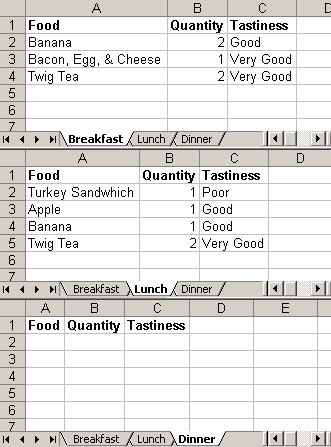
To test this, I created a multi page Excel file that has some food information for different imaginary meals:
To read the Excel file above, I would do this:
<!--- Create a new instance of the POI utility. --->
<cfset objPOIUtility = CreateObject(
	"component",
	"POIUtility"
	).Init()
	/>

<!--- Get the path to our Excel document. --->
<cfset strFilePath = ExpandPath( "./meals.xls" ) />

<!---
	Read the Excel document into an array of Sheet objects.
	Each sheet object will contain the data in the Excel
	sheet as well as some other property-type information.
--->
<cfset arrExcel = objPOIUtility.ReadExcel(
	FilePath = strFilePath,
	HasHeaderRow = true
	) />
Dumping out the arrExcel array, we get to take a look at the data that gets returned:
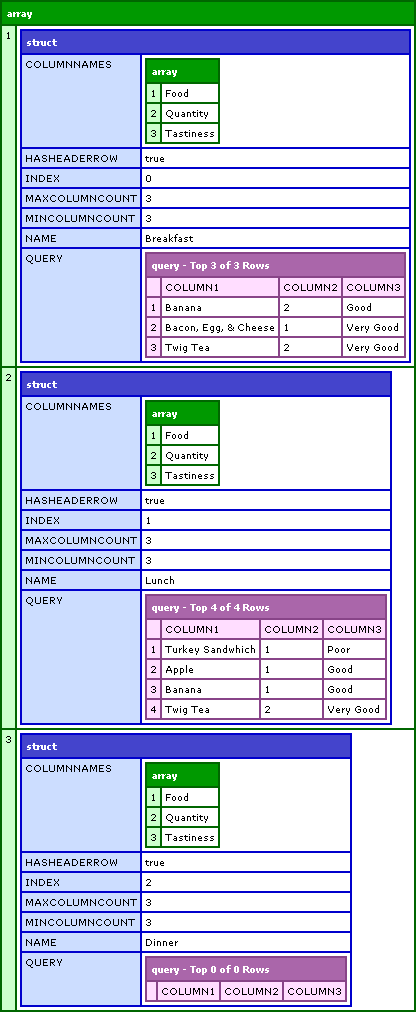
Notice that when reading in the Excel file, I only passed in the FilePath and the HasHeaderRow flag. This will precipitate all sheets to be read in. If, however, I passed in the optional argument, SheetIndex, only the given sheet would be read in and the return structure would be a single Sheet objects as follows:
<!---
	Read in only the Lunch sheet. This is the seocnd Sheet
	of the Excel file, but since Java is ZERO-based, we are
	going to request the first sheet. This will return a
	Sheet object rather than an array of Sheet objects.
--->
<cfset objSheet = objPOIUtility.ReadExcel(
	FilePath = strFilePath,
	HasHeaderRow = true,
	SheetIndex = 1
	) />
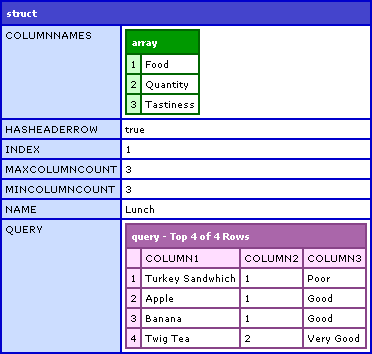
Notice that the only difference in this example is that we passed in the SheetIndex. CFDumping out the objSheet, we get:
Now, what you can't see is that all values from the Excel are stored in the resultant ColdFusion queries as CF_SQL_VARCHAR values. I figure this is the easiest way to deal with the data. I don't mind leaving it up to the ColdFusion programmer to figure out how to use this data. This might be fixed going forward, but so far I am fine with handling it that way.
Now, that covers reading in the Excel files, which is an arguably easier task. Writing Excel files is a bit more complicated. To simplify things, especially while I am learning how to use POI with ColdFusion, I am not giving any formatting options. You can set up header rows, but other than that, data is written to the Excel sheet based on the SQL column type and nothing else. No additionally formatting is applied. One step at a time, please!
Writing works in a similar way to the reading of Excel files; you can write an array of query "objects" to multiple tabs or you can write a single query to a file.
Let' start off writing the meals.xls query data that we read in before (since we already have those ColdFusion queries in memory). We can't just send those objects back into the Write methods as the required structures are not quite the same. Let's create an array of new Sheet objects and then write those to the Excel:
<!---
	Create an array to define the sheets that we
	want to pass in. We are going to use the queries that
	we read in previously.
--->
<cfset arrSheets = ArrayNew( 1 ) />

<!---
	Set up a sheet for the Breakfast meal. We can get a default
	structure from the POI utility (as below) or we could just
	create our own struct of the same type (but this is a nice
	short hand and easy to debug).
--->
<cfset arrSheets[ 1 ] = objPOIUtility.GetNewSheetStruct() />
<cfset arrSheets[ 1 ].Query = objSheet[ 1 ].Query />
<cfset arrSheets[ 1 ].SheetName = "NEW Breakfast" />
<cfset arrSheets[ 1 ].ColumnList = "column1,column2,column3" />
<cfset arrSheets[ 1 ].ColumnNames = "Food,Quantity,Tastiness" />

<!--- Set up a sheet for the Lunch meal. --->
<cfset arrSheets[ 2 ] = objPOIUtility.GetNewSheetStruct() />
<cfset arrSheets[ 2 ].Query = objSheet[ 2 ].Query />
<cfset arrSheets[ 2 ].SheetName = "NEW Lunch" />
<cfset arrSheets[ 2 ].ColumnList = "column1,column2,column3" />
<cfset arrSheets[ 2 ].ColumnNames = "Food,Quantity,Tastiness" />

<!--- Set up a sheet for the Dinner meal. --->
<cfset arrSheets[ 3 ] = objPOIUtility.GetNewSheetStruct() />
<cfset arrSheets[ 3 ].Query = objSheet[ 3 ].Query />
<cfset arrSheets[ 3 ].SheetName = "NEW Dinner" />
<cfset arrSheets[ 3 ].ColumnList = "column1,column2,column3" />
<cfset arrSheets[ 3 ].ColumnNames = "Food,Quantity,Tastiness" />


<!---
	Now that we have our array of Sheet objects, we can write
	them to a new Excel file.
--->
<cfset objPOIUtility.WriteExcel(
	FilePath = ExpandPath( "./new_meals.xls" ),
	Sheets = arrSheets
	) />
Opening the resultant new_meals.xls file, you will see that it is a duplicate of the original XLS file with new Tab names:
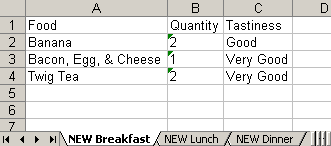
You may notice that in the original Excel file, the Quantity column had numeric values and that in the new Excel file, the quantity column has numbers stored as string values. This is because when the Excel file gets read in, all values get stored as numbers. Then, when writing the queries back to Excel, the POIUtility.cfc ColdFusion component sees that the query column has VARCHAR values and writes them back to the Excel file as strings. This is a byproduct of the demo (reading and writing the same file), not of an error in the Write methods.
The Sheets object that gets passed in was an array, but this could have been a single Sheet object as well that would have written a single-tab Excel file. If you are interested in writing just a single-tab file without creating the intermediary Struct, you could use the WriteSingleExcel() method:
<!---
	When writing a single file, just grab the breakfast
	meal from the previous read.
--->
<cfset objPOIUtility.WriteSingleExcel(
	FilePath = ExpandPath( "./single_meal.xls" ),
	Query = objSheet[ 1 ].Query,
	ColumnList = "column1,column2,column3",
	ColumnNames = "Food,Quantity,Tastiness",
	SheetName = "SINGLE Breakfast"
	) />
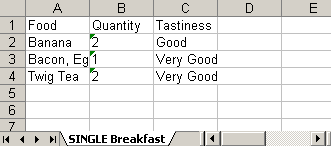
When we open up the resultant Excel file, you will see that we have a single tab with the NEW tab name:
That about sums it up. Like I said before, I wrote this this morning so it has not been field testing. But, I have used it to generate some sweet-ass multi-tab reports so far and I am loving it. Hope this can help some people.

Reader Comments
Jesus Christ, this is amazing!!!!11!!1
Make a project on RIAForge NOW! :)
Looks good Ben!
I should have some free time later this week to play with it.
Damn, this is nice! Where were you a few weeks ago when I needed to write native Excel?! Doh! I'll definitely use this in the future. Great job!
Well Done Ben! Thank you for sharing your work. Keep it coming.
BIG THANKS Ben, Just in this week we were thinking about how to read Excel XML Exported File bu coldfusion, But even WRITING; thats !!!AMAZING!!!.
Thanks Fellas. Glad that this could help.
I will look into RIAForge. I have downloaded stuff from it, but never looked into setting stuff up.
Hi Ben
I looked into the POI stuff for Excel a while ago and came up with a bunch of methods for writing - didn't look into reading as I didn't need it at that time.
I ended up with methods that created styles (date, currency, etc), write sheet headers and footers for printed output, freeze panes, add sheets, rows and cells and setting column widths.
A great resource for me was at http://www.d-ross.org/index.cfm?objectid=9C65ECEC-508B-E116-6F8A9F878188D7CA and http://www.d-ross.org/index.cfm?objectid=9C65ED5A-508B-E116-6F4F7F38C6AE167C
Let me know if you want to 'innovate' any of this stuff.
Antony
Hi Ben,
Thanks for the great work, are you thinking about including the cell comments feature?
Cenk
@Cenk,
I am not sure what you mean by cell comments feature? I am not an Excel master, so I keep my stuff mostly to reading and writing. What are cell comments?
@Antony,
Yeah, I first found POI information on d-ross's site. It was a great starting place. Once I saw that, I then found the actual POI Java docs and kind of just started dreaming from there.
Yeah, sounds like we followed the same path. It's a great hammer to have in your toolkit, makes all the other excel generation options look decidely crap.
Yeah, POI is awesome... and best of all it COMES WITH ColdFusion. That right there makes it a step above the rest.
Ben,
"Excel cell comment" is basically a text entry which can pop-up on mouse-over.
In excel, you can try to add a cell comment by selecting "Insert Comment" from right mouse button menu.
You can see the updated documents about using it via poi hssf at http://jakarta.apache.org/poi/hssf/quick-guide.html#CellComments
Cheers,
Cenk
Hmmm, good to know (even for regular Excel usage). I will take a look into this. Thanks.
Hi Ben,
I'm just familiarising myself with this cool component, however, I'm running into an issue when reading data in from a spreadsheet and then writing it out again. It's all fine reading the data in, but writing it is throwing an error because the meta data of the query is an object and not an array:
Object of type class java.lang.Class cannot be used as an array, line 666.
// Loop over meta data values to set up the data mapping.
for (
LOCAL.MetaIndex = 1 ;
LOCAL.MetaIndex LTE ArrayLen( LOCAL.MetaData ) ;
LOCAL.MetaIndex = (LOCAL.MetaIndex + 1)
)
<cfset application.POIUtility.WriteSingleExcel(
FilePath = ExpandPath( "./river_test.xls" ),
Query = objSheet.Query,
ColumnList = strColumnNames,
ColumnNames = strColumnNames,
SheetName = "sheet 2"
) />
Hi Ben,
I was trying to read the xls file using this component but it ended up with an error that ELEMENT ROW NOT DEFINED IN LOCAL...
Could you please help me out!!!1
Abhishek,
Please send me the XLS file that you are working with and I will debug. Send to ben [ at ] bennadel [ dot ] com. Thanks.
@David,
That is strange. I have not encountered that issue before. Please send me the XLS file you are working with and I will debug. Thanks.
Send to ben [ at ] bennadel [ dot ] com. Thanks.
Do you have any comparative metrics on processing time using your component versus interracting with the MS Excel COM object directly from CF? I wrote a component a couple years ago for my work that managed the various difficulties inherent in dealing with the MS COM directly.
This worked well for quite a while, but eventually the sheer volume of data was too much for my CFC to handle. We've since abandoned the CF-to-Excel COM in favor of writing our own COM wrappers in VB and C++ and accessing them as using CFOBJECT in CF.
The obvious downsides to this is 1) requires MS be installed on server, 2) requires our DLLs be installed on server (not a problem for us though) and 3) debugging and development requires a recompile and CF server bounce on each iterration.
Essentially, I'm wondering if this method is fast-enough to handle the creation of 5000+ line spreadsheets?
I don't have much in the way of metrics. I created a 9,000 record file the other day and the page took about 7 seconds to execute. But, reading, I assume is faster than writing (I am not basing that on experience). I am not sure how well that scales or if that number is accurate as far as multiple runs of the page.
So far though, it seems like the SQL statements to get the data seem to be the limiting factor in most of the reports that I write.
To All,
The reason Dave is erroring out is that GetMetaData() only added Query support in MX 7. So, if you are not using MX 7, this will fail. I am working on adding an optional argument that will replace the GetMetaData() for people using MX6.
Thanks Ben, I'll check it out then. I don't think it's right for converting all our existing exports and imports to (there's too many and they work fine for now), but we're developing a new architecture for all future clients, and this looks like it could provide a nice advantage in development time. You don't of any techniques for doing this type of automation for PPT do you? LOL
Ha ha ha, PPT. Give me a year :)
I am getting this err when trying to read the excel file..
Parameter validation error for function QUERYADDCOLUMN.
The function takes 3 parameters.
The error occurred in D:\CFusionMX\wwwroot\POIUtility.cfc: line 285
283 : // my column indexes at ONE rather than ZERO to get it back
284 : // into a more ColdFusion standard notation.
285 : QueryAddColumn(
286 : LOCAL.SheetData.Query,
287 : "column#(LOCAL.ColumnIndex + 1)#",
@Emmim44,
That is a really strange error. The number of arguments are not variable (in the code). Can you maybe send me the XLS document you are using so I can track down the error?
ben[ at ]bennadel[ dot ]com
Ben,
I'm on a shared hosting environment (Hostmysite.com).
You reference org.apache.poi.poifs.filesystem.POIFSFileSystem in your component.
I'm assuming I should
download the Apache POI library poi-bin-2.5.1-final-20040804.zip file from http://jakarta.apache.org/poi/
and extract the zip file to a new subdirectory called org?
The POI stuff ships with ColdFusion. As long as it has not removed from the installation (can that even be done???) you should be fine.
I have used a number of the POI methods successfully, but I have been searching for a couple more or their equivelant without success.
1) Essentially I'm trying to do a copy and paste on a range of cells. The Excel Macro equivelant is:
Range("D1:Q28").Select
Selection.Copy
Range("C1").Select
ActiveSheet.Paste
2) Remove Columns (like the RemoveRows method example shown below)
// Delete the first row which is the header row.
LOCAL.SheetData.Query.RemoveRows(
JavaCast( "int", 0 ),
JavaCast( "int", 1 )
);
Any suggestions?
@Brian,
I dont know of a way right now where you can delete a column like you can a row with POI. you could do a loop and use the removeCell() for that column. that isnt the best solution im sure. I dont know whats available in version 3.0 of POI.
Im not sure about the other part of your question. I dont really know how you can do that.
-Matthew
I have your wrapper (04/04/2007 version) working for reading my multisheet workbook and I was able to manipulate the query data. Now I want to overwrite the spreadsheet data back into the old spreadsheet (about the 4th sheet). I tried the WriteExcelSheet method, but realize that this won't work because the filepath is not given if I use the WriteExcelSheet directly. I get "The selected method CreateCellStyle was not found." at 75 : LOCAL.Style = ARGUMENTS.WorkBook.CreateCellStyle();
I also tried using WriteSingleExcel because I am only interested in the one sheet, but it blows away my other sheets.
<cfset objPOIUtility.WriteSingleExcel (
FilePath = lcExcelFileFullPath,
Query = qSheetData,
SheetName = "DATA SHEET"
) />
Ideas how I can do what I want here? Thanks for your help.
@Brian,
What you want to do is certainly doable. POI Utility cannot currently handle that though. I can try to update it, but other than telling you it is possible, I have no better advice at this time. Sorry.
That's fine. However, it would be great if you could update it. Thanks.
Ben,
When I sue your writeExcel method I get the following error:
Element TYPENAME is undefined in a CFML structure referenced as part of an expression.
which occurs here:
1542 : // Map the column name to the data type.
1543 : LOCAL.DataMap[ LOCAL.MetaData[ LOCAL.MetaIndex ].Name ] = LOCAL.MetaData[ LOCAL.MetaIndex ].TypeName;
I'm running CFMX 7, do you know how to get around this issue?
@Jean,
Are you positive that you are using MX 7? GetMetaData() only started working nicely for Query objects in 7. If you are using 6, this will break.
Ben,
It's really weird. When I call WriteSingleExcel it works but when I call Write Excel it won't... And my Server.ColdFusion.ProductVersion = 7,0,2,142559
Do you want me to email you my code?
Email me your Excel document, let me try it on my end... ben [ at ] bennadel [ dot ] com.
Ben, I am also getting the typename error, and I am running version 7. This is based on the exact demo code you have listed on this site.
Did you figure out how to help jean?
Fixed my issue.
If you are using your own Query, be sure to add the optional parametters to the QueryNew function that defined the typenames of the columns.
This will NOT work
<cfset testQuery = QueryNew("column1,column2,column3")>
This will work
<cfset testQuery = QueryNew("column1,column2,column3","VarChar,VarChar,VarChar")>
@Dave,
Yeah, that is a subtle point. If you do not explicitly define your column types, then ColdFusion does its best to guess the data by looking at the first 50 rows (I think). It then decides what the common data type is and uses that.
The problem comes from queries of queries and the type of metadata passed along with your Column Headers(POIUtility won't deal with char or NChar or int, they have to be comverted to varchar and integer). This might vary from databases but here we still use SQL Server 2000. I had to add this cfscript code and format the metadata before calling the POIUtility:
//Extract Columns MetaData out of rs_report
LOCAL = StructNew();
LOCAL.MetaData = GetMetaData(rs_report);
ColumnTypeString = "";
//Loop over reportHeader and find match in rs_reportMetadata before assigning to ColumnListType --->
for(i=1; i LTE ListLen(reportHeaders,","); i=i+1){
currentHeader = ListGetAt(reportHeaders,i,",");
//Loop over Each piece of Metadata until there is a match
for(j=1; j LTE ArrayLen(LOCAL.MetaData); j=j+1){
if (LOCAL.MetaData[ j ].Name EQ currentHeader){
//replace char types by varChar
if(LOCAL.MetaData[ j ].TypeName EQ "char"){
LOCAL.MetaData[ j ].TypeName = "VarChar";
}
//replace nChar types by varChar
if(LOCAL.MetaData[ j ].TypeName EQ "nchar"){
LOCAL.MetaData[ j ].TypeName = "VarChar";
}
//replace int by Integer
if(LOCAL.MetaData[ j ].TypeName EQ "int"){
LOCAL.MetaData[ j ].TypeName = "Integer";
}
if (ColumnTypeString EQ ""){
ColumnTypeString = LOCAL.MetaData[ j ].TypeName;
break;
}else{
ColumnTypeString = ColumnTypeString & "," & LOCAL.MetaData[ j ].TypeName;
break;
}
}
}//end for loop
Also note that when you call the utility you have to pass all arguments on one line as such:
<cfset poiArgs.ColumnNames = "Applicant,Certification Applied for,Command/Organization,Home State">
I tried to stack them for readability and I kept getting a "Query XX is nto indexable by Column YY" error. Also, if you can find the function to autosize columns when the excel template is generated please share ! =)
Jean
Jean I have my issue solved with what I posted. Question for everyone, I can't find any detail on how to right an excel sheet with formatting, is this possible?
David,
I know your solution fixes your problem but mine might benefit people who want to give their POIUtility more flexibility. Your solution works great if you know the type of data coming in and you are aware of the issue. The code above lets you use POIUtility with different queries and lets people worry about the "what" instead of the "how".
Cheers!
THANK YOU THANK YOU THANK YOU THANK YOU!!!!
I love it! totally made me look super cool at work.
Your blog rocks as well.
John Allen
@John,
Thanks a lot :) Also, be sure you have the most up-to-date version of the POI Utility:
www.bennadel.com/blog/624-ColdFusion-POIUtility-cfc-Updates-And-Bug-Fixes.htm
This is a great start for what I am looking for. very impressive. one of the columns I am retrieving from the excel file is an ID that matches what I had in a database. Based on this ID, I want to query the database to update one of the fields with new values from the database. How can I modify your code to query my database based on that first column that has the unique ID?
Thank you
Feras
@Feras,
Take a look at this:
www.bennadel.com/index.cfm?dax=blog:517.view
It talks about doing just that (sort of)... at least it talks about Database stuff and POI.
Here is the solution to your problem Emmim44.
I Deleted third parameter of four, "CF_SQL_VARCHAR" since the QueryAddColumn function only takes on 3 parameters in CF 6.1. Only allows "query", "column-name", and "array-name" to be passed. CF MX 7+ takes on 4 parameters: "query", "column-name",optional "datatype", and "array-name". Since I implemented this within a client's CF MX 6.1 application, the reference to the "datatype" parameter was deleted. Faith R. Sloan 17August2007.
Thanx again, Ben for the awesome detailed job you've done with this. I implemented it in CSVToQuery function. (pre-POI Wrapper development)
Have Fun everyone!
-------
Emmim44 wrote the following and Ben's response is at the bottom.
------
I am getting this err when trying to read the excel file..
Parameter validation error for function QUERYADDCOLUMN.
The function takes 3 parameters.
The error occurred in D:\CFusionMX\wwwroot\POIUtility.cfc: line 285
283 : // my column indexes at ONE rather than ZERO to get it back
284 : // into a more ColdFusion standard notation.
285 : QueryAddColumn(
286 : LOCAL.SheetData.Query,
287 : "column#(LOCAL.ColumnIndex + 1)#",
Posted by Emmim44 on Mar 20, 2007 at 11:36 AM
@Emmim44,
That is a really strange error. The number of arguments are not variable (in the code). Can you maybe send me the XLS document you are using so I can track down the error?
ben[ at ]bennadel[ dot ]com
Posted by Ben Nadel on Mar 20, 2007 at 12:08 PM
I have been using POI for quite some time with great success. I use it to read in a template file (since I include macros in the excel) and then write CF data to it. Works nice. The only thing I found was that I had to limit the rows to about 10000 since I am pushing out a lot of data. POI eats memory like candy and I needed to limit it otherwise the server would crash.
I've made my own CF wrappers and have fought my way through cell manipulation, etc. to do the job I needed. My stuff is not as well thought out as yours and is very much designed for something specific. However, there may be things in it of interest to you or that you may want to incorporate. If you wish the code, please let me know and I'll email it to you.
Hello,
I have just started using poiUtility.cfc, but I am getting an error message when I call the WriteSingleExcel function.
---------------
The QUERY argument passed to the WriteSingleExcel function is not of type query.
If the component name is specified as a type of this argument, its possible that a definition file for the component cannot be found or is not accessible.
The error occurred in C:\ColdFusion8\wwwroot\Websites\_NewWebsiteTemplate\components\poiUtility.cfc: line 1799
Called from C:\ColdFusion8\wwwroot\Websites\_NewWebsiteTemplate\parsed\c_subscribers.generateextractfile.cfm: line 30
Called from C:\ColdFusion8\wwwroot\Websites\_NewWebsiteTemplate\fusebox5\fusebox5.cfm: line 179
Called from C:\ColdFusion8\wwwroot\Websites\_NewWebsiteTemplate\index.cfm: line 14
1797 :
1798 :
1799 : <cffunction name="WriteSingleExcel" access="public" returntype="void" output="false"
1800 : hint="Write the given query to an Excel file.">
1801 :
---------------
However, the argument I am passing as the query is definately of type query. The query is being returned by another CFC.
Does anyone know what might be causing this error?
Simon,
Are all your query column types defined? If you are creating a query from scratch or doing a query of query you want to make sure to define them when you create the new object or POI utility will give you an error.
Cheers,
Jean
Jean,
Thank you for your response. The query I am using is a query of a query. How would I ensure my query column types defined properly?
Here is the cfscript is wrote to extract column types out of another query object
//Extract Columns MetaData out of rs_report
LOCAL = StructNew();
LOCAL.MetaData = GetMetaData(rs_report);
ColumnTypeString = "";
//Loop over reportHeader and find match in rs_reportMetadata before assigning to ColumnListType
for(i=1; i LTE ListLen(reportColumNames,","); i=i+1) {
currentHeader = ListGetAt(reportColumNames,i,",");
//Loop over Each piece of Metadata until there is a match
for(j=1; j LTE ArrayLen(LOCAL.MetaData); j=j+1) {
if (LOCAL.MetaData[ j ].Name EQ currentHeader) {
//replace char types by varChar
if(LOCAL.MetaData[ j ].TypeName EQ "char") {
LOCAL.MetaData[ j ].TypeName = "VarChar";
}
//replace nChar types by varChar
if(LOCAL.MetaData[ j ].TypeName EQ "nchar") {
LOCAL.MetaData[ j ].TypeName = "VarChar";
}
//replace int by Integer
if(LOCAL.MetaData[ j ].TypeName EQ "int") {
LOCAL.MetaData[ j ].TypeName = "Integer";
}
if (ColumnTypeString EQ "") {
ColumnTypeString = LOCAL.MetaData[ j ].TypeName;
break;
} else {
ColumnTypeString = ColumnTypeString & "," & LOCAL.MetaData[ j ].TypeName;
break;
}
}
}//end for loop
}//end loop
Let me know if you need it by email
Jean
Jean,
Thank you for the code. Are you able to provide an example of how I can integrate this into my code?
Thanks,
Simon
OK here is the entire script and I might have used some of Ben's code in there too. Basically I plug this in after retrieving some data from an SQL 2000 server (rs_report) and before passing the new query object to POIutility.cfc. I create a new query object for each excel sheet if we have more than one. I did that because excel get really flustered if you try to stick more than 50000 rows in one sheet (64k is the max). I posted the first part earlier but the full monty should show you how i extract the types and assign them to the right columns in the new query object.
<cfscript>
reportMaxRows = 50000; //64k is Excel maxrow 50k doesn't test it and improves load time in case it gets there
if(rs_Report.RecordCount LT reportMaxRows) {
//set all arguments to be pass to POIUtility
poiArgs = StructNew();
poiArgs.FilePath = reportFilePath;
poiArgs.Query = rs_report;
poiArgs.ColumnNames = reportColumNames;
poiArgs.ColumnList = reportColumList;
poiArgs.SheetName = Mid(reportTitle,1,30);
poiArgs.HeaderCSS = "font: bold 10pt arial; text-align: center";
//pass them
APPLICATION.camp.POIUtility.WriteSingleExcel(argumentCollection = poiArgs);
//Multiple Sheets Excel Doc
} else if (rs_Report.RecordCount GTE reportMaxRows) {
//Set Loop Vars
myStartRow = 1;
myEndRow = reportMaxRows;
totalSheets = Ceiling(rs_report.recordCount/reportMaxRows);
//Extract Columns MetaData out of rs_report
LOCAL = StructNew();
LOCAL.MetaData = GetMetaData(rs_report);
ColumnTypeString = "";
//Loop over reportHeader and find match in rs_reportMetadata before assigning to ColumnListType
for(i=1; i LTE ListLen(reportColumNames,","); i=i+1) {
currentHeader = ListGetAt(reportColumNames,i,",");
//Loop over Each piece of Metadata until there is a match
for(j=1; j LTE ArrayLen(LOCAL.MetaData); j=j+1) {
if (LOCAL.MetaData[ j ].Name EQ currentHeader) {
//replace char types by varChar
if(LOCAL.MetaData[ j ].TypeName EQ "char") {
LOCAL.MetaData[ j ].TypeName = "VarChar";
}
//replace nChar types by varChar
if(LOCAL.MetaData[ j ].TypeName EQ "nchar") {
LOCAL.MetaData[ j ].TypeName = "VarChar";
}
//replace int by Integer
if(LOCAL.MetaData[ j ].TypeName EQ "int") {
LOCAL.MetaData[ j ].TypeName = "Integer";
}
if (ColumnTypeString EQ "") {
ColumnTypeString = LOCAL.MetaData[ j ].TypeName;
break;
} else {
ColumnTypeString = ColumnTypeString & "," & LOCAL.MetaData[ j ].TypeName;
break;
}
}
}//end for loop
}//end loop
//Create Array to Hold Sheets Data
arrSheets = ArrayNew(1);
//Loop over rs_report to populate arrSheets.Query--->
for(Sheet=1; Sheet LTE totalSheets; Sheet = Sheet + 1) {
SheetName = Mid(reportTitle,1,28) & "_" & Sheet;
//Get Sheet Structure from POIUtility
arrSheets[ Sheet ] = APPLICATION.camp.POIUtility.GetNewSheetStruct();
arrSheets[ Sheet ].SheetName = SheetName;
arrSheets[ Sheet ].ColumnList = reportColumNames;
arrSheets[ Sheet ].ColumnNames = reportColumList;
//query object to hold slice of rs_report
arrSheets[ Sheet ].Query = QueryNew(reportColumNames,ColumnTypeString);
Row = 1;
loopEndRow = myEndRow - myStartRow;
//Loop over rs_report
for(Row=1; Row LTE loopEndRow; Row = Row + 1) {
QueryAddRow(arrSheets[ Sheet ].Query);
//set rs-report current row
rs_row = (myStartRow + Row) - 1;
//loop over each columns
for(k=1; k LTE ListLen(reportColumNames,","); k=k+1) {
arrSheets[ Sheet ].Query[ ListGetAT(reportColumNames,k) ][ Row ] = rs_report[ ListGetAT(reportColumNames,k) ][ rs_row ];
}//end column loop
}//end row loop
//Update start and end rows
myStartRow = myEndRow + 1;
if((myEndRow + reportMaxRows) GT rs_report.recordCount) {
myEndRow = rs_report.recordCount;
} else {
myEndRow = myEndRow + reportMaxRows;
}
}//End for loop over sheets
//set all arguments to be pass to POIUtility
poiArgs = StructNew();
poiArgs.FilePath = reportFilePath;
poiArgs.Sheets = arrSheets;
poiArgs.HeaderCSS = "font: bold 10pt arial; text-align: center";
//Create Excel Doc and append sheets
APPLICATION.camp.POIUtility.WriteExcel(argumentCollection = poiArgs);
}
</cfscript>
What's the difference between min column count and max column count?
I see in your dump you have 3 and 3. I have a test Excel file that's showing 0 and 4. I have 4 columns.
@Josh,
Not all rows will have the same number of cells in them as they are being read from the sheet. These values are simply done to demonstrate the extremes on either end. They don't necessarily serve a purpose.
@Ben
I was kind of figuring they didn't serve a purpose but I wanted to double-check before deleting them from code (to speed up processing a bit) as I don't think they'll serve a purpose for my needs (at least, at the moment).
Thanks for the prompt response.
Yeah yeah, rip em out. I think the only thing they *MIGHT* do is the Max column might be used to build the QueryNew( "" ) column list. Just do a search in the code for the value.
Is there any problem for excel any version or just the latest one is applicable.
@Esanjor,
Excel 2007 does not work for *reading* XLS files with the current POI version that ships with ColdFusion. However, I believe that 2007 can read files created by the current POI package.
Who uses Excel 2007 anyway ;o)
Just wanted to say: Amazing work, Ben! Your work is once again so much appreciated!
Hi all,
thanks for sharing such great work, although it didn't work for me. I tried several components based on the POI, but none has worked for me perfectly and I'm not skilled enough yet, to find the error.
Unfortunately, if my sheet contains empty cells, the function getCellType() returns me undefined. If I fill those fields I receive the next error:
Element SHEETDATA.QUERY.RECORDCOUNT is undefined in LOCAL
Is anyone able to help me?
Thanks in advance.
Alex
@Alex,
There was a NULL bug in the earlier versions of my project. Make sure you have the newest version:
www.bennadel.com/projects/poi-utility.htm
Hi Ben and thank you for support. I downloaded the latest version and now I can read all excel files.
It is a really great job you've done and if you need a donation, I'm willing to make one, because I'm earning my money with these kind of scripts.
Just let me know.
Kind regards,
Alex
@Alex,
Thanks man. I'm just happy to help out.
Gol durn it Ben, I should have known just to come to your site. My big boss came down to me yesterday with these 2 HUGE spread sheets and wants me to merge them and come up with a bunch of reports based off of them.
I was thinking "I wonder if I can just load them into CF, make a query of each, and then do all the work on them?"
So I searched the internet high and low and finally say .... your site. Doh.
->Erasing all other CF links<-
Maybe I can figure out how to do this and XSLT to make a way kewl (COLD!) app for the future.
@Don,
Ha ha, awesome! Glad I could help. If you get stuck, let me know.
Hello to everyone:
This has been a great tool so far but I am having a problem with the aliases in the cell.cfm look where it reads
<!---
Check to see if we have an alias. If so, then we have to store the
Column/Row value in the document tag.
--->
It is giving me the error "The element at position 0 cannot be found." ...because the code below evaluates to 0.
VARIABLES.RowTag.CellIndex MOD ArrayLen( VARIABLES.DocumentTag.ColumnLookup )
Is it there a quick way to fix this?
VARIABLES.RowTag.CellIndex=52
ArrayLen( VARIABLES.DocumentTag.ColumnLookup ) =26
Thanks in advance.
Hi guys:
This is how I fixed the issue with aliases.
IIF(VARIABLES.RowTag.CellIndex MOD ArrayLen( VARIABLES.DocumentTag.ColumnLookup ) eq 0,"VARIABLES.DocumentTag.ColumnLookup[ ArrayLen( VARIABLES.DocumentTag.ColumnLookup ) ]" ,"VARIABLES.DocumentTag.ColumnLookup[ VARIABLES.RowTag.CellIndex MOD ArrayLen( VARIABLES.DocumentTag.ColumnLookup ) ]")
hi Ben,
Great Great work you did!!!
Thanks for that and the way you explain the stuff is quite cool.
Just one suggestion, please update the code for POIUtility on this main article too as i was banging my head at wall to capture an error but while reading all comments i came across this url:
www.bennadel.com/blog/624-ColdFusion-POIUtility-cfc-Updates-And-Bug-Fixes.htm
that solved my issues.
Thanks again for articles and please keep them coming.
@Ahsan,
Yeah, updating the old posts is a good idea, but definitely something very error prone. I don't have a good way to deal with that; one might argue it's not inline with the concept of a blog.
I added related posts to bottom of the blog, which should help. Also, this POI wrapper has been broken out into its own project:
www.bennadel.com/projects/poi-utility.htm
Hi ben,
Iam able to upload xls docs perfectly.But have a problem if that xl sheet have a filter on it.
Could you plz advise.
Thanks in advance.
@Veeru,
I am sorry, I do not have a good solution for this.
Hey Ben,
First off thanks for the code. It works quite well and has saved me a lot of time. I wanted to share that I added the ability to read dates from cells in the "ReadExcelSheet" method.
This has only been tested with POI version 3.2
This will NOT work with POI version 2.5.1 which is the version that comes with coldfusion 8.
At the top of the method I added:
var oHSSFDateUtil = createObject("java","org.apache.poi.hssf.usermodel.HSSFDateUtil");
Also added the following:
if (LOCAL.CellType EQ LOCAL.Cell.CELL_TYPE_NUMERIC) {
// Get numeric cell data. This could be a standard number,
// could also be a date value. I am going to leave it up to
// the calling program to decide. if(oHSSFDateUtil.isCellDateFormatted(LOCAL.Cell)){
LOCAL.CellValue = LOCAL.Cell.getDateCellValue();
}
else{
LOCAL.CellValue = LOCAL.Cell.GetNumericCellValue();
}
}
Please not that there's an extra bracket at the end of my previous post.
@Mitch,
Cool stuff! Thanks for sharing that stuff. I was not aware of that kind of date type checking.
Ben,
This is working great when I use a spreadsheet created by Google docs, but when I use a sheet created in Excel or OpenOffice I am getting an error:
Element SHEETDATA.QUERY.RECORDCOUNT is undefined in LOCAL.
This seems to go away when I change the "HasHeaderRow = true" to false.
Any thoughts on this?
- BILL -
@Bill,
That's too strange! I can't think of why the recordCount would stop existing based on the source of the Excel file.
Just thought I'd mention that 3.5 POI is out with 2k7 office doc support - I'm looking at modifying the POI utility right now as i'm getting an Object Instantiation Exception when attempting to open a xlsx doc -
I'll let you know if I get it rolling again.
Very, very useful Nice work.
@Kevin,
Kevin were you able to get the xlsx working? I also have a need to handle office 2007 excels docs.
@Kevin,
sure did - had to juggle a few things but works pretty well -
My version of the original also gives the ability to anme your query columns -
I can put it up on drop .io for a bit here if you'd like - drop.io/cfpoiutil
@Kevin,
I haven't had a chance to play with the latest POI JAR - but I hear it's rather nice.
Am trying to enable the creation of 2007 format spreadsheets but cannot see where to specify that. I tried just using an XLSX extension on the filename but that didn't work. Any hits? This is a great CFC!
-reed
@Reed,
The POI jar file that ships with ColdFusion (pre CF9) does not handle Excel 2007 files; for that, you'll probably need to update your jar file.
Ben, first a huge thank you for this - it's 100 kinds of awesome. I've been trying to get something like this going for literally years.
When using the tag-based stuff, if I define a style class with a height attribute and apply that style to a row, an error is thrown from row 127 in row.cfm: Element ROWHEIGHT is undefined in VARIABLES. Am I doing something wrong?
(BTW, I can get it to work by removing "AND Val( VARIABLES.RowHeight )" from the cfif there but I'm not sure if that's kosher.)
@Bob Dively,
I don't think that would be the best solution (removing the code,) but you should be able to add
AND isDefined('VARIABLES.RowHeight') AND Val( VARIABLES.RowHeight )
What do you think @Ben?
@Bob,
I think that is a bug in my project. Make sure you have the latest code from the project page:
www.bennadel.com/projects/poi-utility.htm
For a while, I had the wrong variable in there.
@ben,
Thanks for the response, Ben. I do indeed have the latest version of the code.
@bill,
You're right - removing code is definitely not the best solution.
Anyway, putting in IsDefined( "VARIABLES.RowHeight" ) won't work because it evaluates false and thus the row height code wrapped by the cfif doesn't execute.
I am trying to import data from an Excel file into a table. And I cannot figure out how to do it.
Using POI, I can see all the data on the web page; however, all I want to do is copy the data into my table.
I tried this unsuccessfully:
<cfquery name="qGetData" datasource="#datasource#">
INSERT INTO Newtbl (firstname, lastname, PosNum)
SELECT *
FROM #objSheet.Query#
</cfquery>
Any help is appreciated.
Thanks,
Ted
PS- for this I have an Access database.
@Ted,
I don't think you will be able to do it that way.
Try, simply looping over the new query presented by the POI wrapper, then insert a single line at a time into your database table as follows:
<cfloop query="objSheet.Query">
<cfquery datasource="yourdsn" name="ittInsert">
insert into tablename (col1,col2,col3)
values (#objSheet.Query.col1#,#objSheet.Query.col2#,#objSheet.Query.col3#)
</cfquery>
</cfloop>
@Bill,
Yes, looping over/inserting a single line is now working great.
I just couldn't figure out the "values" lines; but your comment did it for me.
Thank you so much for that!
Is there a way to read a limited portion of an Excel file? I have an extensive Excel document that has over 50 columns, and it crashes the ColdFusion server when I select all of the rows (9k).
@Gregory,
I am not sure how the underlying Java actually works. Meaning, you can read specific rows / cols using the Java methods; but, I'm not sure if it still reads in the whole file first.
Ben..
You are have done it again! While i was scared of been hooked at this part of my new project.. you have come to my rescue. I can at least show my boss how wonderful coldfusion can be (and FLEX too). This is absolutely 1daful.
You are my hero Ben!
@Tola,
Rock on :) Be sure to check out the full project on my "Projects" page.
Has anyone else run into errors generated by using the POI code to create an XLS file on a secure server with headers set to no-cache?
The issue is discussed here:
http://support.microsoft.com/kb/316431
For business reasons, we need to keep the headers set to no-cache and our site also needs to remain on HTTPS.
Generating the XLS file the "old fashioned way" from tables and CFCONTENT no longer works because of Excel 2007's "Extension Hardening" discussed here:
http://blogs.msdn.com/vsofficedeveloper/pages/Excel-2007-Extension-Warning.aspx
Any suggestions other than converting the data to a CSV format? Has this issue been addressed and maybe I've just not run across the answer?
Thanks!
@Jessica,
If you're using IIS (as it seems you are) there is a hotfix at http://support.microsoft.com/kb/812935
that fixes the problem in IIS.
We ran into the same problem, not directly with POI, but with all downloads from SSL where no-cache is on. In our situation, we were able to put in a dynamic check to see if a file was being generated, and to conditionally turn off no-cache when compiling our page on that request. We didn't use the hotfix, so I'm afraid I cannot vouch for its efficacy.
-Bry
@Bryan -
Thanks so much! I'll definitely look into these suggestions...
@Ben,
Ben Wrote: Feb 12, 2007
"Ha ha ha, PPT. Give me a year :)"
Well Ben, just looking over my old posts and came across this... Looks like you gave it a few extra years and punted. Went ahead and let Adobe do it for you eh? ;)
Keep up the awesome work Ben.
@Bryan,
Ha ha ha, yeah... yeah, that's right - I *planned* to let Adobe carry the torch :)
Hey Ben,
Are there instructions for getting your version of the POI up and running on CF8 somewhere? Also, do you know if this approach gets rid of the annoying "the file you are trying to open is in a different format than specified by the file extension" message on Excel 2007?
-Eli
@Eli,
For our project, using POI-generated tables resolves the error message that results when trying to use the "old-style" method of converting ColdFusion-generated data tables --> XLS format.
Unfortunately, since the application was originally created by an external contractor, I'm not sure where they found the instructions on how to create and implement the code...
@Eli, I use Ben's code and POI to generate files that are opened without issue by Excel2007 users. Are you naming your files with an .xlsx extension? If so, try switching to .xls.
@Bob Dively, Awesome! But do you know of instructions somewhere to get POI up and running with Ben's code? That's kinda where I'm stuck right now, and I can't really find instructions for setup anywhere.
@Eli, I work with CFMX7 instead of CF8 but I believe that CF8 ships with a version of POI that works with Ben's code, so AFAIK there's nothing you have to do POI-wise. I just dropped Ben's code in my custom tags directory and it worked. What are you stuck on?
@Bob Dively, Good call! I was trying to install POI, but I guess I should just try with the built-in version. In that case, could you recommend a decent tutorial on installing custom tags? I've worked with CF for three years now, and I've never really needed to do that before.
@Eli, just copy the poi directory from Ben's zip file into your custom tags directory. That's all there is to it.
@Bob Dively, boy, you weren't kidding. That was easy! Now just one last question: I'm trying to use this for dynamic excel reports, so I don't really care about ever writing the file to my server (I'll do it if I have to, but I'd rather avoid the over head). Anyway, do you know if there's a way to immediately serve up the excel file created through POI to a user and then to get rid of it?
Thanks for all your help!
Eli
@Eli, look at the write_custom_tags.cfm example file in Ben's zip. Toward the bottom he uses a cfcontent tag to send the file directly to the user's browser.
@Ben,
I am using Build 2008/09/24 and having the same error Bob described when defining a row height. What variable should it be checking in the if statement?
For those of you interested in using the auto-width features of POI to make Excel automatically resize column widths to fit what's in those columns, I want to share how I did it:
Before you start:
This functionality is unsupported in older versions of POI (those that ship with CF8 don't have it-- dunno about CF9). If you're using a version of CF 8 or earlier, you'll have to do the following:
1. Download the newest version of POI from http://poi.apache.org/download.html (3.6) as of now.
2. Extract poi-3.1-FINAL-20080629.jar
and poi-contrib-3.6-20091214.jar (these will be called something else in later releases, but the file names should be similar) to a safe location.
3. Stop the Coldfusion service (so that you can change stuff in CF without it screaming that you're changing stuff it's using).
4. Go into Coldfusion's lib directory and delete/back-up the older versions of these files. For me running CF8, these were located at
c:\ColdFusion8\lib\poi-2.5.1-final-20040804.jar
and c:\ColdFusion8\lib\poi-contrib-2.5.1-final-20040804.jar
5. Replace the files you just deleted with the ones I told you to extract in step 2. You don't have to rename the new files. Just paste them in.
6. Restart the ColdFusion service.
You now have the newest version of POI installed and can now use auto-width resizing. Now that that's done, just follow these simple steps to enable it:
1. Go into your custom tags folder and open up the poi folder containing Ben's POI utility files. Open up sheet.cfm.
2. If you scroll down in that file, you should eventually get to the following lines:
<cfif (VARIABLES.ColumnWidth EQ "auto")>
<!---
NOTE: This is in the documentation but does not seem to be
supported in the ColdFusion version of the POI library.
--->
<!--- Autosize the current column. --->
<!---<cfset VARIABLES.Sheet.autoSizeColumn( JavaCast( "short", VARIABLES.ColumnIndex) ) />--->
3. Since we're now using the new version of POI, the autoSizeColumn function is now usable. Uncomment this.
4. Since Java arrays start at 0, you'll need to subtract 1 from variables.ColumnIndex for this to work right. All in all, just replace that whole line with
<cfset VARIABLES.Sheet.autoSizeColumn( JavaCast( "short", VARIABLES.ColumnIndex-1) ) />
5. You're all set! You can now add style="width:auto;" to the column styles and have excel auto-size them for you. Hooray!
This took me way too long to figure out myself because I couldn't find very good documentation on it, so hopefully this post will help out others trying to do the same.
Cheers,
Eli
Is POI able to read the images which are bound to the sheet? Here is an article to do it in C#. Any help would be appreciated.
http://joymonscode.blogspot.com/2009/01/reading-image-from-excel-file.html
@patrick,
Based on my experience with the POI library, I think you'd have a hard time extracting the binary, but I won't say it's impossible.
Off the cuff, IF you have Office 2007 installed on the server doing the work, there is another possible way to get to it without POI.
Again, just thinking off the cuff, you could open the XLS by instantiating the COM Excel object, then use the saveAs method to save it into an XLSX file.
Then you'd simply need to open the XLSX file as a zip with whatever zip/cfzip tool you want. The images are stored in \xl\media\ folder within the XLSX file format.
If, of course you're working with an XLSX to begin with, you don't even need office on the server.
Is it possible to dump an existing table formatted from a coldfusion query into multiple worksheets? I really just want to say query one's output (that is saved using "cfsavecontent") into the first worksheet, and query two's output (again saved using "cfsavecontent") into the second worksheet.
Thanks!
Hi Ben,
One minor issue.
Some of my data in SQL Server 2005 is stored in Unicode ie Big 5 etc Chinese charaters and although they are storing in the DB correctly they output just as ?????? using your tool.
Thanks in advance.
Rich Spector
Sr. Web Developer
Ben,
I have successfully been using your wrapper for a few years now (it was very helpful), but my crazy bleeding edge users now have started using Excel 2007 and are breaking my code :-,) The workaround is to get them to save their files as the older 2003 worksheets, but since our server admins have not been allowed to move us yet from CF8 to CF9, I was hoping for some better interim solution. I followed Eli's advice above as a test on my local system and I got farther. It now says 'The supplied data appears to be in the Office 2007+ XML. You are calling the part of POI that deals with OLE2 Office Documents. You need to call a different part of POI to process this data (eg XSSF instead of HSSF)'. I tried to just crudely replace the HSSF calls with XSSF in your utility, but of course that fails. I suppose the next step would be to dig into the POI docs to actually understand what the call syntax should be, but have you or anyone successfully updated your POIUtility.cfc for this?
Thanks,
Brian
Slightly changed your POIUtility.cfc - lines:
//line 1381
ColumnList = rereplace(ARGUMENTS.Sheets[ LOCAL.SheetIndex ].ColumnList,'[[:space:]]',"","all"),
//line 1382 ColumnNames = rereplace(ARGUMENTS.Sheets[ LOCAL.SheetIndex ].ColumnNames,"\n\t\r","","all"),
And
//1399
ColumnList = rereplace(ARGUMENTS.Sheets.ColumnList,'[[:space:]]',"","all"),
//1340 ColumnNames = rereplace(ARGUMENTS.Sheets.ColumnNames,"[\n\t\r]","","all"),
allows me to send in a really long list of headers and column names with line breaks and tabs so it's easier to read in the editor.
Thanks for this cfc Ben!
@Eli
re: auto-width
Thanks for that! I implemented it using jar version poi-3.2-FINAL-20081019.jar on MX7 and it works fine.
I use a modified version of the poi custom tags to make use of Mark Mandel's javaLoader as described here: http://murrayhopkins.wordpress.com/2008/12/17/value-error-when-using-builtin-poi-in-coldfusion-mx7/
I recently tried to upgrade to poi-3.6-20091214.jar but got the dreaded error 500 Unsupported major.minor version 49.0 so will need to check a few things to debug.
Cheers,
Murray
@Eli
I am running CF 9 so I skipped the first part of your suggestion. But when I apply your auto-width fix, the first column will auto fit, but all the following columns are the same size as the first.
If, in fact, I do need to update my POI, I'm not seeing the .jar files you mentioned. All I have is: poi.jar, poi-contrib.jar, poi-ooxml.jar, and poi-scatchpad.jar.
Thanks
@Ben
I couldn't seem to post my comment in Chrome, it would just say "There was a problem submitting your comment." Just wanted to give you a head up on that. Thanks for the awesome POI wrapper!
@Drew, it's been a while, but I remember that same thing happening to me when I was implementing this. If I recall correctly, I think the problem was with where I was putting the auto-width style item. I don't remember exactly what the problem was, but I remember there was some odd issue with that. Also, make sure you trim spaces off your values, in case it has something to do with those.
I wish I remembered more, but I don't work with the company for which I implemented the POI stuff anymore, so I can't look up the code.
As for the .jar files: these are in different locations depending on whether you have a clustered version of CF, and also depending on your version of CF. I never used CF9, so I'm not sure where it would be on that, but I'd recommend just doing a grep for them. If POI is installed, the jars for it have to be somewhere, and if auto-sizing works, POI must be installed.
Good luck!
Hi Ben,
Thanks for the great stuff.....
I am facing an issue with the poi function readxl. When i uploaded the excel file which contains 4 fields after using the poi read function, last field is missing from it...when i dumped the read data...
Help please...
Hey guys. Love this utility function!
I'm having one small problem that maybe you guys can help me out on.
I'm creating my own query using a series of inner joins and one problem is that I have two sets of columns with the same name in two of the tables I'm using. users.first_name and users.last_name which is the same as ees.first_name and ees.last_name.
When I create my column list, I tried using users.first_name etc to distinguish between the two. But this causes a bug.
[Table (rows 251 columns USER_ID, AMOUNT, FIRST_NAME, LAST_NAME, EMAIL, FIRST_NAME, LAST_NAME): [USER_ID: coldfusion.sql.QueryColumn@e3226] [AMOUNT: coldfusion.sql.QueryColumn@1fe704e] [FIRST_NAME: coldfusion.sql.QueryColumn@17f494c] [LAST_NAME: coldfusion.sql.QueryColumn@1a54b82] [EMAIL: coldfusion.sql.QueryColumn@10044a6] [FIRST_NAME: coldfusion.sql.QueryColumn@9af3ee] [LAST_NAME: coldfusion.sql.QueryColumn@104ae5e] ] is not indexable by users.first_name
The error occurred in C:\ColdFusion9\wwwroot\eic-sandbox\dashboard\POIUtility.cfc: line 774
Called from C:\ColdFusion9\wwwroot\eic-sandbox\dashboard\POIUtility.cfc: line 564
Called from C:\ColdFusion9\wwwroot\eic-sandbox\dashboard\POIUtility.cfc: line 907
Called from C:\ColdFusion9\wwwroot\eic-sandbox\dashboard\getloaninfo.cfm: line 53
Called from C:\ColdFusion9\wwwroot\eic-sandbox\Application.cfc: line 230
772 : LOCAL.CellValue = ARGUMENTS.Query[
773 : LOCAL.Columns[ LOCAL.ColumnIndex ]
774 : ][ LOCAL.RowIndex ];
And if I just try using listing them in order (fist_name,last_name,first_name,last_name) it uses whatever is listed first twice (so here it would use users.first_name and users.last_name in both instances of columnList).
Any help is appreciated!
Here is my code:
<!--- Create a new instance of the POI utility. --->
<cfset objPOIUtility = CreateObject(
"component",
"POIUtility"
).Init() />
<cfquery name="qGetLoansData" datasource="eicdb">
SELECT loans.user_id,
loans.amount,
users.first_name,
users.last_name,
users.email,
ees.first_name,
ees.last_name
FROM loans
INNER JOIN users
ON loans.user_id=users.user_id
INNER JOIN ees
ON loans.ee_id=ees.ee_id
</cfquery>
<!---
When writing a single file, just grab the breakfast
meal from the previous read.
--->
<cfset objPOIUtility.WriteSingleExcel(
FilePath = ExpandPath( "./loans_data3.xls" ),
Query = qGetLoansData,
ColumnList = "user_id,amount,users.first_name,users.last_name,email,ees.first_name,ees.last_name",
ColumnNames = "User ID,Loan Amount,Lender First Name,Lender Last Name,Lender Email,EE First Name,EE Last Name",
SheetName = "Loan Data"
) />
Hi Ben,
I'm using the POI to read an excel file as follows:
<!--- Create an instance of the POIUtility.cfc. --->
<cfset objPOI = CreateObject(
"component",
"components.POIUtility"
).Init()
/>
<!--- Read the 1st sheet of the uploaded excel file --->
<cfset objSheet = objPOI.ReadExcel(
FilePath = uploadedFile,
HasHeaderRow = true,
SheetIndex = 0
) />
I get the following error:
Object Instantiation Exception.
An exception occurred when instantiating a Java object. The class must not be an interface or an abstract class. Error: ''.
875 : LOCAL.ExcelFileSystem = CreateObject( "java", "org.apache.poi.poifs.filesystem.POIFSFileSystem" ).Init( LOCAL.FileInputStream );
However, when I open the file, save it (just open and then save, without any other manipulation) and then run my script again, I don't get any error.
Can you please help me with this issue?
Thanks in advance.
Best regards,
Yogesh.
@Yogesh,
Some files just don't play nicely with the POI library for some reason. When you can open/save and get it to work, it must just be an oddity with the original file. I think someone once told me that the size of the file has to be a multiple of 512K or something strange. I don't have any great advice for you, sorry.
@Ben,
It's ok. Many thanks anyway for your reply.
Best regards,
Yogesh.
@Ben,
Referring to my previous post, it's just a supposition, but, maybe it's due to the version of Excel - maybe the original file was created in another version, that's why when I open and save the file, the size changes and then POI can read the file without any problem.
1. Is it possible to programmatically know in which version of Excel the file has been created?
2. Is it possible to programmatically replicate what I've done manually i.e. either open the xls file and save it, or, open the file, copy its contents and paste them in a new xls file?
Thanks in advance.
Best regards,
Yogesh.
Hey, I'm trying to add a clickable url string value in a cell. I think POI supports it with hyperlink(url,displayText) where displayText is optional. I've tried a few things including this but no joy:
But, the cell value in XL comes out as a plain text string:
hyperlink(http://www.londonbarandkitchen.com/itemimage.cfm?itemcode=9456)Is there a way of making a clickable blue link?
Ps. Cheers Ben!
David
@David,
You have to double quote the value you pass to Hyperlink(). And, since it's inside a tag attribute, you have to escape the double quotes:
value="hyperlink( ""your_url_here"" )"
See if that works.
@Ben,
value="hyperlink( ""your_url_here"" )"
Works great thanks...
Does the POI Utility reads xlsx file extensions?
With some changes, yes - the changes are in the comments above, but here is a zip package with all the new stuff in.
http://www.2shared.com/file/Ryqvnzet/poi_xlsx_jars_and_cfc.html
This is from my (heavily modified) CF7 server install so you might not need all the jars included.
@Ben - are you going to release an updated version on your site - or is there a project page for this?
Thanks Nathan and Ben. With the new POIUtility.cfc file, the POI jars, and the OOXML jar, my application can open and read Excel 2007 files (xlsx).
We have ColdFusion8 server. Can we use your utility to read and write to Excel 2003 files?
@Mallik - No reason why not. but I don't have CF 8 so I can't confirm either way. Install it on your development box and see what happens ;)
We run CF 7 on java 1.6u23 JVM, so depends on the java version you have under coldfusion for POI 3.7 to work.
Hi,
I'm trying to download the zip package as shared by Nathan Kelly
http://www.2shared.com/file/Ryqvnzet/poi_xlsx_jars_and_cfc.html
However the download page doesn't seem to work....
Can anyone please help?
Thanks
@Zubair, try:
http://dl.dropbox.com/u/21421558/poi_xlsx_jars_and_cfc.7z
nath
Thanks a lot nathan!
I love this utility! I wish I had this for my last release when I had to use HTML. Now they want it all prettied up so of course I came here to see what Ben had done to solve this. Glad I did!
One problem... I too am getting the error setting the row height. I see one or two people asked about this but I don;t see a clear answer in the comments above. I have compared the most current version to a couple of older versions and that function seems to be the same throughout.
A little help?
Update: I know this was frowned upon in an earlier post but I solved my rowheight problem by commenting the offending variable. I can't seem to find any reference to it anywhere else and things seem to work swimmingly without it.
Here is what it looks like in row.cfm
I also found a problem that others had experienced where the input template file is locked and never unlocked. I know that was solved in an early version but it seems to have been UN-Solved in the current version. I used the CFScript code from the earlier fix as a starting point and updated document.cfm as follows:
...
I really don't know Java so there is probably a much better way to do this... but this solved my problem and hopefully it will help someone else.
Hi Ben,
Would you have a small sample of a cfm page reading a excel sheet and passing the values of each row into a store procedure to insert data in the database?
I am totally new to Coldfusion and am trying to develop a web page where it will take an Excel file, read each row and insert them in a SQL database.
Thanks for sharing your knowledge!
Max
Does your POI tools support the HYPERLINK() formula within cells?
@Gabe
You can do something like this:
@Mickey,
Yep,.. feel silly now. Just needed the double quotes and it was working fine. These tools are great and they offer alot more freedom to do things than the old fashioned way of using table html to genrate the excel file.
@Gabe,
Yeah it's great isn't it?! I just updated one of those old HTML based sheets and it's a world of difference. Using the template file I now have company branding, landscape formatting, and just an overall MUCH better looking spreadsheet.
The Hyperlink didn't work for me the first time I tried it either but it's because I wasn't using "Type=Formula". I also realized after I posted that my example may have been a little unclear as I was using variables inside the hyperlink function... but I think that's probably how this would be used most often. You could, of course just include a static link. But you would still need the double quotes. At least that's how it works for me.
<code>
<poi:cell
type="formula"
ColSpan="3"
value="hyperlink(""https://mylink.xyz.com"",""https://mylinl.xyz.com"")"
style="color:blue;"
/>
</code
I am trying to get the cfc to work, but when I test it I get the following error:
--------------------
Object Instantiation Exception.
An exception occurred when instantiating a Java object. The class must not be an interface or an abstract class. Error: ''.
--------------------
The error occurs on line 875:
LOCAL.ExcelFileSystem = CreateObject( "java", "org.apache.poi.poifs.filesystem.POIFSFileSystem" ).Init( LOCAL.FileInputStream );
Any ideas as to why this is happening?
Searching Ben's blog is a GREAT resource...
I had not seen that error but I found this post
www.bennadel.com/blog/624-ColdFusion-POIUtility-cfc-Updates-And-Bug-Fixes.htm
and someone named Chad had that exact problem. Turned out to be some rogue text in the input excel sheet that was causing trouble. So maybe look there?
@Mickey,
That helped.... turns out the excel file I was testing with was saved as a Excel 2007 Wooksheet instead of an Excel Worksheet. Resaving the file in the correct format got the code to work correctly :)
Does anyone know if there is a way to get this code to handle excel files that are password protected (given you have the password)?
Ran into a weird issue. I am using this formula for one of the cells "=ROUNDUP((9*J3-H3)/R3,0)*R3" ... all the cellnames are variables but on the final outputted excel file the cell contains the formual text and not the final number. When I click into the cell and select the text and click on enter the cell then has the amount returned instead of the formula. Does anyone have any idea why this would happen?
Without seeing your declaration for the cell it is hard to answer. Does it look something like this?
<poi:cell value='COUNTIF(G#rangeStartRow#:G#rangeEndRow#,"=y")' type="formula" numberformat="0" alias="#local.alias#" />
eg are you specifying the type="formula" etc ?
This is what I am using in the code:
<poi:cell value="ROUNDUP((9*@avgmonthly#currentrow#-@total#currentrow#)/@casepack#currentrow#,0)*@casepack#currentrow#" type="formula" numberformat="#,##0" />
But what I get is a cell that contains "ROUNDUP((9*J3-H3)/R3,0)*R3" I also tried adding the equals sign to the formula but that didn;t work either... any ideas?
Is the actual numberformat "#,##0" defined? I needed to add a few of my own but I cant remember whether that caused the error you are describing.
I am not in a position to test my POI code at present so I cant answer this myself: what happens if you substitute another function as a test of the syntax for your cell declaration? eg just put a Sum() function in instead to test if that works. Maybe it doesnt like ROUNDUP for some reason?
Ben,
I'm looking for a version of POIUtility.cfc that supports excel 2007
thanks
Geert
@Geert, jars and components for excel 2007 (xlsx) here (as posted further up for @Zubair)
http://dl.dropbox.com/u/21421558/poi_xlsx_jars_and_cfc.7z
nath
I've been working with a modified version of the POIUtility, I think it may be the version Nathan posted. (using the newest POI files and the updated utility it allows Excel 2007/10 read/write).
I'm having a problem where my users are entering a 13 digit number into an excel field and it is being treated as a number versus a text field. Normally this isn't a problem, but because it is 13 digits versus 12 or less the utility is presenting me a number in scientific notation and truncating the 13th digit off.
Has anyone found a way around this problem? Selectively the user can play with the column formatting and display or type a space or dash into the field and have it handled as a string without truncation....users however aren't consistent in this and we are loosing data.
Is Nathan's version of the POI utility (or Ben's 2008_09_24 version) the newest one? I suspect that internally to the POI utility the 'dataformatter' function is being used.
Thanks, Ryan
@Ryan,
I believe I am using an earlier version that doesn't support Excel 2007.
But have you tried explicitly defining the field type as a string?
I have been using the POIUtility for years and absolutely love it. However, when I run afterwards I can not edit the Excel file that I have processed and I get "Filename.xls is currently in use. Try again later." is this a windows problem or should I by "freeing" the file at the end??
@Emily,
Close the file output stream. This will release any locks on the file and finalize the process.
This works for me
Thanks Mickey, but I am reading not writing. I can find the hook to the Excel File System (LOCAL.ExcelFileSystem) in ReadExcel, but that variable is LOCAL to the POIUtility and all that is returned from the ReadExcel routine is the array of sheets. I don't know how to get the pointer to the File System when reading to close. What am I missing?
Mickey, actually, my problem right now is reading in the files from Excel. A cfdump of the incoming file after calling the POIUtility.cfc shows the cells as being in scientific notation (when a cell has a 13+ digit number in it). I can remove the E+012 and the decimal point, but the accuracy of the field is only retrieving 12 digits. If a user enters 13 digits I get back only 12 useable digits with the 13th onwards truncated/missing.
@Ryan & Emily,
My apologies... I am using POIUtility to generate Excel spreadsheets on demand from a database and the problems you described sounded very much like problems I had and solved during the write process.
I only read in a template file and the rest is output to a new file.
Sorry I couldn't be more help.
Thanks Mickey. Reading the comments I think the answer is to override the ReadExcel method, Return all of LOCAL and close it when I am done. Worth a try anyways. Thanks for getting me thinking!!
@emily - the readExcel method has a 'LOCAL.FileInputStream.Close();' on line 933 of POIUtility
so if the read goes ok it should close with no problems internally.
Is that line in your version?
@nathan
Thanks Nathan. I will check. If it does not I will "upgrade", but if it does I am back to square 1 with my error. After I run my process which reads the Excel file the file is "locked" and I can not edit for further testing which is a real pain.
@ Nathan
.Close is there. Not sure what to try next. I don't need to edit the Excel files very often, but somewhat limiting to only have the opportunity BEFORE I run my background process for the first time at the begining of the day. I will keep digging.
@Emily, Things to look at:
basically anything outside of POIutility that might hang and then retain the file lock.
I've had file locking problems with coldfusion on windows in the past, caused by executing a program from cfexecute, which then never unlocked the resulting output file. My solution was to access the program using cmd.exe (example below):
Never had it with POI though.
That's all I can think of - good luck
@Emily,
Aha! I think I just found something that might help you! It's been a while since I've had to make any updates so this slipped my mind but the template file I read from WAS getting locked and not released. I just found an edit I made to Ben's POI\document.cfm file that fixed it. It appears this must have worked in an earlier version and then was broken by an update to POI Utility.
My code below includes my comments, The code that I commented out, and the code that I pulled and pasted in from an earlier POI version. It begins on line 73.
Hope this helps.
file locking problem still haunting me. Can't remember where we were in this discussion.
@nathan - my close is on line 936. We copy/scrub (remove filters, etc.) the files locally to process. The "script" which does the copy could be contributing to the problem, but it is only the files which are processed by POI that are problematic. The fact that the files are eventually "freed" would indicate that another process involved. I can check with our webbops guys about the logs. Unfortunately, I can not access cold fusion logs.
@mickey - my version does not have Attributes.Template ???
Is there any way to get the POIUtility to work with Railo? I'm getting an error stating "can not load class through its string name, because no definition for the class with the specifed name [org.apache.poi.hssf.usermodel.HSSFWorkbook] could be found"
This worked perfectly for me on CF7-9 but I'm needing to migrate a site that uses this utility to an IIS7/Railo 3.3 setup. Any help would be appreciated.
@Steve, Works for us on railo. Have you put all the jars into the ROOT\WEB-INF\railo\lib folder and restarted?
or maybe your missing a jar?
http://dl.dropbox.com/u/21421558/poi_xlsx_jars_and_cfc.7z
for the pack.
nathan
@nathan,
Thank you for the reply. I'm happy to know that it WILL work with Railo. I'll follow your advice and see what happens.
Thanks again,
Steve
@bob, @mickey, & my self from the past
The variables.rowheight undefined error is is a problem with an incorrect variable.
The problem is line 121 of row.cfm. I fixed it in my copy by changing:
to
I believe this was the intent since it matches the cfset on line 125. Hopefully that helps someone out.
I am running CF8.
I have three files: POIUtility.cfc, readExcelFile.cfm, and meals.xlsx. They are all in the same folder. This is my readExcelFile.cfm looks like:
<cfset objPOIUtility = CreateObject(
"component",
"POIUtility"
).Init()
/>
<!--- Get the path to our Excel document. --->
<cfset strFilePath = ExpandPath( "meals.xlsx" ) />
<!---
Read the Excel document into an array of Sheet objects.
Each sheet object will contain the data in the Excel
sheet as well as some other property-type information.
--->
<cfset arrExcel = objPOIUtility.ReadExcel(
FilePath = strFilePath,
HasHeaderRow = true
) />
When I run readExcelFile.cfm, I got the below error, please advise what did I do wrong. Thank you.
Object Instantiation Exception.
An exception occurred when instantiating a Java object. The class must not be an interface or an abstract class. Error: ''.
The error occurred in C:\inetpub\wwwroot\TRMP-T [C] Development - HP\cfcs\POIUtility.cfc: line 109
Called from C:\inetpub\wwwroot\TRMP-T [C] Development - HP\cfcs\readExcelFile.cfm: line 38
Called from C:\inetpub\wwwroot\TRMP-T [C] Development - HP\cfcs\POIUtility.cfc: line 109
Called from C:\inetpub\wwwroot\TRMP-T [C] Development - HP\cfcs\readExcelFile.cfm: line 38
107 : ).Init(
108 :
109 : ARGUMENTS.FilePath
110 :
111 :
I am having performance issues writing large datasets with cfspreadsheet in CF10. I believe CF uses the POI library, but was wondering if using it external will have better performance?
@Brian,
It's been a while, and we're trying to do the same thing with HSSF vs XSSF - have you gotten this to work?
Thanks,
Ethan
please refer javabestinfo.com/excel-poi-utils.html to get understand excel apache poi utility methods