
Flex Renamer uses regular expressions to rename files and folders. This is the best solution that I have ever seen for bulk renaming. And, it uses regular expressions! How cool is that. I am not sure if you can find this application online anymore, I am not even sure where I found it. I think that this application is Freeware so I am posting it here for your benefit.
Here is a small screen shot of how it works. It can recurse, rename, delete, move, copy, alter the date created, alter the date modified. It can upper case, lower case, put in time stamps, put in parts of the date, and so very much more. I am telling you, this application rocks!
|
|
|
|
|
|
|
|
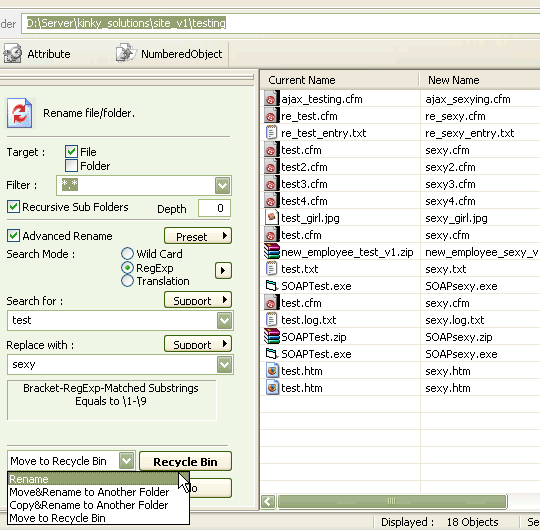 |
|
||
|
|
|
|
One quick case study of where I have used it is when converting a ColdFusion driven site into a static site (for CD-Rom creation). Once you burn out the site, it's awesome for blazing through the directory structure and replacing .cfm files with .htm files (not to mention removing a bunch of other junk that "site burning" applications put into file names).

Reader Comments
For renaming cfm to html I would think rename *.cfm *.htm would be pretty quick for windows users :)
Kevin,
I am Windows and am not familiar with this. Is that a Command Prompt type thing? Where would I find this? Can it handle regular expressions and recursion?
Ben,
with the command prompt you can do "ren *.cfm *.html" and that will rename all the .cfm files to .html.
That aside, I love being able to rename with regular expressions. The flex tool is cool but I use XYPlorer for all my file browsing/organizing needs. It has supports regex renaming plus a whole lot more. It's not free but it's an excellent replacement of the crappy windows file shell. Check it out: http://www.xyplorer.com/
LOL - here I was thinking someone had written a file renamer in Flex :-)
Boyan,
XYPlorer looks pretty awesome. I downloaded the trial and am gonna give it a go at work. I love the whole bottom preview / info pain and the extended context menu. I can't quite figure out how to get that "favorites" frame to show on the bottom left, but I am working on it.
Thanks for the awesome link!
Also, as far as the "ren" command, that is ok, but the Flex Renamer gives you a preview of all the files that are going to be updated. That just feels safer. Also, it can move things to the recycling bin. I am sure that "ren" has its place for certain people, but for me, the Flex Renamer interface and functionality cannot be beat.
Ben,
I don't use "ren" - I was simply explaining the syntax. For XYPlorer, press F8 and that shows/hides the favorites. The option is called "Catalogs" and not "Favorites" in the menu under "Window" - I have no clue what it has two names.
Hi - FIRSTLY, Superb Renamer!
erm... (There's always an erm eh?) - There's ONE feature that would make it DEFINITELY live up the name above, in conjunction with XBOX filename usage?
...and that's that when renaming, etc... an optional checkbox to ONLY rename matching files if the current filename lenght is LONGER than 38.3 chars - i.e. 38 chars, a full stop, and a 3 char extension? - Even better, and useful to everyone, would be a specified amount?...
i.e. I'd LOVE to be able to use your fantastic program with a condition that it leaves alone/does not rename any files that are already under the filename character size limit?
THAT would make this the "Most Awesome Bulk File / Folder Regular Expression Renamer Ever" for me at least!!! ; )
Please, please include this feature, as I haven't found ONE renaming application that allows this, in my travels so far, and it's driving me NUTS! - I have lots of files to rename, and the other logic in your program does EVERYTHING else that I need to catch to make them shorter, remove illegal chars, etc...
Thanks and best regards, and please, if I've missed the obvious (i.e. it already somehow does this), then please feel free to flame me!
Best regards,
Den.
PS - Just found out from the previous posts (I'd jumped right into the forum from a link by mistake!) - that the author is MIA... : (
Ah well, if anyone else is thinking of bettering this great tool, then please keep my plea in mind! ; )
Cheers,
Den.
Ha ha, I WISH I could make something this cool :)
Awesome tool!
By the way, the official site for Flexible Renamer is http://hp.vector.co.jp/authors/VA014830/FlexRena/ . Looks like version 8 beta just came out a few days ago.
@Steve,
Awesome :) I love this tool.
Brilliant! How is it such an amazing tool has been languishing in obscurity for years? This thing needs some promotion...
Thanks for bringing it to light ;)
@Acatalept,
Yeah, this tool is awesome. The renaming feature is awesome; but, equally as badass is the ability to delete files based on patterns (such as deleting all files that end in .SVN).
Flexible Renamer v8.0 was release on 3/9/2008
Go here ==> http://hp.vector.co.jp/authors/VA014830/FlexRena/
There are lots of enhancements. I like this software.
@Hiro,
Just installed the new version on my machine... I also love this software.
@Den
I think this is the flexible renamer search regular expression you are looking for
[^.]{39,}|[^.]{39,}\.[^.]*|[^.]*\.[^.]{4,}
This will find all files with names which are longer than 38.3
It is made of three alternate expressions. The first find files with no extension, 39 chars or longer. The second find files with an extension where the first part is 39 chars or longer. The third find files with an extension 4 chars or longer.
cheers Jimbo
@Den
Actually this is more complete.
[^.]{39,}|.{39,}\.[^.]*|.*\.[^.]{4,}
As some filenames can have more than one "." in them.
Jimbo
Here is the latest version v8.0 http://hp.vector.co.jp/authors/VA014830/english/FlexRena/
@Patrick,
Thanks for the link. This software is so badass :)
There's also Quick File Rename which does what everything flex renamer does but also comes with a command line tool. Actually it can pretty much perform any rename task you will ever require.
See
http://www.skyjuicesoftware.com/software/QuickFileRename
Keep your options open. :)
@S,
Awesome - I'll have to check it out. Thanks.
This File Renamer softwares are very useful for people with vast amount of files in their desktop. I am simply amazed with this kind of tools because it helps me to manage and rename my files in just one click. This innovation is making everything more convenient for everybody.
What I use for big batch of file renaming is Rename Maestro. A single action is equals to a big batch renamed result!
On a daily basis i have had an agonising renaiming process for every project. As a web designer working on custom site designs, once you rename one file there is inevitably 20 file dependancies that also need the reference changed. So the combination of GrepWin, and Flex Renamer is a killer combination for my needs.
Without these 2 tools my job is a nightmare, So i am just saying thanks and you are making at least one life slightly more pleasant.
@Clariz, @Jason,
Yeah, the file renaming stuff is awesome! Especially when you are dealing with files that are batch created by another program. I have not tried GrepWin personally. Is that an in-file renamer kind of thing?
@Ben,
Yeah, GrepWin is an in-file replacement tool- it searches through the chosen directories / sub directories and changes for example: Apples to Oranges inside all files. Makes seconds out of hours of endless opening and closing files.
Sorry for the delay in responding.
Total Commander is also capable of this. File>Multi Rename Tool
Man, you made my day! I've using CKRename for years and this is an amazing tool, much better than anything I've ever used.
Thanks for sharing.
Superb renamer! Saved me hours of work!