I was reading today over on Newschuyl about a CFEclipse plug-in that can parse the ColdFusion SQL debugging output and merge it with the CFQueryParam debugging to turn it into something that can be pasted directly into SQL Analyser (or something to the same effect). The idea is that SQL debugging output that uses CFQueryParams is littered with "?" where the values aught to be - this make is very cut-n-paste UNfriendly.
I think this is an awesome idea. A really awesome idea. The only problem is, I don't roll with CFEclipse. I'd explain why, but I think anyone who rolls with HomeSite to this day will understand me ;) The rest will just think I am a freak. But anyway, how can I take advantage of such a sweet-ass idea without CFEclipse? Build my own Javascript version of course!!
This afternoon at lunch, this is what I came up with:
// Check to see if the CF SQL functions have already been defined. I am doing this
// because I don't know how it will react if someone clicks on the bookmark twice.
if (typeof( ShowCFDebugSQL ) == "undefined"){
// This grabs the ColdFusion SQL debug data from the ColdFusion debugging
// output at the bottom of the page and displays the SQL with the query
// params replaced back into the SQL.
function ShowCFDebugSQL(){
var arrTable = document.getElementsByTagName( "table" );
var arrPre = null;
var objCFDebugTable = null;
var arrRawData = new Array();
var objRawData = null;
var objFrame = document.createElement( "textarea" );
var i = 0;
// Loop over the table looking for the one that houses all of the ColdFusion
// script debugging.
for (i = 0 ; i < arrTable.length ; i++){
// We will know that we found the correct table if this table's class
// name is "cfdebug".
if (
arrTable[ i ].className &&
(arrTable[ i ].className == "cfdebug")
){
// Store this table reference.
objCFDebugTable = arrTable[ i ];
// Don't check any more, we have the only
// table reference that we really need.
break;
}
}
// Check to see if the ColdFusion debugging table was found.
if (objCFDebugTable){
// Get the pre tags that are contained within the ColdFusion
// debugging table. All of the SQL statements are contained
// within PRE tags.
arrPre = objCFDebugTable.getElementsByTagName( "pre" );
// Loop over the PRE looking for the one that contains SQL.
for (i = 0 ; i < arrPre.length ; i++){
// Check for SQL markup. This is not fool-proof, but it seems
// to be working nicely for my purposes.
if( arrPre[ i ].innerHTML.match( new RegExp( "SELECT|INSERT|DELETE|JOIN|WHERE", "i" ) ) ){
// Create an object to store the SQL code and param data.
objRawData = new Object();
// Store the SQL text; this will be the inner HTML of the
// PRE tag that we just found.
objRawData.SQL = arrPre[ i ].innerHTML;
// Store empty params for a default value.
objRawData.Params = "";
// Check for CODE element. Depending on how the browser parses it's DOM,
// the CODE element might be the next or white space element might be
// next. Therefore, check both the next sibling and the next next sibling.
if (
(arrPre[ i ].nextSibling.nodeType == 1) &&
(arrPre[ i ].nextSibling.tagName.toLowerCase() == "code")
){
// We found the CODE element to be the next sibling.
// Check to make sure this CODE node contains query params.
if (arrPre[ i ].nextSibling.innerHTML.match( new RegExp( "^Query Param", "i" ) )){
objRawData.Params = arrPre[ i ].nextSibling.innerHTML;
}
} else if (
(arrPre[ i ].nextSibling.nextSibling.nodeType == 1) &&
(arrPre[ i ].nextSibling.nextSibling.tagName.toLowerCase() == "code")
){
// We found the CODE element to be the next NEXT sibling.
// Check to make sure this CODE node contains query params.
if (arrPre[ i ].nextSibling.nextSibling.innerHTML.match( new RegExp( "^Query Param", "i" ) )){
objRawData.Params = arrPre[ i ].nextSibling.nextSibling.innerHTML;
}
}
// Check to see if we have found any query params.
if (objRawData.Params.length > 0){
// Parse the query param raw data into an object array and store
// the array back into the params key.
objRawData.Params = ParseParams( objRawData.Params );
// Add this to our SQL data array.
arrRawData[ arrRawData.length ] = objRawData;
} else {
// Alert that no query params were found.
alert(
"I found a SQL query that does not have query params:\n\n" +
objRawData.SQL.replace( new RegExp( "\\s+", "g" ), " " ).substring( 0, 150 ) + "...\n\n" +
"This will not be included in the result."
);
}
}
}
// Check to see if we found any SQL / query param data.
if (arrRawData.length > 0){
// We now have to prepare to output the data. Start setting up the
// TEXTAREA frame styles.
objFrame.style.backgroundColor = "#FAFAFA";
objFrame.style.border = "4px solid #FAB60A";
objFrame.style.color = "#000000";
objFrame.style.fontFamily = "monospace, verdana";
objFrame.style.fontSize = "12px";
objFrame.style.height = "500px";
objFrame.style.left = "0px";
objFrame.style.padding = "15px 15px 15px 15px";
objFrame.style.position = "absolute";
objFrame.style.top = "0px";
objFrame.style.width = "90%";
// Allow double-clicking the textarea frame to remove itself.
objFrame.ondblclick = function(){ this.parentNode.removeChild( this ); };
// Add an intro data.
objFrame.value += "+------------------------------------------------------------------------+\n";
objFrame.value += "| Kinky Solutions ColdFusion SQL Debug Parser |\n";
objFrame.value += "| Written by Ben Nadel @ 2007 |\n";
objFrame.value += "| http://www.bennadel.com |\n";
objFrame.value += "+------------------------------------------------------------------------+\n\n";
objFrame.value += "**** DOUBLE-CLICK TO CLOSE TEXT AREA ****\n\n\n";
// Loop over the SQL statements that we have found and parsed.
for (i = 0 ; i < arrRawData.length ; i++){
// Add sql text to the textarea. When doing this, parse the
// query param values back into the SQL raw data. Then, replace
// the escaped < and > values back into the SQL statement.
objFrame.value += ReplaceParams(
arrRawData[ i ].SQL,
arrRawData[ i ].Params
).replace(
new RegExp( "<", "gi" ), "<"
).replace(
new RegExp( ">", "gi" ), ">"
);
// Add a horizontal rule for the next SQL statement.
objFrame.value += "\n\n\n+--- END SQL STATEMENT --------------------------------------------------+\n\n\n";
}
// Add to the textarea to the document.
document.getElementsByTagName( "body" )[ 0 ].appendChild(
objFrame
);
}
} else {
// No debugging table was found.
alert(
"I could not find the ColdFusion debugging information.\n" +
"Try turnning on debugging and running again."
);
}
}
// This takes the raw SQL data and the array of query params and
// replaces the "?" in the raw SQL with the corresponding params.
function ReplaceParams( strSQL, arrParams ){
var intCounter = 0;
return(
strSQL.replace(
new RegExp( "\\?", "g" ),
function(){
var strReturn = "";
// Check to see if we have an available parameter.
if (intCounter < arrParams.length){
// Initialize the return value to the be the param value.
strReturn = arrParams[ intCounter ].Value;
// Check for a non-numeric type. For non-numeric types, we
// want to wrap the value in single quotes.
if (!arrParams[ intCounter ].Type.match( new RegExp( "INT|NUMERIC|FLOAT|DECIMAL|DOUBLE|BIT|REAL", "i" ) )){
// Wrap the value in single quotes. Also, be sure to replace
// single quotes with double quotes so as to maintain single
// quotes within text fields.
strReturn = (
"'" +
strReturn.replace(
new RegExp( "'", "g" ),
"''"
) +
"'"
);
}
// Increment counter to hit the next argument.
intCounter++;
}
// Return the raw data with param replaced back into it.
return( strReturn );
}
)
);
}
// This takes the RAW query param data and parses it into an orderly
// array of objects the break it out into ID (param index), type,
// and value.
function ParseParams( strData ){
var arrParams = new Array();
strData.replace(
new RegExp(
"Parameter\\s#(\\d+)\\(([\\w_]+)\\)\\s*=\\s*([^\\r\\n]*)",
"gi"
),
function( $0, $1, $2, $3 ){
var objParam = new Object();
objParam.ID = $1;
objParam.Type = $2;
objParam.Value = ($3).replace( new RegExp( "<br\\s*/?>$", "gi" ), "" );
// Add this one to the array.
arrParams[ arrParams.length ] = objParam;
}
);
// Return the params array.
return( arrParams );
}
}
Ok, so that's really great, but how does that help my development process? Another simple answer: put it into a bookmarklet. A bookmarklet is a web browser bookmark that runs on any open page and is executed by selecting the bookmark. In order to make that happen, I had to strip out all the comments and line breaks and then put it into HREF format (which just means putting "javascript:" in front of the code). Then, I had to have it call itself.
Bookmark the following link to add this bookmarklet to your browser.
Get The Bookmarklet Code Here (Bookmark ME!)
To get a little sample of how this works, here is a screen shot of some ColdFusion SQL debugging:
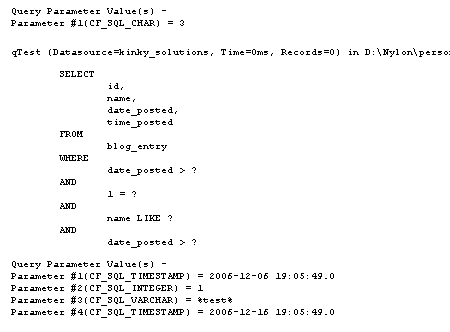
Notice all the "?" in the SQL and the list of ColdFusion CFQueryParams below it. Now, here is a screen shot of the HTML TextArea that pops up with the merged SQL and query params:
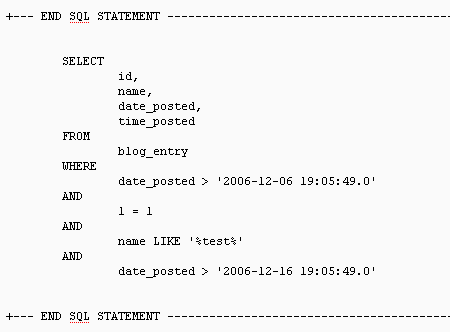
While you cannot tell it from the screen shot, that is a TextArea and can be copied quite nicely into any SQL analyzer for testing.
So, just to recap, add the above Bookmarklet to your browser bookmarks and then on any ColdFusion page that SQL server debugging is displayed, click it to merge ALL the SQL and ColdFusion query params into one, highly cut-n-paste friendly textarea.

Reader Comments
Ben,
great job! I've been thinking of how I can easily display sql queries but haven't had time to put any work into it. So until now I was making an exact copy of the sql code with the passed in parameters and just using cfoutput to display it if a "debugmode" var was set. This should be of great help. Thanks!
Boyan,
Glad this can help. I thought the CFEclipse plug in was such a great idea I had to go and write this. I am hoping it will be awesome. Let me know if you run into any problems and I can update the script.
Nice work. I was actually thinking of doing something like this if people showed any interest in my SQL Explorer extension, but it looks like you saved me the trouble:). One thing to watch out for is timestamps. If a date or time datatype is in timestamp format (i.e. the queryparm value looks something like {ts 2007-01-07 01:01:01.123}) you don't need to quote it... Glad you liked the idea!
Nice call with the time stamp. I knew I would run into problems which is why I check for a numeric value. I tested with some date/time stamps, but none in that format. Thanks for the heads up for that format.
Also, thanks for the inspiration. It is such a useful idea.
I modified the CF debugger to do this a long long time ago. I couldn't work with those stupid ?s. If you want a copy of this code, shoot me an email.
That is a really cool idea, I never thought of doing it that way.
But, just to play devil's advocate, I suspect that doing that requires the modification of installed ColdFusion files (that many of use do not have access to). Using Javascript after-the-fact allows programmers of all access to easily grab the SQL.
That being said, I would love to see it (but as I have no access to the installed files) I would have to clear it with my boss.
I can't get this to work... when I click the link on your page I get "couldn't find the debugging info...".
But when I drag it onto my toolbar and click it while on a CF page (with debugging info) nothing happens. I've tried two different browsers. I've looked at the properties of the bookmark and it looks right.
Help?
Ok - it works for me on some pages. On the pages it doesn't work on, I don't get a JavaScript error or anything - nothing happens. If I ever figure out whats causing the problem I'll let you know.
thanks for the excellent tool.
Awesome. Thank you for sharing this.
Always a pleasure to share.
@Ben and @Steve Nelson - Could I get a copy of the code / process to tweak the CF Debugger to display the <cfqueryparam> values inline with rest of the SQL code, per Steve's comment? Thanks!
Hi Ben,
It does not seem to work on IE8.
I guess the code it's too long for Microsoft.
Do you have any solution for IE8 ?
Thanks in advance,
(Paul)
This is awesome... you don't know how frustrated my team had gotten having to cut/paste variables names back in to replace the "?"