The CSS pseudo elements, :before and :after, have been around since IE8. So, this is probably not news to many of you. But, for me personally, I just started using the :before and :after pseudo elements and I've been absolutely loving them! They making it much easier to keep design-centric elements out of your markup and in your CSS (where they belong). Anyway, I thought I'd put together a quick demo in case anyone else is late to the party.
The CSS pseudo elements, :before and :after, prepend and append content to the selected elements, respectively. By default, these elements have an "inline" display quality; but, their display property can be set using CSS just as with any other element. In order for :before and :after pseudo elements to work, they must have a "content" property. This property can be a string value:
div:after {
	content: "Hello World" ;
}
... or it can be a URL to an image:
div:after {
	content: url( "img/icon.png" ) ;
}
If you don't want to render any content, you can use the empty string; but, you must supply the "content" property in all cases.
These pseudo elements don't show up in the DOM. But, if you're using Firebug or Chrome Dev Tools, you can still view and tweak the pseudo element CSS in the style inspector. These pseudo elements can be styled in the exact same way that any other element can be styled. It's pretty awesome.
That said, here's a quick demo of the :before and :after pseudo elements in action:
<!doctype>
<html>
<head>
	<meta charset="utf-8" />

	<title>CSS Pseudo Elements :before And :after</title>

	<style type="text/css">

		a.button {
			background-color: #F0F0F0 ;
			border: 1px solid #CCCCCC ;
			border-radius: 4px 4px 4px 4px ;
			color: #333333 ;
			display: block ;
			font-size: 30px ;
			padding: 6px 30px 4px 58px ;
			position: relative ;
			text-decoration: none ;
			width: 100px ;
		}

		a.button:before {
			background-color: #FF0066 ;
			border-radius: 3px 3px 3px 3px ;
			color: #FFFFFF ;
			content: "NEW" ;
			font-family: sans-serif ;
			font-size: 15px ;
			left: 9px ;
			line-height: 15px ;
			margin-top: -10px ;
			padding: 3px 3px 2px 3px ;
			position: absolute ;
			text-align: center ;
			top: 50% ;
		}

		a.button:after {
			background-color: #FFFFFF ;
			border: 1px solid #DADADA ;
			border-radius: 22px 22px 22px 22px ;
			color: #333333 ;
			content: "\00BB" ;
			display: none ;
			font-size: 30px ;
			height: 28px ;
			line-height: 26px ;
			margin-top: -14px ;
			position: absolute ;
			right: 6px ;
			text-align: center ;
			text-indent: 1px ;
			top: 50% ;
			width: 28px ;
		}

		a.button:hover:after {
			display: block ;
		}

	</style>
</head>
<body>

	<h1>
		CSS Pseudo Elements :before And :after
	</h1>

	<a href="#" class="button">
		Button
	</a>

</body>
</html>
According to the HTML markup, there's nothing but a button with the text, "Button." However, when you render the page, you can see the "NEW" tag:
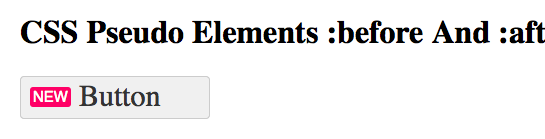
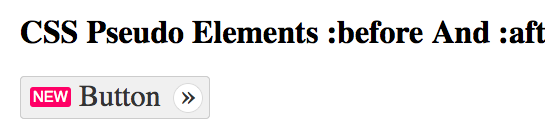
This "NEW" tag was supplied by the :before pseudo element. But, our CSS also has an :after pseudo element with an initial display of, "none;" This pseudo element is set to only show on :hover:
Support for these CSS pseudo elements is IE8+, and basically every other browser. But, the nice thing about the pseudo elements is that they are intended primarily for design elements. This means that you can still gracefully degrade in IE<=7 using the same HTML and CSS. And, like I said, I've only just started using them in my current project; but, so far, they've made life so much easier!

Reader Comments
Lovely, aren't they? ;)
@All,
FYI, here's one of the many places you can look up the hex-encoding for special HTML characters like » -> \00BB:
http://www.yellowpipe.com/yis/tools/ASCII-HTML-Characters/index.php
@Gary,
Werd up!
@Ben,
You know those websites that mark mandatory form fields with asterisk on the label? :before or :after is usually how they do it (hopefully with redundant styling for graceful degradation):
Cool before it was cool, huh.
@WebManWalking,
It's funny you mention that - when I was looking into the pseudo elements, the mandatory-field was one of the first examples I found.
@Ben,
Speaking of CSS and mandatory fields, y'know what I wish you could say? :for(subselector). Example:
Then all you'd have to do is add required. No parallel editing. Forms are such a big part of web development, it would be worth it, even if only label ever used it.
**sigh**
@WebManWalking,
That would be cool. I think there is a :has() selector (or maybe that's only in jQuery). But, that requires a descendant relationship, which would probably not be true for a "label" element.
Actually, though I'm guilty of doing it myself, I don't think using :before to add an asterisk to a required field is good usability. A screen reader won't be able to pick that asterisk up - unless they've changed recently to pick up CSS 'content' values.
Still, they're a great way to add design to markup without the quality of the code suffering. I like to add them as block elements with absolute positioning to get an image from my spriteset to appear behind or next to a link... or any number of similar implementations.
They're also great for adding text content that is useful only to visual users.
@Ben - great post! I've been using pseudo selectors more frequently since IE6/7 usage has been falling among clients and they are indeed and massive time-saver and also a much more elegant way to add this kind of design feature.
@Gary - many screen readers are now adopting WAI-ARIA features so you could substitute the hard-coded asterisk for
on the form element itself. Even though the asterisk is a well-known convention, I prefer the use of attributes to denote this sort of thing, particularly when there's the risk of the label not being linked to that field via its "for" attribute.
@Ben,
You know what's even more appealing about :for(subselector)? It fits some of the things they're doing in CSS4 selectors:
http://coding.smashingmagazine.com/2013/01/21/sneak-peek-future-selectors-level-4/
Checkout :matches(). It takes a subselector as its argument! So you just KNOW they would be warm to the syntax. If only I knew how to submit a new feature request!
@Gary,
Yeah, I've been loving them for inserting icons (using sprites) without having to put in an extra (and empty) span/i/b tab in the markup.
@WebManWalking,
Uggg, I'm still catching up on CSS3 :D
Ben ...
Charmap.exe has the unicode tables for ya' without the browser ;-)
start -> run -> charmap.exe
@Edward,
I just did a bit of Googling and it looks like CMD+Option+T brings up the Character Input thing for Mac OSX. I just did it, and it's not the easiest thing to use. But, for example, I just copied the "Much Greater Than" to my clipboard. Pasted:
?
MUCH GREATER-THAN
Unicode: U+226B, UTF-8: E2 89 AB
Interesting...
@Edward,
... and you can see that my blog doesn't have UTF-8 support :/
On Nix you have WAY more support for char conversion ...
$ man iconv ...
done. :-)
Very usueful tutorial. I've always wanted to learn more about these pseudo-elements. I guess this is the right moment.
It seems to me the "before" and "after" pseudo-selector names were poorly chosen, as they appear to "prepend" or "append" the content respectively. IOW, the injected content is inserted _within_ the element - not before or after the element. I found it a bit confusing at first, since what I observed was not what I expected (or what the names implied).
@Steve,
Yeah, definitely a strangely named set of features. This was part of what confused me when I first started looking into them.
What's even stranger is that the "content" you are adding doesn't have a tag. So, how does this apply to standards? For example, can I add :before/:after to a OL or UL list? Technically, it probably works - *but*, should a list contain any children *other* than LI elements?
Of course, the :before/:after aren't "true" elements.
Now we have a philosophical debate :D
@Maroun,
Awesome! Glad this could help. I have found these CSS techniques to be hugely helpful!!
Hi, great article. Understanding these leverages more style for style and less content for style. Since no additional html markup is required.
We have a course for learning this topic to at: http://www.w3university.co.uk/csscoursepseudo.html
It can also aid in uses for pseudo elements.
Hi Ben, thanks for the tutorial, this is very interesting for me to learn by a beginner like me, and some of these techniques already I apply to the theme of my blog, this post is really helpful for me to broaden my horizons in studying css, i hope can find another article that is related to the css, I really enjoyed this article, once again thank you, sorry if my english is not good ....