
Rendering DOM Elements With ngRepeat In AngularJS
When it comes to compiling and rendering DOM elements, AngularJS is definitely a little bit magical. Things just work! And, they work really well. Especially when it comes to syncing the DOM with the view model (ie. $scope) shared by the various Controllers. At first, they mysterious nature of the syncing is delicious; but, when your application starts to use things like caching, localStorage, directives, and heavy client-side calculations, understanding how AngularJS renders DOM elements in an ngRepeat can be essential to providing a fast, smooth user experience.
The ngRepeat directive provides a way to render a collection of items given a template. To do this, AngularJS compiles the given template and then clones it for each unique item in the collection. As the collection is mutated by the Controller, AngularJS adds, removes, and updates the relevant DOM elements as needed.
But, how does AngularJS know which actions to perform when? If you start to test the rendering, you'll discover that AngularJS doesn't brute force DOM creation; that is, it doesn't recreate the DOM for every rendering. Instead, it only creates a new DOM element when a completely new item has been introduced to the collection. If an existing item has been updated, AngularJS merely updates the relevant DOM properties rather than creating a new DOM node.
It does this by injecting expando properties into the DOM element as well as into the individual items of your collection. At the time of this writing, the expando property injected into your collection items is called "$$hashKey" (though all $$ variables are subject to change). During the execution of the ngRepeat, AngularJS then maps the $$hashKey onto the expando property injected into the DOM; if the two line up, AngularJS does not create a new DOM node.
NOTE: jQuery also uses expando properties. This is a tried and true approach to linking.
To see this in action, take a look at the following demo. We're going to render a collection of items using the ngRepeat directive. One item in the collection will be passed around by-reference. The other item in the collection will be passed around by-value. You'll see that the by-value item precipitates new DOM element creation because the $$hashKey fails to persist across $digest cycles.
<!doctype html>
<html ng-app="Demo" ng-controller="DemoController">
<head>
	<meta charset="utf-8" />

	<title>Rendering DOM Elements With ngRepeat In AngularJS</title>
</head>
<body>

	<h1>
		Rendering DOM Elements With ngRepeat In AngularJS
	</h1>

	<p>
		<a ng-click="rebuild()">Rebuild Friends</a>
	</p>

	<div
		ng-repeat="friend in friends"
		bn-log-dom-creation>

		{{ friend.id }}. {{ friend.name }}

	</div>


	<!-- Load AngularJS from the CDN. -->
	<script
		type="text/javascript"
		src="//ajax.googleapis.com/ajax/libs/angularjs/1.0.2/angular.min.js">
	</script>
	<script type="text/javascript">


		// Create an application module for our demo.
		var Demo = angular.module( "Demo", [] );


		// -------------------------------------------------- //
		// -------------------------------------------------- //


		// Define the root-level controller for the application.
		Demo.controller(
			"DemoController",
			function( $scope ) {


				// I create and return an array of the friends. One
				// of the friends is passed by reference; one of the
				// friends is passed by value.
				function build() {

					var friends = [
						tricia,
						angular.copy( joanna ) // NOTE: By-value.
					];

					return( friends );

				}


				// I re-assemble the collection of friends.
				$scope.rebuild = function() {

					$scope.friends = build();

				};


				// ---


				var tricia = {
					id: 1,
					name: "Tricia"
				};

				var joanna = {
					id: 2,
					name: "Joanna"
				};

				$scope.friends = build();


			}
		);


		// -------------------------------------------------- //
		// -------------------------------------------------- //


		// I log the invocation of the LINK function. Since the Link
		// function is invoked whenever its contextual DOM element is
		// created, this actually logs DOM creation.
		Demo.directive(
			"bnLogDomCreation",
			function() {


				// I link the DOM element to the view model.
				function link( $scope, element, attributes ) {

					console.log(
						"Link Executed:",
						$scope.friend.name,
						$scope.friend
					);

				}


				// Return directive configuration.
				return({
					link: link,
					restrict: "A"
				});


			}
		);


	</script>

</body>
</html>
As you can see, the template for the ngRepeat directive also has a custom directive, bnLogDomCreation. This directive simply logs a message to the console whenever it is linked. And, since it is linked whenever a new DOM element (in the ngRepeat) is created, it conveniently serves to log DOM creation events.
When we ask the Controller to rebuild the friend collection, you can see that one item is passed by reference (tricia); and, one item is passed by value (joanna). Since the second item fails to persist the $$hashKey across $digest cycles, AngularJS creates a new DOM node for it... again... and again... and again.
Multiple requests to the rebuild() method result in the following console output:
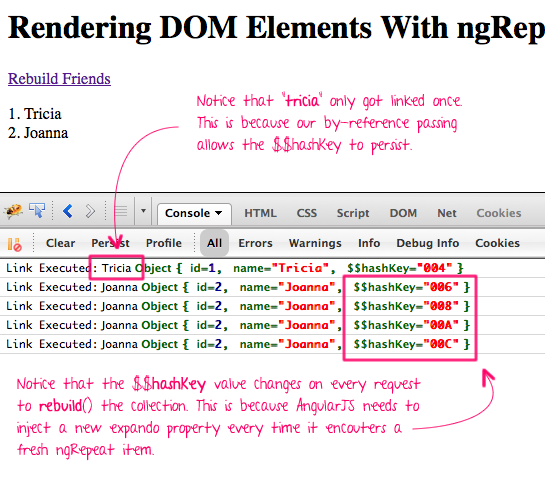
As you can see, AngularJS recreates the "joanna" DOM node and re-links the bnLogDomCreation directive for every update to the collection.
Now that you know this, you can work with AngularJS to make rendering faster and more efficient [in use-cases where the return-on-investment seems valuable]. For example, if you wanted to replace a cached collection item with a live collection item, you may choose to simply copy the non-AngularJS properties rather than completely overwriting the object:
<!doctype html>
<html ng-app="Demo" ng-controller="DemoController">
<head>
	<meta charset="utf-8" />

	<title>Rendering DOM Elements With ngRepeat In AngularJS</title>
</head>
<body>

	<h1>
		Rendering DOM Elements With ngRepeat In AngularJS
	</h1>

	<p>
		<a ng-click="rebuild()">Rebuild Friends</a>
	</p>

	<div
		ng-repeat="friend in friends"
		bn-log-dom-creation>

		{{ friend.id }}. {{ friend.name }}

	</div>


	<!-- Load AngularJS from the CDN. -->
	<script
		type="text/javascript"
		src="//ajax.googleapis.com/ajax/libs/angularjs/1.0.2/angular.min.js">
	</script>
	<script type="text/javascript">


		// Create an application module for our demo.
		var Demo = angular.module( "Demo", [] );


		// -------------------------------------------------- //
		// -------------------------------------------------- //


		// Define the root-level controller for the application.
		Demo.controller(
			"DemoController",
			function( $scope ) {


				// I create and return an array of the friends. One
				// of the friends is passed by reference; one of the
				// friends is passed by value.
				function build() {

					var friends = [
						tricia,
						angular.copy( joanna ) // NOTE: By-value.
					];

					return( friends );

				}


				// I re-assemble the collection of friends.
				$scope.rebuild = function() {

					// Update the ID so we can see *some* change.
					joanna.id++;

					// Update-Copy the joanna friend back into the
					// collection.
					update( $scope.friends[ 1 ], joanna );

				};


				// I update the values in the destination object
				// using the values in the source object, but I
				// ignore any proprietary keys used by AngularJS.
				function update( destination, source ) {

					var angularJSKeyPattern = /^\$\$/i;

					for ( var name in source ) {

						if (
							source.hasOwnProperty( name ) &&
							destination.hasOwnProperty( name ) &&
							! angularJSKeyPattern.test( name )
							) {

							destination[ name ] = source[ name ];

						}

					}

				}


				// ---


				var tricia = {
					id: 1,
					name: "Tricia"
				};

				var joanna = {
					id: 2,
					name: "Joanna"
				};

				$scope.friends = build();


			}
		);


		// -------------------------------------------------- //
		// -------------------------------------------------- //


		// I log the invocation of the LINK function. Since the Link
		// function is invoked whenever its contextual DOM element is
		// created, this actually logs DOM creation.
		Demo.directive(
			"bnLogDomCreation",
			function() {


				// I link the DOM element to the view model.
				function link( $scope, element, attributes ) {

					console.log(
						"Link Executed:",
						$scope.friend.name,
						$scope.friend
					);

				}


				// Return directive configuration.
				return({
					link: link,
					restrict: "A"
				});


			}
		);


	</script>

</body>
</html>
In this example, the "joanna" item is copied originally by-value, just as in the first example. However, this time, rather than completely overwriting the "joanna" object on rebuild(), we copy the "Safe" keys from the core "joanna" object into the collection. This allows AngularJS to update the existing DOM elements without creating any new ones.
This is a lot of hoops to jump through and will definitely make your code more complex. As such, I would never advocate thinking this way until you actually need to. When you first get into AngularJS, just let it work its beautiful magic. Only worry about rendering when performance actually becomes an issue.
Want to use code from this post? Check out the license.

Reader Comments
Ben, I'm really enjoying your Angular posts; I appreciate your insights. I've just started using Angular in production and am loving it. Keep 'em coming!
@Matt,
Awesome my man! Thanks! I'll try to keep it going. If there's anything in AngularJS that you'd like me to explore, just let me know.
Re: "If there's anything in AngularJS that you'd like me to explore, just let me know."
How about pushstate :=)
@Edward,
Ha ha, one of these days.
extremely useful.
@Aladdin,
Thanks! Glad you found this helpful!
@All,
I re-examined this scenario (overwriting locally-cached data with live data) from a slightly different point of view:
www.bennadel.com/blog/2472-HashKeyCopier-An-AngularJS-Utility-Class-For-Merging-Cached-And-Live-Data.htm
This time, instead of copying over ALL the data, I'm simply copying over the $$hashKey expando property from the local data structures into the live data structures.
I created a utility class, HashKeyCopier, that will perform this operation in painless way.
I have found something different between AngularJS 1.0.7 and 1.2.0rc1.
1.2.0rc1:
http://jsbin.com/OVELiwA/2
I found there is no $$hashKey in the object if you have turn on the firebug or console.
1.0.7
http://jsbin.com/oYizAnE/1
When i click the "Rebuild Friends", it will generate a new $$hashKey.
And keep on 1.2.0rc1:
If i remove the $timeout function, and click the "Rebuild Friends", it will also generate a new $$hashKey.
What's changed between 1.0.7 and 1.2.0rc1, and why there are no $$hashKey if i use $timeout?
Angular 1.2 started to allow you to bind directly to array primitives within a loop. Previously, looping over the same element you were binding to would cause HTML redraw each time, as the loop notices each model change, and redraws the HTML. Now you can use `track by` to control this process, and allow you to bind dynamically created elements directly to array elements.
> angularjs adds a $$hashKey property to objects in collections that are being used with ng-repeat and don't otherwise have an identifier configured.
> the $$hashKey is typically generated by incrementing a shared variable.
http://mutablethought.com/2013/04/25/angular-js-ng-repeat-no-longer-allowing-duplicates/
Angular 1.2 started to allow you to bind directly to array primitives within a loop. Previously, looping over the same element you were binding to would cause HTML redraw each time, as the loop notices each model change, and redraws the HTML. Now you can use `track by` to control this process, and allow you to bind dynamically created elements directly to array elements.
> angularjs adds a $$hashKey property to objects in collections that are being used with ng-repeat and don't otherwise have an identifier configured.
> the $$hashKey is typically generated by incrementing a shared variable.
http://mutablethought.com/2013/04/25/angular-js-ng-repeat-no-longer-allowing-duplicates/
Hey Ben,
First off thanks for the article, I've read a number of your pieces and they've all been helpful in one way or another. While I appreciate the efficiency of ng-repeat not to rebuild the entire array in the DOM when a single element is modified or added, I actually have a case where I need that to happen. All of the specifics are pretty irrelevant; what I am trying to do is get ng-repeat to delete and then rebuild the entire array in the DOM (this array will have at most 20 elements so performance is not a concern). I've tried hacky things like setting $scope.array to some dumby value and then back into the array I want, all inside of a $watchCollections listener, but I feel like there must be an easy way to do this. Any tips?
Derek
@Derek,
OK, I just wanted to add that I found a way to do this. angular.copy creates a deep copy which changes $$hashkey, so if you need to trick ng-repeat into re-rendering the entire (small!) array, you can just iterate through the elements assigning deep copies to a temp array, then set the initial array to the temp array.
Ben, thank you so much for this post... solved an issue I've been troubling over for past few weeks. I'm working with a lot of data where performance was becoming an issue having to re-render on each minor change to a scope variable. I was about to say... ok I'll have to live with it. Then this article came up from a question asked over at stackoverflow.com.