
Nested Views, Routing, And Deep Linking With AngularJS
Out of the box, AngularJS gives you routing and the ngView directive. With these two features, you have the ability to map routes onto templates that get rendered inside of the ngView container. This works for simple, one-dimensional web sites; but, unfortunately, if you have a site that requires deep routing, AngularJS leaves you up to your own devices. In order to achieve deep routing, I've found it more useful to map routes onto action variables rather than templates; this gives you a great degree of flexibility and makes creating nested, independent views much easier.
When I think about rendering a page in an AngularJS application, I think in terms of two parallel concepts:
- Request Context
- Render Context
The Request Context is the result of route mapping. The request context contains the route parameters and the "action" onto which the route was mapped. The action variable is a dot-delimited list of values that tells the rendering engine which templates to render. In the "Adopt-a-Pet" demo, for example, the action value for a pet's medical history is this:
standard.pets.detail.medicalHistory
Each item in the action list represents a view within the page that [generally speaking] has a corresponding controller instance.
Graphically, you can think about the relationship between the Request Context and the Render Context as such:
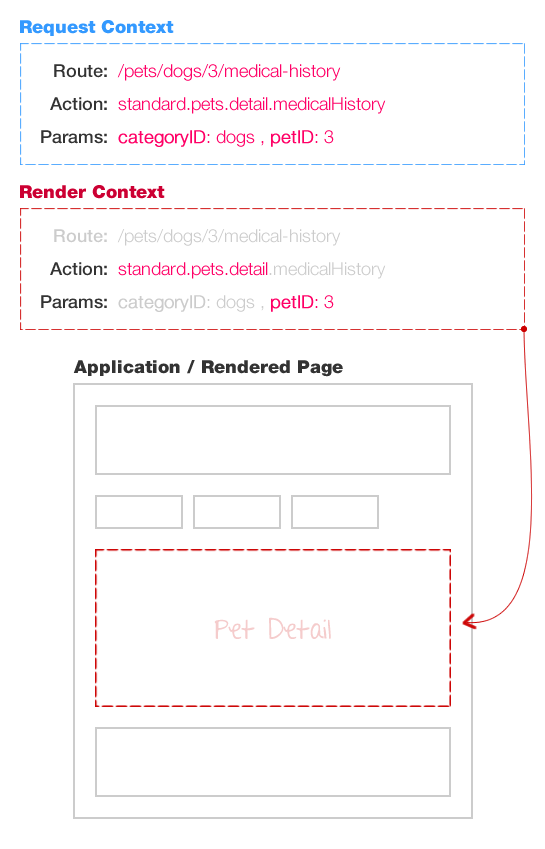
The Render Context is the portion of the Request Context that pertains to a given, nested view. Because the Render Context is a subset of the Request Context, the render context doesn't necessarily need to react to all changes in the Request Context. In fact, the Render Context only needs to react when relevant portions of the Request Context change.
A stripped-down Controller instance would look like this:
(function( ng, app ){

	"use strict";

	app.controller(
		"pets.detail.DetailController",
		function( $scope, requestContext, _ ) {


			// ...
			// Other methods defined here.
			// ...


			// Get the render context local to this controller (and relevant params).
			var renderContext = requestContext.getRenderContext( "standard.pets.detail", "petID" );


			// --- Define Scope Variables. ---------------------- //


			// Get the relevant route IDs.
			$scope.petID = requestContext.getParamAsInt( "petID" );

			// The subview indicates which view is going to be rendered on the page.
			$scope.subview = renderContext.getNextSection();


			// --- Bind To Scope Events. ------------------------ //


			// I handle changes to the request context.
			$scope.$on(
				"requestContextChanged",
				function() {

					// Make sure this change is relevant to this controller.
					if ( ! renderContext.isChangeRelevant() ) {

						return;

					}

					// Get the relevant route IDs.
					$scope.petID = requestContext.getParamAsInt( "petID" );

					// Update the view that is being rendered.
					$scope.subview = renderContext.getNextSection();

					// If the relevant ID has changed, refresh the view.
					if ( requestContext.hasParamChanged( "petID" ) ) {

						loadRemoteData();

					}

				}
			);


			// --- Initialize. ---------------------------------- //


			// Load the "remote" data.
			loadRemoteData();


		}
	);

})( angular, Demo );
As you can see, the "render context" for the given controller involves the action path, "standard.pets.detail" and the route param, "petID". A render context can listen to any portion of the action as well as any subset of route parameters. When the request context changes, the application controller broadcasts the "requestContextChanged" event. The controller listens for this event and checks to see if the change is relevant to the current "render context":
// Make sure this change is relevant to this controller.
if ( ! renderContext.isChangeRelevant() ) {

	return;

}
If the request context change is relevant to the given render context, the Controller may choose to take action (such as reloading any remote data relevant to the rendered view).
If you look at the code, you can see that the renderContext instance exposes the method, getNextSection(). This method returns the next value in the action chain, relative to the render context. So, for example, if the route action was:
standard.pets.detail.medicalHistory
... and the render context location was:
standard.pets.detail
... a call to getNextSection() would return, "medicalHistory." This ability to see the next action in the action path allows the relevant view to figure out which subview to render (if there are any).
A stripped-down View would then look like this:
<div ng-controller="pets.detail.DetailController">


	<!-- More code here. -->


	<!-- Include SubView Content. -->
	<div ng-switch="subview">
		<div ng-switch-when="background" ng-include=" ... "></div>
		<div ng-switch-when="diet" ng-include=" ... "></div>
		<div ng-switch-when="medicalHistory" ng-include=" ... "></div>
	</div>


	<!-- More code here. -->


</div>
As you can see, we use the ngSwitch and ngSwitchWhen directives to render the appropriate subview based on the render context.
I've only been using this approach for a few months; but so far, I've been extremely pleased with the results. This Request Context / Render Context construct allows Controllers to change only when they need to, and no more. Furthermore, I believe it helps you think about Controllers as decoupled instances that rely more on the route data and less so on the inherited data. While this can call for some redundant data collection, it greatly simplifies your rendering logic.
Want to use code from this post? Check out the license.

Reader Comments
Hey Ben...
Are you simply exploring Angular or is this your JS framework of choice? I have an open source app that I found which uses Angular. Originally I was a little turned off by it, but after I whittled down all the unnecessary includes it looks fairly simple.
@Andy,
We've been using AngularJS at InVision for the past few months and have really grown to love it. It has been a rocky road, however; there are a number of big mental hurdles that I found I needed to overcome... of which one was definitely routing.
I am using Angular daily as well. It is by far the smoothest to me.
Just added deep linking to our app too (a slightly different approach but a 'watch' is involved).
@John,
Yeah, AngularJS is pretty slick. One thing I need to start thinking about more deeply is how to most-cleanly share data between $scope instances in conjunction with $scopes that get their own data. Basically, how to have $scope data that is partially inherited and partially retrieved from the server.
Good things to ponder :)
@Ben,
Services are singletons so we have a base service class that handles all XHR (through $http but we wrap it) and have a custom cache implementation. This way we can comfortably call services from other controllers and be fine with knowing it won't duplicate calls/data.
We then extend that base with specific implementations for certain API endpoints. This way it isn't as granular (ex - FoodService.getFoods() creates a base service [from the factory] and sets up the url params, etc).
It is working out pretty good so far. Just be careful if you go the route of a state machine and $watch. While easy, you lose out on control when it comes to timing.
@John,
I like the idea of wrapping the HTTP service. That could have definitely served us well, especially when we want to display general HTTP activity.
That said, I was referring more to the $scope that gets passed to Controllers. I've been trying to keep my view modules very independent; but, it would be very beneficial in some cases to have a $scope that inherits dynamic data from its parent AS WELL as loading its own remote data.
Of course, that increases the complexity because you now have two sources of changing data... maybe it's better to just keep these things independent.
@Ben,
Ah, yes. We're dealing with that a bit now. We use the state service to update data and watch on the state service in other controllers to apply things to the scope.
**pseudo
//state_service
setBlah
getBlah
//controller1
watch stateService.getBlah, function(blah){ doSomething(); }
//controller2
watch stateService.getBlah, function(blah){ $scope.blah = blah; }
This way it is still separate. Again though, careful throwing around watches all willy nilly. :-D
Awesome example. I'm developing a very complex app and this allowed us to create an OS-like interface where the templates are loaded into windows that can maximize, minimize, and animate and not have to worry about losing their "state" when loading new content or changing path.
With a couple $watch statements, I can animate windows around when users change the path, including back/forward buttons.
I also had a few cases where the default route/template/controller pairing would have been useful. So I figured out how to mix and match both methods.
Main template:
Route Handling:
As long as you include the
and hook that up to a div with
in your main template's
, you can get the best of both worlds.
Be aware, ng-view will recreate your controller on every url request so anything you want to live through to the next scope (when it generates) should be moved to a service.
@Brian,
Very interesting. I had never thought of trying to mix and match. It's pretty cool, though, how multiple, complex directives (ngSwitchWhen / ngView) can act on the same element.
Right now, I've been trying to wrap my head around how all of the directives work, especially those that compile the DOM before it is linked. One moment I think I get it - the next, I'm super confused :)
The out-of-the-box AJS routing provides you with the posibiliti to define a controller for each partial like
$routeProvider.
when('/index', {
templateUrl: 'partials/index.html',
controller: IndexCtrl
})
I find this pretty useful, how would you do this with your approach?
Thanks
@Falcon,
With my approach, you can't really do it since AngularJS is not the handling the view-rendering for you. I have just been defining my Controllers using the "ng-controller" directive.
At a philosophical level, I understand the idea of wanting to be able to attach different controllers to the same view; however, from a practical point of view, I've never seen a need to do this.
I'm glad I stumbled upon this post. Interesting comments as well. Ben, thanks for sharing!
Hi and thanks for sharing.. Really thanks!
i started playing with your code and it feels very nice since when I minimized my scripts bundle. So I tried to change the services and controllers declaration as suggested by the documentation but now I'm stuck with the renderContext and requestContext functions.
In order to be injectable i think i should transform the RenderContext value into a factory but doing that angular will start complaying that there is a circular dependency between RenderContext and RequestContext..
Do you have any idea about how to solve this?
(As you can see I'm still learning angular.. :P)
@Alessandro,
When you have a circular dependency it means you have two classes relying on each other. If Dog relies on Animal and Animal relies on Dog, the system goes bananas.
@John, thanks for your response but.. Currently in going bananas too.. :)
But then, writing this answer, I realized that I don't need to transform RenderContext value into a factory because because the instance is not created by angular but directly by the requestContext.. Using the "value" registration now have sense to me too..
So thanks for it too.. :D
@Alessandro,
Good deal. :-D
@Paul,
Thanks, glad you like it!
@Alessandro,
Glad you got it figured out. The RequestContext can be injected using the notation that AngularJS has in their documentation; then, the RenderContext is gotten from the RequestContext. Hope you are liking this approach.
Brilliant. Thanks for sharing!
Btw why is render context called 'Beans' ?
I've been looking through your sample code and I am a bit stumped once you're in the detail-controller for pets.
Where do you register for the different actions caused by changing between the background/diet/medical history tabs.
I see that you check for the subview to determine which html file to show and in main.js where you send the event....but I'm not sure where you listen (or register) for the event so that you can respond to it.
I recently started porting a project from Backbone to Angular.
I did a google search for "nested views on angular " and the first 2 results show this blog (that supports nested views) and this other one http://jan.varwig.org/archive/how-to-do-nested-views-in-angularjs-hint-dont that says that one should not use them.
Can someone help me get some clarity on this?
thanks
Nik.
@Adrian,
Thanks my man! Glad you like. I created a "beans" folder for things that need to be instantiated multiples times during the lifetime of the app. So, unlike a service object, it is more transient. That said, I'm not crazy about the name "bean." I wouldn't say that my folder organization is the best; there are still many things that I wish I had a better approach for.
@Nathan,
No problem - good question. The routes for the application, as defined in the main.js file, map the URLs onto an action variable. In the case of the pet detail page, we have three possible action variables:
standard.pets.detail.background
standard.pets.detail.diet
standard.pets.detail.medicalHistory
If any of those changes (based on the route change), the app triggers a "requestContextChanged" event. As you have said, this event is monitored in the Controller in the $on() event handler; and, when the event fires, it grabs the next "section" of the action variable.
So, if the current Controller context is:
standard.pets.detail
... then the next section is either:
At this point, the Controller doesn't need to do much more; the VIEW takes care of mapping that subview to another html template.
If you look in the view for the pet detail, you will see:
NOTE: I've shortened the template paths for the code sample. Full code is here:
https://github.com/bennadel/AngularJS-Routing/blob/master/assets/app/views/pets/detail/index.htm#L58
In the view, I use the ngSwitch / ngSwitchWhen directives to then dynamically include the desired template based on that subview, which was, in turn, based on the "next section" of the route action parameter.
The included subview then instantiates its own Controller using ng-controller, if necessary. In my demo app, however, none of those subview actually have their own controller - they just render the inherited data in the $scope.
Does that help clarify at all?
@Nik,
I am not 100% sure how to interpret what Jan is saying in his blog post. It looks like he's saying don't use ngView; but, that it's *OK* to use nested ngSwitch statements (which is what I am using in my App, in coordination with ngInclude).
If you look at how my app works, I have states being mapped in the Routes. And, state being set in the Controllers. The controller, however does NOT tell the view how to render. It simply plucks out the parts of the "action variable" that it listens to. It is then UP TO THE VIEW to figure out how to translate that state into HTML.
As I posted in the previous comment, ngSwitch / ngInclude take care of the rendering.
@Ben
That is a really helpful explanation! I was myself somehow lost on what Jan is trying to say precisely. However, I did post on Jan's blog about Angular-UI https://github.com/angular-ui/ui-router. Do you have any thoughts on that?
@Ben
Thanks for a great blog, it has been really helpful for me.
I'm trying to wrap my head around this Deep-Linking technique and had a question which might have an obvious answer that I'm missing.
There is an AppController instance that is always running and will receive all requestContentChanged events.
In the line of code below:
The only time it breaks (return because change is not relevant) is when you are at a particular pet's detail page and click on a random pet.
For example:
http://bennadel.github.com/AngularJS-Routing/#/pets/dogs/4
TO
http://bennadel.github.com/AngularJS-Routing/#/pets/dogs/5
Why is that? Shouldn't it also break when going from Diet to Medical History?
Thanks
Also it's ONLY when you are in the Background tab of a particular pet and then click a random pet.
@Prad,
Clicking random pet works for me (tested on FF) what browser did you test?
The change should be relevant because petID param is passed on to the getRenderContext in detail controller. isChangeRelevant will check the change in params that was passed by getRenderContext.
@Adrian,
Maybe you misunderstood me. I meant that the random pet click hits that return line in the code above from the AppController (as I would expect). However that seems to be the only situation where that occurs.
@Prad,
Ah yes the change would not be relevant to the app controller.
If you want the isChangeRelevant() to return true when the petID changes, I think you can pass the petID params to the getRenderContext() in app controller.
Yup, I definitely see why its not relevant. If you dig deeper, you'll see that's the only situation where the change is not relevant. That's where I'm confused, shouldn't there be more situations where the requestContextChanged event is not relevant to the AppController.
@Nik,
I participated a bit in the early conversation about the UI router project; however, they were moving very fast and my work schedule didn't really permit me to keep up :( I would love to take what they have and re-build my Pet application to see how the two approaches compare / contrast.
I don't necessarily agree with all of their philosophies; but, I'll definitely try to hold my judgement back until I try to use what they are putting together.
@Prad,
I'm a little bit confused by what you are saying. I'm going to put a console.log() right before the return-statement in the AppController to see if I can see what you're saying.
@Prad,
Ok, I have confirmed the behavior. That is very strange - let me see if I can figure out what's going on.
@Prad,
Ah, I see what's going on. Ok, so when you are one pet, with ID 1, you have the following setup:
Route: /pets/dogs/1
Action: standard.pets.detail.background
Params: categoryID / petID
Ok, then you go to the pet with ID 2, you have the following setup:
Route: /pets/dogs/2
Action: standard.pets.detail.background
Params: categoryID / petID
As you can see the "petID" DID change.
As you can see, the "action" value has NOT changed.
It's this last part that causes the behavior. Since the appController does not monitor any route params (as @Adrian) mentioned, the only way it can detect difference is with the "action" variable. And, in this particular case (going from "background" to "background" of two different animals), the action doesn't change. As such, the app controller thinks the change is irrelevant.
The same will happen if you do any route that ONLY changes ID. Example, going from:
#/pets/dogs/3/medical-history
..to:
#/pets/dogs/4/medical-history
You would have to do this manually in the URL, since there are no links; but, it would trigger the same "irrelevant" behavior. Basically nothing that the AppController looks at changes.
I hope that helps - thanks for the excellent question! Really made me think about how this is put together.
@Ben,
Ahh, I understand now.
Thanks a lot to you and @Adrian for your posts!
@Prad,
Awesome, glad we could help!
I'm trying to wrap my head around exactly how this works. I took a look at your demo but even the demo seems quite complex. Is there a working basic demo around that will help me understand how I can introduce this into a project? I'm new to angularJS so it's been and still is quite a learning curve. I think a generic project template would be really useful. It would save me from hacking out the Demo project trying to reduce it to its most basic working level.
@James,
The demo is a bit complex, but you'll notice that the Controllers are all relatively similar. Handling the route changes and converting that into "rendering" changes is fairly consistent.
At a high level, you are mapping "routes" (ie. URLs) onto a set of route params and an action variable. Then, each controller pays attention to part of the action variable and a subset of the route params.
The complete collection - route params plus action variable - is encapsulated within the "RequestContext". Then each Controller creates its own "RenderContext", which is a subset of the action variable and the route params that are relevant to THAT Controller.
When either the route params or the action variable changes, the AppController triggers the RequestContextChanged event down its $scope chain to all of its Controllers. The Controllers then look at the context change and ask, "Is this change relevant to my RenderContext?"
If not, the change is typically ignored. If the change is relevant, the Controller updates its data model and reloads data as necessary.
I hope that helps a bit :)
Hi Ben,
Thanks for this really great introduction to deep linking technique. To be honest, coming from a JSF Swing background, I am more used to seeing this kind of thing embedded within the framework. Even when I am looking at your demo code (which is excellent), I feel that a design pattern like Container/Component would have been great (all containers are components, but not all components need to be containers; a container has one or more children which are all components).
And since I have little JS background, I am still confused if Angular is a new language or is this still JS with JQuery. I wonder, if the controllers can extend a BaseController and inherit:
var renderContext = requestContext.getRenderContext( "standard.contact" );
$scope.subview = renderContext.getNextSection();
The code in such a way that for an end-user developer, it just becomes declarative (with hooks to load data before the controller executes).
I guess with so much confusion abound, this is just a dream. But I am looking at the code as it executes in the debugger to learn and understand Angular part of it (you have done a great job of explaining the pattern you have made use of for deep linking - Thanks for that again).
Regards,
Vin
@Vin,
I think that the ui-router team trying to take this basic concept and roll it into something a lot more declarative:
https://github.com/angular-ui/ui-router
I haven't been able to participate in the conversation over there all that much; but, in passing, I think I am seeing some decisions being made that make some of the stuff much easier (as you would like) and some of the stuff much harder.
The thing I like about my approach is that it is completely flexible in a way that a declarative approach may not work with.
For example, I am working on a project in which you can get to a "Detail" page that has tabbed content. Since each of the tabs represents a very different kind of business usecase, we actually remember which tab the user last accessed on a given "detail" page. Then, when they return to that detail page, we default them to that tab.
So, image you had the following routes:
/item/1234
/item/1234/tabA
/item/1234/tabB
/item/1234/tabC
... the "tabX" routes would open up the detail for "item" and then load that tab immediately (which may require additional data from the server).
However, if they last accessed, "tabB", and then they navigate to the route:
/item/1234
... we *remember* that they last accessed "tabB" and we automatically load that one. In such a case, going from:
/item/1234
... to route:
/item/1234/tabB
... changes the route... BUT, doesn't actually change any of the rendering at all since the tabB was already loaded.
With a mechanism like this, I think a declarative approach to ui-route-mapping becomes problematic. And, this is only one of several cases in which I think it becomes problematic.
That said, I am extremely new to SPA (single page applications) and building such complex, nested interfaces. This has been a huge learning curve for me; and, my current approach took me a good 3-4 weeks to actually come up with (tons of trial and error). As such, I happen to like it; but, I am not convinced that it is the best way to handle nested views. It just seems to be the most flexible that I have seen.
Hi Ben,
What you said about flexibility makes sense.
I also looked at the sample published by ui-router team
Have to say that it is very short but powerful. Do you know if this is going to make into the angularjs main project?
Thanks,
Vinay
@Vin,
I think the long-term intent is to get it into the main AngularJS project; but, I think they want to flesh it out fully in UI first.
I'd like to take some time to re-build my demo app using their approach, so I can get a better feel of how it works. And, see if they feature sets are similar.
Hi Ben,
Thanks for taking it up.
Although I am able to run the sample, I still haven't been able to wrap my head around a lot of subtilities.
It would be lot easier for us to get a grip over it (this whole place/state/view gathering/ view targeting) if you share your analysis with us. I see a very succinct framework, but it has a lot of dimensions (moving parts) which need to be understood as a whole.
In my linear mind, I am constantly comparing it with your approach, which at a conceptual level is simpler :-)
Regards,
Vinay
Also, I didn't see any ability to remember the last selected sub-state.
Say,
I was on : a.b.tab3 [has tab 1,2,3 at the third level of hierarchical navigation]
I click on to: a.c.tab2
When I click on navigation link "b", it still dumps me to the default tab, which is a.b.tab1 (as a result my context of work I was doing in a.b.tab3 is lost, if I click-navigate).
The only way a user can reach back to a.b.tab3, where he was earlier in the middle of say filling up a form, is by using the back button.
In swing based apps, such state is implicitly maintained (therefore my expectation - it may be too much to ask for).
If you take the UI router example app. Why would a user ever be interested in an updating URL? Why do we still need this kind of routing... if you have a single app and no SEO ? Is this the only way to go?
Having played with the example code a little bit more, it seems clean. However, I am interested to hear how someone could go about testing the services?
It seems like they should be unit tests, but I'm not seeing a way to send an actionable event and then test that a specific controller (or controllers) acted on that event.
Any thoughts on whether or nothing something like this would be possible?
@Vin,
I've been meaning to carve out some time to really dive into the ui-route project; I just, unfortunately, have not committed to it yet :)
It's funny you mention saving state of the UI. That is something that I have been thinking about just recently. Everything that I've done, personally, uses manual state storage. For example, I'll store something in a "session" object and then query for it when a given Controller is instantiated. I haven't played with any implicit state storage.
The tricky part with storing state is to be able to tell the difference between a "back" state and a "new" state. If you don't care, I think it becomes much easier. But, if I'm going to render a pristine UI for a forward-navigation to interface "A", I need to have an explicit mechanism for what it means to have a back-navigation to interface "A".
One thought I had was to be able to add a URL parameter that was an ID of the state itself, not just of the route params. But, it seems like you'd have to really implement that throughout the entire app... could be fairly difficult.
@DutchProgrammer,
The only practical reasons for actually updating the URL (that come to mind) are:
* Allowing back-button support. In order for the back-button on your browser / mouse / keyboard to work, the "history" of the browser has to change. Otherwise, you'll end up navigating to the screen prior to actually opening the app.
* Allowing for deep-link bookmarking / Url pasting. If the URL changes, and influences the way the page is rendered, it means that you can bookmark deep aspects of your application. It also means that you can send other people (via IM / email) links to aspects of the application.
If you don't need either of those, such as if you were doing a really simple UI, you wouldn't need to change the URL.
That said, AngularJS has mechanisms built-in that do allow you to listen to state changes via the URL, which provides a convenient, centralized point of "truth" for the application.
@Nathan,
Unfortunately, "testing" is one of my [many] Achilles' heels :( I'm very new to unit testing, let alone something like this were it may have to take several working parts into account when testing.
do you recommend using this solution or ui-router project?
@Joel,
To be fair, I have not had much time to dive into the UI-Router project. I try to check in on the conversation ( I get all the back and forth emails ), but I simply have not played around with it much.
I think it has some things in common with my approach; and, it has some philosophical differences. When my workload is not so large, I'd love to take my sample project and try to rebuild it with UI-Router.
Hopefully, then, I'll be able to feel out a true comparison.
Thanks for your solution. I'm very interested in how this resolves! UI-Router looks good and it would be great to have one capable solution. State based routing solves so many issues and facilitates so many UI designs.
With such great minds having such a struggle to get a fundamental aspect of Single Page Apps working it certainly is a bit frustrating waiting for the outcome. It would be great to see more UI-Router posts so we can combine insights and create better apps with Angular.
You're code is great but could you make it more readable. There are so many empty lines that I find myself scrolling all the time. Why for example put two empty lines before and after every comment. Hope you don't take this the wrong way but if you removed most of the empty lines it would make it a lot easier for some of us.
@Richard,
I definitely appreciate the feedback; my use of white-space definitely does not agree with many people (so you are not alone). My problem is that when the code starts to get too tight, I tend to get a little flustered and am not able to concentrate on it.
I'm told that a lot of people will take my code (in general), and then the first thing they do is remove a LOT of the white-space. I take no offense to this.
I'll try to remove some of my double-spaces; that probably would not be too hard for me to keep a handle on. In fact, I've started to do that in some of my code - I just need to find the right balance.
Thanks again for the feedback! And glad you found the code somewhat useful, if not too long ;)
@Zoom,
I definitely hope to get some UI-Router time under my belt. They seem to be really building a very robust solution. And now that the beta-branch of AngularJS has animation capabilities, I believe that is all being built into UI-Router.
That said, since my example hinges primarily on ngSwitch / ngInclude (which can also use the animation featuers, I believe), my approach should also be able to become animated. I haven't had time to play around with it though.
Hi,
Just a quick thank you. As it happens, for my own purposes, the pending ui-router work being done in native angular is likely the one I'll adopt, but your exploration, code and documentation of the issues have been very valuable in coming to that conclusion - I wouldn't have been able to frame the requirements in anywhere near the modest time it's taken me with the aid of this post and your previous one.
Thanks again
Sean
@Mrsean2k,
I'm glad I could help! I haven't been able to keep up with the ui-router stuff. I keep saying that I'll carve out time, but I just haven't gotten to it :(
Thanks loads for publishing your approach, which you have invested a significant amount of time into.
I am applying your pattern to a simple CRUD based test system and have set up a different controller to handle each of the CRUD operations. The "create" and "update" use the same view (_details.html) but a different controller. I am struggling to see how this would work.
Existing $routeProvider snippet:
Would you just use ng-switch to choose the controller in "_details"? I like the idea of the association of a controller to a view to be maintained in the $routeProvider but can also see the benefit of your approach when applied to nested views. BTW my simple CRUD system is only the proof of concept before ramping up to a full implementation of what would no doubt be a another complex system with nested views (else I would stick with the default route pattern).
@Scotty,
Unfortunately, I don't have a good answer for you. I have not personally found much value in reusing Views with different Controllers. I'm not saying it's bad - a lot of people seem to like doing that. But for me, all of my Views tend to be different enough that reuse is more of a fantasy than a reality.
As such, I never really thought about how my approach could be used with different controllers.
I suppose the ngController attribute could be used IN the ngSwitchWhen statement:
... but, I've not tested that, so this is just a guess that that will work. I assume it should, though, like using an ngController with ngRepeat.
... oops, messed up my nesting on that last one - bout ngSwitchWhen divs were supposed to be inside that ngSwitch div.
Another take on this subject:
http://angular-route-segment.com
This library implements the same idea and it is much simpler to use than ui-router.
The sample config:
@Artem,
Very interesting link - I had not seen this implementation before. It's cool to see how different people do it. We all sort of have the same philosophy, but all different implementations.
I am not personally a fan of putting so much logic into my "main" js file. Everyone else seems to like it though. Maybe just my background. I like defining the routes in the main, but then deferring all the rendering to the nested parts of the application.
But, I really appreciate the link - this inspires me. I wonder if I can try to wrap my approach up into something a little more self contained.
... now, just to find a few more hours in the day :D
@Ben,
Putting the whole config in one file is not neccessary with that library. You can differentiate it across as many files/modules as needed.
@Artem,
Sorry, what I meant was that I don't personally understand defining the Controller and the rendered Template in the route configuration. To me, I like the idea of the routing doing nothing more than mapping routes to variables. Then, the actual rendering of those variables is deferred to the other parts of the app.
But, I can tell you that I seem to be in the small minority of people of like that :)
hey,
we're working on a project and i've been using your idea with rather great success, however for some reason i wanted to update to version 1.2.0rc1 in angular, because i'm trying a few new features. and suddenly the whole system doesn't go further than the initial ng-switch in the main template.
for 1.2.0rc1 i had to include angular-route.js and include the ngRoute as dependency on my application module. that was clear
but it seems like the switch does not load the include templates
when i enter `test` `test2` etc, inside the divs i notice that the ng-switch directive works, it only shows the correct `div`. But it does not load the template via ng-include. any idea if something needs to happen there as well?
I've tried the same steps in your adopt-a-pet demo application and had the same issues.
*UPDATE*
tried moving the adopt a pet to angular 1.2.0rc2,
works better than the rc1, but it introduces a new bug, the ng-switch does not remove the previous content, just loads the new content below the previous one
currently debugging the issue, will post a solution when i find one, just hope it's something we can fix ourself instead of angular having a bug :)
fork of the project to see the issue can be found here: https://github.com/saelfaer/AngularJS-Routing
@Sander,
Wow, that's really weird. I haven't played around with dev-branch yet of AngularjS - I keep waiting with baited breadth for them to release it as a stable version. I can't wait to start playing around with animations.
I'm shocked that their ngSwitch behavior would have changed so dramatically. I wonder if that's part of the animation stuff? It must be a bug?!
@Ben, I found the problem, I don't know if it is an actual angular bug or a design choice they made, but it is not possible at this moment to have a ng-include and an ng-switch-when directive on the same tag.
what you need to do is have a sub element in your dom to hold the ng-include directive.
you can see the actual workings in this little plunkr
http://plnkr.co/edit/1QI5jVq6Ikrtk0YsTaMW?p=preview
Switching over all ng-switch statements to use ng-include on a sub div element worked.
**note** it is the same problem with ng-show and similar directives, you cannot put an ng-hide on the same level as ng-include, it will still display and load the content, unless you add the ng-include on a child-element.
@Sander,
Yikes! This is horrible change! I can only imagine that they did this because both the ngSwitch and the ngInclude might need their own animation access for transitions. But, if that's the case, it feels like a horrible step in the wrong direction :(
I'll try to look into that a bit more; that's terrifying.
Hi Ben. I love your blog.
I don't know if they recently added this to Angular or what, but there is an ngRoute directive now. This is for getting deep linking to work with an ngView. I have not implemented it yet, but I am about to. Here is the doc for it:
http://docs.angularjs.org/api/ngRoute.$route
I assume this is a more standard and out of the box solution to the problem?
Side note. I have been using Controller inheritance to access stuff in the $parent scope. See: http://docs.angularjs.org/guide/dev_guide.mvc.understanding_controller
@Jess,
Sorry. That link did not work with the $ sign. Hopefully this link is better:
http://docs.angularjs.org/api/ngRoute.%24route
Hi Ben,
In my opinion your approach is very flexible than using ng-view and the ui-Roure project.
I upgrade angular to v1.2.0rc1 and unfortunately the ng-switch not work!.
I remove ng-switch-when="standard" and the template loaded!!
can you help me?
Best,
@Asad,
Check out the post i made a few weeks ago (9 september) about this issue, scroll up a bit you can't miss it...
the problem is not the ng-switch-when="standard" but the fact that ng-switch-when directive is used together with the ng-include directive on the same element.
check out my post and if you still have problems let me know.
best regards
Sander
@Sander
Thanks a lots. Before yous post this , I find your
plunkr article! :)
I think the issue is there in the version on angular that I used, I did get the package from Nuget and do what you said not work, I get it from google cdn and that work fine.
I apologize for my bad English.
Thanks a lot again.
Best,
Asad
@Jess,
Thanks my man! I haven't yet gotten to play around with any of the latest AngularJS stuff. Most of what I've done so far has been in the 1.0.7 area. There's so much stuff that I have start trying out!
@Sander, @Asad,
I confirmed on the AngularJS Google group that this behavior is a bug and is due to be fixed (if it has not yet already):
https://groups.google.com/d/topic/angular/w7Yo66Q8MU8/discussion
@Jess That is not a directive, it is a module containing what used to be the routing concept in the core...
@Ben
""Sorry, what I meant was that I don't personally understand defining the Controller and the rendered Template in the route configuration. To me, I like the idea of the routing doing nothing more than mapping routes to variables. Then, the actual rendering of those variables is deferred to the other parts of the app.""
Actually in both UI Router and dotJEM Angular Routing (Another alternative https://github.com/dotJEM/angular-routing)
You only need to link route to state, nothing more... But it's not encouraged by either of the solutions... But in it's basics you can just do:
(that is the syntax for dotJEM Angular Routing, I think the syntax is a bit more hurting for UI Router, but AFAIK it's doable with $state.go)
Which puts it self close to your own idea of actions... kind of...
@Jens,
Ah, gotcha. Thanks for the insight. I haven't seen the dotJem routing solution yet. I'll take a look. Honestly, I haven't had much time to dive into any of the other solutions all that much. I keep meaning to.
how can i remove the # ?
Thank you
Thanks for this excellent example Ben. I am planning a single page application and this is such a great help..
Q: Have there been any updates to Angular in recent months since you wrote this demo, or is this still your preferred approach?
@Holland,
yes there have been updates to angular for sure. The current version is 1.2.10 so this article is somewhat outdated in that regard. However the technique is still very much possible and usable when your application requires it.
every application is different, and you should figure out for yourself if you have many 'subview' like regions in your app which you would like to dynamically replace by other parts without refreshing more than you need.
@sander,
REG: "you should figure out for yourself if you have many 'subview' like regions in your app"
Can you suggest some approach in this regards? I am trying to build a dashboard like page, where more than 4 sections gets loaded. Can this be handled via "subview"?
@Siva,
a 'dashboard' as i understand it, does not seem to be the best usecase for this subview setup. for example, if you have a dashboard with 4 different 'widgets' or 'panels' for example, you don't want to map them to the url.
take Ben's example site, with the cats and dogs, there when the url changes, you see only part of the page needs to be refreshed, while the frame stays on the cat section only the inner content switches. that is why this subview system was created.
managing different widgets on a dashboard would in my eyes better be managed elsewhere.
of course your dashboard could be 1 of the subviews of your site.
where your header and footer and possibly navigation are part of the frame and the dashboard itself is a subview. but the deeper navigation on your dashboard if you work with widgets does not seem to be an ideal usecase for the subview system.
However, if you work with some tabbed interface then the subview could be of some use again, for that you best check the example from Ben, where he actually uses sort of a tabbed interface on each pet page.
I hope you get an idea of what I mean.
Sander
Where is the angular documentation for 'action:'
it is not here:
http://docs.angularjs.org/api/ngRoute/provider/$routeProvider
Thanks.
@Steven, the action property is not something from AngularJS but rather part of the concept that Ben is describing in his blogpost here.
it is a custom added property, which is read by the requestContext service. When you look at his code example on github, you see in the `assets/app/controllers/app-controller.js` how he places a subscribe on the e $routeChangeSuccess event on the $scope. in that callback the current context is set via the requestContext.setContext(...) method. there he passes the action from the current route into the requestContext.
this way we can ask all these checks from the renderContext, as it can verify if the current change is relevant by checking the given action against the one from the current route.
hope this information helps, but I can imagine if you start out the concept described above is rather complex and to be taken as is, I don't think it Ben ever intended to continue development, but rather just experiment with a different concept of routing....
correct me if I'm wrong Ben :p
Thanks Sander.
I appreciate the detailed response.
As angular is a fast moving library, I elected to us the UI-Router to solve this problem.
Many thanks to all who participated in this thread. Everyone's comments has been supportive in leading me to a solution.
@Ben,
plx gve some comprehen
sive etails od deep linking
First of all, thank you Ben! AngularJs is super new for me and I'm using your approach to learn how to work with it. Right now I'm trying to figure out, why this won't work on the newest AngularJs version and how I can use ui.bootstrap in your app. Can you help me out?
@Nomar - I would recommend using Angular UI-Router - "The de-facto solution to flexible routing with nested views":
http://angular-ui.github.io/ui-router/
This works perfectly with the Angular UI Bootstrap library:
http://angular-ui.github.io/bootstrap/
Together these tools are an amazingly powerful way to develop modern web applications.
Loud swallowing.
Thanks for the demo :) I'm using AngularJS 1.2.24 , and it appears from the comments that this solution might be more of a 1.0.x solution? Is there a consensus regarding how to best apply a solution like this, but using the 1.2.x API? Is it included in 1.2.x, one comment seemed to suggest this, but another contradicted it. Would this solution translate well no matter what version of AngularJS you're currently implementing?
Cheers