
Are HTML FORM Tags Required To Display Form Input Controls?
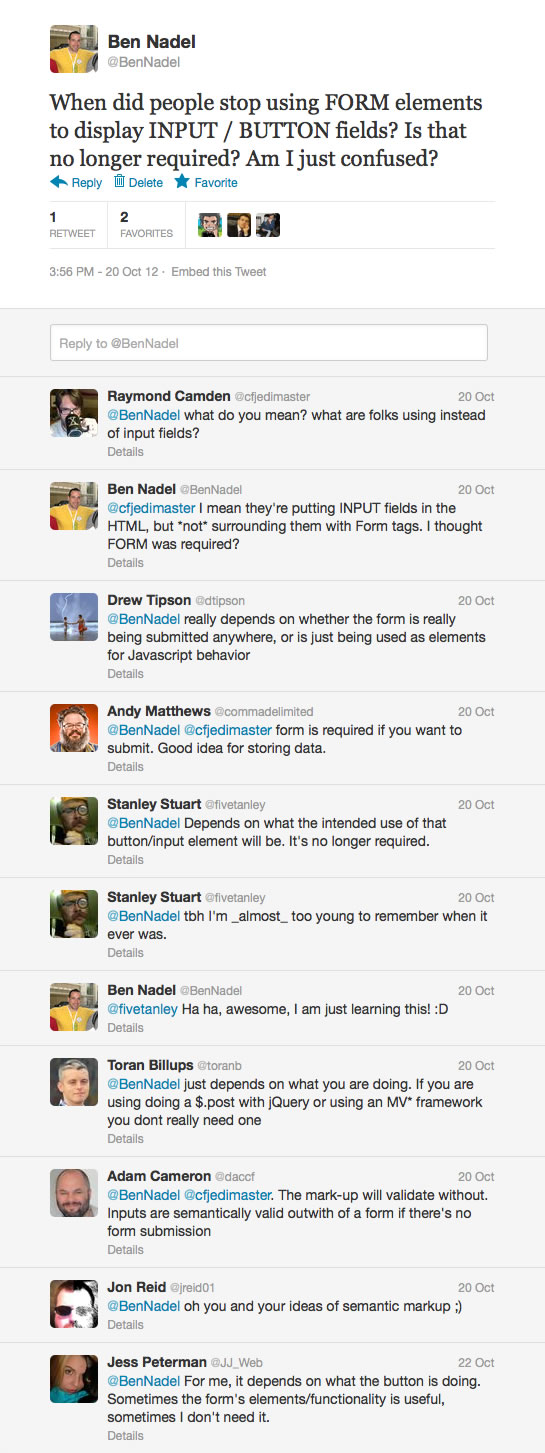
When I got into web development - before AJAX was a thing - I used HTML FORM tags where ever and when ever I needed to display a form input control. This was because all forms actually needed to be submitted back to the server for processing. In the last 10 years or so, I've never really questioned this approach. Even in AJAX (Asynchronous JavaScript and XML) applications, I religiously use FORM tags when ever I needed to display input controls. Recently, however, I worked with a front-end developer who used FORM tags only when a form submission was actually likely to take place. This gave me pause and lead to some crowd-sourced information gathering:
| |
|
|
||
| |
 |
|
||
| |
|
|
The consensus seems to be that FORM tags are no longer required when you simply want to render a form input control. If all your input field is doing is providing a UI (user interface) hook for interactions, then you can put the input fields into the HTML without including a FORM tag.
That said, it seems that using a FORM tag does have some benefits, depending on your particular situation:
- You need it if you want to execute a traditional (ie. non-AJAX) form post.
- You need it you want to capture the "submit" event programmatically.
- You need it in order for mobile Safari to show the "Go" button on the keyboard.
- You need it if you want to programmatically "reset" a form (ie. call reset()).
- It makes generic form serialization easier (since it groups input fields).
- You need it if you want to post files without the modern file API.
- You need it if you have to segregate fields with the same name.
For me, the biggest "gotcha" in the list above is being able to listen for and react to the "submit" event. As far as I'm concerned, if you can't submit data by hitting the "Enter" key, then your form is broken. Of course, this is not always required. And, when it's not required, I have to same that I am pleased that the FORM tag is optional. I will now use it with discretion.

Reader Comments
Another benefit to using the <form> tag, even if you are using AJAX, is that if the user has disabled JavaScript (I know, WHO DOES THAT?), the form could still submit. That would fall under "graceful degradation".
It gives you the ability to do convenient document.formname.elementname references. Don't have to code id attributes and document.getElementById() all the time.
Less overhead to looping over a document.formname.elements array. Don't have to include 90K+ jquery.min.js just use $("input,select,textarea").each().
"A place for your stuff."
I'm not sure a page with form controls (input, select, ...) but without a <form> is w3c valid...
Another classic case of "HTML5 parser is very forgiving as people built shit in the past, this should not encourage you though to write shit now".
A form that doesn't work without JS to me still is a very arrogant and error prone idea. Yes, nobody turns off JS, but one of your scripts not loading or a broken "tweet this" button can still kill the JS execution on the page prematurely. Another thing a form of course allows you to do is send the data to a different script than the current page, which is what the action attribute is for or define a different encoding for the sent data and allowing you to add more header information.
I wrote the first Ajax book. When I read answers like these I regret this now.
@Christian,
I think it really comes down to your particular circumstance. In today's age, people are building applications that depend on a JavaScript as a "platform". In the same way that you need the Flash plugin to run a FLEX app, people are building apps that absolutely require JavaScript to run. I don't think that's arrogant - I think that's simply a fact. It just comes down to what your audience is and what your business requirements are.
I don't think anyone here is advocating the writing of bad HTML simply because it parses.
I definitely prefer including the form tags simply because I'm more comfortable binding to the submit event, and pressing enter to submit a form is second nature for someone who uses forms often or in an application with many forms.
Sure, I could add a key event to catch the enter key, but that feels like the wrong way to fix it when there is little to no downside to adding the form tags to begin with.
I'm thinking there's a Section 508 / Accessibility red flag on that play.
The <form> tag is also helpful if you want to quickly serialize the items in the form with jQuery.serialize(), possibly with an AJAX call.
@Ben,
I'm sure you got into the habit of always coding a form tag because of Netscape. Early versions of NS used to refuse to render form elements on the screen if they weren't in a form.
Just for jollies, I wrote a little tester page and brought it up in NS 8.1. (Yes, I still have it. Doesn't everyone?) You may be happy to know, at least by 8.1, even good old Netscape started imaging form elements that weren't in a form.
I also snooped around the DOM a bit. In every browser I tried, form elements that aren't in a form have their form property defined as null. None of them, not even NS, defined an implicit form node just to hold the form element nodes. (Browsers sometimes define implicit DOM nodes to normalize the DOM, but not in this case.) The only form nodes in the DOM are those explicitly defined with form tags.
So that reminded me of yet another reason to define a form tag: so you can say this.form.otherelementname in onchange scripts and the like.
AS a web developer for about 18 years, I've been in the habit of using the form tag around form elements. Seems like long ago, but I do recall browsers not displaying forms not surrounded by the form tag. This is an interesting article, but I didn't read anything that would change my habit of always using the form tag.
Interesting post and feedback! Your intro grabbed my attention, because a form should be contained in the appropriate <form> tag. (it makes me sleep better at night knowing my code is semantically correct).
I remember reading post after post going on and on about semantic HTML, separation of concerns when CSS was introduced, etc. I admit we've come a long way since then, but i don't think we should completely abandon those values.
I am of the opinion that a form should be enclosed in the <form> tag, regardless of the transportation system used to communicate with your server. It just seems "right", not to mention fair to the semantic evangelists of old :)
If an element is needed somewhere in your markup that visually looks like a button, but doesn't have anything to do with a form or submitting any data then it's called an anchor. With minimal CSS, that anchor can be styled to look like a button. Your users are non the wiser and the elements' intent will be far clearer for to developer working with that code after you're gone.
Just because something is not required for a task to be accomplished, doesn't mean it shouldn't be included. The code commenting debate comes to mind. Should you, shouldn't you... But we all know it's just better if you do :)
Again, interesting post. Thanks!
This is very interesting ... Even HTML 4 strict inputs validate without form tags.
https://gist.github.com/4040378
http://validator.w3.org/check
Ben, I'm doing a lot of heavy usage of AJAX and for the most part I don't use the FORM tag anymore.
I have the benefit of not having to worry about which browser, or ancient browsers, etc., because it is an internal company web site and the company has set a standard for which web browser will be used. That web browser is installed by default on corporate machines.
I'm trully glad for this turn of events, I've noticed in the past how using the FORM tag on IE would shift its internal contents slightly down and to the right which could be a pain when trying to get one's page layout working just right!
I've written my own AJAX library since I found what was out there overly complex (at least to me), and am happy with the results. I use it along with JQuery. My libary automatically submits data as form posts so I am not limited in the size of my blocks.
There is one case where I would still use a FORM tag, when I want to post to a new pop-up window (for opening up a new Excel sheet based on posted data for example). Here I use the deprecated TARGET attribute. It may not be the totally best ways to do this, but it works in a pinch.
I hope everything is okay. I don't see new posts. Always enjoyed your wisdom. Please keep posting
@Alan,
Thanks a lot my man! Unfortunately, I've been buried under a deadline for the last few months and I've had to give up most of the things in my life that make me happy :D (ok, maybe a little overly-dramatic ... but, it's been rough). Hopefully I'll be back in the game starting next week. In the last month, I've managed like 1 post a month; but I should have a lot more coming down the pipe.
Thanks for checking in - I really appreciate it!
Then let's face another question . Can we post a HTML page (can't say to submit a form as we do not have a form tag) without form tag and without Ajax .
Please note : I would appreciate if I do not get below answers or similar kind of .
Ans 1: It doesn't have to exist in the HTML (thus you don't have to use a form tag), you can dynamically create the element
Ans 2:
window.location = "http://www.page.com"; //this get another page
form=document.getElementById('formName'); //this fills the form
form.target='_blank';
form.action='whatever.html';
form.submit();
form.action='whatever.html';
form.target='';