When I think about implementing a RESTful API, my philosophical understanding is very simple: RESTful URLs need to be mapped onto a collection of URL parameters and an event type that is processed by my ColdFusion application. This means that, at its most superficial level, a RESTful API is nothing more than a set of URLs that lay on top of an existing application. Obviously, there's a lot more to REST than that; however, when it comes to simply converting requests into responses, REST is just a layer on top of the same general approach I've been using for years.
When a request comes into the server, URL mapping commonly happen at two levels:
- The web server (ex. Apache, IIS).
- The application server (ex. ColdFusion).
My personal approach is to do most of the URL mapping at the ColdFusion level. At the web server level, I do just enough to get the request routed into the ColdFusion application; then, I let the ColdFusion application do the bulk of the parsing and mapping. I do this because it's simply easier to build and to debug. Trying to figure out why a RewriteRule or a RewriteCond (mod_rewrite) is misbehaving can be like pulling teeth. But, once I get the request into a ColdFusion context, life becomes simple.
Once I have the requested resource URI in ColdFusion, I then need to map it onto a set of URL parameters and an event type that can be processed by my Controllers. To facilitate this action, I created a new project called ResourceMapper.cfc. It's a ColdFusion component that can map resource URI patterns onto a set of captured values and an arbitrary hash.
For example, it can map the HTTP action and resource URI:
GET /blog/archive/2012/08
... onto the following collection of values:
- eventType : blog.search
- archive : true
- archiveYear : 2012
- archiveMonth : 08
This set of values is then processed by the ColdFusion application in order to render a response.
This mapping is defined in the ResourceMapper.cfc as a set of action-based configurations. For example, to define a "get" request mapping, I might have something like this:
<cfscript>

	// Create an instance of our resource mapper.
	resourceMapper = new ResourceMapper( defaultParamName = "event" );


	// Define mappings.
	resourceMapper
		.get(
			"/blog/archive/:year/:month",
			{
				event = "blog.search",
				archive = true
			}
		)
	;

</cfscript>
As you can see, the resource URI can contain named groups (ie. year, month). The resource URI can also map onto a set of arbitrary name-value pairs, defined by the ColdFusion hash. If you don't define a ColdFusion hash, you can still pass in a String value which will be resolved as the "event" parameter.
To see this in action, take a look at the example from my GitHub project:
<cfscript>


	// Param the HTTP method to test with.
	param
		name = "url.httpMethod"
		type = "string"
		default = "GET"
	;

	// Param the resource uri.
	param
		name = "url.resourceUri"
		type = "string"
		default = ""
	;


	// Create an instance of our resource mapper. When we instantiate it,
	// we can define a default param name. This is the name of the param
	// that is created if we pass-in a string as our resource params
	// argument when defining routes.
	resourceMapper = new lib.ResourceMapper( defaultParamName = "event" );


	// Let's define our resources / routes. When defining resources,
	// can use both the individual HTTP method methods (ie. get, put,
	// post, delet). Or, we can use a then when() method and define
	// the HTTP verbs as properties.
	resourceMapper
		.when(
			"/blog/:blogID/comments",
			{
				get = "blog.getComments",
				post = "blog.addComment"
			}
		)
		.get(
			"/blog/archive/:year/:month",
			{
				event = "blog.search",
				archive = true
			}
		)
		.get(
			"/blog/:blogID",
			"blog.view"
		)
		.get(
			"/blog",
			"blog.list"
		)
		.post(
			"/blog",
			"blog.add"
		)
	;


	// Check to see if a resource has been defined.
	if ( len( url.resourceUri ) ) {

		resourceResolution = resourceMapper.resolveResource(
			httpMethod = url.httpMethod,
			resourceUri = url.resourceUri
		);

	}


	// Define some resources to demo.
	demoResources = [
		"/blog",
		"/blog/123",
		"/blog/archive/2012/08",
		"/blog/123/comments"
	];


</cfscript>

<!--- Reset the output buffer. --->
<cfcontent type="text/html" />

<cfoutput>

	<!doctype html>
	<html>
	<head>
		<meta charset="utf-8" />

		<title>ResourceMapper.cfc</title>
	</head>
	<body>

		<h1>
			ResourceMapper.cfc
		</h1>

		<ul>

			<!--- Output each demo resource using GET and POST. --->
			<cfloop
				index="demoResource"
				array="#demoResources#">

				<li>
					<a href="#cgi.script_name#?httpMethod=GET&resourceUri=#urlEncodedFormat( demoResource )#">GET #demoResource#</a>
				</li>
				<li>
					<a href="#cgi.script_name#?httpMethod=POST&resourceUri=#urlEncodedFormat( demoResource )#">POST #demoResource#</a>
				</li>

			</cfloop>

		</ul>


		<!--- Check to see if we have a resolution. --->
		<cfif len( url.resourceUri )>

			<h2>
				Resource Resolution
			</h2>

			<cfif isNull( resourceResolution )>

				<p>
					Sorry, the resource could not be found.
				</p>

			<cfelse>

				<cfdump
					var="#resourceResolution#"
					label="Resource Resolution"
					/>

			</cfif>

		</cfif>

	</body>
	</html>

</cfoutput>
As you can see, there are two ways to define resource URI mappings: with the HTTP verb methods (ie. GET, POST, PUT, DELETE); or, with the when() method, which simply allows a single resource to be reused across multiple HTTP methods.
To "resolve" a resource URI, simply pass-in the HTTP verb and resource URI to the resolveResource() method. This method will return a structure that looks like this:
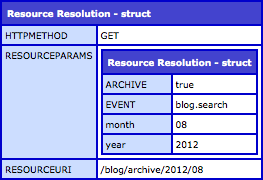
Both the URL components and the name-value pairs are combined to create the "resourceParams" collection.
If the HTTP method / resource URI combination cannot be matched to a defined pattern, NULL is returned.
Behind the scenes, each resource URI configuration gets compiled down and cached as the Java objects, java.util.regex.Pattern and java.util.regex.Matcher. This makes the pattern matching robust and incredibly fast.
... though, now that I think about it, this probably doesn't make it super thread-safe. I'll probably have to re-create the Matcher instances on each request, leaving the Pattern instances cached.
Right now, the ResourceMapper.cfc only accounts for named-groups within the resource URI. In the future, I'd like to make the mapping smarter and more robust. If you'd like to take a look at it, checkout my GitHub project.
Project: ResourceMapper.cfc on GitHub.

Reader Comments
Wow! This will be extremely useful in the future - such an elegant solution to what is normally a complex setup.
Thanks Ben!
@Brian,
Thanks my man! I've got some additional stuff that I want to add to make it a bit more robust. Glad you like it!
That's nice work Ben. Thanks for putting it up on the Githubs.
@Joseph,
Thanks! I'm really trying to get into using GitHub more. Feels like a lot of fun.
Thanks - This is really useful.
I have some code doing something similar in Groovy but was looking to do this in CF too. I actually re-worked your ResourceMapper component to handle all request routing in a lightweight MVC framework I started putting together and it works really well! I think I will also extend it to also allow numeric URL variables.