
Using The Quality Attribute With The CFImage WriteToBrowser Action
The other day, I needed to do some on-the-fly conversion of PNG image files to JPG format in ColdFusion. This was part of stop-gap measure at InVision for mobile devices that can handle more JPG data than they can PNG data. ColdFusion makes this kind of process super simple with the WriteToBrowser action of the CFImage tag. All I had to do was the following:
<!--- Convert PNG to JPG on the fly and write IMG tag to browser. --->
<cfimage
	action="writeToBrowser"
	source="#pngFilePath#"
	format="jpg"
	/>
This worked well; however, I noticed that some of the JPG images had undesirable compression artifacts showing up. It occurred to me that the quality setting used to convert the PNG image to JPG was less than 1 (ie. less than 100% quality).
After looking at the ColdFusion documentation, I didn't see any way to change the quality of the resultant JPG. So, as an experiment, I tried to add the "quality" attribute to the CFImage tag. Since this attribute works with other CFImage actions, I figured, though undocumented, it might work with the WriteToBrowser action.
And, it did!
To see this in action, I put together a simple ColdFusion script that outputs three images using three different CFImage-WriteToBrowser settings:
- Default setting (guessing it's ~ 75% quality).
- Quality 100% (ie. 1).
- Quality 20% (ie. 0.2).
NOTE: I am guessing the default quality is 75% since this is the documented default value for CFImage-Write actions.
Take a look:
<!--- Read in our PNG image. --->
<cfset png = imageNew( "./pull.png" ) />


<!--- Write out as a JPG (default settings). --->
<cfimage
	action="writeToBrowser"
	source="#png#"
	format="jpg"
	/>

<br />
<br />

<!--- Write out as a JPG at 100% (using "quality" attribute). --->
<cfimage
	action="writeToBrowser"
	source="#png#"
	format="jpg"
	quality="1"
	/>

<br />
<br />

<!--- Write out as a JPG at 20% (using "quality" attribute). --->
<cfimage
	action="writeToBrowser"
	source="#png#"
	format="jpg"
	quality=".2"
	/>
And here is what the page output looks like:
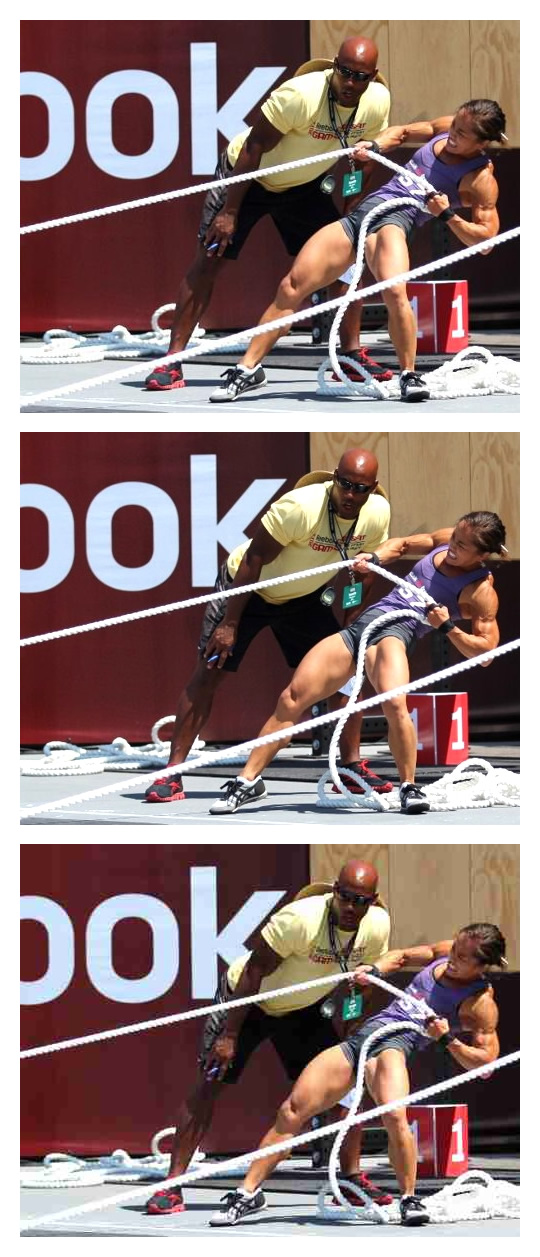
As you can see, the second image with explicit quality of "1" has less compression artifacts than the first image at whatever the default quality setting is.
I don't know if this is an unintended side-effect of the underlying "write" action that ColdFusion must be performing; or, if this is simply a mistake in the documentation? But, it's pretty cool that this works.
Want to use code from this post? Check out the license.

Reader Comments
My fiendish plan to spoil your day has been foiled by you figuing out the problem AND because I'm leaving the first comment thereby MAKING your day!
@Evil Ben,
Ha ha, you're a nut!
quality parameter works on resize too. Adobe's documentation really sucks.
@Me,
Ah, good to know! Thanks!