
Before this morning, I had never written a Unit Test in my life. Ok, that's not 100% true - I once wrote a unit test as part of a pair-programming experiment, a few years ago, with Peter Bell. But, on my own, not once. Then, yesterday, in my blog comments, Sean Corfield finally pushed me past the tipping point. And, this morning, I downloaded Jasmine, "a behavior-driven development (BDD) framework for testing JavaScript code." And, since I am getting comfortable with RequierJS for asynchronous module loading, I figured I would try to get Jasmine and RequireJS to work together.
Since I have never used Jasmine (or any testing framework) before, I relied heavily on the Jasmine Documentation as well as a RequireJS skeleton repo by Tyler Kellen. I don't necessarily know how unit tests integrate with the app code, so ignore my architecture - I just wanted to get something working.
For this first experiment, I simply created a "test" directory in the root of my site:
- app
- app / js
- app / js / lib
- app / js / lib / jasmine-1.2.0
- app / js / lib / require
- app / js / model
- app / js / model / romanNumeralEncoder.js
- app / test
- app / test / spec
- app / test / spec / romanNumeralEncoder.js
- app / test / runner.htm
In the "test" directory, the romanNumeralEncoder.js file is a "test specification", or "spec." In this context, it is a RequireJS module that defines a number of Jasmine tests to run against my model.
I know in Test-Driven Development (TDD), you're supposed to write your tests first; but, since I felt completely out of my element, I wanted to create my Model first. Of course, I didn't want to get to far into my Model, so I just created the skeleton for the RomanNumeralEncoder module:
RomanNumeralEncoder.js (Model)
// Define the module.
define(
	[
		/* No dependencies. */
	],
	function(){


		// I provide functionality for encoding and decoding roman
		// numerals from a base10 radix.
		function RomanNumeralEncoder(){
			// ...
		}

		// Define the class methods.
		RomanNumeralEncoder.prototype = {};


		// -------------------------------------------------- //
		// -------------------------------------------------- //


		// Return the module constructor.
		return( RomanNumeralEncoder );


	}
);
As you can see, other than the constructor, nothing in it is defined at all.
With this in place, I then went into my "test" directory and created my runner.htm. This is the file that loads the Jasmine and RequireJS frameworks, loads the test specifications, and then tests the actual code.
runner.htm - Our Test Runner
<!doctype html>
<html>
<head>
	<title>My First Unit Test With Jasmine And RequireJS</title>

	<!-- Include the Jasmine assets for running in an HTML page. -->
	<link rel="stylesheet" type="text/css" href="../js/lib/jasmine-1.2.0/jasmine.css"></link>
	<script type="text/javascript" src="../js/lib/jasmine-1.2.0/jasmine.js"></script>
	<script type="text/javascript" src="../js/lib/jasmine-1.2.0/jasmine-html.js"></script>

	<!--
		Since we are in the "test" directory, not in the standard
		"js" directory, we need to define the path prefix' for the
		RequireJS modules so that the modules can be found from the
		tests running in the Spec directory.
	-->
	<script type="text/javascript">

		var require = {
			paths: {
				"domReady": "../js/lib/require/domReady",
				"model": "../js/model"
			}
		};

	</script>
	<script type="text/javascript" src="../js/lib/require/require.js"></script>

	<!--
		Use RequireJS to load and execute the actual Jasmine test
		specifications (ie. specs).

		NOTE: We have to use the domReady! plugin since the Jasmine
		reporter needs to have access to the BODY tag of the document
		when outputting the results of the test.
	-->
	<script type="text/javascript">

		require(
			[
				"domReady!",
				"spec/romanNumeralEncoder"
			],
			function( document ){

				// Set up the HTML reporter - this is reponsible for
				// aggregating the results reported by Jasmine as the
				// tests and suites are executed.
				jasmine.getEnv().addReporter(
					new jasmine.HtmlReporter()
				);

				// Run all the loaded test specs.
				jasmine.getEnv().execute();

			}
		);

	</script>

</head>
<body>
	<!-- Left intentionally blank. -->
</body>
</html>
Since the Jasmine unit tests are taking place outside of the standard "js" directory, I had to pre-define some RequieJS module paths. This way, when the test specifications (ie. specs) try to load modules in the "model" directory, RequireJS will know how to locate the relevant JavaScript files.
My test runner is only loading one test specification module, related to the RomanNumeralEncoder module I mentioned above:
RomanNumeralEncoder.js (Test Specification)
// Load the RomanNumeralEncoder and describe tests.
define(
	[
		"model/romanNumeralEncoder"
	],
	function( RomanNumeralEncoder ){


		// Describe the test suite for this module.
		describe(
			"The RomanNumeralEncoder encodes and decodes decimal values.",
			function(){


				// Create our test module.
				var encoder = new RomanNumeralEncoder();

				// Test the encoding of decimal values into roman
				// numeral strings.
				it(
					"should encode decimal values",
					function(){

						expect( encoder.encode( 1 ) ).toBe( "I" );
						expect( encoder.encode( 2 ) ).toBe( "II" );
						expect( encoder.encode( 3 ) ).toBe( "III" );
						expect( encoder.encode( 4 ) ).toBe( "IV" );
						expect( encoder.encode( 5 ) ).toBe( "V" );
						expect( encoder.encode( 6 ) ).toBe( "VI" );
						expect( encoder.encode( 7 ) ).toBe( "VII" );
						expect( encoder.encode( 8 ) ).toBe( "VIII" );
						expect( encoder.encode( 9 ) ).toBe( "IX" );
						expect( encoder.encode( 10 ) ).toBe( "X" );

					}
				);

				// Test the decoding of roman numeral strings into
				// decimal values.
				it(
					"should decode roman numeral values",
					function(){

						expect( encoder.decode( "I" ) ).toBe( 1 );
						expect( encoder.decode( "II" ) ).toBe( 2 );
						expect( encoder.decode( "III" ) ).toBe( 3 );
						expect( encoder.decode( "IV" ) ).toBe( 4 );
						expect( encoder.decode( "V" ) ).toBe( 5 );
						expect( encoder.decode( "VI" ) ).toBe( 6 );
						expect( encoder.decode( "VII" ) ).toBe( 7 );
						expect( encoder.decode( "VIII" ) ).toBe( 8 );
						expect( encoder.decode( "IX" ) ).toBe( 9 );
						expect( encoder.decode( "X" ) ).toBe( 10 );

					}
				);


			}
		);


	}
);
I don't yet understand how to best organize my test suites and my individual test "expectations"; so, for this first pass, I simply broke a number of encode/decode assertions into two basic tests: one for the encode() class method and one for decode() class method.
Then, in the spirit of Red-Green-Refactor, I ran my test runner to see that it would fail:
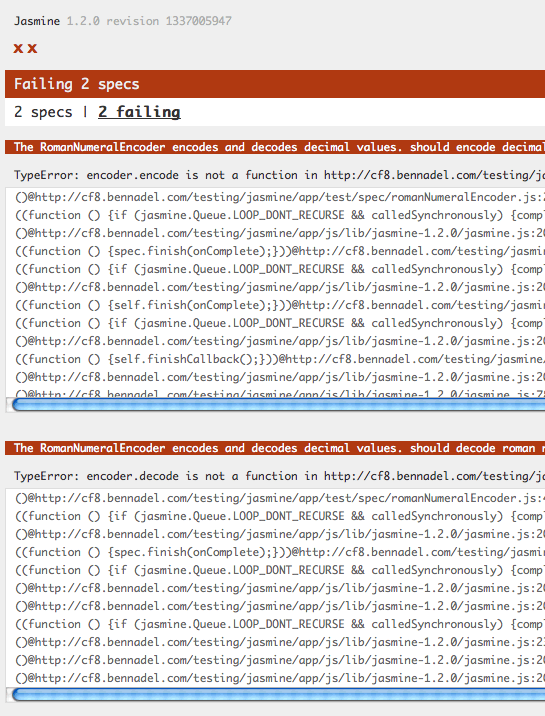
Here, the errors are indicating that our RomanNumeralEncoder() module doesn't have an encode() or a decode() method. So, I added them:
RomanNumeralEncoder.js (Model)
// Define the module.
define(
	[
		/* No dependencies. */
	],
	function(){


		// I provide functionality for encoding and decoding roman
		// numerals from a base10 radix.
		function RomanNumeralEncoder(){
			// ...
		}

		// Define the class methods.
		RomanNumeralEncoder.prototype = {

			// I decode roman numerals into decimal values.
			decode: function( romanNumeralValue ){

				return( 0 );

			},


			// I encode decimal values as roman numerals.
			encode: function( decimalValue ){

				return( "" );

			}

		};


		// -------------------------------------------------- //
		// -------------------------------------------------- //


		// Return the module constructor.
		return( RomanNumeralEncoder );


	}
);
Right now, they don't do anything logical; but, I wanted to see how their existence would change the results of the Jasmine test runner:
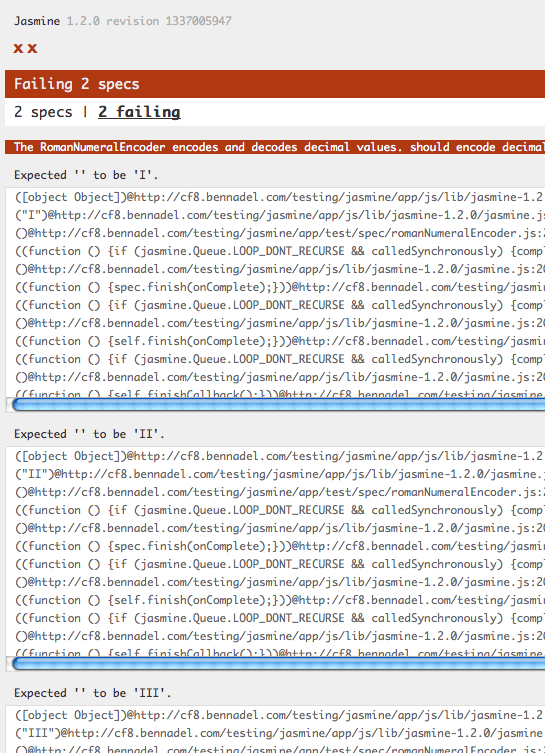
It's still failing; but this time, the tests fail because the expectations aren't met. Specifically, the encode() and decode() methods are not returning the expected values. So, I added some model logic to be able to superficially map roman numerals to decimal numbers:
RomanNumeralEncoder.js (Model)
// Define the module.
define(
	[
		/* No dependencies. */
	],
	function(){


		// I provide functionality for encoding and decoding roman
		// numerals from a base10 radix.
		function RomanNumeralEncoder(){
			// ...
		}

		// Define the class methods.
		RomanNumeralEncoder.prototype = {

			// I decode roman numerals into decimal values.
			decode: function( romanNumeralValue ){

				// Lazy conversion, just to get something working.
				switch ( romanNumeralValue ){
					case "I": return( 1 );
					case "II": return( 2 );
					case "III": return( 3 );
					case "IV": return( 4 );
					case "V": return( 5 );
					case "VI": return( 6 );
					case "VII": return( 7 );
					case "VIII": return( 8 );
					case "IX": return( 9 );
					case "X": return( 10 );
				}

				// If nothing matched, we don't currently support a
				// convertion for this value.
				return( null );

			},


			// I encode decimal values as roman numerals.
			encode: function( decimalValue ){

				// Lazy conversion, just to get something working.
				switch ( decimalValue ){
					case 1: return( "I" );
					case 2: return( "II" );
					case 3: return( "III" );
					case 4: return( "IV" );
					case 5: return( "V" );
					case 6: return( "VI" );
					case 7: return( "VII" );
					case 8: return( "VIII" );
					case 9: return( "IX" );
					case 10: return( "X" );
				}

				// If nothing matched, we don't currently support a
				// convertion for this value.
				return( null );

			}

		};


		// -------------------------------------------------- //
		// -------------------------------------------------- //


		// Return the module constructor.
		return( RomanNumeralEncoder );


	}
);
This module is obviously very limited in what it can do; but, when I run the Jasmine test runner against this module, I get a successful outcome!
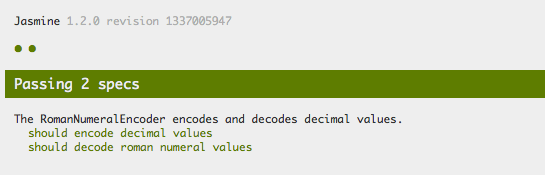
Playa! Now that I have "Green" tests, I can start to refactor my code with confidence. As I replace my dumb-logic with actual business logic, I can be reassured that my application, as a whole, will remain stable... as long as my tests keep passing.
I know that this is a small first step; but it is certainly one that is long overdue!

Reader Comments
I just kicked off a project at work incorporating TDD with Rhino Mocks, which also let's me define expectations, Webern to the point of making sure that only the expected methods run and nothing else. Really looking forward to seeing how this goes.
That's supposed to read "even to the point...". Stupid autocorrect.
@Matt,
From what I read, it looks like Jasmine can create "spies" that essentially decorate method calls a means to track whether or not they execute. Seems like a pretty robust framework.
Now, that I've tried this on the client side, I gotta try out a ColdFusion unit testing framework as well :)
@Ben,
That's how Rhino Mocks works. It also keeps track of how many times something runs, such as in my project where I populate a Queue from the database, process the items, dequeueing them add they're handled, and them check for more records in the database. The method that retrieves records runs twice when there are results, and I can write a unit test that insures this.
Go Ben, Go! :)
Once you get into the swing of TDD, you'll enjoy it. Writing a test lets you think about how the code needs to perform, a little piece at a time, and as you get into a rhythm of switching between test and code and test and code etc, you'll find you're producing more robust, more modular code (because testable code tends to be more modular), which in turn means it's easier to maintain and enhance the code.
Jasmine is a very nice testing tool for JS code. I've been using it for my ExtJS apps, and write everything in CoffeeScript. You might want to check out CS, Ben.
@Brian,
No, no!! Use ClojureScript, not CoffeeScript!! :)
@Sean, thanks, but one thing at a time heh. Gaining the same depth of knowledge about ExtJS that I have with Flex is what I'm currently immersed in. Also, doesn't look like ClojureScript plays very nicely with ExtJS. CoffeeScript, on the other hand, really shines here since so much of ExtJS uses declarative configuration objects very similar to JSON or YAML. Still, I'm always on the lookout for more JS options, so I'll have to revisit it at some point.
The timing of this entry could not be more perfect for me, Ben! Thank you.
I am doing exactly the same thing now. I need to build some client side data editing tool now, and I decided to introduce some unit testing into this. It is my first time with unit testing (and TDD) too (I am trying mxunit now too).
Though I have just started, it already helped me catch some bugs that I probably wouldn't be able to find without Jasmine.
By the way, the framework that I am using for this is Serenade.js. It is yet another JavaScript MVC framework and is still young (0.2.1 as of now) but it is really great! It is minimalistic but gives all the necessary functionality. The thing I love about it is that you only need to alter you model and the view will be updated, or you can alter your view and the model will be updated(2-way bindings). This framework uses its own very simple template engine, and basically what it does is giving you a DOM element with all other elements and texts nested and all necessary events already bind to it. And then you choose where to inject this element in your DOM.
@Kirill,
Now that I've tried Jasmine for the client-side, I definitely gotta try something like MXUnit for the ColdFusion-side. Is that the best-in-breed for ColdFusion these days (if you know)?
@Ben,
MXUnit is absolutely best-in-breed for CFML these days.
Ben,
Don't forget about the ColdFusion Koans...they all use MXUnit to test CF "stuff". It might night be straight up MXUnit testing, but it might give you the basics for MXUnit, and you might learn a thing or 2 in the process :)
Some day I might be able to get into the JS testing stuff, but first trying to get MXUnit appreciated in my job...oh wait, I mean get testing unit testing appreciated in my job :)
@Dan, @Sean,
Thanks, I'm gonna see if I can try MXUnit this morning. I'll also check out the Koans - I've heard great things about that, too.
Go Ben Go!
Once you start TDD'ing the whole way you look at your code changes.
MXUnit really is best in breed for cfml.
I have not done js unit testing before myself so I was wondering what everyones opinion is on qUnit vs Jasmine?
@All,
Ran my first MXUnit test:
www.bennadel.com/blog/2394-Writing-My-First-Unit-Tests-With-MXUnit-And-ColdFusion.htm
Getting this working was a bit more of a struggle with all the path mappings that seem to be required. Feeling empowered :D
Awesome intro to the jasmine unit testing story for javascript developers -just wanted to drop a note and mention that you can run these tests from the command line using the jasmine-node package. (npm install jasmine-node)
We use this as our ci test runner from jenkins like so
jasmine-node tests.js
@Toran,
Oh very cool! I need to completely uninstall / re-install my Node.js stuff. Well, actually, everything I've installed with Homebrew :) I accidentally installed Homebrew with "sudo" and now (I think), it requires special permissions for everything which complicates like every subsequent installation. Hmmph!
Really? Wow.
Great article! It helped me a lot
I'm also giving my first steps with requireJs.
Just a question, is the domReady plugin the same as enclosing the call to jasmine in $(function(){...}) ???
thanks
@Opensas,
The domReady plugin is just a RequireJS plugin that "loads" when the DOM is ready to be interacted with. As you are saying (I think), this is akin to using the jQuery DOM-ready shorthand:
The nice thing about using the domReady plugin is that you don't have to further wrap things in your code:
... vs:
Of course, you can use either and they do the exact same thing.
thanks to your article, and also james burke's help, I could also load jasmine itself using requireJS
have a look at this sample project: https://github.com/opensas/BackboneBootstrap/tree/master/webapp/js/src/tests
@Opensas,
Very cool! Slowly, I'm really getting into the TDD stuff.
Thanks for the write-up! It got me up and running in no time.
As a long-time ColdFusion user I'm used to your site appearing in the top 5 results for most of what I google for. It's quite amusing to see that continuing no matter what technologies I look at!
@Barnaby,
Ha ha, glad I am popping up in other categories :)
can you help me for writing unit test for the following angular controller.js
var app = angular.module('gtmAppControllers', ['ngRoute', 'ui.bootstrap']);
app.controller("FormController", function ($scope, dateFilter, $rootScope, $http, $location, $routeParams, LoginService) {
$scope.userid = "gtmm14001";
$scope.logIn = function () {
console.log("Form Login Controller");
LoginService.get({
userid: $scope.userid
}).
$promise.then(function (data) {
console.log("Associate Found with " + data);
$rootScope.associate = data;
var currentDate = dateFilter(new Date(), 'yyyy-MM-dd');
$location.path(data.userid + '/works/' + currentDate);
}, function (error) {
console.log("No Associate Found with " + $scope.userid);
});
};
});
app.service('Associate', ['$rootScope',
function ($rootScope) {
return $rootScope.associate;
}
]);