
After reading the REST API Design Rulebook by Mark Masse, I'm all jazzed up about API design! This recent enthusiasm has afforded me the motivation to attack a number of new topics all at the same time. If I'm going to be experimenting with API design, why not try it on an Amazon EC2 (Elastic Compute Cloud) Micro instance? And if it's on EC2, why not try it using Node.js? And, if it's on a remote server, why not look into how Cross-Origin Resource Sharing (CORS) works with jQuery and remote REST APIs? This last question - cross-domian AJAX requests - is what I'd like to touch on in this post.
While I've done a ton of work with AJAX (Asynchronous JavaScript and XML), I've never actually done anything with CORS (Cross-Origin Resource Sharing). Many months ago, Sagar Ganatra - an awesome Adobe ColdFusion Engineer - talked about cross-origin requests with the XmlHTTPRequest2 object. This was one of my first views into the possibility of cross-domain AJAX requests; sadly, my exploration ended there.
Until yesterday!
CORS (Cross-Origin Resource Sharing) is both simple and complex. It is quite simple in philosophy; but, the devil, as always, is in the details. I need to give a huge thank-you to Nicholas Zakas and Remy Sharp for clearing up the CORS workflow on their respective blogs.
CORS is AJAX. What makes CORS special is that the AJAX request is being posted to a domain different than that of the client. Historically, this type of request has been deemed a security threat and has been denied by the browser. With the prevalence of AJAX and the transformation of thick-client applications, however, modern browsers have been evolved to embrace the idea that critical information doesn't necessarily come from the host domain.
Now, modern browsers (Internet Explorer 8+, Firefox 3.5+, Safari 4+, and Chrome) can make AJAX requests to other domains so long as the target server allows it. This security handshake takes place in the form of HTTP headers. When the client (browser) makes cross-origin requests, it includes the HTTP header - Origin - which announces the requesting domain to the target server. If the server wants to allow the cross-origin request, it has to echo back the Origin in the HTTP response heder - Access-Control-Allow-Origin.
NOTE: The server can also echo back "*" as the Access-Control-Allow-Origin value if it wants to be more open-ended with its security policy.
Depending on the complexity of the cross-origin request, the client (browser) may make an initial request - known as a "preflight" request - to the server to gather authorization information. This preflight request can be cached by the client and is therefore not needed for subsequent CORS requests.
NOTE: Not every type of CORS request requires a preflight request; furthermore, some browsers do not support this concept.
Rather than diving deeper into the actual HTTP request headers (on which I am not an authority), I'd rather just get into some code that makes use of CORS (Cross-Origin Resource Sharing) AJAX requests.
Before we look at the Node.js server, let's take a look at the client-side jQuery code that performs the CORS requests. In the following code, I'm making both a PUT and a DELETE request to the Node.js server. Notice that I am chaining these two requests in serial; this allows the preflight request to be made on the first CORS request but not on the second:
demo.htm - Our jQuery-Powered CORS Demo
<!DOCTYPE html>
<html>
<head>
	<title>Cross-Origin Resource Sharing (CORS) With jQuery And Node.js</title>
</head>
<body>

	<h1>
		Cross-Origin Resource Sharing (CORS) With jQuery And Node.js
	</h1>


	<h2>
		PUT Response
	</h2>

	<pre id="putResponse">
		<!-- To be populated dynamically. -->
	</pre>


	<h2>
		DELETE Response
	</h2>

	<pre id="deleteResponse">
		<!-- To be populated dynamically. -->
	</pre>


	<!-- Load our JavaScript and make some CORS requests. -->
	<script type="text/javascript" src="../jquery-1.7.1.js"></script>
	<script type="text/javascript">


		// Wrap up the PUT request execution.
		var makePUTRequest = function(){

			// Make the PUT request.
			$.ajax({
				type: "PUT",
				url: "http://localhost:8080/some/url/resource/path",
				contentType: "application/json",
				data: JSON.stringify({
					name: "Tricia",
					age: 37
				}),
				dataType: "text",
				success: function( response ){

					// Put the plain text in the PRE tag.
					$( "#putResponse" ).text( response );

				},
				error: function( error ){

					// Log any error.
					console.log( "ERROR:", error );

				},
				complete: function(){

					// When this completes, execute teh
					// DELETE request.
					makeDELETERequest();

				}
			});

		};


		// Wrap up the DELETE request execution so it can easily be
		// invoked from the end of the PUT delete response.
		var makeDELETERequest = function(){

			// Make the DELETE request.
			$.ajax({
				type: "DELETE",
				url: "http://localhost:8080/some/url/resource/path",
				contentType: "application/json",
				data: JSON.stringify({
					name: "Tricia",
					age: 37
				}),
				dataType: "text",
				success: function( response ){

					// Put the plain text in the PRE tag.
					$( "#deleteResponse" ).text( response );

				},
				error: function( error ){

					// Log any error.
					console.log( "ERROR:", error );

				}
			});

		};


		// Execute the PUT request.
		makePUTRequest();


	</script>
</body>
</html>
As you can see, there's nothing really special going on here. I'm using jQuery to execute AJAX requests in the same way that I always would. The only difference is that I'm posting the AJAX requests to a different domain (and port number).
When we run the above code, we get the following page output:
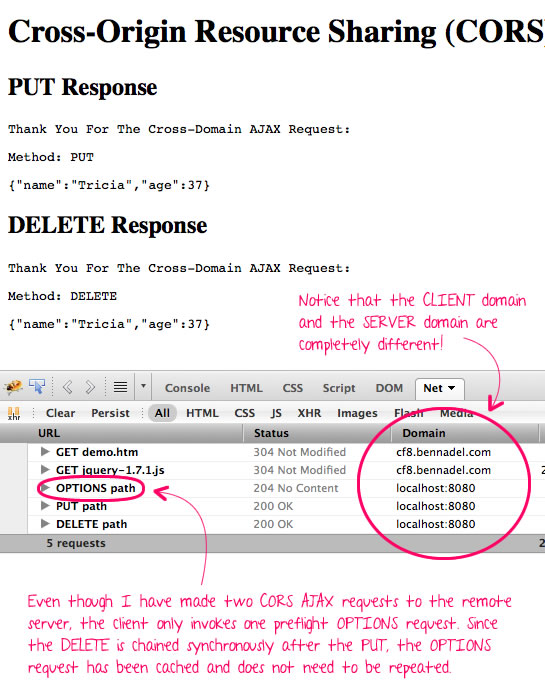
As you can see, the PUT request is preceded by an OPTIONS request. This OPTIONS request tells the client if a CORS request will be allowed; and, for those requests, which methods (GET, POST, PUT, etc.) can be executed. This OPTIONS request is cached by the client for a server-defined amount of time. This is why only one OPTIONS request needs to be performed despite that fact that two CORS requests (PUT and DELETE) and being run.
Now that we see how little the client-side code has to change - hardly at all - let's take a look at the Node.js server to see how the security handshake works. For this demo, the Node.js server understands two concepts: 1) OPTIONS requests and 2) everything else. If the request is not an OPTIONS request, the Node.js server simply echos back the request body that was posted.
server.js - Our CORS-Enabled Node.js Server
// Include our HTTP module.
var http = require( "http" );


// Create an HTTP server so that we can listen for, and respond to
// incoming HTTP requests. This requires a callback that can be used
// to handle each incoming request.
var server = http.createServer(
	function( request, response ){


		// When dealing with CORS (Cross-Origin Resource Sharing)
		// requests, the client should pass-through its origin (the
		// requesting domain). We should either echo that or use *
		// if the origin was not passed.
		var origin = (request.headers.origin || "*");


		// Check to see if this is a security check by the browser to
		// test the availability of the API for the client. If the
		// method is OPTIONS, the browser is check to see to see what
		// HTTP methods (and properties) have been granted to the
		// client.
		if (request.method.toUpperCase() === "OPTIONS"){


			// Echo back the Origin (calling domain) so that the
			// client is granted access to make subsequent requests
			// to the API.
			response.writeHead(
				"204",
				"No Content",
				{
					"access-control-allow-origin": origin,
					"access-control-allow-methods": "GET, POST, PUT, DELETE, OPTIONS",
					"access-control-allow-headers": "content-type, accept",
					"access-control-max-age": 10, // Seconds.
					"content-length": 0
				}
			);

			// End the response - we're not sending back any content.
			return( response.end() );


		}


		// -------------------------------------------------- //
		// -------------------------------------------------- //


		// If we've gotten this far then the incoming request is for
		// our API. For this demo, we'll simply be grabbing the
		// request body and echoing it back to the client.


		// Create a variable to hold our incoming body. It may be
		// sent in chunks, so we'll need to build it up and then
		// use it once the request has been closed.
		var requestBodyBuffer = [];

		// Now, bind do the data chunks of the request. Since we are
		// in an event-loop (JavaScript), we can be confident that
		// none of these events have fired yet (??I think??).
		request.on(
			"data",
			function( chunk ){

				// Build up our buffer. This chunk of data has
				// already been decoded and turned into a string.
				requestBodyBuffer.push( chunk );

			}
		);


		// Once all of the request data has been posted to the
		// server, the request triggers an End event. At this point,
		// we'll know that our body buffer is full.
		request.on(
			"end",
			function(){

				// Flatten our body buffer to get the request content.
				var requestBody = requestBodyBuffer.join( "" );

				// Create a response body to echo back the incoming
				// request.
				var responseBody = (
					"Thank You For The Cross-Domain AJAX Request:\n\n" +
					"Method: " + request.method + "\n\n" +
					requestBody
				);

				// Send the headers back. Notice that even though we
				// had our OPTIONS request at the top, we still need
				// echo back the ORIGIN in order for the request to
				// be processed on the client.
				response.writeHead(
					"200",
					"OK",
					{
						"access-control-allow-origin": origin,
						"content-type": "text/plain",
						"content-length": responseBody.length
					}
				);

				// Close out the response.
				return( response.end( responseBody ) );

			}
		);


	}
);


// Bind the server to port 8080.
server.listen( 8080 );


// Debugging:
console.log( "Node.js listening on port 8080" );
As you can see, the Node.js server either responds with a 204 No Content response for OPTIONS requests; or, it responds with a 200 OK response for everything else.
As far as I'm concerned, this is some pretty cool stuff! CORS (Cross-Origin Resource Sharing) AJAX requests may not be supported by every modern browser; but, if you're working on API design, like I am, client-side support is not necessarily a must-have - rather, it's a nice-to-have. And, with such little overhead, it's not too hard to implement.

Reader Comments
After you understand the concepts here, this is an awesome cheatsheet for enabling CORS in just about anything http://enable-cors.org/
good post; well presented.
Can you explain how this works in internet explorer 8+? I thought the IE implementation of the Wc3 Recommedation was (typically) non-conformist and requires us to create a XDomainRequest object?
Note: anyone silly enough to use IE will need to
in the demo.htm before the first ajax call, as CORS is disabled when run from a localhost.
ref. http://bugs.jquery.com/ticket/8122
@Drew,
Awesome link, thanks!
@Cubic,
Unfortunately (or fortunately), I'm on a Mac, so I tend not to test too much R&D code in IE as it would require me booting up my Virtual Machine. Thanks for the link.
In the api.jquery.com site, it looks like you can add the "withCredentials" header to the AJAX xhrFields collection to get jQuery to honor this:
http://api.jquery.com/jQuery.ajax/
... look under "xhrFields" (the last property).
Hi, Ben
Thank you for the awesome post. It really worked for me.
I tried to make a HTTP POST request using CORS but it was not making HTTP OPTIONS request. After researching i found that POST and GET requests will not make any OPTIONS request for handshake, unless you have a custom headers like X-PINGOTHER.
More information is here
https://developer.mozilla.org/En/HTTP_access_control#Preflighted_requests
Thanks a lot :)
Hi Ben,
We met at jQuery Conference in Boston in 2010. I have no idea if you remember me (I'm in one of your photos in the header)
At my company, we're now starting to explore CORS, and in my search for "jquery" and "CORS," your page shows up! It's good to know that the $.ajax() call doesn't change, although it does require jQuery 1.5.1. We just moved to 1.7.2, so it looks like we did upgraded in the nick of time. Thanks again for putting up these blog posts.
I have to support IE8, and I don't think jQuery supports IE8 or IE9 through jQuery.support.cors = true; I think some more work is required. :(
I am trying to add the Basic Authorization in the same request. I have the Hash with me.
How can I add it. I tried appending the following :
Authorization : "Basic myHash"
but it is not working somehow!
Please help..
Hi Ben!
Thanks for this writeup! I have been struggling for a day with this now and I think the next step is to pull out the little hair I have left :-(
I have done the exact same than you have on your example but for some reason that is beyond me I cannot get this to work.
My preflight options request is never sent to the server (or never reached). It just fails immediately with no response header. Its like ajax decices that it will fail, before it does anything.
Even when I turn of the server at port 8080 it does the exact same. This tells me that its not even trying!
This happens only with the "complex" request with the contentType optons added. Once that is remove, it works for obvious reasons
It happens in chrome, safari and firefox
This code is working on IE , chrome and Firefox, But in IE9 and IE10 if this option is disabled it is not working.
Internet options ? Security ? disabled - access data sources across domains.
What is the work around to enable it programmatically or work CORS even this option is disabled.
I want JQuery code only. Please help me.
Nice write up but I'd like to point out an issue that I have been having and have yet to find a resolution. Maybe you or another commenter can elaborate on this situation.
I have a site on one port making requests to WebAPI on another port. CORS is set up via the header and I can make requests via AJAX just fine. But we all know that doesn't suffice in the real world.
Enter security.
I have an MVC controller that will accept credentials and validate a user, using Forms Authentication the security ticket is responded back to the user's browser via the .ASPXAUTH cookie.
Subsequent requests via AJAX do NOT send the cookie across the wire and therefore the user is not authorized for using any secured endpoint.
So far I have not found any good news as a way around this to get it set up to support sending the cookie. The only thing I can come up with is a token based form of security (much like the big boys using API keys for their endpoints) sent via header information.
The API that I am building not only has to be secured but also be able to allow a legacy ColdFusion site and JRun use that same security model so OAuth is out the question for us.
Any ideas?
Thanks!
CD
Extremely well presented. Nothing i've found on the web is as knowledgeable as this short article.
Life saver!
Thanks!
I am getting this error: ReferenceError: require is not defined. Any idea?
hi, i have a problem with sending "DELETE" request to my server using AngularJS. I followed your instructions but only query() and get() methods works flawless, but remove() function which user {method: "DELETE"} does not work and my server receives OPTIONS instead of DELETE. Thank you for your help
Very useful.
Thanks.
Very much useful for me, thank you so much.
How to send http credential via ajax request to nodejs (express) ?
Nice post, but did I miss something - both PUT and DELETE are going to the same host and same port... So then it doesn't show CORS in action on the browser side?