ColdFusion Screen Shots: GIF vs. JPG
It's nice to see screen shots of people's code. What is not nice is to see a really trashy screen shot that doesn't need to be trashy. There are different file compressions for a reason. They all perform differently in different situations. If you are taking a screen shot of code or your browser where there is a LOT of empty space and a small color set, there is no reason to ever make that a JPG image. JPG image compression is not meant for this. Please make it a GIF.
If you are not convinced, take a look at the screen shots below:
Saved as a GIF image.
| |
|
|
||
| |
 |
|
||
| |
|
|
Saved as a JPG image (at 60% quality)
| |
|
|
||
| |
 |
|
||
| |
|
|
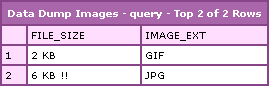
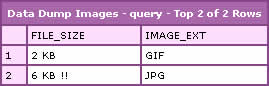
As you can see from the CFDump data, the GIF image is only 2 KB. The JPG image it 6 KB; three times the size! Not only is the JPG image much bigger, look how trashy it looks in comparison. So, when it comes to screen shots (most of the time) GIF good, JPG bad :)

Reader Comments
PNG Better-
GIF: 1,418 bytes
PNG: 836 bytes
Also, check out the Page Saver extension for Firefox:
http://pearlcrescent.com/products/pagesaver/
It can save the entire page or just the visible area as PNG with but the click of a button.
Rick,
That is pretty cool. I like that it integrates with Mozilla. My favorite little app for this sort of thing is the GadWin Print Screen:
http://www.gadwin.com/printscreen/
It allows you to take screen capture and save to file, clipboard, both, or whatever. Its reallllly useful. And since, I am in Fireworks all day long, I just go from screen to clipboard, to Fireworks.
Also, are there any limitations with PNGs in browsers? I can never remember that?
As for limitations in PNGs ... yes and no.
Pretty much every browser to come out since ~2000 can show 8-bit PNGs with or without (1-bit) transparency, and 24-bit PNGs *without* full 8-bit alpha transparency. All of the major players *except* IE can also handle 24-bit PNGs with full alpha transparency without batting an eye.
IE biffs it and shows a grey block for a background unless you jump through a bunch of CSS hoops to activate DirectX for PNG images. Yes, this can significantly slow down the user experience, and yes it gets hella annoying if your DirectX install is corrupted. (More common than you think, expecially in corporate environments.)
Most of my production-level CSS works around the IE limitation not by activating DirectX but by doing something like:
foo { background: url(whatever.png) top left no-repeat; }
body.ie foo { background-image: url(whatever.gif); }
body.ie7 { background-image: url(whatever.png; }
Yeah, the IE users get a significantly-reduced graphic quality, and yeah I have to produce a GIF version of every 24-bit RGBA PNG, but it's still a better solution, IMHO. IE7 fixes the RGBA problem, hence the third line.
But, for the purposes you've been talking about (non alpha-transparent screenshots), there aren't any problems unless you are looking to be compatible with pre-millennium browsers.
HOWEVER
(There's always a catch, isn't there?)
PNG images can have a concept of original gamma, and not all browsers support it, and not all browsers that do support it do so *correctly*. If you have a PNG in the middle of a page that you know is the same color as everything else, but the colors look a little screwy in IE, maybe brighter or darker, that's the problem.
The solution (no matter how much the Mac-fanatics such as yourself might scream and complain) is to use TweakPNG or PNGCrush or something similar to remove the gamma setting from the PNG file. Really, you should be going in and removing all of the extra crap from PNG files anyway. I keep a shortcut to TweakPNG on my desktop, that's how often I use it.
The gamma problem is only a problem for PNGs exported from *some* software, notably Adobe products. It can also affect JPEGs, but is much less likely. (I'm pretty sure there's a setting to turn it off for JPEGs, but not one for PNGs. I have no idea why.) And really, you'd only notice it if, as I said, your PNG was surrounded by a bunch of GIFs or JPEGs that were supposed to be the same color. I happen to know that Page Saver doesn't put the gamma in the file, and thus doesn't create the problem. (It does, however, create interestingly-structured PNG files, but that's a whole different story.)
-R
Rick,
Dynamite explanation! I was not aware of such PNG gamma issues. I knew there were issues with PNGs and the transparency, and have seen all those DirectX work arounds. But, mostly, as you say, I don't mess around with images in that way. I am talking about straight up screen captures.
But I am gonna look into those little image utilties you mention. I am always looking for useful stuff like that.
As far as image software, I rarely ever touch Adobe products - er, well I used to not. I am a Fireworks man through and through.
You are a wealth of information and ideas :)
Surprisingly few people know about the gamma issue, and it's quite surprising. I only discovered it because I'm one of those really obsessive-compusive types that tries to eke out every spare byte from my images, and thus heavily mix GIFs, PNGs, and JPEGs on the same page, depending on which is smallest. One day I had a site that had all 3 overlapping, cut from the same PSD file, and even though I knew the background color was the exact same, there were 3 different shades on my screen. But when I viewed the same page in another browser, it looked perfect. Totally blew my mind.
I found some obscure Adobe forum posts that showed me how to fix the JPEG issue, but at the time couldn't find anything about the PNG part of it. But, again being the dork that I am, I'd read the PNG file spec a few years back and knew that it has a concept of required versus proprietary chunks. I figured it was a proprietary chunk gumming up the works and dropped the PNG into notepad. Sure enough, I could read enough of it to see that ImageReady had a bunch of extra garbage in there. I went on a hunt to find a program that would show me the guts of the PNG and found TweakPNG. Sure enough, there was a gamma chunk. Remove, save, upload, reload, and voila! Everything looked perfect.
As I said, I'm sure some iPod-toting, beret-wearing, goatee-sporting graphic designer will tell you that removing the gamma from a PNG is like scooping a baby's eyes out with a spork ... but if every other image format is okay without a gamma, then I'm okay with it.
Long story short: I need to get a life.
this is a test... please ignore
Rick, as we say in London - that post was "mental" man! :-) Respec!
Thanks for the link for Gadwin above,just what i was looking for and it also does png images.. superb