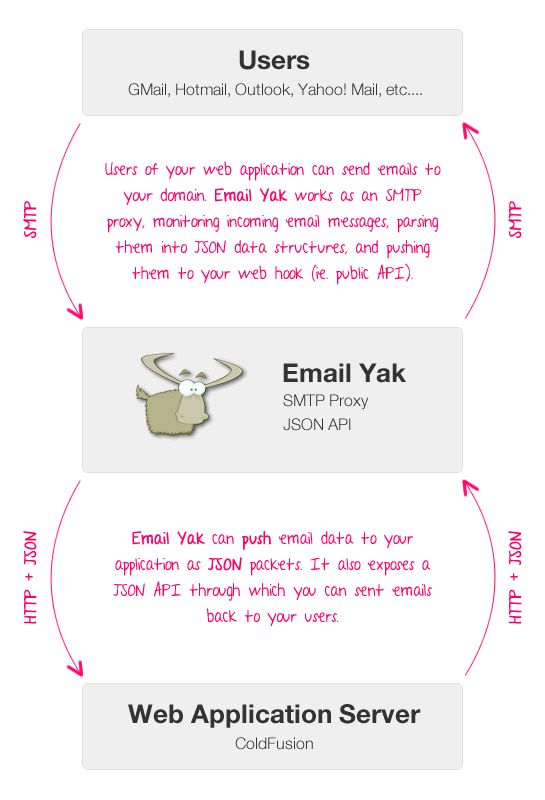
Yesterday, I started looking at a Software as a Service (SaaS) platform called Email Yak. Email Yak provides your web application with an SMTP proxy and JSON API that allows you to create bidirectional email-based communication between your web application and your end users. You communicate with Email Yak using HTTP requests, web hooks, and JSON; your users communicate with Email Yak using standard email protocols. Essentially, Email Yak completely abstracts and simplifies the management and monitoring of email accounts and inboxes.
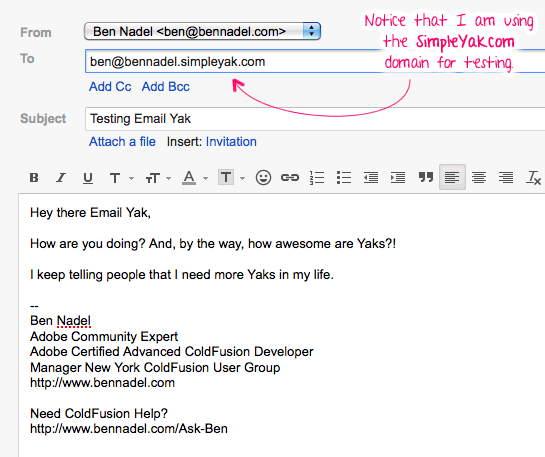
Setting up Email Yak is incredibly easy - all you have to do is add an MX record to your web application's DNS settings. Or, if you just want to start testing immediately, you can simply create a subdomain for their "simpleyak.com" domain. For my experimentation, I used their domain to get things started in just a few seconds:
bennadel.simpleyak.com
Once you have the domain set up, you have to authorize an email account at the domain. You can do this be either using their JSON API, their online Sandbox UI (user interface), or by simply sending an email using Email Yak - any email address used to generate an outbound email is automatically activated to accept inbound emails as well.
Once you have Email Yak set up as this SMTP proxy, you can start sending and receiving emails to and from your web application users, respectively. Your users communicate with this email proxy using their normal, everyday email clients and SMTP (Simple Mail Transfer Protocol). When an email from a user comes into Email Yak, it gets parsed into JSON (JavaScript Object Notation) data. This JSON data can then be pushed automatically to your web application's web hook; or, it can be periodically pulled down using the JSON API.
To experiment with this, I wanted to create a ColdFusion web hook that would echo emails back to the end user. So, imagine that a user sent an email that looked like this:
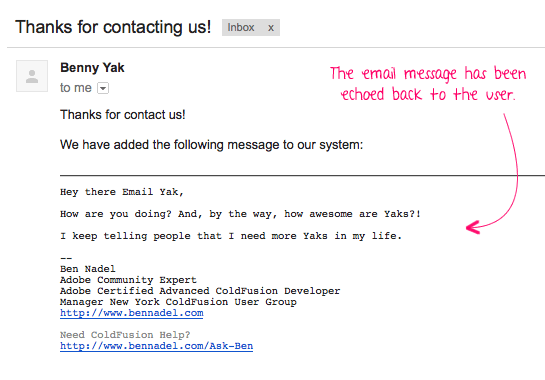
This would go to Email Yak, get parsed as JSON (JavaScript Object Notation), get pushed to my web hook, and my ColdFusion web application would then send back an email that looks like this:
Ok, let's take a look at the ColdFusion code that makes this possible. The first part of demo code is a ColdFusion user defined function (UDF) that converts the HTTP body into an MD5-hashed hexadecimal digest. This is optional, but allows us to verify that the incoming email actually came from Email Yak and not some malicious source.
<cffunction
	name="toHexDigest"
	access="public"
	returntype="any"
	output="false"
	hint="I take the given API key and the POST BODY and return the HEX digest for request authentication.">

	<!--- Define arguments. --->
	<cfargument
		name="apiKey"
		type="string"
		required="true"
		hint="I am the Email Yak API key."
		/>

	<cfargument
		name="content"
		type="string"
		required="true"
		hint="I am the string content of the post that we are verifying."
		/>

	<!--- Define the local scope. --->
	<cfset var local = {} />

	<!---
		We need to hash the body of the post using the MD5 algorithm.
		Let's define a key specification using the Email Yak API key.
	--->
	<cfset local.secretKeySpec = createObject( "java", "javax.crypto.spec.SecretKeySpec" ).init(
		toBinary( toBase64( arguments.apiKey ) ),
		javaCast( "string", "HmacMD5" )
		) />

	<!---
		Now, let's create our MAC (Message Authentication Code)
		generator to hash the actual email post content.
	--->
	<cfset local.mac = createObject( "java", "javax.crypto.Mac" ).getInstance(
		javaCast( "string", "HmacMD5" )
		) />

	<!--- Initialize the MAC using our secret key. --->
	<cfset local.mac.init( local.secretKeySpec ) />

	<!--- Hash the content. --->
	<cfset local.hashedBytes = local.mac.doFinal(
		toBinary( toBase64( arguments.content ) )
		) />

	<!---
		Now we need to convert the bytes to a HEX string. We will
		need to convert each byte individually, so create a buffer
		to hold each HEX character.
	--->
	<cfset local.hexBuffer = [] />

	<!--- Loop over each byte. --->
	<cfloop
		index="local.byte"
		array="#local.hashedBytes#">

		<!---
			Get the HEX value. If a value comes through with a
			negative number, it will be "padded" with "F"
			characters. As such, let's make sure to only get the
			right-most 2 bits of the underlying byte.

			NOTE: We're using 255 insetad of 256 because we are
			using signed integers.
		--->
		<cfset local.hexChar = formatBaseN(
			bitAnd( local.byte, 255 ),
			16
			) />

		<!---
			When appending, make sure the HEX value has 2 digits.
			The conversion will cut off the leading zero for values
			less that 10.
		--->
		<cfif (len( local.hexChar ) eq 1)>

			<!--- Prepend the padding zero. --->
			<cfset local.hexChar = ("0" & local.hexChar) />

		</cfif>

		<!--- Append 2-digit hex value. --->
		<cfset arrayAppend( local.hexBuffer, local.hexChar ) />

	</cfloop>

	<!--- Return the HEX digetst of the content. --->
	<cfreturn arrayToList( local.hexBuffer, "" ) />
</cffunction>


<!--- ----------------------------------------------------- --->
<!--- ----------------------------------------------------- --->
<!--- ----------------------------------------------------- --->
<!--- ----------------------------------------------------- --->


<!--- Define a log file for local CFDump'ing. --->
<cfset logFile = (
	getDirectoryFromPath( getCurrentTemplatePath() ) &
	"log.htm"
	) />

<!---
	Define the base API url. All Email Yak resources will be based
	off of this value.
--->
<cfset apiUrl = "https://api.emailyak.com/v1/#application.apiKey#" />


<!---
	Since we are dealing with an POST that may not be from a known
	source, let's wrap the processing in a Try/Catch where we can
	handle errors more appropriately.
--->
<cftry>


	<!--- Get a reference to the post headers. --->
	<cfset httpHeaders = getHttpRequestData().headers />


	<!--- Make sure the Email Yak auth key exists. --->
	<cfif !structKeyExists( httpHeaders, "X-Emailyak-Post-Auth" )>

		<!--- We can't authorize with out the right headers. --->
		<cfthrow
			type="NotAuthorized"
			message="Authorization failed."
			detail="Request cannot be authorized without the [X-Emailyak-Post-Auth] HTTP request header."
			/>

	</cfif>

	<!--- Get the secure digest of the content using our API key. --->
	<cfset hexDigest = toHexDigest(
		application.apiKey,
		toString( getHttpRequestData().content )
		) />

	<!--- Check to make sure the digests match. --->
	<cfif (httpHeaders[ "X-Emailyak-Post-Auth" ] neq hexDigest)>

		<!--- The digest does not match - source may be malicious. --->
		<cfthrow
			type="NotAuthorized"
			message="Authorization failed."
			detail="The provided message digest did not match the calculated digest."
			/>

	</cfif>


	<!--- Check to make sure the content is valid JSON. --->
	<cfif !isJSON( toString( getHttpRequestData().content ) )>

		<!--- Can't process this data. --->
		<cfthrow
			type="BadRequest"
			message="Request content must be valid JSON."
			detail="The content of the post was not valid JSON."
			/>

	</cfif>


	<!--- Parse the JSON content. --->
	<cfset email = deserializeJSON(
		toString( getHttpRequestData().content )
		) />


	<!--- Log the email data that came through. --->
	<cfdump
		var="#email#"
		output="#logFile#"
		hide="Headers"
		format="html"
		label="Email Yak Data"
		/>


	<!---
		Now that we have an email, let's see if we can respond to
		the user and echo back what they said. Since the given email
		may have many parsed parts, we'll echo back only the first
		part of the series.
	--->

	<!--- Create the email post. --->
	<cfset emailPost = {} />

	<!---
		Use a new or registered address. If the email is not yet
		registered, it will automatically be registered and can then
		be used to receive emails.
	--->
	<cfset emailPost[ "FromAddress" ] = "ben@bennadel.simpleyak.com" />

	<!--- Set the from name. --->
	<cfset emailPost[ "FromName" ] = "Benny Yak" />

	<!---
		When sending, send back to the user who sent the incoming
		email message.
	--->
	<cfset emailPost[ "ToAddress" ] = email.fromAddress />

	<!--- Set the subject. --->
	<cfset emailPost[ "Subject" ] = "Thanks for contacting us!" />

	<!---
		Define the post property names first, so we can maintain
		case. We'll define the actual content using a content buffer.
	--->
	<cfset emailPost[ "HtmlBody" ] = "" />
	<cfset emailPost[ "TextBody" ] = "Update your email client!" />

	<!--- Define the HTML. --->
	<cfsavecontent variable="emailPost.HtmlBody">
		<cfoutput>

			Thanks for contact us!<br />
			<br />

			We have added the following message to our system:<br />
			<br />

			<hr />

			<!--- Echo back the content that was received. --->
			<pre>#htmlEditFormat( email.parsedData[ 1 ].data )#</pre>

		</cfoutput>
	</cfsavecontent>


	<!---
		Send out the email using the Email Yak API. Notice that we
		must post the content as JSON and that the API URL includes
		the API key as part of the resource definition.
	--->
	<cfhttp
		result="apiResponse"
		method="post"
		url="#apiUrl#/json/send/email/">

		<!--- Set the content type to be JSON. --->
		<cfhttpparam
			type="header"
			name="content-type"
			value="application/json; charset=utf-8"
			/>

		<!--- Specify that we can accept JSON as well. --->
		<cfhttpparam
			type="header"
			name="accept"
			value="application/json; charset=utf-8"
			/>

		<!--- Post the email. --->
		<cfhttpparam
			type="body"
			value="#serializeJSON( emailPost )#"
			/>

	</cfhttp>


	<!--- Log the response. --->
	<cfdump
		var="#deserializeJSON( toString( apiResponse.fileContent ) )#"
		output="#logFile#"
		format="html"
		label="API Response"
		/>


	<!--- ------------------------------------------------- --->
	<!--- ------------------------------------------------- --->


	<!--- Catch any unspecified errors. --->
	<cfcatch>

		<!--- Log exception. --->
		<cfdump
			var="#cfcatch#"
			output="#logFile#"
			format="html"
			label="CFCATCH - Unexpected Exception"
			/>

	</cfcatch>

</cftry>
As you can see, this looks like a standard API workflow: a request is received, parsed, and then routed. The incoming Email Yak request, the outgoing Email Yak API response, and any errors generated during the request are being logged to a local HTML file. After the email has come in and been echoed, our log file looks like this:
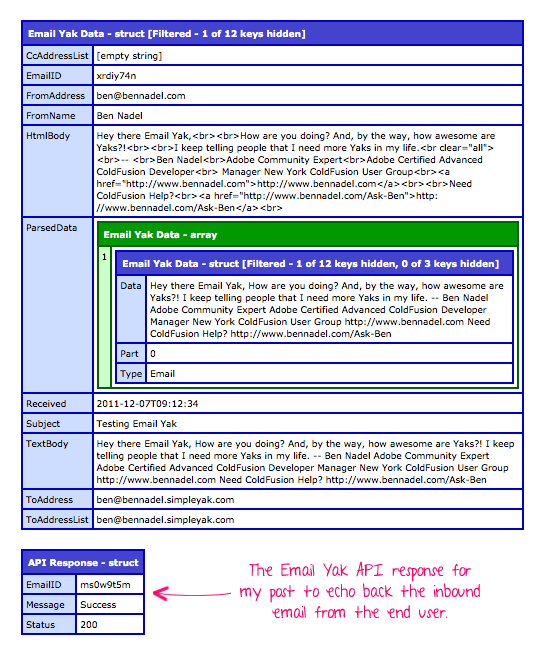
As you can see, Email Yak provides fairly detailed information about the inbound emails including both HTML and Text content. Notice that the email content is also provided in a parsed data structure. Since this inbound email was the first in its conversation, there is only one parsed item. If, however, this was part of a series of replies, Email Yak would parse each part of the conversation into a different index of the "ParsedData" container.
I haven't experimented with any email attachments yet; but, from what I read, Email Yak will host any attachments that it receives. Secure URLs to these attachments will then be provided in the JSON data that gets posted to your web application's web hook. Perhaps I will look into this next.
This is a pretty awesome service. Sure, you could probably replicate it in ColdFusion using CFPOP, CFIMAP, scheduled tasks, and a whole lot of logic; but, it probably wouldn't work as well as an API that specializes in executing this one concept perfectly. More importantly, however, seeing stuff like this has really opened my eyes to the possibility of providing more non-browser-based interactions with my web applications. Perhaps Email Yak will do for email communication what Twilio has done for SMS text messaging and phone communication.

Reader Comments
Nice find Ben,
One of the things I like about a service like this is that you can use it to ensure that your outbound messages have indeed left your SMTP server. Sometimes IIS' built in SMTP service can get bogged down and lock up but if you can update a database field every time Email Yak receives a message from you, you can be sure that at least the first phase of delivery was completed.
Another thing that I like about this relates back to your old article about using + (plus) addressing in messages to do your own bounceback tracking. From what it looks like on their web site, Email Yak might be able to handle this bounceback tracking on its own.
Definitely seems worth playing with their tools to see what the possibilities are.
On a side note, did anyone else have The Coasters song Yakety Yak playing in their head while reading this article? ;)
@David,
Regarding: Yakety Yak... I almost made that the subject line of my test email :D
The bounce-back idea is interesting. I haven't fully looked through the API yet; but, it seems like that kind of functionality would be very much in alignment with the kinds of stuff they are doing.
Once that is cool that I did read was that if your callback returns anything but a 200 OK response, Email Yak will keeping trying to hit the web hook until something works:
"If anything but a HTTP status 200 is returned, the push will be retried every 5 minutes for the next 120 hours until a 200 response is received."
That's pretty awesome! Seems unlikely that anything will slip through the cracks.
Robert from Email Yak here.
Thanks for the great write up. If you guys have any questions, don't hesitate to shoot me an email at robert@emailyak.com.
@Ben Yes, the attachments works exactly as you described. We even had one customer use the hosted URLs and fed them right over to TransloadIt's API (http://transloadit.com/docs/http-import) to help process them.
Again, if you have any questions, shoot me an email.
Great writeup Ben! Quick question - what program/tool did you use to create your screen shots? I love your arrows and the handwriting font you used. Can you spill your secrets?
Ben, You made it to the front page of Hacker News!
http://news.ycombinator.com/item?id=3325330
Hey Ben,
Nice write-up, emails coming from noreply@ addresses definitely should be a thing in the past.
Full disclaimer, I work for a competing service called Mailgun (http://mailgun.net) and I believe you should be checking us also.
The significant difference here is that Mailgun offers more flexible capabilities for receiving/forwarding, but we're also armed with powerful email deliverability capabilities: our networks are clean and monitored, our relationships with ESPs are nice and dandy and our traffic quality is superb.
BTW here's our take on how incoming traffic must be handled:
http://blog.mailgun.net/post/12482374892/handle-incoming-emails-like-a-pro-mailgun-api-2-0
Best,
Mailgunners
@Robert,
I love the idea of pulling the attachments into other APIs. I feel like that's part of what's so powerful about the email abstraction - once you get out of the email realm, things become so much simpler.
@Jason,
Thanks my man - glad you like it :) The graphics program is Adobe Fireworks. I'm not at my computer, but I believe the font is "A Year Without Rain":
http://www.dafont.com/a-year-without-rain.font
@Aaron,
Oh dang!! I didn't even see that! Thanks for the heads-up.
@Ev,
I'll have to check it out. Actually, @Aaron was just telling me about Mailgun yesterday. I'll take a look. Since I've never used this approach before, I'm always looking for some good guidance on how things should be approached.
@All,
I got around to playing with the attachment stuff. Pretty cool and easy to use:
www.bennadel.com/blog/2295-Creating-An-Image-Thumbnail-Service-Using-Email-Yak-Attachments-And-ColdFusion.htm
I tried creating a simple, ColdFusion-powered image thumbnailing service that would take attachments, scale them down, and send them back.
Hey guys, I created a ColdFusion component wrapper for the Email Yak API:
www.bennadel.com/blog/2297-EmailYak-cfc-A-ColdFusion-Wrapper-For-The-Email-Yak-API.htm
It hides all the HTTP logic and the case-sensitivity for the parameters.
I was going to move to another e-mail provider but this is even better and seems very efficient! Believe it or not, this is actually the first time I've heard of Email Yak (newbie here) -- and I'm on my way to checking it out. So glad I got to read this entry before doing anything. Thanks again!
@Ardham, Howdy. I started Email Yak last year. If you have any questions, please don't hesitate to shoot me an email, robert at emailyak.com