
My First Look At The RequireJS Build Optimizer For Node.js
Over the last few weeks, I've started to look into the RequireJS asynchronous loader and JavaScript dependency management system. Right off the bat, the facilitated modularity and code organization provided by RequireJS feels like a really solid approach to thick-client application development. With the increased modularity, however, we end up with many small, cohesive files. And, while this is great for development and debugging, it's not so great for production where a large number of HTTP requests can result in slower page-loads. To get the best of both worlds, RequireJS provides a build tool that will concatenate and inline dependencies to produce a single optimized JavaScript file for your application.
As with all of my blog posts on RequireJS, this is my first exploration of a particular feature. As such, it's not an in-depth, exhaustive exploration; rather, it's a small glimpse at the power provided by the optimization tool. To experiment with the build tool - r.js - I created a small, pointless JavaScript application that does nothing more than link a few dependencies together. Here is the main HTML file that gets loaded:
test.htm (Our Application User Interface)
<!DOCTYPE html>
<html>
<head>
	<title>Using The RequireJS Optimizer With Node.js</title>

	<!-- Load the RequireJS + jQuery library. -->
	<script
		type="text/javascript"
		data-main="main"
		src="./require-jquery.js">
	</script>

</head>
<body>
	<!-- Left intentionally blank. -->
</body>
</html>
As you can see, this does nothing more than load the RequireJS / jQuery bundle and define "main.js" as the core application file. It's important that main.js is external to the HTML page so that the build tool can easily parse it and minify it.
Here is the main.js file. It does nothing more than require a few dependencies and log some success statements to the JavaScript console.
main.js (Our Main Application File)
// Require some modules. Notice that we are using the TEXT plugin
// with this set of dependencies.
require(
	[
		"text!./data.txt",
		"mod-1",
		"mod-2"
	],
	function( data, mod1, mod2 ){

		// Log the loaded modules.
		console.log( "Loaded!" );
		console.log( "Data:", data );
		console.log( "Mod-1:", mod1 );
		console.log( "Mod-2:", mod2 );

	}
);
As you can see, the main file makes use of both the Text plugin (text!) and some standard JavaScript modules. The build tool, as part of the optimization process, will inline the content of the "data.txt" file so that the text value does not require any additional HTTP requests.
Here are the modules being loaded.
data.txt
This is text from the data.txt file.
mod-1.js
// Define an anonymous module.
define(
	[
		"./subsequent"
	],
	function( subsequent ){

		return( "This is mod-1 [" + subsequent + "]" );

	}
);
mod-2.js
// Define an anonymous module.
define(
	[
		"./subsequent"
	],
	function( subsequent ){

		return( "This is mod-2 [" + subsequent + "]" );

	}
);
Both of the included JavaScript modules have a dependency on the subsequent.js module. I put this in to make sure that nested dependencies would be parsed as well.
subsequent.js (Our Nested Module Dependency)
// Define a subsequent anonymous dependency that is required
// by the other modules.
define(
	function(){

		return( "SUB-MODULE" );

	}
);
So that's all the code in this application. As you can see, it's a rather trite example; the only thing we're trying to test here is the optimizer, not the architecture of the application. When I run the main HTML file, however, I am able to get a successful outcome with the following values logged to the console:
Loaded!
Data: This is text from the data.txt file.
Mod-1: This is mod-1 [SUB-MODULE]
Mod-2: This is mod-2 [SUB-MODULE]
If you were to look at the Firebug Network activity for this page request, you would see that RequireJS made a separate request for every module (and text-file) dependency in the application:
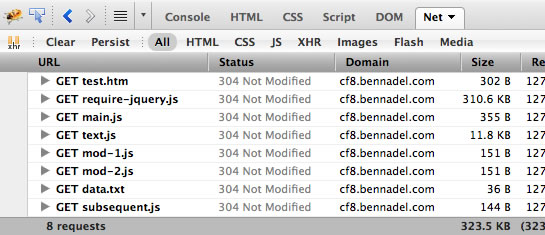
Ok, so now let's take a look at the build process. To optimize the JavaScript files, I've got the r.js file saved in the directory above my application directory. Then, using the command line tool (Terminal on the Mac) I navigated to the application directory and ran the following command:
ben$ node ../r.js -o name=main out=main-built.js baseUrl=.
This will run the "r.js" file through my local version of Node.js (v0.4.8). During the build and optimization process, r.js will parse main.js and following all of its defined dependencies. These dependencies will then be concatenated and minified into the "main-built.js" file.
When I run the above code, I get the following terminal output:
Tracing dependencies for: main
Uglifying file: /testing/jquery/requirejs-1.0/optimizer/app/main-built.js
/testing/jquery/requirejs-1.0/optimizer/app/main-built.js----------------
/testing/jquery/requirejs-1.0/optimizer/app/text.js
text!data.txt
/testing/jquery/requirejs-1.0/optimizer/app/subsequent.js
/testing/jquery/requirejs-1.0/optimizer/app/mod-1.js
/testing/jquery/requirejs-1.0/optimizer/app/mod-2.js
/testing/jquery/requirejs-1.0/optimizer/app/main.js
This produces main-built.js. And, when I open up main-built.js, I get the following "stuff" (I've added line breaks to make the wrapping work):
main-built.js (Our RequireJS-Optimized Application File)
(function(){var a=["Msxml2.XMLHTTP","Microsoft.XMLHTTP","Msxml2.
XMLHTTP.4.0"],b=/^\s*<\?xml(\s)+version=[\'\"](\d)*.(\d)*[\'\"]
(\s)*\?>/im,c=/< body[^>]*>\s*([\s\S]+)\s*<\/body>/im,d=typeof
location!="undefined"&&location.href,e=d&&location.protocol&&
location.protocol.replace(/\:/,""),f=d&&location.hostname,g=d&&
(location.port||undefined),h=[];define("text",[],function(){var
i,j,k;return typeof window!="undefined"&&window.navigator&&
window.document?j=function(a,b){var c=i.createXhr();c.open("GET"
,a,!0),c.onreadystatechange=function(a){c.readyState===4&&b(
c.responseText)},c.send(null)}:typeof process!="undefined"&&
process.versions&&!!process.versions.node?(k=require.nodeRequire
("fs"),j=function(a,b){b(k.readFileSync(a,"utf8"))}):typeof
Packages!="undefined"&&(j=function(a,b){var c="utf-8",d=new
java.io.File(a),e=java.lang.System.getProperty("line.
separator"),f=new java.io.BufferedReader(new java.io.
InputStreamReader(new java.io.FileInputStream(d),c)),g,h,i="";
try{g=new java.lang.StringBuffer,h=f.readLine(),h&&h.length()
&&h.charAt(0)===65279&&(h=h.substring(1)),g.append(h);while
((h=f.readLine())!==null)g.append(e),g.append(h);i=String
(g.toString())}finally{f.close()}b(i)}),i={version:"1.0.0",
strip:function(a){if(a){a=a.replace(b,"");var d=a.match(c);
d&&(a=d[1])}else a="";return a},jsEscape:function(a){return
a.replace(/(['\\])/g,"\\$1").replace(/[\f]/g,"\\f").replace(
/[\b]/g,"\\b").replace(/[\n]/g,"\\n").replace(/[\t]/g,"\\t")
.replace(/[\r]/g,"\\r")},createXhr:function(){var b,c,d;if
(typeof XMLHttpRequest!="undefined")return new XMLHttpRequest;
for(c=0;c<3;c++){d=a[c];try{b=new ActiveXObject(d)}catch(e)
{}if(b){a=[d];break}}if(!b)throw new Error("createXhr():
XMLHttpRequest not available");return b},get:j,parseName:
function(a){var b=!1,c=a.indexOf("."),d=a.substring(0,c),
e=a.substring(c+1,a.length);return c=e.indexOf("!"),c!==-1&&
(b=e.substring(c+1,e.length),b=b==="strip",e=e.substring(
0,c)),{moduleName:d,ext:e,strip:b}},xdRegExp:/^((\w+)\:)
?\/\/([^\/\\]+)/,useXhr:function(a,b,c,d){var e=i.xdRegExp.
exec(a),f,g,h;return e?(f=e[2],g=e[3],g=g.split(":"),h=g[1]
,g=g[0],(!f||f===b)&&(!g||g===c)&&(!h&&!g||h===d)):!0},
finishLoad:function(a,b,c,d,e){c=b?i.strip(c):c,e.isBuild&&
e.inlineText&&(h[a]=c),d(c)},load:function(a,b,c,h){var j=i
.parseName(a),k=j.moduleName+"."+j.ext,l=b.toUrl(k),m=h&&h.
text&&h.text.useXhr||i.useXhr;!d||m(l,e,f,g)?i.get(l,
function(b){i.finishLoad(a,j.strip,b,c,h)}):b([k],function(a)
{i.finishLoad(j.moduleName+"."+j.ext,j.strip,a,c,h)})},write
:function(a,b,c,d){if(b in h){var e=i.jsEscape(h[b]);c.
asModule(a+"!"+b,"define(function () { return '"+e+"';});\n")}}
,writeFile:function(a,b,c,d,e){var f=i.parseName(b),g=f.
moduleName+"."+f.ext,h=c.toUrl(f.moduleName+"."+f.ext)+".js";
i.load(g,c,function(b){var c=function(a){return d(h,a)};c.
asModule=function(a,b){return d.asModule(a,h,b)},i.write(
a,g,c,e)},e)}},i})})(),define("text!data.txt",[],function()
{return"This is text from the data.txt file."}),define(
"subsequent",[],function(){return"SUB-MODULE"}),define(
"mod-1",["./subsequent"],function(a){return"This is mod-1
["+a+"]"}),define("mod-2",["./subsequent"],function(a){
return"This is mod-2 ["+a+"]"}),require(["text!./data.txt",
"mod-1","mod-2"],function(a,b,c){console.log("Loaded!"),
console.log("Data:",a),console.log("Mod-1:",b),console.
log("Mod-2:",c)}),define("main",function(){})
Pretty crazy stuff! If I go into my main HTML file, however, and change the "data-main" attribute from "main" to "main-built", my page runs properly! In fact, I get the exact same console output:
Loaded!
Data: This is text from the data.txt file.
Mod-1: This is mod-1 [SUB-MODULE]
Mod-2: This is mod-2 [SUB-MODULE]
This time, however, when you look at the Firebug Network activity tab, you see the following:
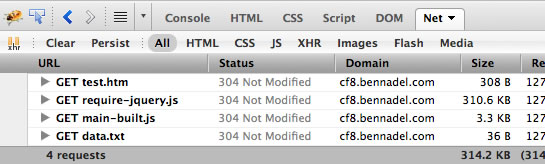
As you can see, this significantly reduced the number of HTTP requests that needed to be made. One thing that I don't quite understand, however, is why "data.txt" needed to be loaded as an additional HTTP request. If you can look through the minified code produced by the RequireJS build tool, you can see that the content of the "data.txt" file has been inlined with the code. As such, I am not sure why this is showing up as an external dependency.
NOTE: After a little bit of experimenting, I discovered that if I removed the "./" from "./data.txt" dependency definition, the subsequent HTTP request would no longer be necessary. This must have something to do with the way the resource name is being normalized. The "./" must throw off the normalization during the build process?
This stuff is pretty awesome! And, really painless to use (as long as you have node.js installed on your development machine). What's super nice about it is that I can continue to use all the modularity and code separation during development; then, for production, I can quickly and efficiently create a much more optimized JavaScript application file. Awesome pants!
Want to use code from this post? Check out the license.

Reader Comments
Wow, that was quick follow-up article, Ben :)
I didn't have a lot of code, so I put everything in one file right away and used curl (https://github.com/unscriptable/curl) instead of require.js, because it is lighter, as it provides less functionality.
There are also two mini-require implementations I know of. They are part of ACE (https://github.com/mozilla/ace/blob/master/build_support/mini_require.js) and Dryice (https://github.com/mozilla/dryice/blob/master/lib/dryice/mini_require.js). They didn't work for me out of the box like require.js and curl did though.
I think for a bigger project I'd use require.js and the optimizer. So thanks for posting this.
@Oliver,
I've played a bit with LABjs, but only for the asynchronous loading. As far as dependency management, RequireJS is the only thing I've used. But, what's so nice about it so far is that, as you say, it just works out of the box :) I'm kind of jazzed up about this stuff. I want to try and code something a bit more complex to really wrap my head around it.
@Ben I believe the issue with ./data.txt is due to a bug resolving relative resources that are in the baseUrl directory. It will be resolved in the requirejs 1.0.2 release that should be out within a week. The workaround, since the modules are already at the baseUrl level -- which is the top of the module space -- is to just leave out the './', as you did.
@Ben: Yes, require.js worked like a charm right away. Thanks James :) Curl was also pretty easy to integrate (one difference is that the method is called "curl" instead" of "require").
Keep us posted on your findings :)
@James,
Ah, good to know re: 1.0.2. I think I'll probably just stop using "./" in general. It's a hold over from how I tend to write HREF values. But those point to file paths; I'd like to start thinking about this stuff more like "class paths" which don't have "./" constructs :)
@Ben: relative IDs are great when you have a set of related modules that are all in a particular directory, but yes, for things that are at the "top" of the module space, it does not buy much.
All that said, 1.0.2 was pushed out so it should work now however you do it.
@James,
Awesome! Thanks for the heads up - I'll take a look at the updates.
I've been using RequireJS with Appcelerator's Titanium and it's giving me great results. It's making loading all the required JS files much easier and much more modular
Hi Buddy,
Great and simple explanation. Thank you so much
Cheers,
Vikram
hi
this is great explanation. Finally i found a reason to completely fall in love with requireJS. Is there any tutorial of converting this optimzed code to offline web application?
Excellent post, thanks for stripping it down and walking through it. Just what I was looking for to get started.
Quick questions, what process are you using to switch between the two files for dev and production. For example: I deploy to Heroku, so it'd just a git push of the latest committed code, so I need to be able to swap from main.js to main-built.js. Any tips? Should I be using a grunt task that Heroku runs before starting my node app? I don't want to have to change it manually, commit it, push to production and then change it back for development.