Using jQuery's $.map() Method To Convert Data Into Detached DOM Node Buffers
A couple of weeks ago, I blogged about the appendEach() jQuery plugin that allows you to append an array of jQuery objects to the rendered DOM tree. This plugin was created so that detached DOM (Document Object Model) nodes could be created and configured, en masse, without incurring the performance cost of visual rendering. At the heart of the plugin was a the $.map() method which translated the array of jQuery objects into an array of DOM nodes. While I like the plugin, I have found that in practice, it can be useful to just use the $.map() method directly to convert raw data into a detached DOM node buffer.
The jQuery $.map() method is pretty awesome. You give it an iterable object and a callback and it will give you an array:
var array = $.map( iterableObject, callback );
The returned array is the aggregate of all the values returned by the given callback. As I've talked about before, if you return an array from the callback, the $.map() method will merge the returned array into the aggregate array it is constructing. This allows the callback to return both single values as well as multi-value collections.
To demonstrate the power of this method, I'm going to use the jQuery $.map() method to convert raw data (such as the kind that might be returned from a remote AJAX call) into a detached DOM node buffer. This buffer will then be attached to the rendered page using the append() method.
<!DOCTYPE html>
<html>
<head>
	<title>Using jQuery $.map() To Create DOM Buffers</title>
</head>
<body>

	<h1>
		Using jQuery $.map() To Create DOM Buffers
	</h1>

	<ul class="friends">
		<!-- To be populated dynamically. -->
	</ul>


	<!-- BEGIN: Template. -->
	<script type="text/x-template" class="friendTemplate">

		<li class="friend">
			<span class="name">[NAME]</span>
			<span class="age">
				(<span class="value">[AGE]</span>)
			</span>
		</li>

	</script>
	<!-- END: Template. -->


	<script type="text/javascript" src="./jquery-1.7rc1.js"></script>
	<script type="text/javascript">


		// Get a reference to some DOM elements.
		var friends = $( "ul.friends" );
		var friendTemplate = $( $( "script.friendTemplate" ).html() );

		// Define some data that we are going to use to populate our
		// friend list.
		var friendsData = [
			{
				id: 1,
				name: "Tricia",
				age: 35
			},
			{
				id: 2,
				name: "Joanna",
				age: 39
			},
			{
				id: 3,
				name: "Sarah",
				age: 30
			},
			{
				id: 4,
				name: "Kit",
				age: 31
			},
		];


		// -------------------------------------------------- //
		// -------------------------------------------------- //


		// Now, we are going to use jQuery $.map() in order to
		// create a detached buffer of DOM (Document Object Model)
		// nodes that we'll append to the rendered page.
		var buffer = $.map(
			friendsData,
			function( friendData, index ){

				// Create a new instance of the friend template.
				var friend = friendTemplate.clone();

				// Populate the values.
				friend
					.attr( "data-id", friendData.id )
					.find( "span.name" )
						.text( friendData.name )
						.end()
					.find( "span.age span.value" )
						.text( friendData.age )
						.end()
				;

				// Now, return the raw DOM node. Since we are using
				// $.map(), this will result in an array of raw DOM
				// nodes.
				return( friend.get() );

			}
		);


		// Now that we have an array of non-rendered, detached DOM
		// elements, we can go ahead and append them to the rendered
		// node tree.
		friends.append( buffer );


	</script>

</body>
</html>
As you can see, I am using the $.map() method to iterate over the friendsData collection. For each datum within the collection, I am then creating and populating an instance of the LI template. Rather than appending this detached DOM node to the page, however, I am returning the underlying, raw DOM node as my callback response:
return( friend.get() );
The .get() method returns the encapsulated array of DOM nodes. The $.map() then takes this array and merges is into the aggregate array that it is constructing. Once the $.map() method has finished executing, it leaves us with an array of raw DOM nodes. This array is then subsequently attached to the rendered page:
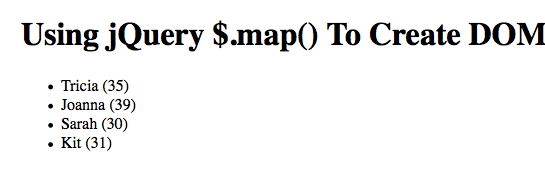
Rendering and re-painting DOM nodes is a relatively expensive process. As such, I like to do as much configuration pre-rendering as possible. This usually means the construction of detached jQuery collections that can be used to set attributes, append text values, and bind event handlers. By using jQuery's $.map() method, we can easily leverage all of the power provided by the jQuery API while still ending up with a collection of raw DOM nodes.
Want to use code from this post? Check out the license.

Reader Comments
@All,
Just did some quick debugging to make sure that worrying about *detached* DOM node buffers was actually worth-while. And it is:
www.bennadel.com/blog/2281-jQuery-Appends-Multiple-Elements-Using-Efficient-Document-Fragments.htm
jQuery creates Document Fragments under the cover. That means it makes the insert of multiple nodes much more efficient.
Groooovy!
This is pretty cool. I didn't know about this functionality. We use handlebarsjs to accomplish something similar. It's a pretty cool templating system. If you don't have a lot of changes to make with a lot of variables I think this method would be much snappier though.
@Mike,
I don't know much about HandlebarsJS, but I've heard it's a pretty awesome templating system. Glad this looks interesting. I am sure each would have their place.
Thank you for a great article and useful tips, guys!